
🌴[CVPR 2024] OakInk2: A Dataset of Bimanual Hands-Object Manipulation in Complex Task Completion
A Dataset of Bimanual Hands-Object Manipulation in Complex Task Completion
:wrench: Dataset Toolkit
Xinyu Zhan* · Lixin Yang* · Yifei Zhao · Kangrui Mao · Hanlin Xu
Zenan Lin · Kailin Li · Cewu Lu†
CVPR 2024
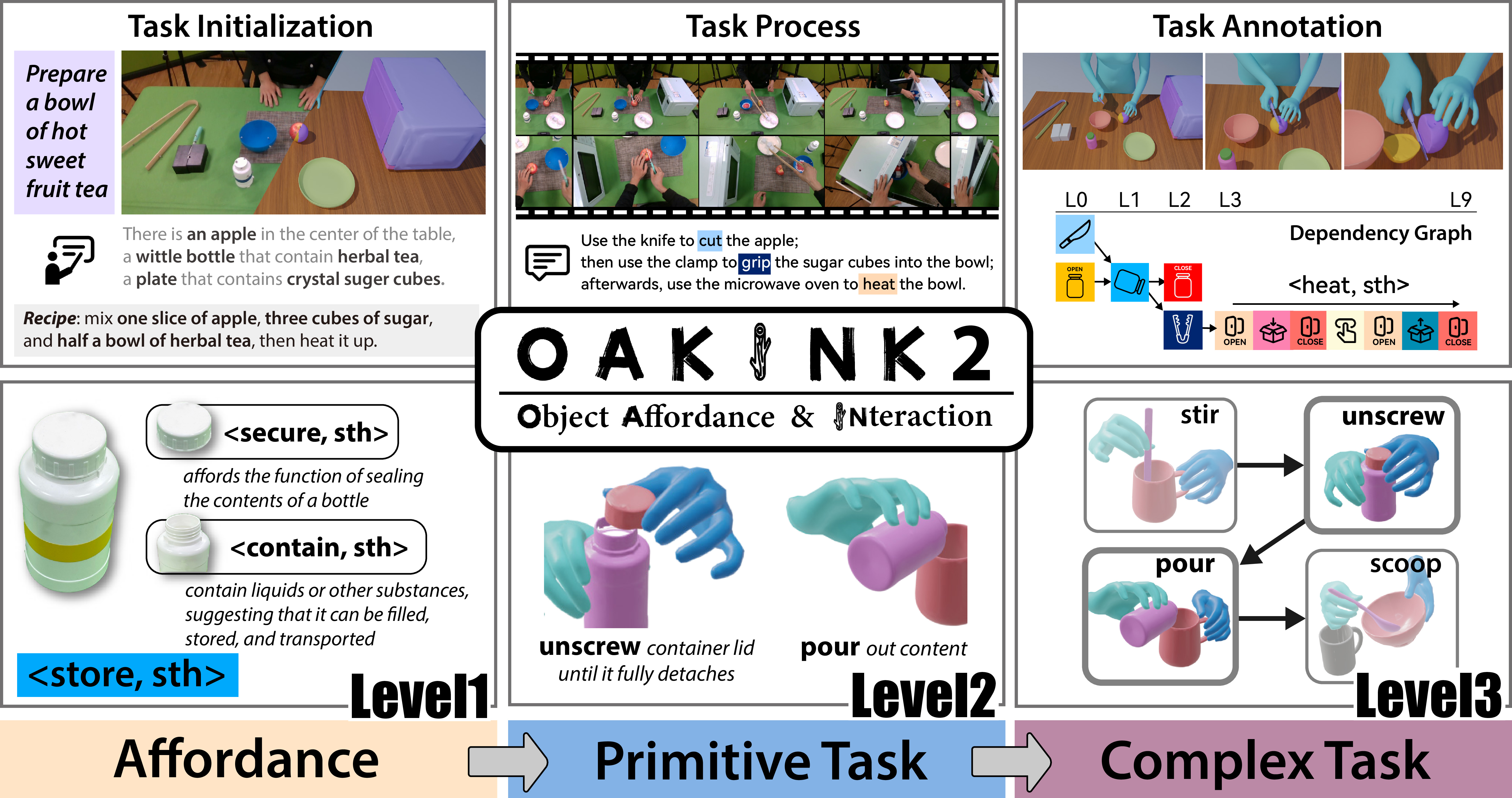


This repo contains the OakInk2 dataset toolkit (oakink2_toolkit) -- a Python package that provides data loading, splitting, and visualization.
Updates
- [2024-12] Some annotation files in the dataset repository were not successfully uploaded, causing
git-lfsto fail to point to the correct files. These annotation files have been re-uploaded to fix this error. Therefore, before and after this fix, the number of annotation files downloaded using thehuggingface-cliwill differ (resulting in the failure of using offset to index sequences). When using the dataset, please ensure to update it to the latest commit using thehuggingface-cli. - [2025-04]
objectpreview.taris added back for backward compatibility reasons. The content is now the same asobjectraw.tar.
Setup dataset files.
Download tarballs from huggingface.
There is an example download script located at script/download.py, which use ./hub under current working directory as cache directory and download the dataset to ./OakInk-v2-hub. Please provide enough disk space for the cache.
You will need the data tarball and the preview version annotation tarball for at least one sequence, the objectraw tarball, the objectrepair tarball and the program tarball. Organize these files as follow:
data
|-- data
| -- scene_0xy00z++00000000000000000000YYYY-mm-dd-HH-MM-SS
|-- anno_preview
| -- scene_0xy00z++00000000000000000000YYYY-mm-dd-HH-MM-SS.pkl
|-- object_preview (deprecated, kept for compatibility)
|-- object_raw
|-- object_repair
|-- object_affordance
-- program</code></pre>
OakInk2 Toolkit
- Install the package.
<pre><code class="lang-bash">pip install .</code></pre>
Optionally, install it with editable flags: <pre><code class="lang-bash">pip install -e .</code></pre>
- Check the installation.
<pre><code class="lang-bash">python -c 'from oakink2toolkit.dataset import OakInk2_Dataset'</code></pre>
It the command runs without error, the installation is successful.
- Quick start: using the toolkit to load the sequences.
<pre><code class="lang-python">from oakink2toolkit.dataset import OakInk2_Dataset
# Load the dataset oi2data = OakInk2_Dataset( dataset_prefix='data', return_instantiated=True, # set to False if only metainfo wanted annooffset='annopreview', objoffset='objectrepair', # set to 'object_raw' for downsampled object raw scans affordanceoffset="objectaffordance", )
# Load sequence complextaskdata = oi2data.loadcomplextask(seqkey) primitivetaskdatalist = oi2data.loadprimitivetask(complextaskdata)
# Load a certain object & affordance objid = primitivetaskdatalist[1].taskobjlist[0] affordancedata = oi2data.loadaffordance(objid, returninstantiated=True) # or set returninstantiated for metainfo only</code></pre>
OakInk2 Preview-Tool

- Setup the enviroment.
1. Create a virtual env of python 3.10. This can be done by either conda or python package venv.
1. conda approach
<pre><code class="lang-bash">conda create -p ./.conda python=3.10
conda activate ./.conda</code></pre>
On modern systems (e.g., ubuntu 24.04), you may need to use a more recent standard library:
<pre><code class="lang-bash">conda install -c conda-forge libstdcxx-ng=12 # suppose the system toolchain is gcc-12</code></pre>
2.
venv approach First use pyenv or other tools to install a python intepreter of version 3.10. Here 3.10.16 is used as example:
<pre><code class="lang-bash">pyenv install 3.10.16 pyenv shell 3.10.16</code></pre>
Then create a virtual environment:
<pre><code class="lang-bash">python -m venv .venv --prompt oakink2_preview . .venv/bin/activate</code></pre> 2. Install the dependencies.
Make sure all bundled dependencies are there. <pre><code class="lang-bash">git submodule update --init --recursive --progress</code></pre>
Use
pip to install the packages: <pre><code class="lang-bash">pip install -r req_preview.txt</code></pre>
Note that
oakink2preview is compatible with torch version higher than specified in reqpreview.txt. Choose the most appropriate version for your environment.
- Download the SMPL-X model(version v1.1) and place the files at
asset/smplxv1_1.
The directory structure should be like:
<pre><code class="lang-">asset
-- smplxv11
-- models
|-- SMPLX_NEUTRAL.npz
-- SMPLX_NEUTRAL.pkl- Launch the preview tool:
python -m oakink2preview.launch.viz.gui --cfg config/gui_preview.ymlOr use the shortcut:
oakink2vizgui --cfg config/gui__preview.yml- (Optional) Preview task in segments.
asset/manov1_2.
The directory structure should be like:
asset -- manov12 -- models |-- MANO_LEFT.pkl -- MANO_RIGHT.pkl</code></pre>
2. Launch the preview segment tool (press enter to proceed). Note
seq_key should contain '/' rather than '++' as directory separator.
<pre><code class="lang-bash">python -m oakink2preview.launch.viz.seg3d --seqkey scene0xy00z/00000000000000000000YYYY-mm-dd-HH-MM-SS</code></pre>
Or use the shortcut: <pre><code class="lang-bash">oakink2vizseg3d --seqkey scene0xy00z/00000000000000000000YYYY-mm-dd-HH-MM-SS</code></pre>
- (Optional) View the introductory video on youtube.
Dataset Format
data/scene_0xy00z++00000000000000000000YYYY-mm-dd-HH-MM-SS
This stores the captured multi-view image streams. Stream from different cameras are stored in different subdirectories.
<pre><code class="lang-">scene_0xy00z++00000000000000000000YYYY-mm-dd-HH-MM-SS
|-- <serial 0>
| |-- <frame id 0>.jpg
| |-- <frame id 1>.jpg
| |-- ...
| -- <frame id N>.jpg
|-- ...
-- <serial 3>
|-- <frame id 0>.jpg
|-- <frame id 1>.jpg
|-- ...
-- <frame id N>.jpganno/scene_0xy00z++00000000000000000000YYYY-mm-dd-HH-MM-SS.pkl
{
        'cam_def': dict[str, str],                      # camera serial to name mapping
        'cam_selection': list[str],                     # selected camera names
        'frameidlist': list[int],                     # image frame id list in current seq
        'cam_intr': dict[str, dict[int, np.ndarray]],   # camera intrinsic matrix [3, 3]
        'cam_extr': dict[str, dict[int, np.ndarray]],   # camera extrinsic matrix [4, 4]
        'mocapframeid_list': list[int],               # mocap frame id list in current seq
        'obj_list': list[str],                          # object part id list in current seq
        'obj_transf': dict[str, dict[int, np.ndarray]], # object transformation matrix [4, 4]
        'raw_smplx': dict[int, dict[str, torch.Tensor]],# raw smplx data
        'raw_mano':  dict[int, dict[str, torch.Tensor]],# raw mano data
    }
The raw smplx data is structured as follows:
{ 'body_shape': torch.Tensor[1, 300], 'expr_shape': torch.Tensor[1, 10], 'jaw_pose': torch.Tensor[1, 1, 4], 'leye_pose': torch.Tensor[1, 1, 4], 'reye_pose': torch.Tensor[1, 1, 4], 'world_rot': torch.Tensor[1, 4], 'world_tsl': torch.Tensor[1, 3], 'body_pose': torch.Tensor[1, 21, 4], 'lefthandpose': torch.Tensor[1, 15, 4], 'righthandpose': torch.Tensor[1, 15, 4], }worldrot, bodypose, {lh,rh}handpose are quaternions in [w,x,y,z] format. The lower body of bodypose, jawpose, {l,r}eye_pose are not used.
The raw mano data is structured as follows:
{ 'rh_posecoeffs': torch.Tensor[1, 16, 4], 'lh_posecoeffs': torch.Tensor[1, 16, 4], 'rh__tsl': torch.Tensor[1, 3], 'lh__tsl': torch.Tensor[1, 3], 'rh__betas': torch.Tensor[1, 10], 'lh__betas': torch.Tensor[1, 10], }{lh,rh}_posecoeffs are quaternions in [w,x,y,z] format.
object{raw,scan}/objdesc.json
{
        obj_id: {
            "obj_id": str,
            "obj_name": str,
        }
}object{raw,scan}/alignds
align_ds
    |-- obj_id
    |   |-- *.obj/ply
    |   |-- ...
    -- ...</code></pre>
objectaffordance/affordancepart

    This directory stores the object affordance part models.
    <pre><code class="lang-">affordance_part
    |-- objpartid
    |   |-- *.obj
    |   |-- ...
-- ...objectaffordance/affordancelabel.json
{
        'all_label': list[str],                     # list of all labels (including affordance & instantiation)
        'affordance_label': list[str],              # list of affordance labels (reflecting part functions)
        'affordanceinstantiationlabel': list[str] # list of affordance instantiation labels (reflecting interactions & primitive tasks)
}objectaffordance/instanceid.json
[
        objpartid,                        # object part id that maps to full object instance
        ...
]objectaffordance/objectaffordance.json
{
        objpartid: {
            "objpartid": str,                     # object part id
            "is_instance": bool,                    # whether the part id maps to an instance
            "has_model": bool,                      # whether the part id has a model, i.e object segmentation
            "affordance": list[str],                # list of affordance labels
            "affordance_instantiation": list[str],  # list of affordance instantiation labels
        }
}objectaffordance/objectpart_tree.json
{
        objpartid: list[str],                     # list of object part id that are children of the current part id
}objectaffordance/partdesc.json
{
        obj_id: {
            "obj_id": str,
            "obj_name": str,
        }
}program/programinfo/scene0xy00z++00000000000000000000YYYY-mm-dd-HH-MM-SS.json
{
        (str(lhinterval), str(rhinterval)): {
            "primitive": str,
            "obj_list: list[str],
            "interactionmode": str,        # [lhmain, rhmain, bhmain]
            "primitive_lh": str,
            "primitive_rh": str,
            "objlistlh": list[str],
            "objlistrh": list[str],
        }
    }
+ {lh,rh}_interval: the interval of the primitive in the sequence. If None, the corresponding hand is not available (e.g. doing something else) in current primitive. + primitive: the primitive id. + obj_list: the object list involved in the primitive. + interactionmode: the interaction mode of the primitive. lhmain means the left hand is the main hand for affordance implementation. Similarly, rhmain means the right hand is the main hand, and bhmain means both hands are main hands. + primitive_{lh,rh}: the primitive id for the left/right hand. + objlist{lh,rh}: the object list involved in the left/right hand.
program/descinfo/scene0xy00z++00000000000000000000YYYY-mm-dd-HH-MM-SS.json
{
        (str(lhinterval), str(rhinterval)): {
            "seg_desc": str,                # textual description of current primitive
        }
}program/initialconditioninfo/scene_0xy00z++00000000000000000000YYYY-mm-dd-HH-MM-SS.json
{
        (str(lhinterval), str(rhinterval)): {
            "initial_condition": list[str], # initial condition for the complex task
            "recipe": list[str],            # requirements to complete for the complex task
        }
}program/pdg/scene_0xy00z++00000000000000000000YYYY-mm-dd-HH-MM-SS.json
{
        "id_map": dict[interval, int],      # map from interval to primitive id
        "v": list[int],                     # list of vertices
        "e": list[list[int]],               # list of edges
    }
FAQ
- How to load the dataset with the
oakink2_toolkitlibrary?
from oakink2toolkit.dataset import OakInk2_Dataset
# Load the dataset     oi2data = OakInk2_Dataset(         dataset_prefix='data',         return_instantiated=True,   # set to False if only metainfo wanted         annooffset='annopreview',         objoffset='objectrepair', # set to 'object_raw' for downsampled object raw scans         affordanceoffset="objectaffordance",     )
# Load sequence     # complextaskdata = oi2data.loadcomplextask(seqkey)     # primitivetaskdatalist = oakink2dataset.loadprimitivetask(complextaskdata)
oakink2vizguifails to create context and reportinglibGL error: failed to load driver: swrast.
LIBGL_DEBUG=verbose to get more information.
If the error is due to libffi.so.7 has wrong symbols when using conda environment, downgrade the libffi package to version 3.3.
conda install libffi=3.3oakink2vizguiexits withThis application failed to start because no Qt platform plugin could be initialized.
Xrdp or TigerVNC could be a good starting point.
oakink2vizguiexits withqt.qpa.plugin: From 6.5.0, xcb-cursor0 or libxcb-cursor0 is needed to load the Qt xcb platform plugin.
libxcb-cursor-dev:
sudo apt-get install -y libxcb-cursor-devoakini2vizsegcan not find font:
Traceback (most recent call last):
    File "/mnt/homes/xinyu-ldap/oakink2-preview/.venv/bin/oakink2vizseg3d", line 33, in <module>
        sys.exit(loadentrypoint('oakink2-toolkit', 'consolescripts', 'oakink2viz_seg3d')())
    File "/mnt/homes/xinyu-ldap/oakink2-preview/src/oakink2preview/launch/viz/seg3d.py", line 302, in main
        run(run_cfg)
    File "/mnt/homes/xinyu-ldap/oakink2-preview/src/oakink2preview/launch/viz/seg3d.py", line 273, in run
        img = captioncombinedview(img, ptaskdata.taskdesc)
    File "/mnt/homes/xinyu-ldap/oakink2-preview/src/oakink2preview/util/viscv2util.py", line 17, in captioncombined_view
        font = ImageFont.truetype(font, size=20)
    File "/mnt/homes/xinyu-ldap/oakink2-preview/.venv/lib/python3.10/site-packages/PIL/ImageFont.py", line 807, in truetype
        return freetype(font)
    File "/mnt/homes/xinyu-ldap/oakink2-preview/.venv/lib/python3.10/site-packages/PIL/ImageFont.py", line 804, in freetype
        return FreeTypeFont(font, size, index, encoding, layout_engine)
    File "/mnt/homes/xinyu-ldap/oakink2-preview/.venv/lib/python3.10/site-packages/PIL/ImageFont.py", line 244, in init
        self.font = core.getfont(
    OSError: cannot open resource
Solution: install package fonts-freefont-ttf for ubuntu:
sudo apt install fonts-freefont-ttf


