
Docker image for the Amnezia VPN self-hosted server
Amnezia VPN Docker Server
This is a Docker image for the Amnezia VPN server.
I also recommend reviewing my repository, which uses Docker to deploy a pair of OpenVPN servers (with and without TLS) that route their traffic through any AmneziaWG / XRay server, including THIS server.
The docker image currently uses the latest Ubuntu LTS release — 24.04.
Requirements
The choice of the LTS version is because it has the most battle-tested settings and software. Why use anything other than LTS for the core image if you can use LTS?
The requirement from Amnezia itself is to install the server on a machine with Ubuntu
https://amnezia.org/starter-guide
Minimum system requirements for VPS:>
Operating System - Linux, suitable for Ubuntu 22.04 or Debian 11.>
Supported processor architecture - x86-64.
As host machine I checked: On a real machine (dedicated server):
- Ubuntu 20.04;
- Ubuntu 24.04, 25.10;
Installation
- Download the Amnezia VPN client. You will use it later to install all necessary packages on
- Configure the host machine with Docker (including Docker
- Create the container.
Clean image build
Clone this repository:
git clone https://github.com/nokitakaze/AmneziaVPNDockerServer.git
cd AmneziaVPNDockerServer
docker-compose build
Using a Docker image
Your docker-compose.yml:
version: '3'
services:
  ssh-service:
    image: nokitakaze/amnezia-vpn-server
    ports:
      - "2222:22"
    volumes:
      - /var/run/docker.sock:/var/run/docker.sock  # Docker socket
      - ./authorizedkeys:/root/.ssh/authorizedkeys
      - ./ssh-keys:/etc/ssh/server-keys
Please note that you only need to expose port 22. All other ports on the host machine are forwarded by Amnezia VPN during setup on the ports you specify within your client when setting up the server.
- Create a pair of SSH keys (private and public). I prefer using the
Place your SSH public key in the authorized_keys file.
Remember to export the private key in SSH format (BEGIN RSA PRIVATE KEY) without a password and keep it in a safe place. You will need it in step 6.
- Start your container
docker-compose down && docker-compose up -dYour container will automatically generate new keys for the SSH server. If you delete the keys from the ssh-keys folder, it will create new ones when the container restarts.
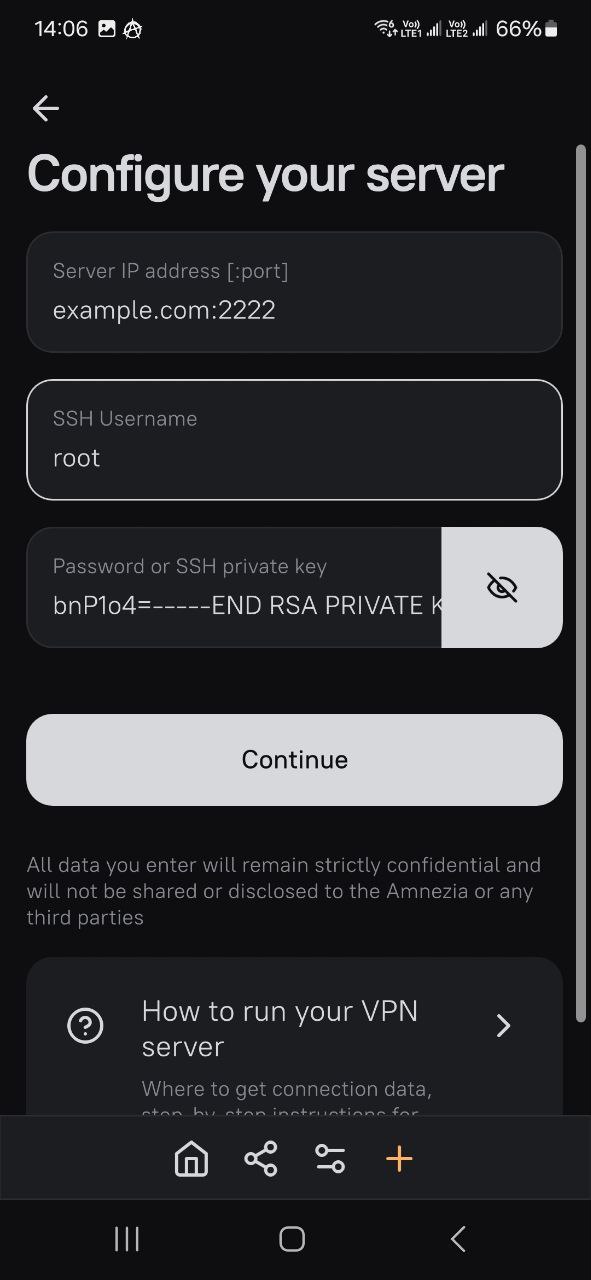
- Set up the server
Server IP address: Your address with a port. For example: example.com:2222 or 192.168.148.8:12345
SSH Username: root
Password or SSH private key: Your private SSH key without a password, created in step 4.
- Set up protocols
Then, by using docker ps, you will be able to see all running sub-containers, including amnezia-awg, amnezia-xray, and others.

License
Licensed under the Apache License.
Please note that this container requires privileged access to Docker on your host machine via /var/run/docker.sock.
The author of this repository is not affiliated with or endorsed by the developers of Amnezia VPN. The software provided here includes Amnezia VPN, which operates independently of this Docker image. The author has no control over the source code or behavior of Amnezia VPN and is not responsible for any actions or outcomes resulting from its use.
Disclaimer of Liability: This Docker image is provided "AS IS" without any warranties, express or implied, and is intended for use at the user's own risk. Users are strongly encouraged to perform their own security and functionality review of Amnezia VPN before deployment. By using this software, you agree that the author of this repository shall not be held liable for any damages, loss of data, or other harm arising from the use of Amnezia VPN or any other components contained within this image.


