
tdx - your todos, in markdown, done fast.
tdx



Your todos, in markdown, done fast.
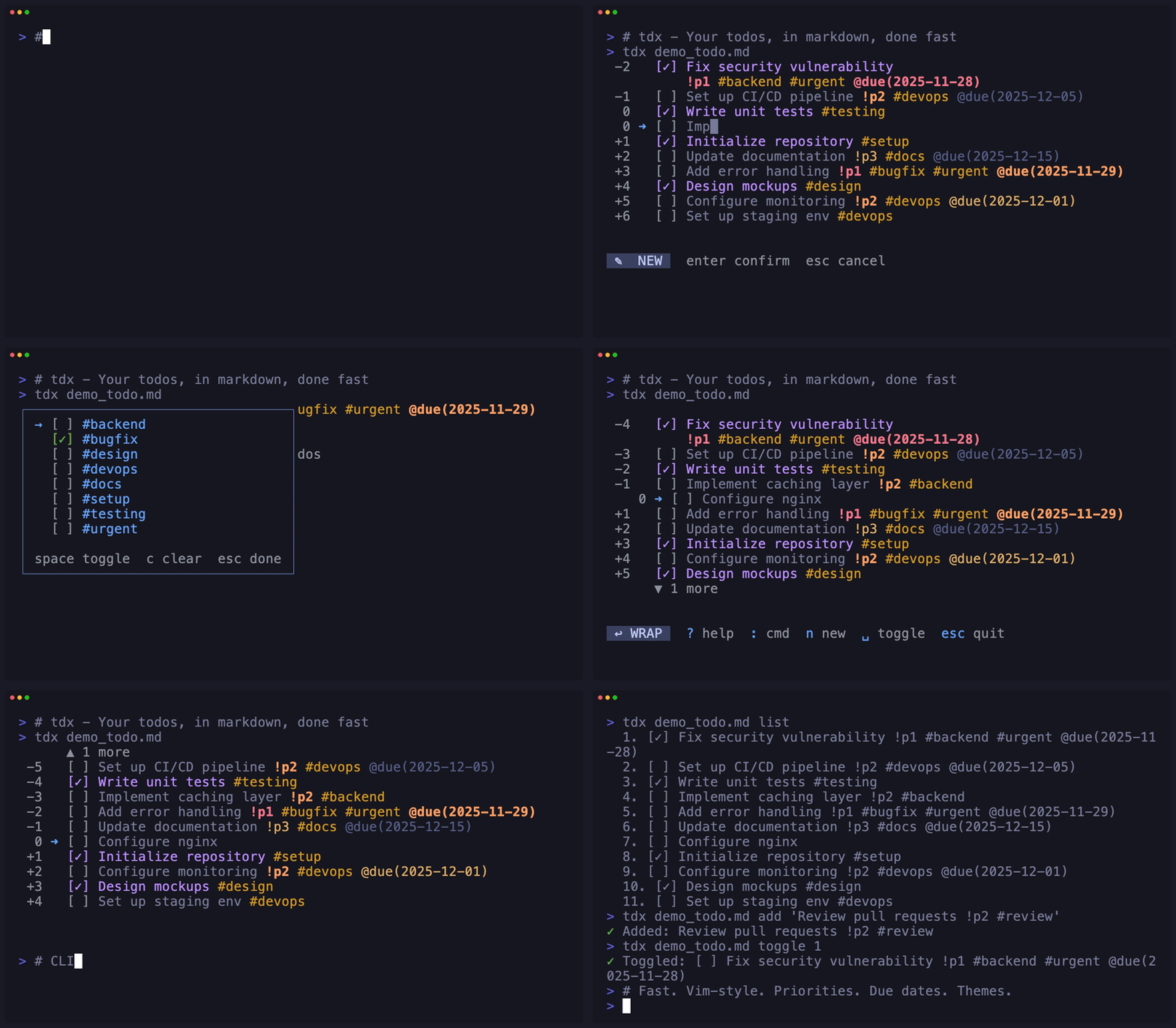
A fast, single-binary CLI todo manager focused on developer experience. Features vim-style navigation, an interactive TUI, and scriptable commands—all stored in plain markdown you can version control.
Features
- ⚡ Fast - Single binary (4MB), instant startup, 30-40x faster than alternatives
- 📝 Markdown-native - Todos live in
todo.md, version control friendly - ⌨️ Vim-style navigation -
j/k, relative jumps (5j), number keys - 🖥️ Interactive TUI - Toggle, create, edit, delete, undo, move, copy
- 🎯 Command Palette - Helix-style
:commands with fuzzy search - 📋 Read-Only Mode - Prevent auto-save, check/uncheck all, filter done
- 🔧 Scriptable -
list,add,toggle,edit,deletecommands - 🔄 Smart Conflict Detection - Auto-merge external changes, reactive file watching
- 📑 Per-File Configuration - YAML frontmatter for file-specific settings
- 📂 Recent Files - Jump to recently opened files with cursor position restoration
- 🌍 Cross-platform - macOS, Linux, Windows
Installation
Homebrew (macOS/Linux)
brew install niklas-heer/tap/tdxQuick Install Script
curl -fsSL https://niklas-heer.github.io/tdx/install.sh | bashDownload Binary
Download the latest binary for your platform from Releases:
tdx-darwin-arm64- macOS Apple Silicontdx-darwin-amd64- macOS Inteltdx-linux-amd64- Linux x64tdx-linux-arm64- Linux ARM64tdx-windows-amd64.exe- Windows x64
From Source
Requires Go 1.25+:
git clone https://github.com/niklas-heer/tdx.git
cd tdx
just build
just install
Nix
# Try it without installing
nix run github:niklas-heer/tdx
Install to profile
nix profile install github:niklas-heer/tdx
Usage
Interactive TUI (Default)
Launch the interactive todo manager:
tdxKeyboard Shortcuts:
| Key | Action | |-----|--------| | j / k | Move down / up | | gg | Go to first item | | G | Go to last item | | Space / Enter | Toggle completion | | n | New todo after cursor | | N | New todo at end of file | | e | Edit todo | | d | Delete todo | | c | Copy to clipboard | | m | Move mode | | Tab | Indent (nest under previous) | | Shift+Tab | Outdent (move up one level) | | / | Fuzzy search | | t | Tag filter | | p | Priority filter | | D | Due date filter | | r | Recent files | | : | Command palette | | u | Undo | | ? | Help menu | | Esc | Quit | | Cmd+V / Ctrl+Y | Paste (in edit mode) |
Command Palette (:):
Press : to open the command palette with fuzzy search. Available commands:
| Command | Description | |---------|-------------| | check-all | Mark all todos as complete | | uncheck-all | Mark all todos as incomplete | | sort-done | Sort todos by completion (incomplete first) | | sort-priority | Sort todos by priority (p1 first, then p2, etc.) | | sort-due | Sort todos by due date (earliest first) | | filter-done | Toggle showing/hiding completed todos | | filter-due | Toggle showing only todos with due dates | | filter-overdue | Toggle showing only overdue todos | | filter-today | Toggle showing only todos due today | | filter-week | Toggle showing only todos due this week | | clear-done | Delete all completed todos | | read-only | Toggle read-only mode (changes not saved) | | save | Save current state to file | | force-save | Force save even if file was modified externally | | reload | Reload file from disk (discards unsaved changes) | | wrap | Toggle word wrap for long lines | | line-numbers | Toggle relative line numbers | | set-max-visible | Set max visible items for this session | | show-headings | Toggle displaying markdown headings between tasks |
Read-Only Mode:
Start tdx with -r or --read-only flag for workflows where you don't want changes saved automatically:
tdx -r checklist.mdUse :save to manually save when ready, or :read-only to turn auto-save back on.
Vim-style navigation:
5j- Move down 5 lines3k- Move up 3 linesgg- Jump to first itemG- Jump to last item
/ to enter search mode. Type to filter todos with live highlighting. Press Enter to select or Esc to cancel.
Nested Tasks:
Organize your todos hierarchically using Tab and Shift+Tab:
- [ ] Main project
- [ ] Subtask 1
- [ ] Subtask 2
- [ ] Sub-subtask
- [ ] Another task
- Press
Tabto indent a task under its previous sibling - Press
Shift+Tabto outdent (move up one level) - Deleting a parent task promotes its children to the parent's level
- New tasks (
n) are created at the same nesting level as the cursor
Add hashtags to your todos for organization:
- [ ] Fix authentication #urgent #backend
- [ ] Update docs #docs
- [ ] Add dark mode #feature #frontend
t to open tag filter mode:
- Navigate with
↑/↓orj/k - Toggle tags with
SpaceorEnter - Clear all filters with
c - Press
Escwhen done
Priorities:
Add priority markers to your todos using !p1, !p2, !p3, etc.:
- [ ] Fix critical security bug !p1
- [ ] Update dependencies !p2
- [ ] Write documentation !p3
- [ ] Refactor code !p2
- [ ] Add nice-to-have feature
!p1- Critical/Urgent (displayed in red)!p2- High priority (displayed in orange)!p3- Medium priority (displayed in yellow)!p4+- Lower priorities (displayed dimmed)
:sort-priority command to sort todos by priority (p1 first, then p2, etc.). Tasks without a priority marker are placed at the end. You can combine priorities with tags: Fix bug !p1 #backend #urgent
Priority Filtering:
Press p to open priority filter mode:
- Navigate with
↑/↓orj/k - Toggle priorities with
SpaceorEnter - Clear all filters with
c - Press
Escwhen done
⚡ p1 p2). You can combine priority and tag filters to narrow down your view.
Due Dates:
Add due dates to your todos using @due(YYYY-MM-DD):
- [ ] Submit quarterly report @due(2025-12-01)
- [ ] Review pull request @due(2025-11-30) #code-review
- [ ] Fix critical bug !p1 @due(2025-11-29) #urgent
- [ ] Plan team meeting @due(2025-12-15)
- Overdue - Red (past the due date)
- Due today - Orange
- Due soon - Yellow (within 3 days)
- Future - Dimmed
:sort-due command to sort todos by due date (earliest first). Tasks without a due date are placed at the end. You can combine due dates with priorities and tags.
Due Date Filtering:
Press D (capital D) to open due date filter mode:
- Overdue - Show only overdue tasks
- Today - Show tasks due today
- This Week - Show tasks due within 7 days
- Has Due Date - Show all tasks with any due date
↑/↓ or j/k, select with Space or Enter, clear with c, and press Esc when done.
Active due date filters are shown in the status bar (e.g., 📅 overdue). You can combine due date filters with priority and tag filters.
CLI Commands
# List all todos
tdx list
Add a new todo
tdx add "Buy milk"
Toggle completion (1-based index)
tdx toggle 1
Edit a todo
tdx edit 2 "Updated text"
Delete a todo
tdx delete 3
Open most recent file
tdx last
Use custom file
tdx ~/notes/work.md list
tdx project.md add "Task"
Recent Files
tdx automatically tracks recently opened files and restores your cursor position when you reopen them.
TUI Mode:
Press r in the TUI to open the recent files overlay:
- Type to filter files by path (fuzzy search)
- Navigate with
↑/↓orj/k - Press
Enterto open a file - Press
Escorrto close
# Open the most recently used file
tdx last
List recently opened files (sorted by frequency and recency)
tdx recent
Open a specific recent file by number
tdx recent 1
Clear recent files history
tdx recent clear
Features:
- Smart Sorting: Files are ranked by both frequency (how often you open them) and recency (when you last accessed them)
- Cursor Restoration: When you reopen a file, tdx automatically restores your cursor to the last position
- Change Detection: If the file content has changed since your last visit, the cursor resets to the first item for safety
- Configurable Limit: Set maximum recent files in your config (default: 20)
In ~/.config/tdx/config.toml:
[recent]
max_files = 20  # Maximum number of recent files to track
Recent files are stored in ~/.config/tdx/recent.json and include:
- File path
- Last access time
- Access count (frequency)
- Last cursor position
- Content hash (for change detection)
File Format
Todos are stored in todo.md using standard Markdown:
# Todos
- [x] Completed task
- [ ] Incomplete task
- [ ] Another task
Other markdown content is preserved.Configuration
tdx supports three levels of configuration with the following priority:
Priority Order: CLI flags > Frontmatter > Global config > Defaults
Global Configuration
Create ~/.config/tdx/config.toml (or $XDGCONFIGHOME/tdx/config.toml) to set defaults:
[theme]
name = "tokyo-night"
[display] check_symbol = "✓" select_marker = "➜"
[defaults] file = "todo.md"      # default file (use ~/path for central file) max_visible = 0       # 0 = unlimited word_wrap = true show_headings = false read_only = false filter_done = false
[recent] max_files = 20
You only need to include the settings you want to change from the defaults.
Available options:
| Section | Option | Type | Default | Description | |---------|--------|------|---------|-------------| | [theme] | name | string | "tokyo-night" | Theme to use | | [display] | check_symbol | string | "✓" | Symbol for completed items | | [display] | select_marker | string | "➜" | Symbol for selected item | | [defaults] | file | string | "todo.md" | Default file path (use ~/path for central file) | | [defaults] | max_visible | number | 0 | Limit visible tasks (0 = unlimited) | | [defaults] | word_wrap | boolean | true | Enable word wrapping for long lines | | [defaults] | show_headings | boolean | false | Show markdown headings between tasks | | [defaults] | read_only | boolean | false | Prevent all edits (view-only mode) | | [defaults] | filter_done | boolean | false | Hide completed tasks by default | | [recent] | max_files | number | 20 | Maximum recent files to track |
Per-File Configuration
Add YAML frontmatter to customize behavior for specific files:
---
read-only: false
max-visible: 10
show-headings: true
Todos
- [ ] Task one
Read-only checklist:
--- read-only: true
Shopping List
- [ ] Milk
--- show-headings: true max-visible: 15 filter-done: true
Project Tasks
Backend
- [ ] API endpoints
Frontend
- [ ] UI components
Configuration Priority
Settings are applied in this order (highest to lowest priority):
- CLI flags -
tdx -r --show-headings todo.md - Frontmatter - YAML at top of individual todo files
- Global config -
~/.config/tdx/config.toml - Defaults - Built-in defaults (word_wrap: true, others: false/0)
# config.toml sets word_wrap = false
Frontmatter sets read-only: true
CLI flag: --show-headings
Result: wordwrap=false, readonly=true, show_headings=true
tdx --show-headings todo.md
Architecture
AST-Based Markdown Engine
tdx uses Goldmark (Go's industry-standard Markdown parser) with a custom serializer to provide robust, format-preserving todo management:
Why AST over regex?
- ⚡ Performance - Parse once, manipulate efficiently in memory
- 🎯 Precision - Surgical updates to specific nodes without side effects
- 📝 Format Preservation - Maintains your markdown structure, spacing, and formatting
- 🔒 Reliability - Correctly handles edge cases (nested lists, code blocks, links, etc.)
- 🏷️ Rich Features - Enables advanced features like tag extraction, heading tracking
Read File → Goldmark Parser → AST (in-memory tree)
                                  ↓
                           Manipulate nodes
                           (toggle, add, delete, swap)
                                  ↓
                          Custom Serializer → Write File
Implementation Details:
- Parser (
internal/markdown/ast.go:29)
TaskCheckBox node within a ListItem
- Preserves source bytes with segment pointers for text nodes
- AST Operations (
internal/markdown/ast.go)
ExtractTodos() - Walk AST and collect all task list items
- ExtractHeadings() - Find headings and their positions relative to todos
- ToggleTodo() - Flip checkbox state in the AST
- UpdateTodoText() - Append new text to source, update segment pointers
- DeleteTodo() - Remove list item node from parent
- AddTodo() - Create new list item with checkbox and text nodes
- SwapTodos() - Reorder list items (handles adjacent and cross-section swaps)
- Custom Serializer (
internal/markdown/serializer.go:12)
Key Benefits:
- ✅ Non-destructive - Your markdown formatting, comments, and structure stay intact
- ✅ Complex markdown - Handles nested lists, code blocks, links, emphasis seamlessly
- ✅ Fast operations - No regex scanning, no full-file rewrites
- ✅ Predictable - AST guarantees correct parsing and serialization
- ✅ Tag support - HashtagExtraction built into AST traversal
- ✅ Heading-aware - Knows which todos belong under which headings
Performance Optimizations
tdx is built for speed with several key optimizations:
- Search debouncing - Search operations are debounced (50ms) to avoid scoring all todos on every keystroke
- Heading caching - Heading positions are cached and only recomputed when todos change
- Zero-allocation navigation - Finding next/previous visible items allocates no memory (~8ns)
- Unified input handling - TUI and piped input share the same handlers, reducing code and bugs
FuzzyScore (exact match):     5.6ns/op    0 allocs
FuzzyScore (fuzzy match):    33.4ns/op    0 allocs
Cached headings:              1.0ns/op    0 allocs
Search 100 todos:             9.8µs/op  114 allocs
Navigation (visible todo):    8.0ns/op    0 allocs
Project Structure
tdx/
├── cmd/tdx/              # Main application
│   ├── main.go          # Entry point, CLI routing
│   ├── config.go        # Build-time configuration
│   ├── userconfig.go    # User configuration (themes, settings)
│   └── *_test.go        # Comprehensive test suite
├── internal/
│   ├── markdown/        # AST-based markdown engine
│   │   ├── parser.go    # Markdown → AST
│   │   ├── ast.go       # AST data structures
│   │   └── serializer.go # AST → Markdown
│   ├── tui/             # Terminal UI (Bubble Tea)
│   │   ├── model.go     # Application state
│   │   ├── update.go    # Event handling
│   │   ├── view.go      # Rendering
│   │   ├── commands.go  # Command palette
│   │   ├── render.go    # Display logic
│   │   └── *_test.go    # Unit & benchmark tests
│   ├── cmd/             # CLI command handlers
│   │   └── cli.go       # List, add, toggle, etc.
│   ├── config/          # Configuration handling
│   │   ├── config.go    # Legacy YAML config (deprecated)
│   │   └── recent.go    # Recent files tracking
│   └── util/            # Utilities
│       ├── text.go      # Text processing, fuzzy search
│       ├── clipboard.go # Clipboard operations
│       └── text_test.go # Unit & benchmark tests
└── scripts/             # Development & release tools
Development
Prerequisites
- Go 1.25+
- just (command runner)
Building
# Build binary
just build
Build for all platforms
just build-all
Install to /usr/local/bin
just install
Commands
just build      # Build binary
just install    # Install to PATH
just tui        # Run TUI
just list       # List todos
just add "X"    # Add todo
just toggle 1   # Toggle todo
just check      # Run go vet
just fmt        # Format code
just clean      # Clean artifacts
Theme Customization
Theme Picker
Press : to open the command palette and select theme to open the theme picker:
- Navigate with
↑/↓orj/kto preview themes in real-time - Press
Enterto apply and save the theme - Press
Escto cancel and restore the previous theme
Theme Config File
Set your theme in ~/.config/tdx/config.toml:
[theme]
name = "tokyo-night"  # or any builtin/custom theme
See the Global Configuration section for all available settings.
Builtin Themes
tokyo-night(default)catppuccin-latte(light)catppuccin-frappecatppuccin-macchiatocatppuccin-mochadraculagithub-darkgruvbox-darkmonokainordone-darkrose-pinesolarized-dark
Custom Themes
Create your own themes by adding .toml files to ~/.config/tdx/themes/:
# ~/.config/tdx/themes/my-theme.toml
[theme]
name = "my-theme"
author = "Your Name"
[colors] Core colors Base = "#c0caf5"       # default foreground Dim = "#565f89"        # muted text Accent = "#7aa2f7"     # highlights, selections Success = "#9ece6a"    # completed items, matches Warning = "#e0af68"    # move mode Important = "#bb9af7"  # checked items AlertError = "#f7768e" # errors
Tags (hashtags like #urgent)
Tag = "#e0af68"
Priorities (!p1, !p2, !p3+)
PriorityHigh = "#f7768e"    # !p1 - critical
PriorityMedium = "#bb9af7"  # !p2 - high
PriorityLow = "#565f89"     # !p3+ - medium/low
Due dates (@due(YYYY-MM-DD))
DueUrgent = "#7dcfff"  # overdue or due today
DueSoon = "#7aa2f7"    # due within 3 days
DueFuture = "#565f89"  # due later
Custom themes appear in the theme picker alongside builtin themes. You can also override builtin themes by creating a file with the same theme name.
Note: The Tag, Priority, and Due colors are optional. If omitted, sensible defaults are used based on the core colors.
Custom File Path
tdx ~/notes/work.md           # Use specific file
tdx project.md add "Task"     # All commands work
Build Configuration
Build metadata in tdx.toml:
version = "0.6.0" description = "your todos, in markdown, done fast"License
MIT - see LICENSE


