
Fast transcript search for humans & agents for Claude Code, Codex, Pi, OpenCode, Github Copilot & Cursor
memex
Fast local history search for Claude, Codex CLI, Cursor, OpenCode, Pi Coding Agent, OpenClaw, and GitHub Copilot CLI logs. Uses BM-25 and optionally embeds your transcripts locally for hybrid search.
Mostly intended for agents to use via skill. The intended workflow is to ask agent about a previous session & then the agent can narrow things down & retrieve history as needed.
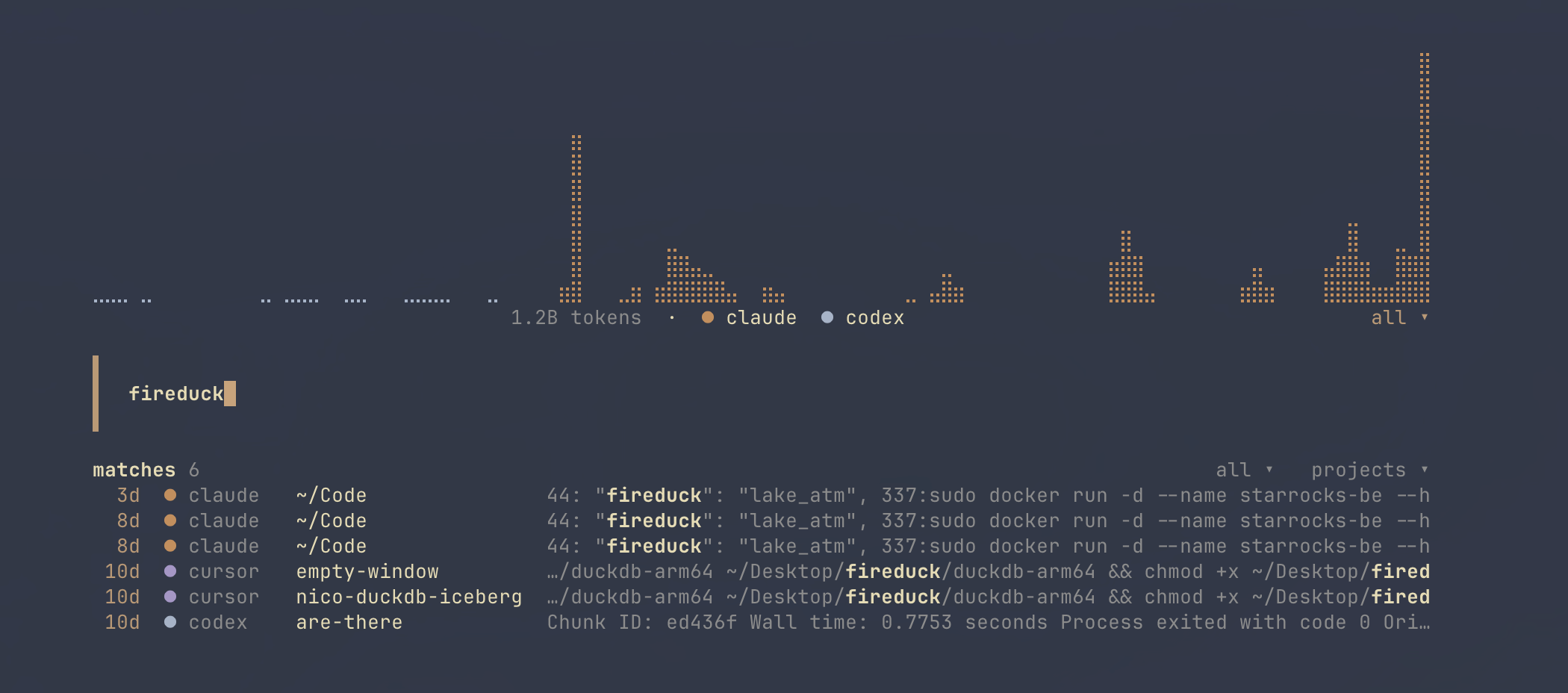
Includes a TUI for browsing, finding and resuming agent CLI sessions, with optional token usage tracking.
Install
brew install nicosuave/tap/memexOr
curl -fsSL https://raw.githubusercontent.com/nicosuave/memex/main/scripts/setup.sh | shOr (from the AUR on Arch Linux):
paru -S memexOr (with Nix):
nix run github:nicosuave/memexNix development and advanced configuration
Development shell:
nix developNote: No binary cache is configured, so first builds compile from source.
NixOS service:
Enable background indexing with the provided module:
{
  inputs.memex.url = "github:nicosuave/memex";
outputs = { nixpkgs, memex, ... }: {     nixosConfigurations.default = nixpkgs.lib.nixosSystem {       modules = [         memex.nixosModules.default         {           services.memex = {             enable = true;             continuous = true; # Run as a daemon (optional)           };         }       ];     };   }; }
Home Manager:
Configure memex declaratively (generates ~/.memex/config.toml):
{
  inputs.memex.url = "github:nicosuave/memex";
outputs = { memex, ... }: {     # Inside your Home Manager configuration     modules = [       memex.homeManagerModules.default       {         programs.memex = {           enable = true;           settings = {             embeddings = true;             include_reasoning = false;             model = "minilm";             execution_provider = "auto"; # coreml on macOS, cpu elsewhere             cudadeviceid = 0; # optional when execution_provider = "cuda"             cudalibrarypaths = ["/usr/local/cuda/lib64"]; # optional override             cudnnlibrarypaths = ["/usr/lib/x86_64-linux-gnu"]; # optional override             compute_units = "ane"; # CoreML only: ane, gpu, cpu, all             autoindexon_search = true;             token_usage = false; # opt in to local token and cost tracking             indexserviceinterval = 3600;           };         };       }     ];   }; }
Then run setup to install the skills:
memex setupRestart Claude, Codex, OpenCode, or Pi after setup.
Quickstart
Index (incremental):
memex indexPlaintext reasoning is excluded by default because it is usually low-value search noise. Opt in with memex index --include-reasoning; reasoning records remain BM25-only. Encrypted and redacted payloads, along with reasoning signature fields, are always excluded.
Search (JSONL default):
memex search "your query" --limit 20TUI:
memex tuiNotes:
- Embeddings are disabled by default. Pass
--embeddingsto generate them during indexing. - Searches run an incremental reindex by default (configurable).
- Concurrent searches coalesce stale auto-index work: one process refreshes while other lexical
index, reindex, embed, and analytics backfill commands wait up to 30 seconds for another index mutation to finish and report its holder on timeout.
Full transcript:
memex session <session_id>Single record:
memex show <doc_id>Human output:
memex search "your query" -vMultiple machines over SSH
Each machine keeps and updates its own index. The coordinating memex queries configured machines concurrently over SSH, merges their rankings, and keeps the originating machine attached to every result. The TUI uses the same backend for search, history previews, sharing, token charts, and interactive resume.
Install a protocol-compatible memex binary on each machine and configure SSH normally in ~/.ssh/config. Then add machines to ~/.memex/config.toml:
[multi_machine]
default = ["local", "mini"]
timeout_seconds = 10
[[machines]] id = "mini" label = "Mac mini"
[machines.control] type = "ssh" host = "mini" # SSH config alias
[machines.index] type = "remote"
The ssh = "mini" field is a shorthand for the machines.control table. Set command = "/path/to/memex" when memex is not on the non-interactive SSH PATH. SSH keys, users, ports, jump hosts, and host-key policy remain in ~/.ssh/config.
memex search "tantivy corruption"             # configured defaults
memex search "tantivy corruption" --machine mini
memex usage --machine local --machine mini
Unavailable machines produce partial results with a warning. Remote token usage requires token_usage = true in that machine's memex config. The index backend is intentionally separate from the control transport so an immutable S3 split backend can replace type = "remote" later while SSH continues to handle indexing and resume.
In the TUI, use the machines dropdown (or press m while the session list is focused) to select the configured default set, local, or one remote machine. The machine, source, project, and query filters are shared by the session results and token chart; the range dropdown bounds the chart.
Token usage
Token tracking is disabled by default because it scans and caches local agent logs. Enable it in ~/.memex/config.toml:
token_usage = trueThen reconstruct historical token usage from local Claude Code, Codex, Cursor, OpenCode, Pi, OpenClaw, and Copilot logs:
memex usage
memex usage --source codex --since 2026-07-01
memex usage --json --events
--cost auto prefers a provider-stored request cost and otherwise applies the versioned built-in API price catalog. --cost source uses only stored costs; --cost reprice always applies the catalog. Calculated costs are API-equivalent estimates, not subscription charges. Events with unknown models or prices remain in token totals and are reported as unpriced.
Each source also reports prompt-cache efficiency: the cache hit rate, plus an estimate of cache waste — prompt tokens that were in the previous request's prompt but were re-billed at input rates instead of read from cache, priced at catalog rates and attributed to idle gaps past the cache TTL or model switches where those apply. Waste is estimated per transcript file chain and errs toward undercounting: subagent sidechains, ambiguous dedupe deltas, and prompts that shrink past compaction are not counted.
Local token history is reconstructed usage. It is deliberately kept separate from authoritative subscription quota percentages and reset windows.
When token tracking is enabled, press Ctrl+T on the TUI home screen to toggle the 30-day activity chart between session count and token volume. Token activity is loaded lazily and cached when first shown.
Build from source
cargo build --releaseLinux with NVIDIA CUDA support:
cargo build --release --features cudaBinary:
./target/release/memexSetup (manual)
If you built from source, run setup to install:
memex setupThis detects which tools are installed (Claude/Codex/OpenCode/Pi) and presents an interactive menu to select which to configure.
Search modes
| Need | Command | | --- | --- | | Exact terms | search "exact term" | | Fuzzy concepts | search "concept" --semantic | | Mixed | search "term concept" --hybrid |
Common filters
--project <name>--role <user|assistant|tooluse|toolresult>--tool <tool_name>--session <session_id>--source claude|codex|cursor|opencode|pi|openclaw|copilot--since <iso|unix>/--until <iso|unix>--limit <n>--min-score <float>--sort score|ts--top-n-per-session <n>--unique-session--fields score,ts,docid,sessionid,snippet--json-array
source and, when available, tree/linkage metadata:
eventid, parenteventid, logicalparenteventid,
parentsessionid, threadsource, conversationkind,
parenttooluseid, sourcetooluseid, and
sourcetoolassistant_uuid.
Background index service
Works on macOS (launchd) and Linux (systemd).
Enable:
memex index-service enable memex index-service enable --continuous memex index-service enable --web-uiDisable:
memex index-service disableindex-service reads config defaults (mode, interval, log paths). Flags override.
On Linux, creates systemd user units in ~/.config/systemd/user/. On macOS, creates a launchd plist in ~/.memex/. On successful enable, memex writes autoindexon_search = false to config when that setting is absent, so searches do not duplicate daemon work. Explicit user config is preserved.
--web-ui implies continuous mode and serves a local search and transcript browser at http://127.0.0.1:6363. It mirrors the TUI's core workflow with search-as-you-type, source and project filters, a persistent session list, and Matches/History transcript previews. The server binds to loopback by default because the index contains private conversation history. Override the address explicitly when needed:
memex index-service enable --web-listen 127.0.0.1:8080To run the same UI in the foreground without changing the background service:
memex webThe browser frontend lives in web/, uses React and shadcn components, and is built with cd web && bun install && bun run build. The generated static assets are embedded in the memex binary, so serving the UI does not add a JavaScript runtime to the daemon.
Embeddings
Enable during indexing:
memex index --embeddingsRecommended when embeddings are on (especially non-potion models): run the background index service or index --watch, and consider setting autoindexon_search = false to keep searches fast.
Embedding model
Select via --model flag or MEMEX_MODEL env var:
| Model | Dims | Speed | Quality | |-------|------|-------|---------| | minilm | 384 | Fastest | Good | | bge | 384 | Fast | Better | | nomic | 768 | Moderate | Good | | gemma | 768 | Slowest | Best | | potion | 256 | Fastest (tiny) | Lowest |
memex index --model minilm
or
MEMEX_MODEL=minilm memex index
Execution provider
Select via executionprovider in config or MEMEXEXECUTION_PROVIDER:
| Provider | Platforms | Notes | |----------|-----------|-------| | auto | all | Default. Uses CoreML on macOS, CPU elsewhere | | cpu | all | Force CPU execution | | coreml | macOS | Uses CoreML; compute_units controls ane/gpu/cpu/all | | cuda | Linux/NVIDIA | Requires a binary built with --features cuda and CUDA 12/cuDNN runtime libraries |
When execution_provider = "cuda", you can optionally select a GPU with cudadeviceid or MEMEXCUDADEVICE_ID.
When loading CUDA, memex first tries the system loader paths, then any configured cudalibrarypaths / cudnnlibrarypaths, then common CUDA install locations and active venv / conda site-packages/nvidia/*/lib directories. If your system keeps CUDA or cuDNN in a nonstandard location, set MEMEXCUDALIBRARYPATHS and MEMEXCUDNNLIBRARYPATHS or the matching config keys.
Config (optional)
Create ~/.memex/config.toml (or <root>/config.toml if you use --root):
embeddings = true
autoindexon_search = true
include_reasoning = false  # opt in to plaintext reasoning; encrypted/redacted payloads stay excluded
token_usage = false  # opt in to local token and cost tracking
model = "minilm"  # minilm, bge, nomic, gemma, potion
execution_provider = "auto"  # auto, cpu, coreml, cuda
cudadeviceid = 0  # optional, when execution_provider = "cuda"
cudalibrarypaths = ["/usr/local/cuda/lib64"]  # optional list of CUDA library dirs
cudnnlibrarypaths = ["/usr/lib/x86_64-linux-gnu"]  # optional list of cuDNN library dirs
compute_units = "ane"  # CoreML only: ane, gpu, cpu, all
scancachettl = 3600  # seconds (default 1 hour)
maxindexedtoolinputbytes = 65536  # 64 KiB default
maxindexedtooloutputbytes = 262144  # 256 KiB default
indexservicemode = "interval"  # interval or continuous
indexserviceinterval = 3600  # seconds (ignored when mode = "continuous")
indexservicepoll_interval = 30  # seconds
indexserviceweb_ui = false  # serve local browser; forces continuous mode when true
indexserviceweb_listen = "127.0.0.1:6363"
indexservicelabel = "memex-index"  # service name (default: com.memex.index on macOS)
indexservicesystemd_dir = "~/.config/systemd/user"  # Linux only
clauderesumecmd = "claude --resume {session_id}"
codexresumecmd = "codex resume {session_id}"
cursorresumecmd = "cursor-agent --resume {session_id}"
opencoderesumecmd = "opencode resume {session_id}"
piresumecmd = "pi --session {sourcepathshell}"
copilotresumecmd = "your-copilot-resume-command {session_id}"
herdr_resume = "tab"  # inside a herdr pane: "tab" (default), "split", or "off"
Service logs and the plist live under ~/.memex by default (macOS). On Linux, systemd units are created in ~/.config/systemd/user/.
scancachettl controls how long auto-indexing considers scans fresh. include_reasoning defaults to false. Set it to true (or pass memex index --include-reasoning) to add plaintext reasoning as BM25-only records. Encrypted and redacted reasoning payloads are always excluded. maxindexedtool*bytes limits oversized tool payloads while leaving user and assistant text unchanged. memex keeps roughly the first three quarters and final quarter, with a marker reporting the omitted middle. Each value must be at least 1024 bytes. Run memex index --reindex to apply new limits to records that are already indexed. execution_provider applies to ONNX-backed models; potion uses the model2vec backend. cudalibrarypaths and cudnnlibrarypaths accept path lists and are only used when execution_provider = "cuda".
Resume command templates accept {sessionid}, {project}, {source}, {sourcepath}, {sourcedir}, {cwd}, plus shell-quoted {sourcepathshell}, {sourcedirshell}, and {cwdshell}.
The skill definitions are bundled in skills/.
herdr plugin
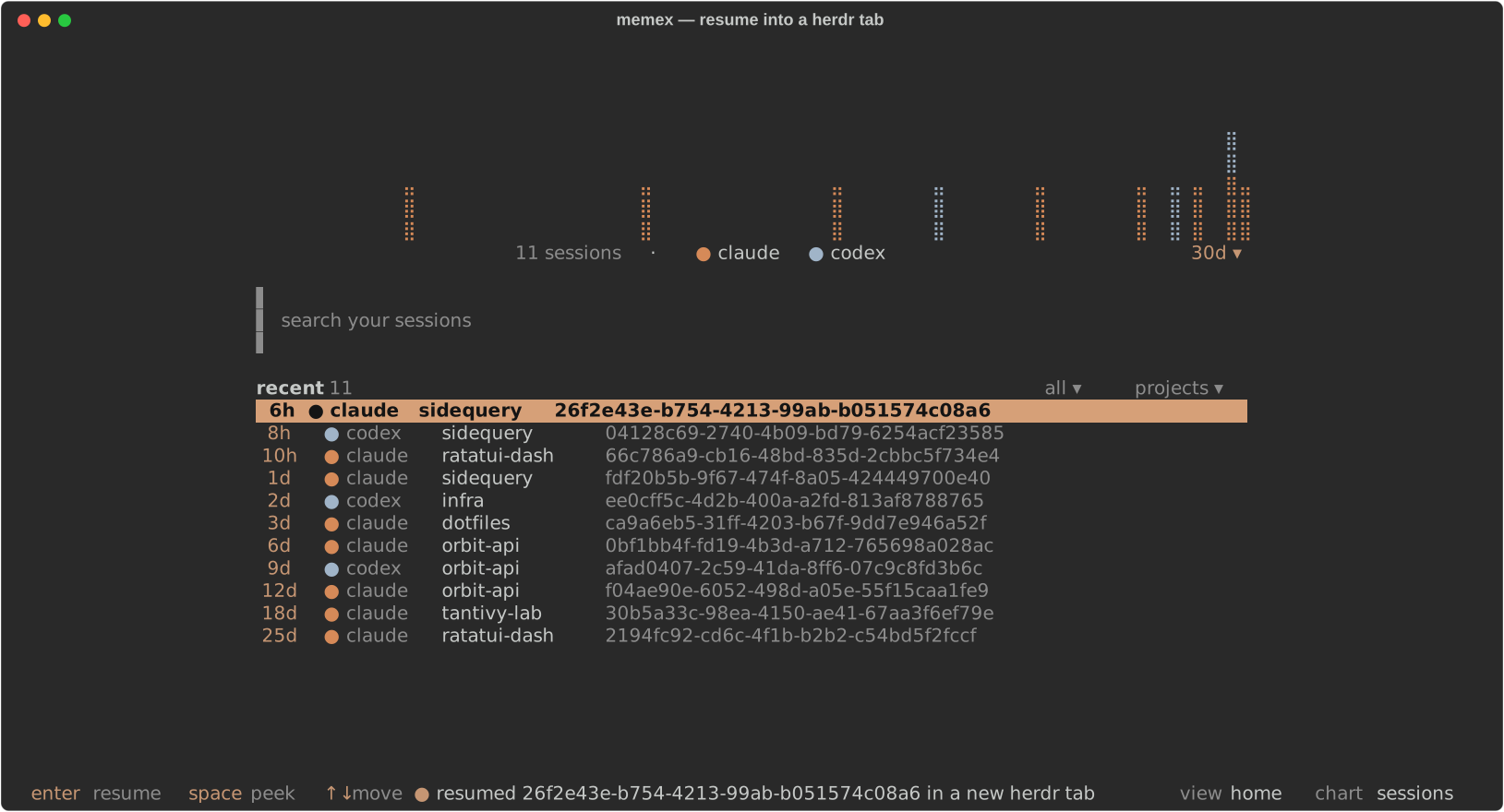
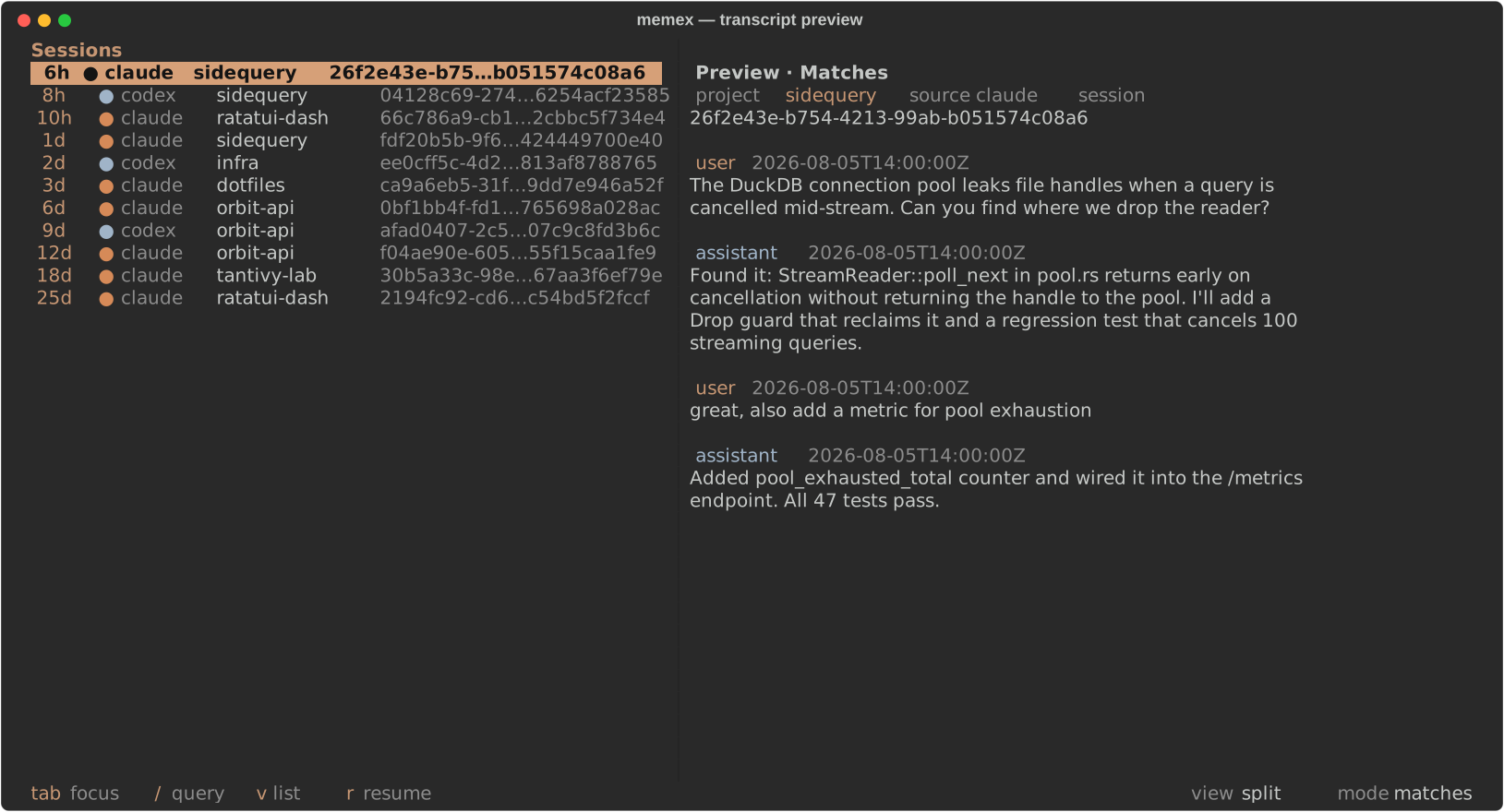
This repo is also a herdr plugin: it turns the memex TUI into a herdr-native session desk. Browse and search every past agent session from a herdr pane, then resume one into a new herdr tab.
herdr plugin install nicosuave/memexOr from a checkout:
cargo build --release
herdr plugin link .
install reuses a memex already on your PATH when it is current, otherwise it downloads the release build matching the plugin version. link uses target/release/memex from the checkout.
| Action | What it does | | --- | --- | | memex: session palette | Recent sessions as an overlay: Enter resumes into a new tab, quitting returns focus where it was | | memex: recent sessions here | The palette pre-filtered to the focused workspace's repo | | memex: session desk | Opens the TUI zoomed over the focused pane | | memex: toggle sidebar | Opens the TUI as a split beside your work, or closes it | | memex: resume last session | Resumes the most recent session for the focused pane's directory, without opening the TUI | | memex: refresh index | Runs an incremental memex index now | | memex: open web UI | Starts memex web if nothing is listening, then opens it in the browser |
Resuming inside herdr opens the session in a new herdr tab rather than taking over the current pane, so the desk stays where it is and you can resume several sessions in a row. Set herdr_resume = "split" (or "off") in memex's own config.toml to change that. Each herdr session start also kicks off a background incremental index.
The plugin is backed by two new CLI surfaces that work anywhere:
memex sessions --cwd . --limit 5     # JSONL: sessionid, cwd, gitroot, resume_cmd, ...
memex herdr resume-last --cwd .      # resume the newest session for this repo into a herdr tab
Plugin config lives at config.toml in the plugin's herdr config directory and is re-read on every action:
toggle_placement = "split"     # split, overlay, zoomed, tab
toggle_direction = "right"     # right, down
indexonstartup = true        # background index at herdr session start
web_listen = "127.0.0.1:6363"
Bind the desk to a key in your herdr config:
[[keys.command]]
key = "cmd+m"
type = "plugin_action"
command = "nicosuave.memex.palette"
description = "memex session palette"
The plugin is listed in the herdr marketplace through the herdr-plugin GitHub topic on this repo.


