
Production-grade n8n Enterprise on AWS — multi-main EKS, RDS Postgres, ElastiCache Redis, S3, and ALB in one terraform apply.
terraform-aws-n8n
Terraform module for deploying n8n on AWS.
Deploys the production-grade multi-main setup: multiple n8n main instances, dedicated worker pods, external PostgreSQL (RDS), Redis (ElastiCache), and S3 for shared file storage. An n8n Enterprise license is required.
The module expects a pre-existing VPC. If your parent domain is hosted in Route 53, pass route53zoneid and the module issues the ACM certificate and creates the DNS alias record itself. A single terraform apply brings up n8n end to end with no manual DNS steps. If your DNS is elsewhere, pass a pre-validated certificate_arn instead.
Pre-release module>
The terraform-aws-n8n module is in pre-release. Expect breaking changes at any time before the first stable release.
Architecture
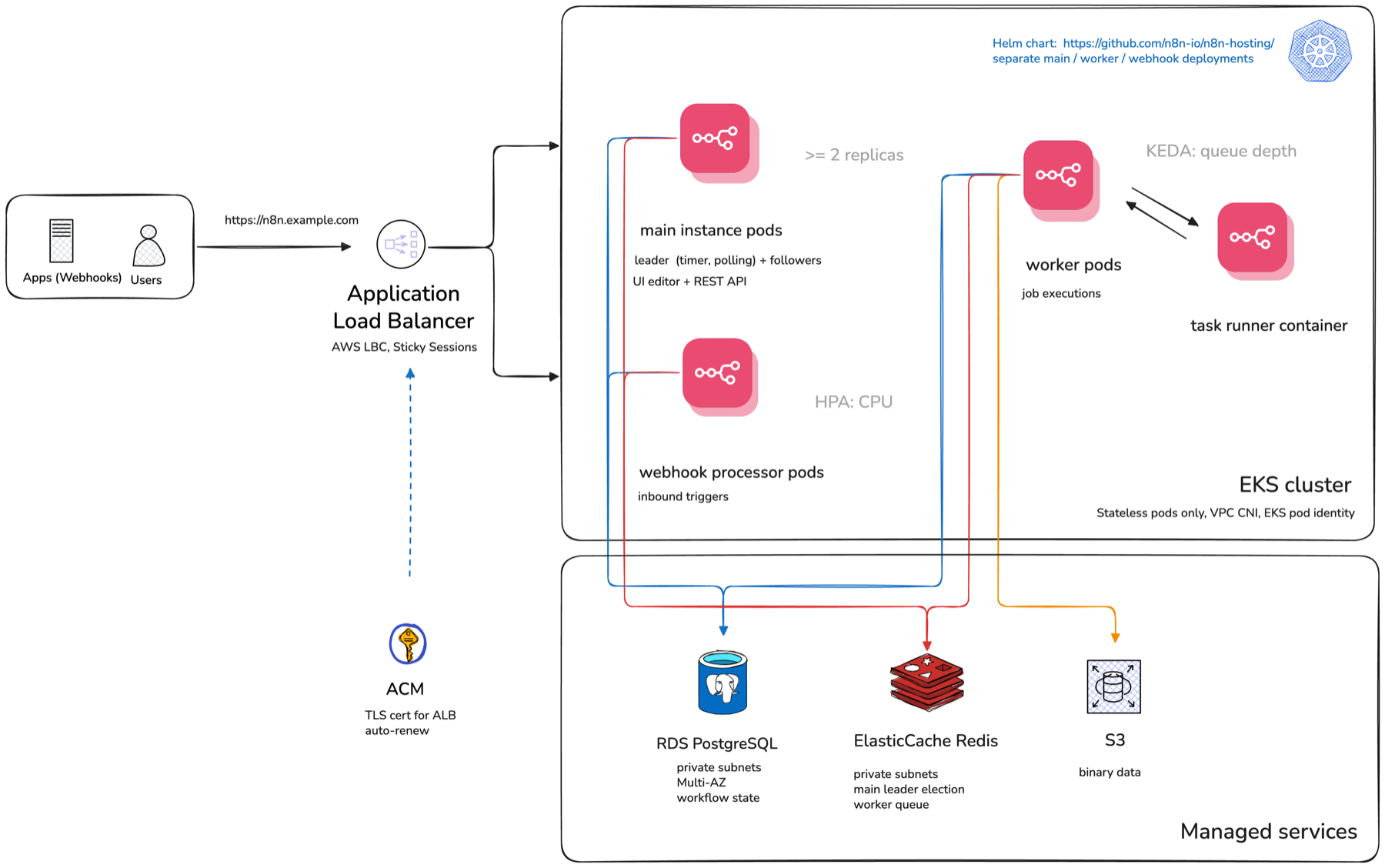
Users and inbound webhooks hit an Application Load Balancer (managed by the AWS Load Balancer Controller) that fronts the EKS cluster. Inside the cluster the n8n Helm chart runs three separate deployments: main instance pods (leader election, UI/editor, REST API), webhook processor pods for inbound triggers, and worker pods that run job executions and scale on Redis queue depth via KEDA. State lives in managed services outside the cluster: RDS PostgreSQL for workflow state, ElastiCache Redis for leader election and the worker queue, and S3 for binary data. ACM issues the TLS certificate for the ALB. The cluster also ships the EBS CSI driver and a default encrypted gp3 StorageClass, so PersistentVolumeClaims from workloads deployed beside n8n bind out of the box (n8n itself needs no volumes).
AWS permissions for pods (the Load Balancer Controller, Cluster Autoscaler, EBS CSI driver, and n8n's own S3 access) are granted entirely through EKS Pod Identity, not IRSA. See docs/pod-identity.md for the associations this module creates and how to extend the pattern for your own workloads.
In this multi-main topology, n8nlicensedetachfloatingon_shutdown defaults to false, overriding n8n's own upstream default, so a rolling restart of the main pods cannot crash-loop the fleet by zeroing the shared floating license cert. See docs/troubleshooting.md for the failure mode this avoids and how to recover if you hit it anyway.
Prerequisites
General
- An n8n Enterprise license key (
n8nlicensekey): the module does not provision a community-edition deployment. - Terraform CLI
>= 1.9, with theaws,kubernetes, andhelmproviders configured by the caller. The module declaresrequiredprovidersbut does not configure them (seeexamples/small/providers.tf). - Read Stability & versioning before pinning a module version, and Compatibility for the provider/chart majors this module ships against.
Networking
- A pre-existing VPC (
vpcid), itsvpccidrblock, and public + private subnet IDs (publicsubnets,private_subnets) tagged for EKS/ALB. VPC creation is intentionally out of scope (see Out of scope). The examples provision one viaterraform-aws-modules/vpc/awsif you need a reference.
DNS & TLS
Set exactly one of:
route53zoneid: the module issues and validates the ACM certificate and, whencreate_ingress = true, manages the Route 53 alias. With caller-owned ingress, the caller also owns its DNS record.certificatearn: a pre-validated certificate for any other DNS provider. Seeexamples/cloudflare/andexamples/godaddy/for the pattern of issuing the cert outside the module and passing the ARN in.
Secrets
n8nlicensekey: pass as a Terraform variable (e.g. from a secrets manager orTFVARn8nlicensekey), never hardcoded in.tfvarscommitted to version control.- The module generates
n8nencryptionkeyand (whencreatedatabase = true) the RDSdbpassword, and returns both as sensitive outputs. Back these up immediately after the first apply: there is no re-issue path, and losing the encryption key makes existing credentials/workflow secrets unrecoverable. See Out of scope.
Compute
- Pick a starting node size and count from the Examples table (
small,medium, orlarge), then tunenodeinstancetype,nodemin, andnodemaxfrom there.nodeminis a steady-state floor you pay for 24/7;nodemaxis a hard ceiling enforced by the Cluster Autoscaler.
Logging & metrics (optional)
n8nmetricsenabledexposes a Prometheus-scrapeable endpoint (see Prometheus metrics). The module does not bundle Prometheus, Grafana, or a log shipper; see Out of scope.- Enterprise log streaming is available separately from the metrics endpoint.
Usage
module "n8n" {
  source  = "n8n-io/n8n/aws"
  version = "~> 0.2.0"
aws_region      = "us-east-1"   cluster_name    = "n8n-cluster"   n8n_domain      = "n8n.example.com"   n8nlicensekey = var.n8nlicensekey
# Pre-existing VPC — bring your own.   vpcid          = module.vpc.vpcid   privatesubnets = module.vpc.privatesubnets   publicsubnets  = module.vpc.publicsubnets   vpccidrblock  = module.vpc.vpccidrblock
# EKS node group autoscaling bounds (defaults shown). Driven by Cluster   # Autoscaler — see note below; you pay for node_min nodes 24/7.   node_min = 3   node_max = 6
# DNS — set exactly one:   # 1. Parent domain in Route53 → module handles ACM + alias record.   route53zoneid = "Z0123456789ABCDEFGHIJ"   # 2. DNS elsewhere → bring your own pre-validated cert.   # certificatearn = awsacmcertificatevalidation.n8n.certificate_arn }
The module declares requiredproviders but does not configure them. Callers must configure aws, kubernetes, and helm providers. kubernetes and helm are configured against the cluster this module creates — see examples/small/providers.tf for the standard wiring.
nodemin and nodemax are the EKS node group's autoscaling bounds. nodemin is your steady-state floor — you pay for those nodes 24/7 even when idle. nodemax is a hard ceiling: if peak workload needs more nodes than allowed, pods stay Pending. Defaults fit the small example only; see the Examples table for production sizing.
For a full end-to-end example including the VPC, see examples/small/ (Route 53), examples/cloudflare/, or examples/godaddy/. If terraform apply fails on a helmrelease (most often due to a Helm 4 cache layout issue or a webhook race on first install), see docs/troubleshooting.md.
Support
This module is open source software, maintained by the n8n Solutions team independently of n8n's enterprise products. While the n8n Support team provides dedicated support for the enterprise offerings, this module isn't included.
Bug reports and feature requests: open a GitHub issue. We triage on a best-effort basis; there is no SLA.
Security issues: see SECURITY.md for the disclosure process. Do not open public issues for security findings.
General n8n questions (not specific to this module): use the n8n community forum.
Stability & versioning
This module is pre-1.0. We use minor versions (0.1, 0.2, …) as the breaking-change boundary and patches (0.1.0, 0.1.1, …) for additive or bug-fix changes.
| Across | What may change | | ------ | --------------- | | 0.MINOR.PATCH → 0.MINOR.PATCH+1 | Bug fixes, new optional inputs, new outputs, new resources whose absence wouldn't affect existing callers. No removed or renamed inputs/outputs. No changed defaults that move infra. No changed resource addresses. | | 0.MINOR → 0.MINOR+1 | Anything else, including removed inputs, renamed inputs, default changes that force resource replacement, refactored resource addresses, and bumped provider version floors. Each such change is called out in CHANGELOG.md with an upgrade note. |
Pin with version = "~> 0.2.0" to auto-receive 0.2.x patches without accidentally crossing a 0.2 → 0.3 boundary. Note the three-component constraint: ~> 0.2.0 resolves to >= 0.2.0, < 0.3.0, whereas the two-component ~> 0.2 would resolve to >= 0.2, < 1.0 and let you cross minor boundaries unintentionally. To upgrade across minor lines, retype the constraint (e.g. version = "~> 0.3.0") and read the release notes.
This contract goes away at 1.0.0 in favor of standard SemVer.
Compatibility
This module ships against specific provider majors. Notably:
- AWS provider:
~> 6.0. Upgrading from a v0.1.x deployment (which
aws ~> 5.0) requires a one-time terraform plan -refresh-only
followed by terraform apply -refresh-only to settle AWS provider 6.0's
per-resource region attribute into state before applying other changes.
Callers who must stay on AWS provider 5.x should pin this module to ~> 0.1.0.
- Helm provider:
~> 3.0. The 3.x release is a Plugin Framework
helm_release drift detection is stricter, so the first
terraform plan after upgrading from v0.1.x may show in-place diffs on
existing releases. Callers who must stay on Helm provider 2.x should pin
this module to ~> 0.1.0.
- Kubernetes provider:
~> 2.0. - Terraform CLI:
>= 1.9. - n8n Helm chart: default
1.10.0. Other chart versions can be
n8nchartversion.
- n8n application image: defaults to the chart's
docker.n8n.io/n8nio/n8nrepository on the floatingstabletag; production deployments should pin a specific version vian8nimagetag(e.g."1.2.3") to avoid crossing major-version boundaries on an unplanned pod reschedule.n8nimagerepositorypoints the release at a custom image (see Custom n8n images). - EKS: validated on Kubernetes
1.35. - PostgreSQL: validated on RDS
18.4.
n8nchartversion/n8nimagetag on an existing deployment, and docs/helm-chart-coverage.md for which n8n Helm chart values this module exposes versus leaves untouched.
Out of scope
v0.2.0 intentionally does not cover the following. Each item is documented here so that issues filed against them can be triaged quickly; several are candidates for future minor releases (see ROADMAP.md).
- VPC creation. The module requires a pre-existing VPC with both
terraform-aws-modules/vpc/aws, but that VPC is
not managed by this module. Rationale: VPCs are
organization-shaped, not service-shaped.
- Multi-region / cross-region deployments. One module instance =
region argument is the natural foundation for this
in a future minor.
- GovCloud, AWS China, and Outposts. The module uses generic AWS
- Air-gapped deployments.
n8nimagerepositorymoves the n8n
ghcr.io/n8n-io, the task runner sidecar image, and the KEDA /
Cluster Autoscaler / AWS Load Balancer Controller / metrics-server
charts and images from their respective upstreams.
n8nimagepull_secrets carries registry credentials for the n8n
image and nothing else. Mirroring the whole set into a registry you
control is possible, but the module exposes no inputs for pointing
the charts and controller images at the mirror.
- Backup/DR automation beyond RDS snapshots. The module enables
n8nencryptionkey output is emitted exactly once at apply time;
backing it up is the operator's job and is the single most
important thing they will forget.
- Bundled observability. The module installs KEDA (for worker
n8nmetricsenabled exposes the metrics
endpoint; scrape configuration is the caller's monitoring stack.
Rationale: observability stacks are deeply opinionated per-org;
bundling one is more harmful than helpful.
Examples
Six runnable examples ship with the module: three sizing tiers (small, medium, large) on Route 53, two DNS-variant examples (cloudflare, godaddy) at small sizing, and one topology-variant example (split-ingress) at small sizing. Sizing decisions for medium and large are derived from internal load testing.
| Dimension | small (default) | medium | large | | --- | --- | --- | --- | | Target scale | Dev / small team | ~5–15M exec/day | ~50–60+M exec/day | | Avg req/s | ~10–30 | ~60–175 | ~350–960 | | Node type | t3.xlarge (4 vCPU, 16 GB) | m6i.2xlarge (8 vCPU, 32 GB) | m7i.4xlarge (16 vCPU, 64 GB) | | Nodes desired / min / max | 3 / 3 / 6 | 5 / 5 / 15 | 10 / 10 / 50 | | Total vCPU (desired) | 12 | 40 | 160 | | Private subnets | 2× /24 (254 IPs each) | 2× /24 | 2× /20 (4,094 IPs each) | | VPC CNI tuning | default | default | WARMENITARGET=0 | | Database | RDS db.t3.small (2 vCPU, 2 GB) | RDS db.m6g.2xlarge (8 vCPU, 32 GB) | Aurora PostgreSQL I/O-Optimized | | DB instances | 1 writer (Multi-AZ standby) | 1 writer (Multi-AZ standby) | 1 writer + 1 reader | | DB storage | 50 GB gp2 | 200 GB gp3 | Aurora auto-scales to 128 TB | | DB IOPS ceiling | 150 baseline / 3,000 burst | 3,000 baseline (gp3) | None — I/O-Optimized | | PgBouncer | No | No | Yes — 2 replicas | | Redis | cache.t3.medium | cache.r6g.large | cache.r6g.large | | Redis nodes | 1 (no failover) | 1 (no failover) | 1 (no failover) | | Webhook pods min / max | 2 / 50 | 5 / 50 | 30 / 80 | | Worker pods min / max | 1 / 10 | 5 / 40 | 20 / 160 | | Worker concurrency | 10 | 20 | 40 | | Execution concurrency limit | 100 | 200 | 2,000 | | Webhook memory limit | 1 Gi | 2 Gi | 4 Gi | | Webhook memory request | 512 Mi | 512 Mi | 1 Gi | | Pruning retention | 10k records / 14 days | 500k records / 7 days | 5M records / 24h | | Est. cost / month (on-demand) | ~$440 | ~$2,000 | ~$21,000+ | | Est. cost / month (1-yr reserved) | ~$285 | ~$1,300 | ~$13,600 |
The DNS-variant examples (cloudflare, godaddy) are sizing-equivalent to small — they only swap the DNS provider for cert validation and the alias record.
split-ingress is also sizing-equivalent to small. It swaps the topology rather than the DNS provider: createingress = false, an internet-facing ALB serving only the webhook path prefixes (optionally behind a WAF), and an internal ALB serving the editor UI and REST API. It is the runnable version of the pattern described in the next section.
Bring your own Ingress (two-ALB split)
A complete, runnable version of everything in this section, including the
certificate, both alias records and a WAF hook, is at
examples/split-ingress/.By default the module creates a single internet-facing ALB Ingress that routes /webhook to the webhook processors and / to the mains. Some deployments need to split that: a public, internet-facing ALB for /webhook so external systems can deliver triggers, and a separate internal ALB for the editor UI and REST API, reachable only over VPN or a peered network, optionally behind a WAF.
Set create_ingress = false and the module steps out of routing entirely. It still creates everything the Ingresses point at, and it also stops managing the Route 53 alias A-record and the data.aws_lb lookup behind it, so your own DNS records are no longer reverted on the next terraform plan. The ACM certificate is still issued when route53zoneid is set, and remains usable by your own Ingresses.
Route to the Services the module exposes as outputs:
| Output | Value | Serves | | --- | --- | --- | | n8nservicename | n8n-main | Editor UI, REST API | | n8nwebhookservice_name | n8n-webhook-processor | Webhooks, forms, waiting resumptions, MCP | | n8nwebhookpath_prefixes | see below | The prefixes that must reach the processors | | n8nserviceport | 5678 | Both |
Route every webhook prefix, not just /webhook
The module runs the chart with disableProductionWebhooksOnMainProcess = true, which disables five endpoint families on the main pods, not one. Each returns 404 if it reaches n8n-main:
| Prefix | Breaks if misrouted | | --- | --- | | /webhook | Production webhook triggers | | /webhook-waiting | Wait-node resumption, Slack and Telegram human-in-the-loop callbacks | | /form | Form Trigger nodes | | /form-waiting | Multi-page and waiting forms | | /mcp | MCP server triggers |
n8nwebhookpath_prefixes returns this list so your Ingress stays in step with the module as n8n adds endpoints. Iterate over it rather than hardcoding, and declare the prefixes before any catch-all / rule.
module "n8n" {
  source = "n8n-io/n8n/aws"
create_ingress = false
# Two ALBs need two hostnames: a DNS name can alias only one load balancer.   # Setting route53zoneid plus n8nadditionaldomains makes the module issue   # and validate one certificate covering both, consumed below through the   # certificatearn output. n8nwebhook_url makes n8n hand out webhook URLs on   # the public host rather than the internal one.   route53zoneid        = var.route53zoneid   n8nadditionaldomains = [var.webhook_domain]   n8nwebhookurl        = "https://${var.webhook_domain}"
# ... remaining inputs }
Public ALB: webhooks only, on its own hostname.
resource "kubernetesingressv1" "webhook" {
  metadata {
    name      = "n8n-webhook-public"
    namespace = module.n8n.namespace
annotations = merge(       {         "alb.ingress.kubernetes.io/scheme"      = "internet-facing"         "alb.ingress.kubernetes.io/target-type" = "ip"
# The module-issued, already-validated certificate. It covers         # webhookdomain because that name is in n8nadditional_domains.         "alb.ingress.kubernetes.io/certificate-arn" = module.n8n.certificate_arn       },       # Omit the key entirely when there is no WAF: a null annotation value       # fails the plan.       var.wafaclarn == null ? {} : {         "alb.ingress.kubernetes.io/wafv2-acl-arn" = var.wafaclarn       },     )   }
spec {     ingressclassname = "alb"     rule {       host = var.webhook_domain       http {         dynamic "path" {           foreach = module.n8n.n8nwebhookpathprefixes
content {             path      = path.value             path_type = "Prefix"             backend {               service {                 name = module.n8n.n8nwebhookservice_name                 port { number = module.n8n.n8nserviceport }               }             }           }         }       }     }   }
# The namespace output alone orders this after the namespace, but not after   # the Helm release that creates the Services the ALB registers targets for.   depends_on = [module.n8n] }
Internal ALB: admin UI, VPN-only. Define a second kubernetesingressv1
with scheme = "internal", on its own hostname (var.n8n_domain), routing "/"
to module.n8n.n8nservicename on the same port.
#
Give that one the webhook prefixes too, ahead of its "/" rule. Otherwise
the catch-all sends /webhook to the main pods, which serve none of it, and
the request falls through to the editor's SPA handler and returns 200 with
an HTML body: an in-VPC caller reads that as success while nothing ran.
Customizing the module-managed Ingress
Before reaching for create_ingress = false, check whether the narrower inputs cover you. They keep the module's single-apply DNS wiring intact:
ingress_scheme:internet-facing(default) orinternal. Use this
albinboundcidrsandalbinboundprefixlistids: restrict which
[], which leaves the ALB open to the internet, as it has
always been. Set either one and the AWS Load Balancer Controller narrows the
security group it manages for the ALB:
# Reachable only from the corporate egress ranges.
  albinboundcidrs = ["203.0.113.0/24", "198.51.100.7/32"]
# Or keep the ranges in a managed prefix list, edited in one place and shared   # with other load balancers and security groups.   albinboundprefixlistids = [awsec2managedprefixlist.corp_egress.id]
Setting both is a union, not an intersection. The restriction covers every listen port, so port 80 (the HTTPS redirect) is filtered too.
This also blocks inbound webhooks. The module-managed ALB serves the webhook path prefixes alongside the editor UI, and a source restriction applies to the whole load balancer rather than per path. Slack, Stripe, GitHub, and Telegram senders outside the allow-list stop reaching n8n, and they see a connection timeout rather than an error you will find in the n8n logs. Reach for these inputs when nothing external calls in, or when every sender is on a known range. To lock down the editor while keeping webhooks public, run two load balancers instead: that is what examples/split-ingress/ is for.
albsslpolicy: the TLS negotiation policy for the HTTPS listener,
ELBSecurityPolicy-TLS13-1-2-2021-06 by default. Set it to any AWS-published ELBSecurityPolicy-* name to match a compliance baseline. ingress_annotations: amap(string)merged over the module's defaults
ingress_annotations = {
    "alb.ingress.kubernetes.io/wafv2-acl-arn"            = awswafv2web_acl.n8n.arn
    "alb.ingress.kubernetes.io/load-balancer-attributes" = "accesslogs.s3.enabled=true,accesslogs.s3.bucket=my-alb-logs"
  }
Eight caveats:
- Overriding
alb.ingress.kubernetes.io/target-group-attributesdrops the
stickiness.enabled=true if you set that key.
- Set the scheme through
ingress_schemeand the TLS policy through
albsslpolicy, not through ingress_annotations. Doing both raises a
plan-time warning, because the annotation silently wins and the failure mode
is an admin UI that is public when you meant it to be internal, or a TLS
floor that never took effect.
albinboundcidrsnarrows a public ALB; it is not the same as
ingress_scheme = "internal". The ALB stays in the public subnets with a
public DNS name, and the allow-list is the only thing keeping other sources
out. Choose internal when the deployment should not be on the public
internet at all, and use the two together for defence in depth.
- Both source restrictions are ignored by the controller when
ingress_annotations sets alb.ingress.kubernetes.io/security-groups,
because you then own the ALB's security group and the controller stops
managing its rules. Nothing in the plan reveals this, so the module warns.
Put the restriction in your own security group rules instead.
albinboundcidrsis IPv4 only, matching the ALB the module builds: it
ipv4 address type in place, so an IPv6 rule
could never match a client. A dualstack ALB also needs a VPC and subnets
carrying IPv6 CIDRs, which this module does not create. If you run one, set
the allow-list on the annotation through ingress_annotations instead.
- An
IngressClassParamssettingspec.inboundCIDRsorspec.prefixListsIDs
spec.ingressClassName, and the module-managed
Ingress also carries the legacy kubernetes.io/ingress.class annotation, which
the controller matches first. Verified live against LBC v3.5.0. The immunity is
incidental rather than designed, so it is worth knowing about: caller-owned
Ingresses that set only spec.ingressClassName, including both of the ones in
examples/split-ingress/, do not have it. See
docs/troubleshooting.md
for the kubectl commands, and for the two preconditions that make the
override possible at all, neither of which the LBC chart sets up by default.
- Prefix lists are heavier than they look. A security group rule referencing a
RulesPerSecurityGroupLimitExceeded authorizing the new ones, and leaves
the security group with no ingress rules, so everything times out, webhooks
included, while terraform apply reports success. Verified live against LBC
v3.5.0. Keep 2 x (combined list weight + CIDR count) at or under the
quota, or raise quota L-0EA8095F first. See the
troubleshooting entry.
- Locking yourself out is recovered with
terraform apply, not from the
Setting alb.ingress.kubernetes.io/inbound-cidrs directly through ingress_annotations was the only way to restrict the ALB before these inputs existed, and it still works: ingress_annotations remains the last write. If you are migrating, delete the annotation in the same change, or the stale value keeps winning. The module raises a plan-time warning when both are set.
Redis high availability
Redis backs two things n8n cannot run without in queue mode: the Bull queue that distributes executions across workers, and the leader election that coordinates the multi-main pods. By default the module provisions it as a single-node awselasticachecluster: cheapest, and a single point of failure for both. A node failure or AZ event stalls executions and leader election until ElastiCache replaces the node.
Set redishighavailability_enabled = true to provision an awselasticachereplication_group instead: one primary and one replica, automaticfailoverenabled so ElastiCache promotes the replica on its own, and multiazenabled so the replica lands in a second AZ rather than sharing the primary's fate. Both nodes use redisnodetype, so **the Redis line of the bill roughly doubles**.
The replication group also sets atrestencryption_enabled, which the single-node cluster resource has no equivalent for. It is free on the AWS-managed key and is set in the same release that introduces the resource on purpose: the argument is ForceNew, so switching it on later would replace the cache for everyone already running HA. Encryption in transit is a separate concern and is not covered by this variable.
module "n8n" {
  # ...
  redishighavailability_enabled = true
  redisnodetype                 = "cache.r6g.large"
}
What this actually buys you, measured
The honest version, from a forced failover on a live cluster (aws elasticache test-failover) rather than from the AWS marketing page:
| | Single node (default) | HA replication group | |---|---|---| | Queued executions after a node loss | Gone | Survive on the promoted replica | | Time to a working queue | However long AWS takes to build a new node | ~20s promotion, pods back within a minute | | n8n pods during the event | Restart | Restart |
The row that matters is the first one. HA does not make the failover invisible to n8n: every main, worker and webhook pod exits and restarts while it happens. n8n's RedisClientService calls process.exit once Redis has been unreachable for QUEUEBULLREDISTIMEOUTTHRESHOLD (10s by default) and logs Unable to connect to Redis after trying to connect for 10s / Exiting process due to Redis connection error. Raising that threshold to 30s was tried here and only moved the exit later, which is why the module leaves it alone by default. See Surviving a Redis failover without restarting for why 30s failed and what does work.
That restart is a fail-fast by design, not a crash-loop: Kubernetes brings each pod straight back, and the observed end-to-end recovery was under a minute with the queue contents intact. So buy this for durability of the queue, and plan for a brief pod-fleet restart, not for uninterrupted execution.
QUEUEBULLREDISRECONNECTON_FAILOVER (on by default since n8n 2.10.0) covers the narrower case where the connection survives and the demoted primary answers writes with READONLY. It did not prevent the restarts observed here, because the client hit connect timeouts rather than READONLY.
Surviving a Redis failover without restarting
n8nredistimeoutthreshold sets QUEUEBULLREDISTIMEOUT_THRESHOLD, the budget n8n spends trying to reach Redis before calling process.exit. It defaults to null, leaving the chart's 10000 in place, which is what every existing deployment already runs.
Raising it is the only lever this module has, and **the budget is much coarser than the number suggests**. n8n does not set ioredis's connectTimeout, so it stays at its 10s default, and a connect to a demoted primary hangs for that full 10s before failing. Each failed attempt therefore spends about 11.1s (1s retry interval plus the 10s hang), and the threshold is effectively quantized:
| You set | Real budget | Reconnect attempts before exit | |---|---|---| | 10000 (default) | 11.1s | 1 | | 30000 | 33.2s | 3 | | 60000 | 66.4s | 6 |
Measured against a reproduction of the failure (two Redis instances and a /etc/hosts flip standing in for the endpoint repointing, with n8n's exact client options and a verbatim copy of its retry strategy):
| Endpoint stale for | Client recovered at | 10000 | 30000 | 60000 | |---|---|---|---|---| | 15s | 33.4s | exits 21.2s | survives | survives | | 25s | 44.5s | exits 21.4s | exits 43.4s | survives |
The second row is the live failure, reproduced: a 30s threshold fires **1.1 seconds before** the connection would have come back. That is the whole reason raising it to 30s looked like it did nothing.
module "n8n" {
  # ...
  redishighavailability_enabled = true
  n8nredistimeout_threshold     = 60000
}
Confirmed on a live cluster
A forced failover against a real ElastiCache replication group, with n8nredistimeout_threshold = 60000: no container terminated, and every pod logged Recovered Redis connection rather than exiting. n8n's own counter shows the quantum predicted above, measured rather than inferred:
Lost Redis connection. Trying to reconnect in 1s... (18.1s/60s)
Lost Redis connection. Trying to reconnect in 1s... (29.1s/60s)
Lost Redis connection. Trying to reconnect in 1s... (40.1s/60s)
Recovered Redis connection
Those gaps are 11.1s and 11.0s. A 30s threshold would have exited at the 40.1s sample, about 11 seconds before recovery.
The real endpoint stayed stale for 48 seconds, roughly double the worst case modelled above, measured by resolving the primary endpoint once a second from inside the cluster. CoreDNS caching plus the endpoint's own TTL stretches the window well past the promotion itself.
Two things worth knowing before you set it:
- It is a trade, not a free win. The threshold is also what makes a pod
- 60000 is a recommendation, not a guarantee. It cleared a 48 second window
The underlying issue belongs upstream: n8n leaves connectTimeout at 10s and offers no way to change it, which is what makes the budget coarse. Lowering it to 2s pulled recovery from 8.4s after the endpoint repointed down to 1.4s in the same reproduction.
Switching topologies replaces Redis
The two topologies are different Terraform resource types, so a moved block cannot bridge them. Flipping the toggle on a default deployment destroys the cache and creates the replacement, and **everything queued or in flight at that moment is lost**. This is a maintenance-window operation:
- Stop new work reaching n8n (pause the schedule triggers, or take the
- Let the workers drain.
bull:jobs:waitandbull:jobs:activeat zero is
terraform apply. Expect one destroy and one create on the Redis tier, and
- Resume traffic.
<cluster_name>-redis-rg rather than
<cluster_name>-redis). ElastiCache shares one identifier namespace between
cache clusters and replication groups and rejects a second resource reusing the
name:
InvalidParameterValue: Cannot have a cluster and replication group with
same identifier. Please use a different identifier.
The two resources are independent, so Terraform is free to create the new one while the old one still exists. With a shared name the apply would destroy the old cache and then fail to create the replacement, leaving the deployment with no queue backend and needing a second apply to recover. The distinct suffix makes enabling and disabling each a single apply.
The suffix reads -redis-rg (replication group) rather than -redis-ha because the resource is not exclusive to high availability. redistransitencryption_enabled selects it too, for an unrelated reason. See Redis in-transit encryption and AUTH for the full matrix.
That sharing is also the one case where enabling high availability does not replace anything. A deployment already running with redistransitencryption_enabled = true is on a replication group, so Terraform plans the change as an in-place modification, raising the node count through ElastiCache's IncreaseReplicaCount API rather than rebuilding. The provider converges that change in stages, so one apply does not enable automatic failover. Follow Adding high availability to an encrypted group for the measured sequence, and still drain first.
Redis in-transit encryption and AUTH
By default the module secures its ElastiCache queue backend by **network boundary**: Redis sits in private subnets behind a security group that admits only VPC traffic, with no TLS and no credentials. That is a defensible posture inside a trusted VPC and it is the module's accepted as-built behaviour, but it leaves two things open. Queue payloads (workflow execution data) cross the VPC in cleartext, and anything that reaches the network boundary reaches Redis unauthenticated.
Set redistransitencryption_enabled = true to close both. The module then enables TLS in transit, generates an AUTH token, publishes it as a Kubernetes secret, and wires QUEUEBULLREDISTLS plus QUEUEBULLREDISPASSWORD onto every n8n container. Retrieve the token with:
terraform output -raw redisauthtokenThe generated token respects ElastiCache's constraints: 16 to 128 characters, with ! & # $ ^ < > - the only permitted non-alphanumerics. A broader special set is rejected by AWS at create time.
It uses the same replication group high availability does
authtoken is not available on awselasticache_cluster. AWS exposes it only on awselasticachereplication_group, and only when transit encryption is already enabled. A third variable, rediskmsencryption_enabled, lands on the same resource for the same reason: kmskeyid is also replication-group-only. So all three of redishighavailability_enabled, redistransitencryptionenabled and rediskmsencryptionenabled select the replication group, each for an unrelated reason, and **any one alone is enough to move off the default cluster resource**:
| redishighavailabilityenabled | redistransitencryptionenabled | rediskmsencryption_enabled | Resource | Nodes | Failover | TLS + AUTH | KMS key | | --- | --- | --- | --- | --- | --- | --- | --- | | false | false | false | awselasticachecluster | 1 | no | no | none | | true | false | false | awselasticachereplication_group | 2, Multi-AZ | yes | no | ElastiCache-managed | | false | true | false | awselasticachereplication_group | 1 | no | yes | ElastiCache-managed | | false | false | true | awselasticachereplication_group | 1 | no | no | customer-managed | | true | true | false | awselasticachereplication_group | 2, Multi-AZ | yes | yes | ElastiCache-managed | | true | false | true | awselasticachereplication_group | 2, Multi-AZ | yes | no | customer-managed | | false | true | true | awselasticachereplication_group | 1 | no | yes | customer-managed | | true | true | true | awselasticachereplication_group | 2, Multi-AZ | yes | yes | customer-managed |
The three are independent. Encryption does not buy you a replica, so enabling it alone leaves the cache single-node and the bill unchanged; availability does not buy you a credential, so enabling that alone leaves the endpoint plaintext; a customer-managed key does not buy you either, so enabling that alone changes nothing about node count, failover, or transit encryption. rediskmsencryption_enabled defaults to false to avoid replacing an existing standalone cache and dropping its queue. That default awselasticachecluster is not encrypted at rest: Redis OSS at-rest encryption is available only on replication groups. Any HA- or TLS-selected replication group is encrypted with the ElastiCache-managed key; enabling the CMK toggle selects the same resource and replaces that key with the module CMK.
Because all three land on one resource with one identifier (<cluster_name>-redis-rg), turning any later one on plans as a modification of the replication group you already have rather than a replacement, as long as at least one of the three was already true. Turning on the first of the three is what forces the initial replacement, whichever one that is.
Adding high availability to an encrypted group
This direction is in place, but it takes more than one plan-and-apply cycle. The AWS provider handles the replica count before automatic failover: the first apply calls ElastiCache's IncreaseReplicaCount API, waits for the replica, and returns with automatic failover still disabled. A fresh plan then proposes the remaining automatic-failover change.
Use this sequence:
- Drain the queue, set
redishighavailability_enabled = true, and apply.
- Wait until the replication group is
available, then plan and apply again.
redisapplyimmediately = false, AWS records
AutomaticFailoverStatus = "enabled" in PendingModifiedValues and activates
it in the next maintenance window. To activate it now, set
redisapplyimmediately = true for this apply.
- Wait for AWS to report automatic failover as
enabled, then run one final
redisapplyimmediately = true if you used it; the final plan
should be empty.
This sequence was verified on a live encrypted replication group. The replica landed in a second availability zone without replacing the group. A forced failover then promoted it in 22 seconds. Authenticated Redis probes recovered after approximately 26 to 31 seconds, /healthz stayed available, and every n8n pod kept the same UID and zero restart count with n8nredistimeout_threshold = 60000.
Adding encryption to a plaintext replication group works, but not in one apply, and not with redistransitencryption_enabled alone. See the next section.
Adding TLS to an existing replication group
Setting redistransitencryption_enabled = true on a deployment that already runs redishighavailability_enabled = true plans as a clean in-place modify and then fails at apply. AWS refuses a direct plaintext-to-encrypted transition:
InvalidParameterCombination: Direct transition from transit-encryption-disabled
to transit-encryption-enabled is not allowed. Update the cluster to
transit-encryption-mode preferred prior to enabling transit encryption.
That is not a dead end. preferred is a mode in which the endpoint accepts TLS and plaintext at the same time, which is exactly what a migration needs, and redistransitencryptionmode plus redisapply_immediately exist to drive it. The sequence below was run end to end against a live ElastiCache replication group with a client holding a connection open throughout, and **no step interrupted service**.
Step 1 of 3: accept TLS alongside plaintext
redishighavailability_enabled  = true
redistransitencryption_enabled = true
redistransitencryption_mode    = "preferred"   # <- the migration lever
redisapplyimmediately          = true          # <- AWS rejects the change without it
Took 17 minutes 27 seconds. Throughout, a plaintext connection opened before the change and held open answered every PING, and new plaintext connections kept succeeding: 1198 consecutive replies on the held-open connection and 1192 on fresh ones, with zero errors. TLS starts working the moment the change lands.
Terraform rolls the n8n pods onto TLS in the same apply. Pods that have not rolled yet keep working, because plaintext is still accepted.
No AUTH token is created in this step. AWS will not accept one in preferred mode, so the module does not generate it, publish the Secret, or set passwordFromEnv on the KEDA triggers until the mode is required.
[!WARNING]
While the mode is preferred, Redis is reachable **unencrypted and
unauthenticated** by anything in the VPC. A check block warns on every apply
for as long as you stay there. Do not park here.
Step 2 of 3: close plaintext and introduce the token
redistransitencryption_mode = "required"
redisapplyimmediately       = true
One apply, 8 minutes 18 seconds. Terraform issues this as two API calls: the mode change first, then the AUTH token behind it. That ordering is what makes it work at all, since AWS rejects a token supplied in the same call as the move to required, with the same message it uses in preferred:
InvalidParameterValue: The AUTH token modification is only supported when
encryption-in-transit is enabled.
Plaintext stops being accepted partway through: measured at 131 seconds after the change was issued, the held-open plaintext connection was closed by the server and new plaintext connections began timing out. Nothing was using plaintext by then, because step 1 already moved the pods to TLS.
The endpoint hostname also changes shape here, from <group>.<id>.ng.0001.<region>.cache.amazonaws.com to master.<group>.<id>.<region>.cache.amazonaws.com. Both resolve during the migration; the old name is retired when this step completes. Terraform picks up the new one and rewrites the Helm values in the same apply, so nothing needs doing by hand.
Step 3 of 3: actually require the token
This step is not optional. The token in step 2 is introduced with ElastiCache's ROTATE strategy, which by design keeps the previous credential valid so clients that have not restarted are not locked out. For a group that had no token, the previous credential is no credential at all, so after step 2 the endpoint still answers unauthenticated connections:
$ redis-cli -h master.<group>.<id>.<region>.cache.amazonaws.com --tls ping
PONG          # <- with no token supplied
Rotate once more to close it:
terraform apply -replace='module.n8n.randompassword.redisauth_token[0]'Seconds, not minutes. Afterwards an unauthenticated connection is refused, and both the old and the new token still work, so the pod roll this triggers has no lockout window:
$ redis-cli -h ... --tls ping
NOAUTH Authentication required.
None of this applies to a new deployment
Creating Redis with redistransitencryption_enabled = true from the start gives you TLS and a required token in a single apply, because the group is created encrypted rather than modified into it. redistransitencryption_mode defaults to required and redisapplyimmediately to false, so a first-time caller never touches either.
Or replace the group instead
If a maintenance window is cheaper than three applies:
terraform apply -replace='module.n8n.awselasticachereplication_group.n8n[0]'That destroys the group and builds an encrypted one in one step, and every queued job goes with it. Drain workers first.
[!WARNING]
Enabling this on a default deployment replaces Redis. The cluster and the
replication group are different resource types, so flipping the flag destroys
one and creates the other, dropping every job queued at that moment. Drain
workers and use a maintenance window.>
Upgrading the module without touching this variable replaces nothing. A
movedblock absorbs thecountadded to the cluster resource, and existing
deployments plan No changes.
create_elasticache = false is not compatible
The module cannot put TLS or a token on a Redis it does not manage, so this combination is rejected at plan time rather than applied. Terminate TLS on your own endpoint and leave this variable at its default. See Bring your own Redis.
Worker autoscaling
Queue-depth autoscaling keeps working with the flag on. Both worker triggers gain enableTLS and a reference to the AUTH token, so KEDA reads queue depth over the same encrypted, authenticated connection the workers use.
TLS is the half that has to land. Without it KEDA opens a plaintext connection to a TLS-only endpoint and hangs on connection to redis failed: i/o timeout before authentication is ever attempted. Nothing crashes: the HPA simply reports <unknown> and workers freeze at their current replica count, so credentials alone would read as no fix at all.
The token is not written into the ScaledObject. The trigger carries passwordFromEnv: QUEUEBULLREDIS_PASSWORD, which names an environment variable rather than a value, and KEDA resolves it against the worker pod's first container, following the secretKeyRef the chart already sets there. Nothing sensitive lands in a manifest, and no TriggerAuthentication resource is needed.
This depends on KEDA being allowed to read Secrets outside its own namespace, which its chart permits by default. If you install KEDA yourself with KEDARESTRICTSECRET_ACCESS=true, or set permissions.operator.restrict.secret or permissions.metricServer.restrict.secret to true, the token cannot be resolved and queue-depth scaling will stall.
Bring your own Redis
create_elasticache = false is the Redis-tier counterpart to create_database = false. The module then creates no ElastiCache cluster, replication group, subnet group, or security group, and wires both n8n and the KEDA queue-depth triggers at the endpoint you supply:
module "n8n" {
  # ...
  create_elasticache = false
  redishost         = awselasticachereplicationgroup.shared.primaryendpointaddress
  redis_port         = 6379 # the default
}
This is the hook the cross-region HA/DR design depends on: both regions point at one shared, replication-capable Redis rather than each running its own.
Two constraints worth knowing before you reach for it:
- The endpoint must be reachable from the EKS node subnets on
redis_port.
- No AUTH, no TLS. The module wires host and port only. An external Redis
Point redis_host at a primary endpoint rather than a node address when the Redis you supply is itself a replication group, so the name follows the primary across a failover.
Getting the toggle and the inputs out of step is the easy mistake here, and it fails quietly rather than loudly: create_elasticache defaults to true, so setting redis_host alone gets you a module-managed ElastiCache and n8n queued onto that, while the Redis you supplied sits idle. Both exist, the apply succeeds, and the executions land somewhere you are not watching. The module raises a check warning for that case, and for its inverse (tuning redisnodetype or redishighavailability_enabled while create_elasticache = false, where neither reaches anything).
KMS key after terraform destroy
The module-managed DB, EKS, S3, and optional Redis keys use deletionwindowin_days = 7 (the AWS minimum), so Terraform schedules them for deletion 7 days out rather than removing them immediately. A key in PendingDeletion cannot decrypt data: access stops as soon as deletion is scheduled, while permanent loss occurs when the seven-day window completes. Two operational consequences:
- Cost: ~$1/month prorated, ~$0.23 per destroy cycle. Negligible but
- Repeat applies inside the window: every module KMS alias uses
name_prefix
name), so apply → destroy → apply works cleanly within the
7-day window — each apply gets a fresh alias suffix. If you need to recover
a scheduled-for-deletion key, run aws kms cancel-key-deletion --key-id
<key-id>, then aws kms enable-key --key-id <key-id>, and import it back
into state. Use the matching address: awskmskey.db[0],
awskmskey.eks[0], awskmskey.s3[0], or awskmskey.redis[0].
Do not change s3kmsencryption_enabled from true to false while retained objects still use awskmskey.s3: changing the bucket default affects only new writes, but Terraform also schedules the old key for deletion immediately. Re-encrypt every retained object under SSE-S3 or another retained key before disabling the module CMK.
Custom n8n images
n8nimagerepository points the Helm release at an image you build, instead of the chart's docker.n8n.io/n8nio/n8n. Typical reasons: an internal base image, extra system dependencies your workflows shell out to, or community packages baked in. That last one is the motivating case: n8n installs community packages onto the pod's filesystem, which is ephemeral in EKS, so the only way to keep UI-installed nodes working across reschedules is n8nreinstallmissing_packages = true, an npm install on every pod boot. A package with a large dependency tree makes every rollout CPU and memory heavy (#52).
Deploying a custom image is the easy half:
module "n8n" {
  # ...other inputs...
n8nimagerepository = "123456789012.dkr.ecr.eu-west-1.amazonaws.com/n8n"   n8nimagetag        = "2.27.4-mypackages"
# The chart derives the task runner sidecar's tag from the app image's tag,   # and no n8nio/runners:2.27.4-mypackages exists. Pin the n8n version the   # custom image is built from, or main and worker pods land in   # ImagePullBackOff.   n8ntaskrunnerimagetag = "2.27.4"
# Not needed any more: the packages are in the image.   n8nreinstallmissing_packages = false }
Three things to know about the inputs:
- Repository and tag are separate inputs. The chart renders
{{ .Values.image.repository }}:{{ .Values.image.tag }}, so a tag or digest
inlined into n8nimagerepository is rejected at plan time. Setting the
repository without a tag is accepted but warns: the chart then appends its
own stable, which most private registries do not publish.
n8ntaskrunnerimagetagis usually required alongside a custom tag.
n8ntaskrunners_enabled = true) and
the sidecar image is n8nio/runners, tagged from image.tag unless
overridden. Only skip the override when your tag happens to be a published
n8n version. A plan-time warning fires when it looks like you forgot.
- Pull access comes from the node group by default. With
n8nimagepull_secrets empty, the image has to be pullable by the node
group's IAM role, which covers a public registry and any ECR repository in
this account (the module already attaches
AmazonEC2ContainerRegistryReadOnly). For a private registry that issues
static credentials, put the name of a kubernetes.io/dockerconfigjson
secret in n8nimagepull_secrets. For cross-account ECR, do neither:
an ECR authorization token expires after 12 hours, so a pull secret holding
one is stale long before the next apply. Add the node group role to the
source registry's repository policy instead, using the
nodegrouprole_arn output as the principal.
The pinned chart renders imagePullSecrets nowhere, so n8nimagepull_secrets reaches the pods the only way left: the module creates the n8n ServiceAccount itself with the secrets attached, and passes serviceAccount.create = false. The chart documents that arrangement. Two consequences worth knowing before you set it. The module's account is named n8n-enterprise-pull rather than the chart's n8n-enterprise, so that enabling this on a running deployment creates a new account alongside the one Helm still owns instead of colliding with it; the S3 Pod Identity association follows whichever name is in play. Changing the association's service account replaces it, so pods running under the old name briefly cannot refresh their S3 credentials until the same apply's rollout repoints them, which it does within minutes and cached credentials outlive. And the secrets are yours to create and rotate: the module takes names, not credentials, so nothing lands in Terraform state that a terraform show would leak.
Keep the custom image's n8n version in step with what you would otherwise pin via n8nimagetag: it is now your responsibility to rebuild for n8n upgrades and security patches.
Getting baked-in nodes to actually load
Putting the packages in the image is not enough, and the natural instinct is wrong: a plain npm install into the image's node_modules does not load. n8n dropped that in 1.0 ("n8n will no longer load custom nodes from its global nodemodules directory", v10 migration guide), and the loader confirms it: packages/cli/src/load-nodes-and-credentials.ts scans only n8n-nodes-base, @n8n/n8n-nodes-langchain, and the custom directories at startup. Community packages are loaded separately, per row in the installedpackages table, from ~/.n8n/nodes/nodemodules.
n8ncustomextensions_path is the supported route. It sets N8NCUSTOMEXTENSIONS on all three pod types, pointing n8n at a directory your image populated:
FROM docker.n8n.io/n8nio/n8n:2.27.4
USER root
RUN mkdir -p /opt/n8n-nodes && cd /opt/n8n-nodes && \
    npm install --omit=dev n8n-nodes-example@1.4.0
USER noden8nimagerepository = "123456789012.dkr.ecr.eu-west-1.amazonaws.com/n8n"
n8nimagetag = "2.27.4-mypackages"
n8ntaskrunnerimagetag = "2.27.4"
n8ncustomextensions_path = "/opt/n8n-nodes"The path must sit outside /home/node/.n8n, and the module rejects anything under it at plan time. The chart mounts a volume there on the main deployment only (emptyDir, since the module leaves persistence.enabled at the chart default), so an image that baked nodes into ~/.n8n/custom or ~/.n8n/nodes would have them hidden on mains while workers and webhook processors still see them: workflows that execute fine but cannot be opened in the editor. That also rules out the alternative of baking into ~/.n8n/nodes/node_modules to satisfy existing installed_packages rows.
Mounting the nodes instead of baking them
Rebuilding an image for every package change is not always the trade you want. n8nextravolumes and n8nextravolume_mounts put the same directory in front of n8n from a ConfigMap, a Secret, or a ReadWriteMany claim, and the plan-time warning about an empty extensions path recognises a mount that covers the path just as it recognises a custom image:
n8ncustomextensions_path = "/opt/n8n-nodes"
n8nextravolumes = [     {       name                    = "custom-nodes"       persistentvolumeclaim = { claimname = "n8n-nodes-efs", readonly = true }     },   ]
n8nextravolume_mounts = [     { name = "custom-nodes", mount_path = "/opt/n8n-nodes" },   ]
The volumes land on main, worker and webhook-processor pods alike, on the n8n container only. Everything above about the CUSTOM.* rename and the /home/node/.n8n shadowing applies here too: the loader does not care where the files came from.
Which route to pick comes down to how the nodes are built. A ConfigMap caps out at 1 MiB and holds no node_modules tree of any size, so it suits a
README truncated. View on GitHub


