
🌀 MUSE — Memory-Unified Skills & Execution. A pure-Markdown OS for AI pair programming with lossless cross-conversation context management.
🎭 MUSE
The AI Coding Governance System — Roles, Memory, Skills, in Plain Markdown









The nine Muses of Greek mythology were daughters of Mnemosyne — the Titaness of Memory. They transformed their mother's gift of total recall into mastery of the arts and sciences.>
MUSE inherits this lineage. It ensures no insight is lost across AI conversations, transforming raw session data into structured knowledge that drives execution.
MUSE is a pure-Markdown governance system for AI pair programming. It goes beyond format specs (like AGENTS.md or .cursorrules) by providing a full system — role isolation, persistent memory, 65 skills, cross-role directives, and visual dashboards — all with zero code dependencies.
┌─────────────────────────────────────────────────────┐
│ L3  Memory Infrastructure   mem0 · MemOS · memsearch│  ← MUSE doesn't compete here
├─────────────────────────────────────────────────────┤
│ L2  Governance System       🎭 MUSE                 │  ← Only player at this layer
│     Roles · Memory · Skills · Directives · Dashboard│
├─────────────────────────────────────────────────────┤
│ L1  Workflow Kits           Spec Kit · sudocode      │  ← MUSE covers this + more
├─────────────────────────────────────────────────────┤
│ L0  Format Specs            AGENTS.md · .cursorrules │  ← MUSE is compatible
└─────────────────────────────────────────────────────┘
AGENTS.md defines the format. MUSE builds the system on top of it.
Inspired by LCM (Lossless Context Management) + lossless-claw. MUSE implements LCM's core design principles using pure Markdown SOPs — zero code dependencies.
✨ Why MUSE?
Problem: AI coding assistants have context window limits. Format specs like .cursorrules or AGENTS.md give your AI instructions — but they can't manage memory, roles, or cross-session knowledge. Long conversations forget early content. New conversations start from scratch.
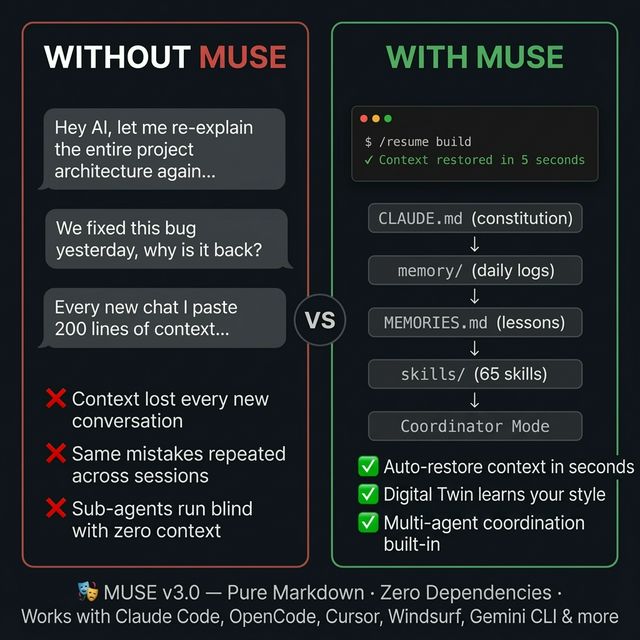
Solution: MUSE wraps your AI with a governance protocol — role isolation, persistent dual-layer memory, 65 reusable skills, cross-role directive queue, and visual dashboards. All in plain Markdown.
| Without MUSE | With MUSE | |---------|---------| | AI forgets early context in long conversations | Pre/Post Compaction protocols preserve critical info | | New conversations need manual context setup | /resume auto-assembles context in 5 steps | | One persona for all tasks | Role isolation: build / QA / growth each see only their context | | No cross-session memory | Dual-layer: memory/ (short-term) + MEMORIES.md (long-term) | | Same mistakes repeated | /distill distills lessons → /search finds them later | | No visibility into project health | Web Dashboard + VS Code Extension |
🎯 Benchmark (run ./scripts/benchmark.sh on your own project):
-/resumeloads 16.9× more context than a bare.cursorrulescold start
- 15/15 governance features vs 0/15 for format-spec-only setups
- 344 lines of accumulated project knowledge vs 0 retained across sessions
Optional
Works with: Claude Code · OpenClaw · OpenCode · Cursor · Windsurf · Gemini CLI · Codex CLI · Copilot · Aider · Antigravity — or any AI tool that supports system prompts.| Tool | Install Command | Format | |------|----------------|--------| | Claude Code / OpenClaw | ./scripts/install.sh --tool claude | .agent/skills/ + CLAUDE.md | | OpenCode | ./scripts/install.sh --tool opencode | .agents/skills/ + CLAUDE.md | | Cursor | ./scripts/install.sh --tool cursor | .cursor/rules/*.mdc | | Windsurf | ./scripts/install.sh --tool windsurf | .windsurf/rules/*.md | | Gemini CLI | ./scripts/install.sh --tool gemini | .gemini/skills/ + GEMINI.md | | Codex CLI | ./scripts/install.sh --tool codex | AGENTS.md (single file) | | Copilot | ./scripts/install.sh --tool copilot | .github/copilot-instructions.md | | Aider | ./scripts/install.sh --tool aider | CONVENTIONS.md | | Antigravity | ./scripts/install.sh --tool antigravity | .gemini/antigravity/skills/ |
Recommended companion: nah — context-aware permission guard for Claude Code. Deterministic classifier that auto-allows safe operations, asks for ambiguous ones, and blocks dangerous patterns (e.g. curl | bash). Eliminates permission fatigue without sacrificing safety. pip install nah && nah install
🚀 Quick Start (5 minutes)
Option A: Interactive Setup (Recommended)
# Clone MUSE
git clone https://github.com/myths-labs/muse.git
Run interactive setup — configures language, model, and preferences
cd muse && ./setup.sh
The setup wizard will ask for your language, AI model, and docs preferences, then configure everything automatically.
Option B: Multi-Tool Install (Cursor / Windsurf / Gemini CLI / Codex CLI)
# Clone MUSE
git clone https://github.com/myths-labs/muse.git
Install for your tool (auto-converts to the right format)
cd muse && ./scripts/install.sh --tool cursor --target /path/to/your-project
Or auto-detect installed tools
./scripts/install.sh --target /path/to/your-project
Supported: claude, openclaw, opencode, cursor, windsurf, gemini, codex, or all.
Option C: Manual Setup
# Clone MUSE
git clone https://github.com/myths-labs/muse.git
Copy templates to your project
cp muse/templates/CLAUDE.md your-project/CLAUDE.md
cp muse/templates/USER.md your-project/USER.md
cp muse/templates/MEMORIES.md your-project/MEMORIES.md
mkdir -p your-project/memory your-project/.muse
Copy skills & workflows
cp -r muse/skills your-project/.agent/skills
cp -r muse/workflows your-project/.agent/workflows
Add MUSE entries to your .gitignore
cat muse/templates/.gitignore-template >> your-project/.gitignore
Your project should look like:
your-project/
├── CLAUDE.md              # 📜 Constitution (AI iron rules)
├── ETHOS.md               # 💡 Builder philosophy (5 principles)
├── USER.md                # 👤 Your preferences
├── MEMORIES.md            # 🧠 Long-term lessons
├── .muse/                 # 🎭 Role states
│   └── build.md           # ⚙️ Dev execution
├── memory/                # Short-term memory
│   └── YYYY-MM-DD.md
├── .agent/
│   ├── skills/            # Skills library
│   └── workflows/         # resume/bye/sync/distill/ctx/sprint/retro
└── [your code]
2. Customize CLAUDE.md
This is MUSE's core — the AI's "constitution". Edit to match your project:
# Iron Rules
- All communication in [your language]
- Check Skills before ANY task
- Large files: view ≤300 lines at a time
- Context ≥ 80%: immediately exit
- Verify before claiming done
- End conversations with /bye
3. Start using

You: /resume           ← AI reads constitution → reads memory → starts work
     ... work ...
You: /ctx              ← Check if context is enough
     ... continue ...
You: /bye              ← One-click wrap-up, auto-save
Sprint workflow (v2.29+):
You: /sprint           ← Think → Plan → Build → Review → Test → Ship → Reflect
You: /retro             ← Weekly stats from git log + memory (commits, shipped, lessons)
🏛 Architecture
graph TB
    subgraph "🏛 Constitution Layer"
        A["CLAUDE.md"] --> B["Iron Rules + Safety"]
        A --> C["ETHOS.md<br/>Builder Philosophy"]
    end

    subgraph "🎭 Role Layer"
        R[".muse/*.md<br/>build · qa · growth"] --> S["Role Isolation"]
        R --> T["📡 Directive Queue<br/>cross-role messaging"]
    end

    subgraph "🧠 Memory Layer"
        D["memory/*.md<br/>short-term"] -->|"/distill"| E["MEMORIES.md<br/>long-term"]
        D --> D1["Drift Detection<br/>stale >7d auto-flag"]
        E --> E1["4 Categories<br/>preference · feedback<br/>project · reference"]
    end

    subgraph "🤖 Coordinator"
        CO["coordinator-mode"] --> CO1["Understand → Dispatch"]
        CO --> CO2["Sub-agent Synthesis"]
    end

    subgraph "⚡ Skills Layer (65)"
        G["Trigger Skills<br/>on-demand"]
        H["Lifecycle Skills<br/>strategic-compact"]
    end

    subgraph "🔄 Workflow Layer"
        I["/resume"] --> J["Work"]
        J -->|"/sprint"| SP["Think→Plan→Build<br/>→Review→Test→Ship"]
        J -->|"/ctx"| K{"Healthy?"}
        K -->|"🟢"| J
        K -->|"🔴"| L["/bye"]
        L --> D
        L --> L1["Digital Twin<br/>profile update"]
    end
LCM Concept Mapping
| LCM Concept | MUSE Implementation | Description | |---------|----------|------| | SQLite persistence | memory/ + MEMORIES.md | Markdown as database | | Leaf nodes | memory/YYYY-MM-DD.md | Daily conversation snapshots | | Condensed nodes | MEMORIES.md | Cross-day distilled lessons | | Condensation | /distill | Leaf → long-term memory | | Assembler | /resume | Context assembly | | lcm_grep | ./scripts/search.sh (TF-IDF) | Ranked semantic search | | compact:before | Pre-Compaction Protocol | Save before compress | | contextThreshold | /ctx 80% red line | Auto health check |
📖 Commands
| Command | Description | Input | |---------|------------|:-----:| | /start | First-time setup — configures project, roles, language | None (interactive) | | /resume [scope] | Boot — restore context & start work | build, growth, etc. | | /sprint | Feature sprint — Think → Plan → Build → Review → Test → Ship → Reflect | None (guided) | | /retro | Weekly retrospective — stats from git log + memory | None needed | | /settings | Change language, AI model, or preferences | Subcommand (optional) | | /ctx | Context health check (🟢🟡🔴) | None needed | | /bye | One-click wrap-up — save, sync, archive | None needed | | /distill | Condense memory/ → MEMORIES.md | None needed | | /search | TF-IDF search across memory, roles, skills | Query string | | /sync [direction] | Cross-file sync in multi-role setup | Direction (optional) | | /sync receive | Pull updates from other roles mid-conversation | None needed | | /resume [project] qa | Start QA verification (independent from build) | Project name (optional) | | /resume crash | Recover from context blowout | None needed |
Defensive Auto-Save (L0 Defense)
MUSE doesn't wait for context to run out. Every 10 interaction rounds, it silently updates memory/CRASH_CONTEXT.md. If a sudden blowout occurs, at most 10 rounds of progress are lost.
| Layer | Trigger | Reliability | |:----:|------|:------:| | L0 | Every 10 rounds (silent) | ⭐⭐⭐ | | L1 | 🔴 context detection | ⭐⭐ | | L2 | /resume crash scans convo/ | ⭐ |
Auto-Distill Detection
Every /bye automatically checks memory/ accumulation. Reminds you to /distill when:
- ≥ 7 days of un-distilled logs
- ≥ 5 new log files since last distill
- ≥ 15 total files and never distilled
🧩 Skill System
Loading Behavior
| Type | When Loaded | Examples | |------|---------|------| | Always-on | Every turn automatically | CLAUDE.md iron rules, Safety | | Trigger | When task matches | git-commit, systematic-debugging | | Lifecycle | On specific events | strategic-compact (compression), verification (completion) |
Tier Classification
| Tier | Description | Ships with MUSE? | Examples | |:----:|------|:-------------:|------| | 🏛 Core | Required for MUSE to function | ✅ Built-in | context-health-check, strategic-compact, verification-before-completion, using-superpowers | | 🔧 Toolkit | General dev tools, recommended | ✅ Included | git-commit, systematic-debugging, security-review, tdd-workflow, frontend-design, ui-ux-pro-max, +19 more | | 🎯 Domain | User-created, domain-specific | ❌ Private | Your own custom skills |
Skill Lifecycle
memory/ lessons repeat → /distill finds pattern → write to MEMORIES.md
→ appears ≥3 times → upgrade to CLAUDE.md constitution
→ methodology is generic enough → create new Skill
→ useful across projects → contribute to MUSE Toolkit
📁 Directory Convention
Standard Project Structure
project/
├── CLAUDE.md              # 📜 Constitution
├── README.md              # Public README
├── LICENSE                # License
├── USER.md                # Preferences (private)
├── MEMORIES.md            # Long-term lessons (private)
├── assets/                # 🎨 Project assets (public)
│   ├── logo.png           # Project logo
│   ├── banner.png         # README/social banner
│   ├── screenshots/       # App screenshots
│   ├── diagrams/          # Architecture diagrams
│   └── social/            # Social media assets (OG images, previews)
├── .muse/                 # 🎭 Role states (private)
│   ├── build.md / qa.md / growth.md / ...
├── memory/                # Short-term memory (private)
│   └── YYYY-MM-DD.md
├── convo/                 # Conversation archives (private)
│   └── YYMMDD/
├── docs/                  # Documentation
│   ├── [public docs]      # → git push ✅
│   └── internal/          # Strategy/fundraising (private)
├── src/ | packages/       # Source code
└── .agent/                # Skills + Workflows (private)
Naming Conventions
| Category | Pattern | Example | |------|------|------| | Memory logs | YYYY-MM-DD.md | 2026-03-12.md | | Conversations | YYMMDD-NN-desc.md | 260312-02-muse_setup.md | | Crash archives | +CRASH suffix | 260312-05-debugCRASH.md | | .muse roles | [role].md lowercase | build.md, qa.md |
Assets Convention
| Subdirectory | Purpose | Naming Pattern | |-------------|---------|---------------| | assets/ (root) | Logo, banner, favicon | logo.png, banner.png, favicon.ico | | assets/screenshots/ | App/feature screenshots | feature-name.png or YYMMDD-feature.png | | assets/diagrams/ | Architecture, flow charts | component-name-diagram.png | | assets/social/ | OG images, social cards | og-default.png, x-card.png |
Tip: Keep assets/ in git (public). Large video files (>10MB) should use Git LFS or external hosting.
🔧 Customization
Minimal Setup (Personal Project)
Just 3 things:
CLAUDE.md— Constitution (required)memory/— Short-term memory (required)MEMORIES.md— Long-term memory (recommended)
Standard Setup (Indie Developer)
Add the role system:
.muse/build.md— Dev state.muse/qa.md— Quality verificationUSER.md— Personal preferences
Full Setup (Team / Multi-Project)
Add GM + all roles + sync:
.muse/strategy.md— Strategy (global, one per workspace).muse/gm.md— Project GM (project-level CEO).muse/build.md+qa.md+growth.md+ops.md+research.md+fundraise.md/syncworkflow — Cross-role sync
🔌 MCP Server (Claude Plugin)
MUSE includes a built-in MCP (Model Context Protocol) server — a zero-dependency Bash implementation that lets Claude Code, Cursor, and other tools access your project's role files, memory, and directives through a standard protocol.
Quick Setup
# From your MUSE-enabled project
./scripts/mcp-server.sh --help
Available Tools
| Tool | Description | |------|-------------| | musegetstatus | Read all L0 lines → project overview (~400 tokens) | | muselistroles | List all role files with summaries | | musegetrole | Deep-read a specific role file | | musesenddirective | Send 📡 cross-role directive | | musewritememory | Append to today's memory log | | musesearchmemory | Search across memory files |
Configuration
Add to your tool's MCP config (e.g., ~/.config/claude/claudedesktopconfig.json):
{
  "mcpServers": {
    "muse": {
      "command": "/path/to/muse/scripts/mcp-server.sh",
      "args": ["--project-root", "/path/to/your/project"]
    }
  }
}Requires:jq(brew install jqon macOS,apt install jqon Linux)
🌐 Optional Third-Party MCP Integrations
MUSE links well-vetted third-party MCP servers as optional add-ons. Each runs independently, has its own token / config, and is fully opt-in.
| MCP | Purpose | Cost | Setup | |-----|---------|------|-------| | 🎨 Lazyweb | UI design reference search · real-app screenshots + semantic descriptions (pricing pages, onboarding, dashboards, etc.) | Free (per-user token) | /setup-lazyweb — 3 steps, ~2 min |
How it works: Open the vendor's install page, copy the generated install instructions block (token embedded), paste it to your AI agent (Claude Code / Cursor / Codex / OpenClaw / Windsurf / etc.), and say "install this". The agent picks the right install path for its client. Restart the client to load tools.>
Why we link these: design taste calibration is non-trivial without real references. Lazyweb gives MUSE-driven projects access to a curated UI library — useful when an agent needs to advise on pricing pages, onboarding flows, dashboard layouts, or compare a mockup to industry patterns.
Want to suggest another MCP for the list? Open a PR · we vet for free-tier availability, no-billing safety, and per-user token isolation.
🤔 FAQ
Q: Does MUSE require installation? No. MUSE is pure Markdown files. Copy them to your project and you're ready. Zero dependencies.
Q: Which AI tools does it support? Ten tools with native install support: Claude Code, OpenClaw, OpenCode, Cursor, Windsurf, Gemini CLI, Codex CLI, Copilot, Aider, and Antigravity. Run ./scripts/install.sh --tool <name> to install in the correct format for each tool. Additionally, ./scripts/convert-skills.sh --tool <name> exports all 65 skills to any supported format. Import from agency-agents (35K+ ⭐) with --import agency-agents.
Q: How is this different from lossless-claw? lossless-claw is a code plugin (SQLite + DAG + sub-agents) that requires the OpenClaw runtime. MUSE is pure Markdown SOPs, works with any AI tool, zero dependencies. Same principles, different implementation.
Q: What if memory/ files pile up? Archive files older than 30 days to memory/archive/. Use /distill to extract key lessons into MEMORIES.md first, then safely archive the originals.
Q: Is there a visual dashboard? Yes! Two options:
- Online: Visit muse.mythslabs.ai/dashboard and load your project folder — 100% client-side, data stays in your browser.
- Local: Run
./scripts/dashboard.shto generate a self-contained HTML dashboard at.muse/dashboard.html.
./scripts/skill-discovery.sh with commands like recommend "frontend", categories, stats, export <name>, or registry. See CHANGELOG for details.
Q: Is there a VS Code extension? Yes — vscode-extension/ provides an activity bar with Roles, Skills, and Memory tree views, plus in-editor dashboard and skill search. Run cd vscode-extension && npm install && npm run compile, then press F5.
💬 Follow Us
- 🌐 GitHub: Myths Labs
- 🐦 X (Twitter): @MythsLabs
- 💼 LinkedIn: Myths Labs
- 👤 Creator: @SunshiningDay — indie dev, solo-building MUSE
🙏 Credits
- gstack by Garry Tan — Sprint pipeline, builder ethos, and reframing methodology (YC CEO's open-source software factory)
- LCM Paper by Ehrlich & Blackman — Theoretical foundation for lossless context management
- lossless-claw by Martian Engineering — OpenClaw implementation of LCM
- nah by Manuel Schipper — Context-aware permission guard (complements MUSE's Safety Protocol)
- Greek Mythology — Mnemosyne and her nine Muses, eternal symbols of memory and creation
📜 License
MIT © Myths Labs
Built with 🎭 by Myths Labs — Solo-developed by JC
MUSE v3.5.0


