
Design, Test & Optimize Powerful Algorithms with Full Control
Zorg


Design, Test & Optimize Powerful Algorithms with Full Control
A high-performance R&D framework built in Zig for quantitative developers. Zorg provides a comprehensive development kit, flexible data management, and a terminal user interface to streamline algorithm engineering. Built-in order management, position tracking, and detailed reporting through SQLite and HTML visualizations enable rigorous analysis of market models.
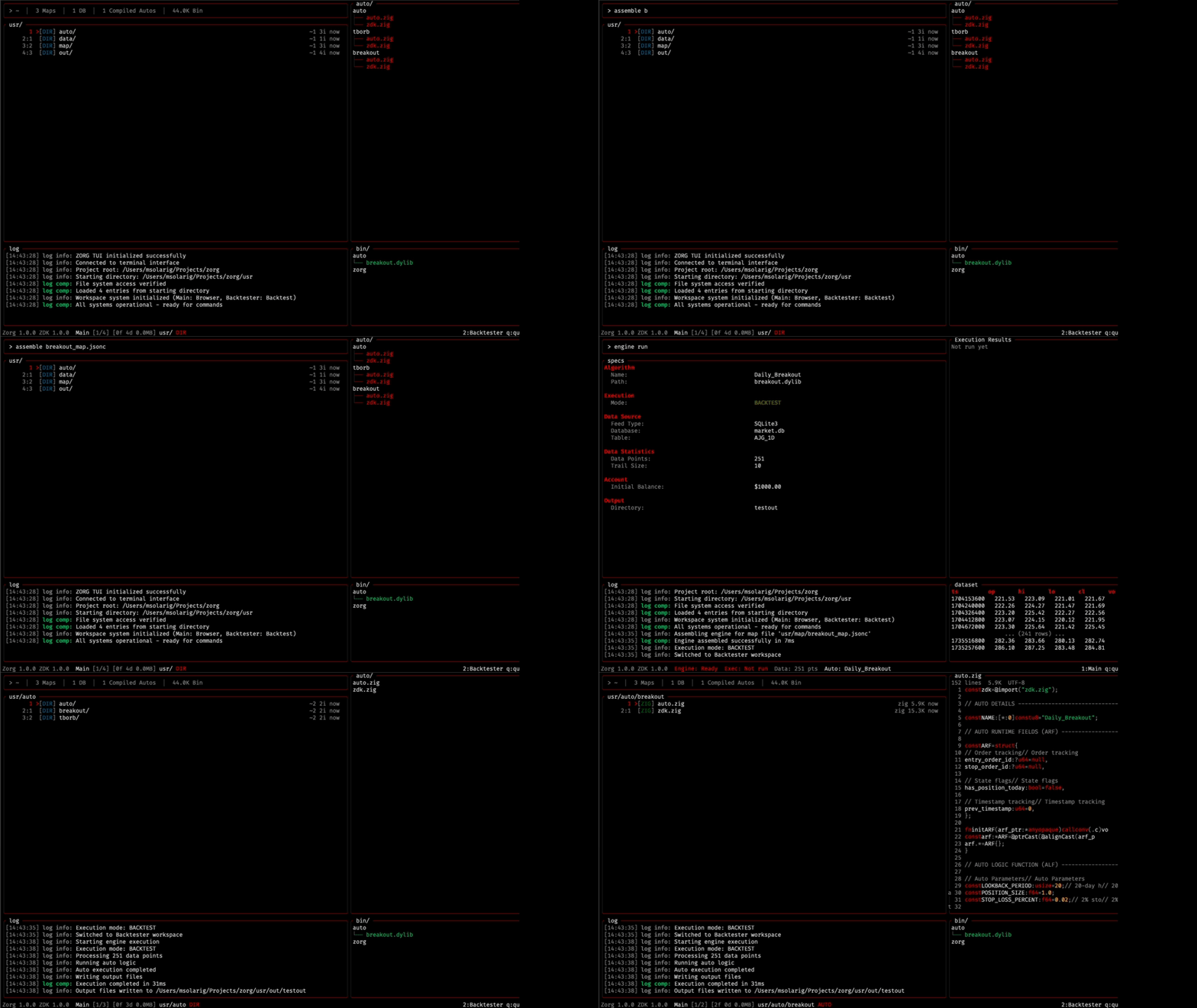
Workflow
The Engine Map
The Engine Map is your command center, a declarative configuration file that defines every aspect of your execution process. No hidden parameters, no opaque defaults. Just transparent, explicit control over your entire research pipeline.
You define how to assemble the engine you need:
{
    // Exec Configuration
    "ENGINEEXECUTIONMODE"          : "Backtest",
// Auto Configuration     "ENGINEAUTOTO_ATTACH"          : "breakout",       // Data Configuration     "ENGINEDATAFEED_MODE"          : "SQLite3",     "ENGINEDBFILE_NAME"            : "market.db",     "ENGINEDBTABLENAME"           : "AJG1D",     "ENGINETIMESTAMP0"             : 0,     "ENGINETIMESTAMPn"             : 2000000000,     "ENGINETRAILLENGTH"            : 10,
// Account Configuration     "ENGINEACCOUNTCONFIG": {         "balance"                    : 1000.0     },          // Output Configutaion     "ENGINEOUTPUTCONFIG": {         "OUTPUTDIRNAME"            : "testout"     } }
The Auto
Autos are the core of Zorg, they are the algorithms that will be executed against any given dataset. Autos are constructed using the Zorg Development Kit (ZDK).
Don't worry about anything, just:
touch -auto AUTONAMEand a full auto template will be generated under usr/auto/
Autos live in their own directories, with auto.zig as their entrypoint and central file. Additionally, each auto counts with a copy of the at-gen latest ZDK version. Allowing them to be self contained. It is encouraged to add dependencies such as custom indicators and scripts inside the auto dir if needed.
Don't forget to reference your auto in the engine map to link it at assembly time!
Data
In order to execute a process, data is necessary! Zorg is program to receive .db files with the following structure:
| symbol | timestamp | open | high | low | close | volume | |--------|------------|--------|--------|--------|--------|----------| | XYZ | 1609459200 | 145.30 | 148.75 | 144.80 | 147.50 | 2340000 | | XYZ | 1609545600 | 147.60 | 149.20 | 146.90 | 148.10 | 2180000 | | XYZ | 1609632000 | 148.15 | 150.40 | 147.85 | 149.80 | 2510000 | | XYZ | 1609718400 | 149.90 | 151.25 | 149.30 | 150.65 | 2290000 | | XYZ | 1609804800 | 150.70 | 152.10 | 150.20 | 151.40 | 2420000 | | ... | ... | ... | ... | ... | ... | ... | | XYZ | 1672358400 | 235.80 | 237.45 | 234.90 | 236.20 | 3120000 | | XYZ | 1672444800 | 236.30 | 238.60 | 235.75 | 237.85 | 3050000 | | XYZ | 1672531200 | 237.90 | 239.80 | 237.20 | 238.95 | 2980000 | | XYZ | 1672617600 | 239.00 | 240.55 | 238.40 | 239.70 | 3210000 | | XYZ | 1672704000 | 239.80 | 241.20 | 239.15 | 240.50 | 3340000 |
Each table represents a symbol-timeframe pair (e.g., XYZ_1D for daily data). Timestamps are Unix epoch integers, OHLC values are floats, and volume is an integer.
For simple 1D fetches, you can manually call the included python utility script. Make sure to add your .db files and table name in the engine map so they get linked!
Output
for any given execution, Zorg will generate an output directory (specified in map). In this directory you will find:
- runtime.log
- results.db
- report.html
The last item, the html report, serves as a mere example of what you can do with the collected data. It is not there to enforce a standard output format but rather to show what can be built solely from the results.db file:


Documentation
Documentation for:
- Zorg Development Kit (ZDK)
- Engine Map configurations
- TUI Commands
Installation
Currently, Zorg is distributed via source. Package manager support (Homebrew, etc.) is planned for future releases.
Prerequisites
- Zig 0.15.2 - Download here
- Python 3.13 (optional, for data fetching utility)
Build from Source
# Clone the repository
git clone https://github.com/msolarig/zorg.git
cd zorg
Build the project
zig build
The binary will be available at zig-out/bin/zorg
Quick Start
Launch the TUI:
./zig-out/bin/zorgRun a backtest:
- Create or select an auto in
usr/auto/ - Configure your engine map in
usr/map/ - Ensure your data is in
usr/data/ - Execute via TUI or command line
- View results in
usr/out/<output_dir>/
./zig-out/bin/zorg --map usr/map/breakout_map.jsoncComplete documentation coming soon. For now, explore the source code and sample autos.
Project Structure
zorg/
├── src/                      # Core source code
│   ├── engine/               # Engine components
│   │   ├── assembly/         # Map parsing, data & auto loading
│   │   ├── execution/        # Backtest execution logic
│   │   └── output/           # Logging, SQLite writer, HTML reports
│   ├── zdk/                  # Zorg Development Kit
│   │   └── core/             # Account, Order, Fill, Position
│   ├── tui/                  # Terminal User Interface
│   │   ├── panes/            # UI components
│   │   └── utils/            # Render and format utilities
│   ├── tests/                # Test suite
│   └── zorg.zig              # Main entry point
│
├── usr/                      # User workspace
│   ├── auto/                 # User autos
│   ├── data/                 # User databases (.db files)
│   ├── map/                  # User engine maps (.jsonc)
│   └── out/                  # Execution output docs
│
├── zdk/                      # ZDK template for auto generation
├── utils/                    # Utility scripts (Python data fetcher)
├── build.zig                 # Build configuration
└── zig-out/bin/zorg          # Compiled binaries
The src/ directory contains the framework itself, while usr/ is your workspace for algorithms, data, and results. Everything you create—autos, maps, and output—lives in usr/.
Contributing
Contributions are welcome! If you'd like to contribute to Zorg:
- Fork the repository
- Create a feature branch (
git checkout -b feature/your-feature) - Commit your changes (
git commit -m 'Add some feature') - Push to the branch (
git push origin feature/your-feature) - Open a Pull Request
License
This project is licensed under the terms of the MIT License.


