
:cloud: :whale: :zap: :rocket: Create environment and deployment pipelines to ECS Fargate with CodePipeline, CodeBuild and Github using Terraform
ECS Simple Pipeline - Easy way to deploy Containers on AWS
Create environment and deployment pipelines using ECS, ECR, CodePipeline and Git with TerraformCheck this repo if you need to ship more services to production - ECS Microservices Orchestration
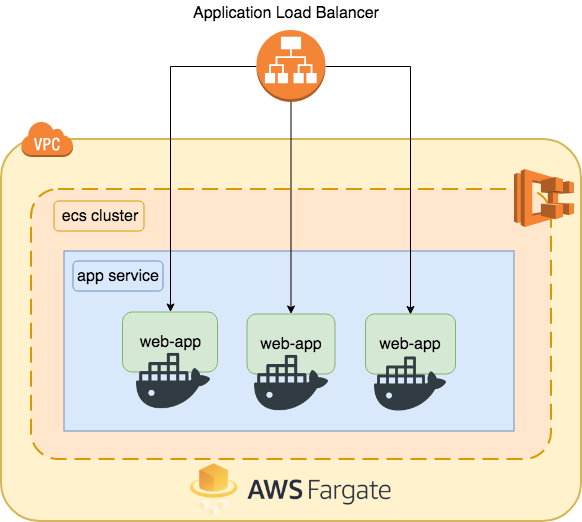
Architecture
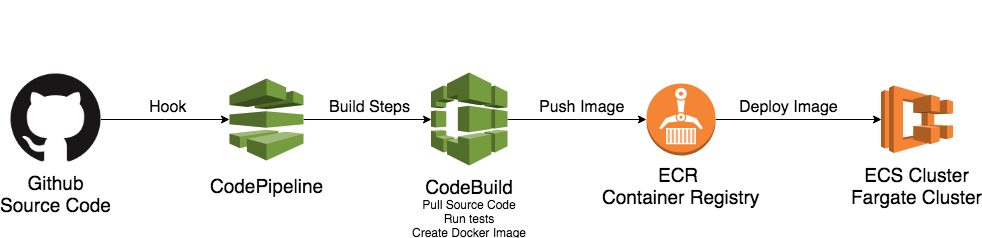
Deploy Pipeline
How to Deploy
Edit your preferences
Edit variables.tf file to customize application preferences like Github account, repo and owner, Load Balancer ports and cluster preferences.
# Customize the Cluster Name
variable "cluster_name" {
  description = "ECS Cluster Name"
  default     = "web-app"
}
Customize your ECR Registry Name
variable "apprepositoryname" {
  description = "ECR Repository Name"
  default     = "web-app"
}
APPLICATION OPTIONS  ######
variable "container_name" {
  description = "Container app name"
  default     = "micro-api"
}
Edit the Github preferences in the same file to specify infos like repo, owner or organization, branches e etc.
# Github Repository Owner
variable "gitrepositoryowner" {
  description = "Github Repository Owner"
  default     = "msfidelis"
}
Github Repository Project Name
variable "gitrepositoryname" {
  description = "Project name on Github"
  default     = "micro-api"
}
Default Branch
variable "gitrepositorybranch" {
  description = "Github Project Branch"
  default     = "master"
}
Edit Auto Scaling Metrics
# Number of containers
variable "desired_tasks" {
  description = "Number of containers desired to run app task"
  default     = 2
}
variable "min_tasks" {   description = "Minimum"   default     = 2 }
variable "max_tasks" {   description = "Maximum"   default     = 4 }
variable "cputoscale_up" {   description = "CPU % to Scale Up the number of containers"   default     = 80 }
variable "cputoscale_down" {   description = "CPU % to Scale Down the number of containers"   default     = 30 }
Edit your Build steps
This demo build, dockerize and deploy a simple Node.JS application. Customize your build steps on modules/pipeline/templates/buildspec.yml file.
How to Deploy
1) Github Access Token
- Create your Github Access Token to Command Line. This link have all information about this.
- Export Github Token as an environment variable.
export GITHUBTOKEN=YOURTOKEN2) Terraform
- Initialize Terraform
terraform init- Plan our modifications
terraform plan- Apply the changes on AWS
terraform apply


