
WebRTC/RTSP/RTMP/LL-HLS bridge for Wyze cams in a docker container




WebRTC/RTSP/RTMP/HLS Bridge for Wyze Cam
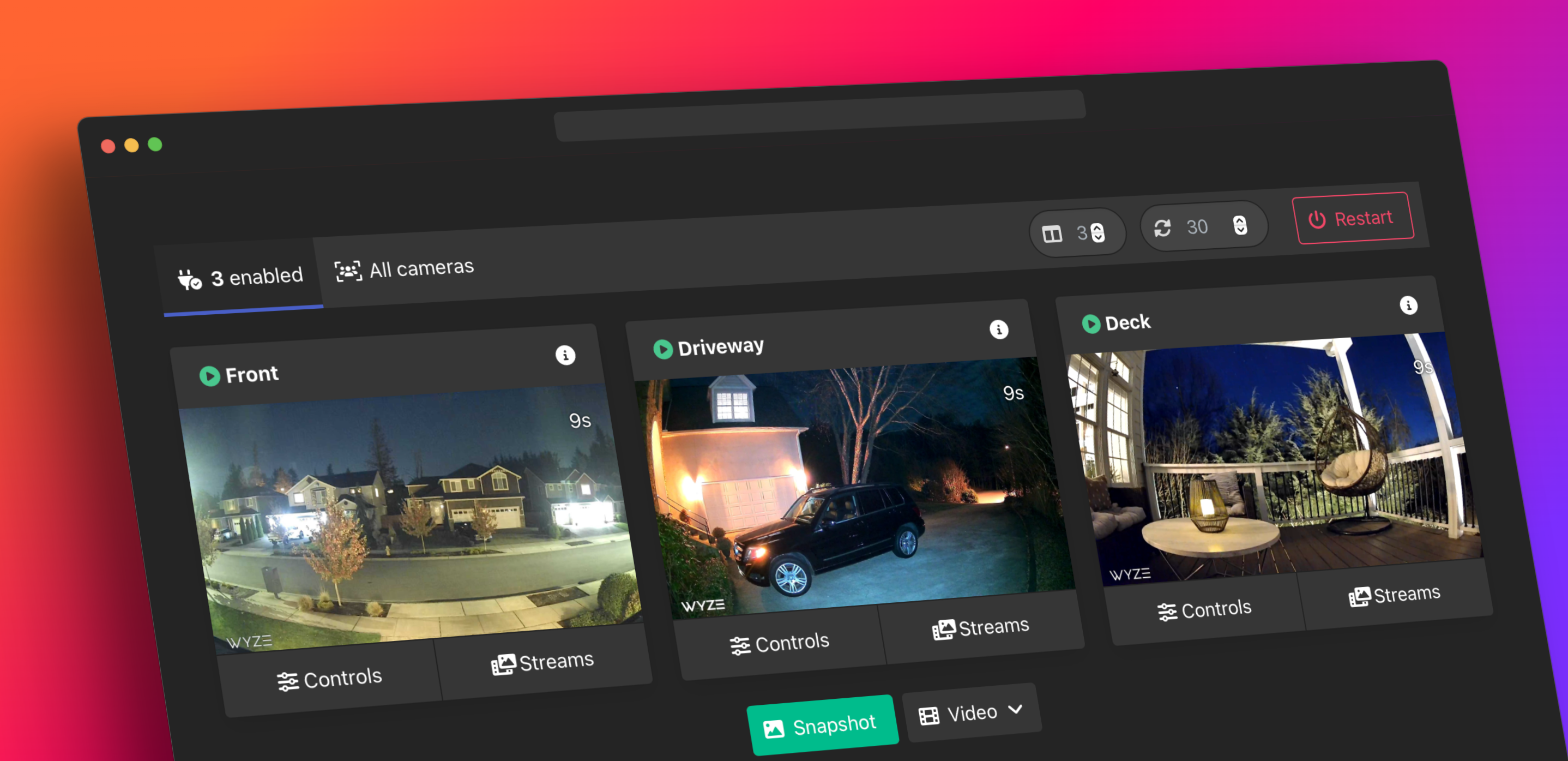
Create a local WebRTC, RTSP, RTMP, or HLS/Low-Latency HLS stream for most of your Wyze cameras including the outdoor, doorbell, and 2K cams.
No modifications, third-party, or special firmware required.
It just works!
Streams direct from camera without additional bandwidth or subscriptions.
Please consider ⭐️ starring or ☕️ sponsoring this project if you found it useful, or use the affiliate link when shopping on amazon!
[!IMPORTANT]
As of May 2024, you will need an API Key and API ID from: https://support.wyze.com/hc/en-us/articles/16129834216731.
[!WARNING]
Please double check your router/firewall and do NOT forward ports or enable DMZ access to the bridge unless you know what you are doing!









See the supported cameras section for additional information.
Quick Start
Install docker and run:
docker run -p 8554:8554 -p 8888:8888 -p 5050:5000 -e WB_AUTH=false mrlt8/wyze-bridgeYou can then use the web interface at http://localhost:5050 where localhost is the hostname or ip of the machine running the bridge.
See basic usage for additional information or visit the wiki page for additional information on using the bridge as a Home Assistant Add-on.
What's Changed in v2.10.3
- FIX: Increased
MTX_WRITEQUEUESIZEto prevent issues with higher bitrates. - FIX: Restart RTMP livestream on fail (#1333)
- FIX: Restore user data on bridge restart (#1334)
- NEW:
SNAPSHOTKEEPOption to delete old snapshots when saving snapshots with a timelapse-like custom format withSNAPSHOTFORMAT. (#1330)
SNAPSHOTKEEP=180, SNAPSHOTKEEP=180s, SNAPSHOT_KEEP=3m
- Example for 3 days: SNAPSHOTKEEP=72h, SNAPSHOTKEEP=3d
- Example for 3 weeks: SNAPSHOTKEEP=21d, SNAPSHOTKEEP=3w
- NEW:
RESTREAMIOoption for livestreaming via restream.io. (#1333)
RESTREAMIOFRONTDOOR=reMyCustom_Key123
What's Changed in v2.10.2
- FIX: day/night FPS slowdown for V4 cameras (#1287) Thanks @cdoolin and @Answer-1!
- NEW: Update battery level in WebUI
What's Changed in v2.10.0/v2.10.1
FIXED: Could not disable WBAUTH if WBAPI is set. (#1304)
WebUI Authentication
Simplify default credentials for the WebUI:
- This will not affect users who are setting their own WBPASSWORD and WBAPI. - Default WB_PASSWORD will now be derived from the username part of the Wyze email address instead of using a randomly generated password. - Example: For the email address john123@doe.com, the WB_PASSWORD will be john123. - Default WB_API will be based on the wyze account for persistance.
Stream Authentication
NEW: STREAM_AUTH option to specify multiple users and paths:
- Username and password should be separated by a : - An additional : can be used to specify the allowed IP address for the user. - This does NOT work with docker desktop - Specify multiple IPs using a comma - Use the @ to specify paths accessible to the user. - Paths are optional for each user. - Multiple paths can be specified by using a comma. If none are provided, the user will have access to all paths/streams - Multiple users can be specified by using | as a separator
EXAMPLE:
STREAM_AUTH=user:pass@cam-1,other-cam|second-user:password@just-one-cam|user3:pass- user:pass has access to cam-1 and other-cam - second-user:password has access to just-one-cam - user3:pass has access to all paths/cameras
See Wiki for more information and examples.
Recording via MediaMTX
Recoding streams has been updated to use MediaMTX with the option to delete older clips.
Use RECORDALL or RECORDCAM_NAME to enable recording.
RECORDPATHAvailable variables are%pathor{camname},%Y%m%d%H%M%S%f%s(time in strftime format).RECORD_LENGTHLength of each clip. Usesfor seconds ,hfor hours. Defaults to60sRECORD_KEEPDelete older clips. Usesfor seconds ,hfor hours. Set to 0s to disable automatic deletion. Defaults to0s
FAQ
- How does this work?
- Does it use internet bandwidth when streaming?
- Can this work offline/can I block all wyze services?
- Why aren't all wyze cams supported yet (OG/Doorbell Pro)?
Compatibility







Should work on most x64 systems as well as on most modern arm-based systems like the Raspberry Pi 3/4/5 or Apple Silicon M1/M2/M3.
The container can be run on its own, in Portainer, Unraid, as a Home Assistant Add-on, locally or remotely in the cloud.
Ubiquiti Unifi
[!NOTE]
Some network adjustments may be needed - see this discussion for more information.
Supported Cameras
[!IMPORTANT]
Some newer camera firmware versions may cause issues with remote access via P2P. Local "LAN" access seems unaffected at this time. A temporary solution is to use a VPN. See the OpenVPN example.
| Camera | Model | Tutk Support | Latest FW | | ----------------------------- | -------------- | ------------------------------------------------------------ | --------- | | Wyze Cam v1 [HD only] | WYZEC1 | ✅ | 3.9.4.x | | Wyze Cam V2 | WYZEC1-JZ | ✅ | 4.9.9.x | | Wyze Cam V3 | WYZE_CAKP2JFUS | ✅ | 4.36.11.x | | Wyze Cam V4 [2K] | HL_CAM4 | ✅ | 4.52.3.x | | Wyze Cam Floodlight | WYZE_CAKP2JFUS | ✅ | 4.36.11.x | | Wyze Cam Floodlight V2 [2k] | HL_CFL2 | ✅ | 4.53.2.x | | Wyze Cam V3 Pro [2K] | HL_CAM3P | ✅ | 4.58.11.x | | Wyze Cam Pan | WYZECP1_JEF | ✅ | 4.10.9.x | | Wyze Cam Pan v2 | HL_PAN2 | ✅ | 4.49.11.x | | Wyze Cam Pan v3 | HL_PAN3 | ✅ | 4.50.4.x | | Wyze Cam Pan Pro [2K] | HL_PANP | ✅ | - | | Wyze Cam Outdoor | WVOD1 | ✅ | 4.17.4.x | | Wyze Cam Outdoor v2 | HL_WCO2 | ✅ | 4.48.4.x | | Wyze Cam Doorbell | WYZEDB3 | ✅ | 4.25.1.x | | Wyze Cam Doorbell v2 [2K] | HL_DB2 | ✅ | 4.51.1.x | | Wyze Cam Doorbell Pro 2 | AN_RDB1 | ❓ | - | | Wyze Battery Cam Pro | ANRSCW | ⚠️ | - | | Wyze Cam Flood Light Pro [2K] | LDCFP | ⚠️ | - | | Wyze Cam Doorbell Pro | GWBE1 | ⚠️ | - | | Wyze Cam OG | GWGC1 | ⚠️ | - | | Wyze Cam OG Telephoto 3x | GWGC2 | ⚠️ | - |
Basic Usage
docker-compose (recommended)
This is similar to the docker run command, but will save all your options in a yaml file.
- Install Docker Compose.
- Use the sample as a guide to create a
docker-compose.ymlfile with your wyze credentials. - Run
docker-compose up.
docker-compose up -d to run it in detached mode.
[!CAUTION]
If your credentials contain a$character, you need to escape it with another$sign (e.g.,pa$$word>pa$$$$word) or leave your credentials blank and use the webUI to login.
[!NOTE]
You may need to update the WebUI links if you're changing the ports or using a reverse proxy.
Updating your container
To update your container, cd into the directory where your docker-compose.yml is located and run:
docker-compose pull # Pull new image
docker-compose up -d # Restart container in detached mode
docker image prune # Remove old images
🏠 Home Assistant
Visit the wiki page for additional information on Home Assistant.

Additional Info
- Camera Commands (MQTT/REST API)
- Two-Factor Authentication (2FA/MFA)
- ARM/Apple Silicon/Raspberry Pi)
- Network Connection Modes
- Portainer
- Unraid
- Home Assistant
- Homebridge Camera FFmpeg
- HomeKit Secure Video
- WebUI API
Web-UI
The bridge features a basic Web-UI which can display a preview of all your cameras as well as direct links to all the video streams.
The web-ui can be accessed on the default port 5000:
http://localhost:5000/See also:
WebRTC
WebRTC should work automatically in Home Assistant mode, however, some additional configuration is required to get WebRTC working in the standard docker mode.
- WebRTC requires two additional ports to be configured in docker:
ports:
      ...
      - 8889:8889 #WebRTC
- 8189:8189/udp # WebRTC/ICE- In addition, the
WB_IPenv needs to be set with the IP address of the server running the bridge.
environment:
- WB_IP=192.168.1.116- See documentation for additional information/options.
Advanced Options
All environment variables are optional.
- Audio
- Bitrate and Resolution
- Camera Substreams
- MQTT Configuration
- Filtering Cameras
- Doorbell/Camera Rotation
- Custom FFmpeg Commands
- Interval Snapshots
- Stream Recording and Livestreaming
- rtsp-simple-server/MediaMTX Config
- Offline/IFTTT Webhook
- Proxy Stream from RTSP Firmware
- BOA HTTP Server/Motion Alerts
- Debugging Options
Other Wyze Projects
Honorable Mentions:
- @noelhibbard's script - Original script that the bridge is bassd on.
- kroo/wyzecam - Original library that the bridge is based on.
- gtxaspec/wzminihacks - Firmware level modification for Ingenic based cameras with an RTSP server and self-hosted mode to use the cameras without the wyze services.
- thingino - Advanced custom firmware for some Ingenic-based wyze cameras.
- carTloyal123/cryze - Stream video from wyze cameras (Gwell cameras) that use the Iotvideo SDK from Tencent Cloud.
- xerootg/cryze_v2 - Stream video from wyze cameras (Gwell cameras) that use the Iotvideo SDK from Tencent Cloud.
- mnakada/atomcam_tools - Video streaming for Wyze v3.
- shauntarves/wyze-sdk - python library to interact with wyze devices over the cloud.


