
wake and sleep Kubernetes deployments on a schedule
Snorlax · 
Snorlax is a Kubernetes operator that wakes and sleeps a specified set of Kubernetes deployments on a schedule.
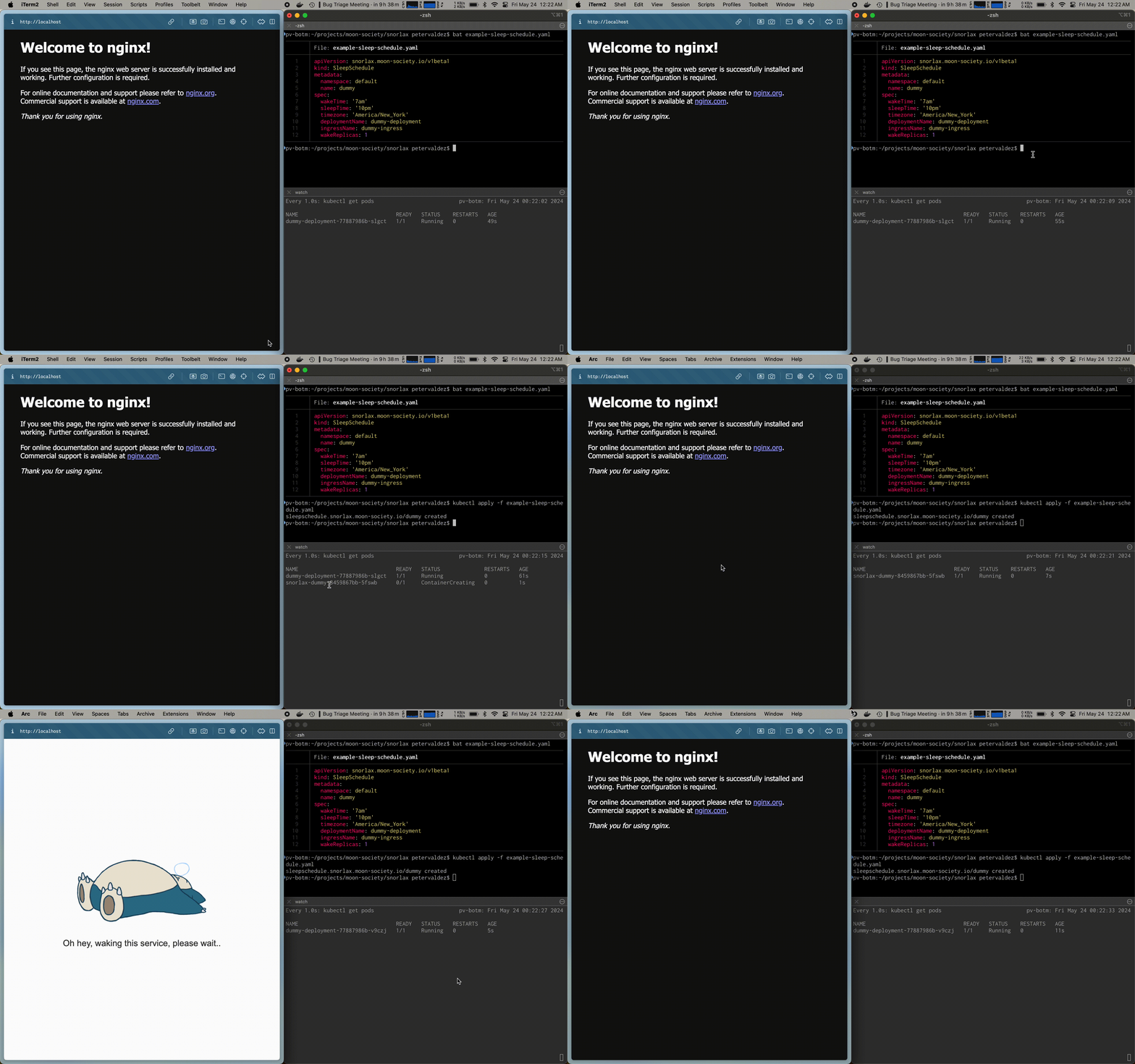
You can also specify ingresses which will be updated to point to a wake server when asleep. When a request is received, the wake server serves a "waking up" splash page and wakes the deployments up. Once the deployments are ready, the ingresses are restored and the splash page will auto-refresh.
Why Snorlax?
Sleeping your environments is the equivalent of turning off the lights at night.
- Cost savings: Scale down your environments when they're not needed (e.g. overnight), freeing up cloud resources
- Security: Reduce the attack surface of your infrastructure when deployments are sleeping
- Environmentally responsible: Reduce the energy consumption of your infrastructure
See it in action
Usage
- Install the
snorlaxHelm chart to install theSleepScheduleCRD and controller
helm repo add moonbeam https://moonbeam-nyc.github.io/helm-charts
    helm repo update
helm install snorlax moonbeam/snorlax --create-namespace --namespace snorlax- Create your
SleepScheduleresource to define the schedule for the deployment
# filename: your-app-sleep-schedule.yaml
apiVersion: snorlax.moonbeam.nyc/v1beta1     kind: SleepSchedule     metadata:       namespace: your-app-namespace       name: your-app     spec:       # Required fields       wakeTime: '8:00am'       sleepTime: '10:00pm'       deployments:       - name: your-app-frontend       - name: your-app-db       - name: your-app-redis
# (optional) the ingresses to update and point to the snorlax wake server,       # which wakes your deployment when a request is received while it's       # sleeping.       ingresses:       - name: your-app-ingress
# (optional, defaults to all deployments) specify which deployments         # must be ready to wake this ingress         requires:         - deployment:             name: your-app-frontend
# (optional, defaults to UTC) the timezone to use for the input times above       timezone: 'America/New_York'
- Apply the
SleepScheduleresource
kubectl apply -f your-app-sleep-schedule.yamlOther features
- Ingress controller awareness: Snorlax determines which ingress controller you're running so it can create the correct ingress routes for sleep.
- Stays awake until next sleep cycle: If a request is received during the sleep time, the deployment will stay awake until the next sleep cycle
- Ignores ELB health checks: Snorlax ignores health checks from ELBs so that they don't wake up the deployment
Try it yourself locally
(Requires make, minikube and helm to be installed)
Run make demo to:
- create a Minikube cluster
- install the latest Helm release of
snorlax - deploy a dummy deployment, service, ingress, and sleep schedule
- starts the minikube tunnel to proxy
localhostto your Minikube cluster ingress service (you'll need to enter your password)
You can also then try updating the sleep schedule with kubectl edit sleepschedule dummy.
How to develop
(Requires make, minikube, helm, and docker to be installed)
Setup Minikube with the CRD and dummy application with sleep schedule:
make dev-setupThen make your updates and run the operator:
make dev-runFuture work
- Scale entire namespaces
- Sleep when no requests are received for a certain period of time
- Add support for custom wake & sleep actions (e.g. hit a webhook on wake)
- Add support for cron-style schedules (e.g.
0 8 *) - Add a button to manually wake up the deployment (instead of auto-waking on request)
- Custom image/gif for sleeping page
- Always sleeping mode, reset at a certain time of day
- Support waking a deployment on TCP connection
- Select deployments & ingresses by label
- Support wildcards for deployment & ingress names
Reach out
Wondering how to best use Snorlax? Have questions or ideas for new features?
I'd love to hear, and maybe even build them! Reach out to me at:



