
docker-notes
Docker Notes For Fresh Learner
Last updated Jul 1, 2026
82
Stars
56
Forks
0
Issues
0
Stars/day
Attention Score
31
Language breakdown
No language data available.
▸ Files
click to expand
README
Docker Notes - Best Practices
Table Content
1. Docker Architecture
- Cheat Sheet
- Docker CLI
4.1. List all docker image
4.2 Running ubuntu bash
4.3. List of containers
4.4. Docker commit
- Running processes in container
5.1. View output of container
5.2. Kill a container
- Manage container
6.1. Memory limits
6.2. CPU limits
- Networking
7.1. Getting container ip
7.2. UDP ports
- Connecting between Containers
8.1. host -> container
8.2. container --> container
- container connects to other container directly.
- Listing images
10.1. Getting images
10.2. Removing images
- Volumes
11.1. Sharing data with the host
11.2. Sharing Data between Containers
- Docker Registries
12.1. Finding Images
- Dockerfile
- References
1. Docker Architecture
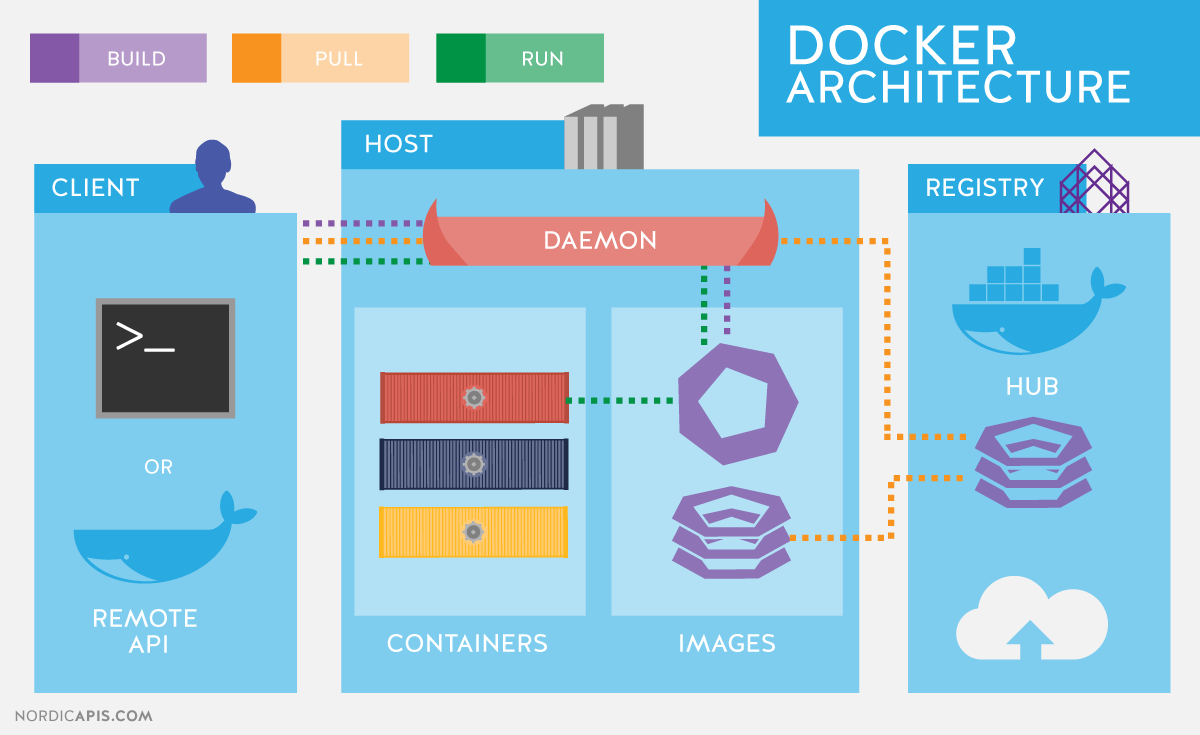
2. Setup
3. Cheat Sheet
https://github.com/wsargent/docker-cheat-sheet#why-docker

4. Docker CLI
4.1. List all docker image
docker images4.2 Running ubuntu bash
- image --> docker run --> running container --> stopped container --> docker commit --> new images
- image is not change.
-ti = terminal keyboardInteractive
docker run -ti ubuntu:latest4.3. List of containers
docker psList of docker with format
docker ps --format $FORMATList all (-a)
docker ps -aList last (-l)
docker ps -l4.4. Docker commit
- create new image from container
docker commit <docker id | name> [<new-image-name>]- set tag for new images
docker tag < sha256 > < tag-name >docker tag 52caa40054059fc07e4148337efa0a937799dc25ddc6b2e9f4d7deec4cf63177 my-imagedocker run -ti my-image5. Running processes in container
- --rm : do not keep container after finish process
docker run --rm -ti ubuntu sleep 5
docker run --rm -ti ubuntu cat /etc/hosts
docker run -ti ubuntu bash -c "sleep 5; echo done"- -d : (detach) run docker process in background
docker run -d -ti ubuntu bash- attach
docker ps -l [--format $FORMAT]
docker attach <container-name>- detach, leave it running in background
- add another process in existed container
docker exec -ti <container-name> <command>docker exec -ti gifted_kirch bash5.1. View output of container
docker logs <container-name>docker run --name my-container -d ubuntu bash -c "more /etc/hosts"
docker logs my-container5.2. Kill a container
docker kill <container-name>6. Manage container
6.1. Memory limits
docker run --memory <maxium-allowed> <image-image> <command>6.2. CPU limits
docker run --cpu-shares relative to other containers
docker run --cpu-quota to limit it in general
7. Networking
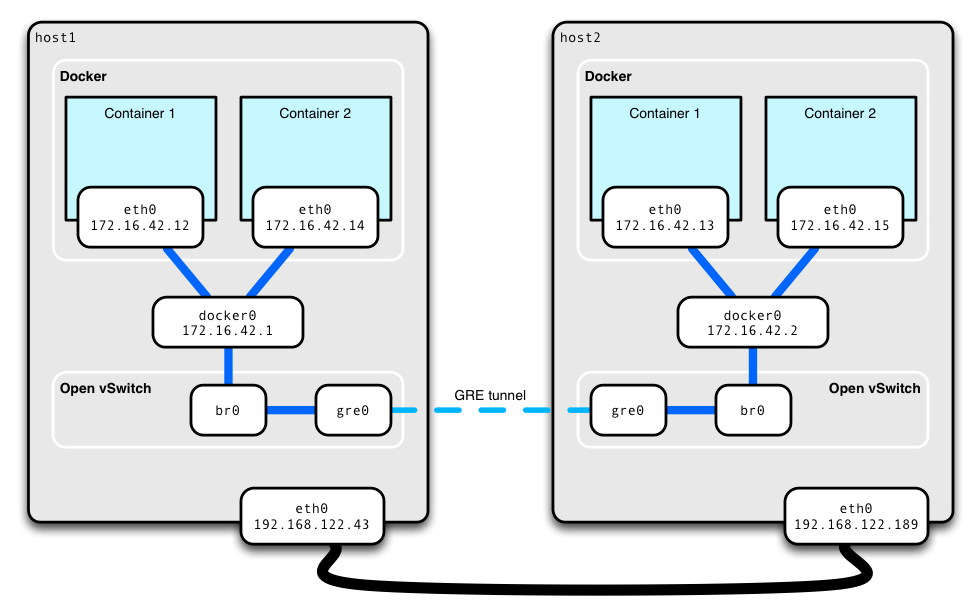
ex:
- echo-server ( -p portin[:portout] )
docker run --rm -ti -p 45678:45678 -p 45679:45679 --name echo-server ubuntu:14.04 bash
nc -lp 45678 | nc -lp 45679
7.1. Getting container ip
docker ps docker inspect <container-id> | grep IPnc <container-ip> <port>nc 172.17.0.2 45678 nc 172.17.0.2 45679docker run --rm -ti -p 45678 -p 45679 --name echo-server ubuntu:14.04 bash
docker port echo-server
7.2. UDP ports
docker run -p ousite-port:insite-port/protocol(tcp/udp)docker run -p 1234:1234/udp8. Connecting between Containers
Client Container-->Host Network--->Virtual Network ---> Server Container
ex:
docker run -ti --rm -p 1234:1234 unbuntu:14.04 bash nc -lp 12348.1. host -> container
docker ps -l docker inspect <container-id> | grep IP nc <container-ip> 12348.2. container --> container
docker run -ti --rm ubuntu:14.04 bash nc <container-id> 12349. container connects to other container directly.
- server
docker run -ti --rm --name server ubuntu:14.04 bash
nc -lp 1234- client
docker run --rm -ti --link server --name client ubuntu:14.04 bash
nc server 1234- Link directly:
- A service with its DB - not good
- Automatically assigns a hot name
- That links can break when containers restart
9.1. Making Links Not Break
- Docker has private networks.
- Fix the Links
- Must create the networks in advance
docker network create <network-name>- server
docker network create example
docker run --rm -ti --net=example --name server ubuntu:14.04 bash
nc
nc -lp 1234- client
docker run --rm -ti --link server --net=example --name client ubuntu:14.04 bash
nc server 1234- Now kill the server and restart again.
- The link between server and client does not break.
9.2. Limiting access to only host
docker run -p 127.0.0.1:1234:1234/tcp10. Listing images
- List downloaded images
docker images- Tagging gives images
docker commit <container-id|name> <new-image-name>[:<tag>]docker ps -l
docker commit b5938fe91f4c my-image-now
docker images10.1. Getting images
- for offline work
docker pull10.2. Removing images
docker rmi <image-name|id>docker images
docker rmi my-image11. Volumes
- Sharing data between containers and containers and host.
- Virtual "dicsc"
- Two types:
- Volumes is not a part of image.
11.1. Sharing data with the host
- like VMware.
- Sharing folders with the host
mkdir /home/docker/my-volume
docker run -ti -v=/home/docker/my-volume:/shared-folder ubuntu bash
cd /shared-folder
touch my-data
Press Crtl + D
ls ./my-volume/shared-folder
- Sharing a "single file" into a container
11.2. Sharing Data between Containers
- volumes-from
- Shared disks that exist only as long as they are being used
- Can be shared between containers
- Container #1
docker run -ti -v /shared-data ubuntu bash echo "hello, is it great!" > /shared-data/my-file- Container #2
docker ps -l docker run -ti --volumnes-from jovial_goodall ubuntu bash cat /shared-data/my-file12. Docker Registries
- Registries and distributes images.
12.1. Finding Images
https://hub.docker.com
docker search centos- Push image to the world.
docker login
docker pull centos
docker tag centos:123 test/test-image-32:v123.1234
docker push test/test-image-32:v123.123413. Dockerfile
- What is it ?
- code to create image
- each line takes the image of previous line and makes another images.
- the previous image is unchanged.
14. References
- https://docs.docker.com/engine/reference/builder/
- http://apachebooster.com/kb/wp-content/uploads/2017/09/docker-architecture.png
- https://github.com/wsargent/docker-cheat-sheet#why-docker
- http://extremeautomation.io/img/cheatsheets/cheatsheetdockerpage1.png


