
An elegant, information-rich status, menu, and side bar for Pi Agent.
Pi Atelier
A responsive status rail and activity sidebar for Pi.
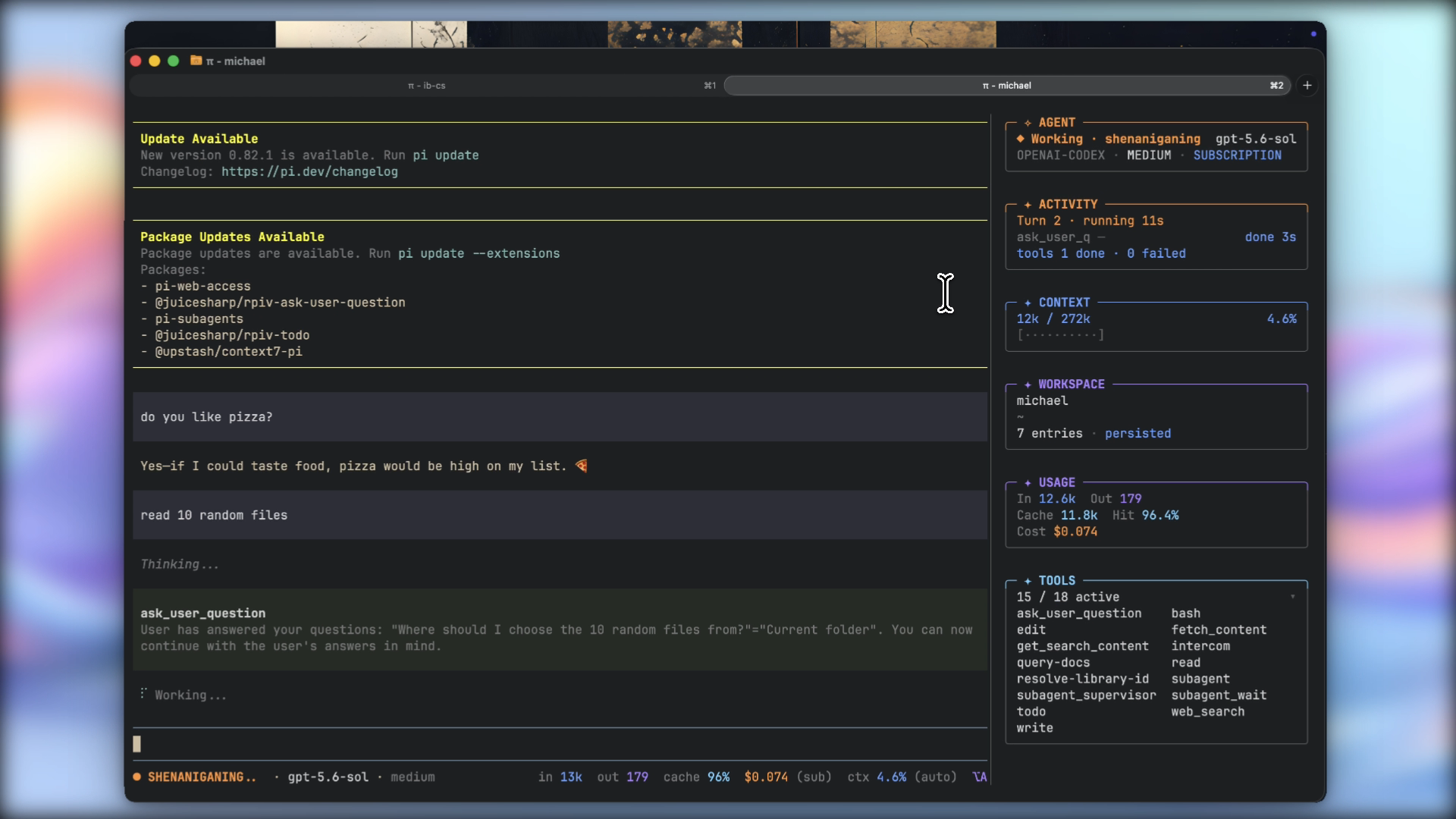
Features
- Responsive one-line status rail
- Live agent, tool, context, workspace, usage, and TODO information
- Model, thinking-level, and tool controls
- Configurable display presets, segments, and sidebar panels
- Session details, rename, and compaction actions
- Completion notifications on macOS and Windows
- No telemetry or external network requests
Requirements
- Pi 0.80.7 or newer
- Node.js 22.19.0 or newer
- Interactive TUI mode
Install
pi install npm:pi-atelierRun a local checkout without installing it:
pi -e ./pi-atelierPi packages run with your system permissions. Review third-party source before installation.
Use
Open the control center:
/atelierDefault shortcut: alt+a
The control center includes display settings, sidebar controls, model and tool selection, session details, rename, and compaction.
Commands:
/atelier display            # display settings
/atelier sidebar            # toggle sidebar
/atelier sidebar on|off     # set sidebar visibility
/atelier sidebar tools      # toggle tool names
/atelier enable|disable     # set extension state
The sidebar starts visible and hides when the terminal is too narrow. Press Ctrl+Shift+R to resize it.
The TODO panel supports Pi todo results and the optional @juicesharp/rpiv-todo extension.
Status rail presets:
- editorial: default layout
- minimal: compact layout
- classic: detailed telemetry
Configuration
User configuration:
~/.pi/agent/pi-atelier.jsonTrusted project configuration:
<project>/.pi/pi-atelier.jsonProject settings override user settings. Session changes override both. Global sidebar and notification preferences remain user-only.
{
  "preset": "editorial",
  "shortcut": "alt+a",
  "density": "comfortable",
  "contextWarning": 70,
  "contextDanger": 90,
  "showSidebarOnStartup": true,
  "showSidebarToolNames": false,
  "completionNotifications": true
}
Use Settings → Display to reorder or hide status rail segments and sidebar panels.
Privacy
Pi Atelier:
- Does not collect telemetry or analytics
- Does not store prompts, responses, credentials, or session content
- Uses read-only Git inspection for workspace status
- Does not read untracked file contents
- Reads project configuration only for trusted projects
- Does not include prompts or responses in notifications
Troubleshooting
- Shortcut unavailable: use
/atelier, changeshortcut, then run/reload. - Status rail missing: use TUI mode and check for another custom footer.
- Metric mismatch: token and cost totals cover the session; context usage covers the current model context.
Development
git clone https://github.com/michaelmjhhhh/pi-atelier.git
cd pi-atelier
npm install
npm run check
npx --no-install pi -e .
See CONTRIBUTING.md.
License
MIT


