
An open agent-skills library for malware analysis, reverse engineering, and threat hunting - 118 curated, runnable skills mapped to MITRE ATT&CK, D3FEND, and CAR.
AnalystAIPack




An open agent-skills library for malware analysis, reverse engineering, and threat hunting.
AnalystAIPack gives an AI agent the working knowledge of a malware analyst and threat hunter: which Volatility 3 plugin to run on a memory image, how to unpack a packed sample, how to hunt C2 beaconing in network logs, and how to turn findings into YARA and Sigma. It is a focused, depth-first library — 118 curated skills across four tightly-scoped subdomains, where every skill ships a tested, runnable analysis script, not just prose.
The name says what it is: a pack of ready-to-load AI agent skills for the security
analyst — covering the full workflow to hunt, reverse, and analyze malicious
code.
Independent project. Not affiliated with Anthropic, MITRE, or any vendor named here.
Built from scratch and synthesized from many primary sources; not copied from any other
skills repository. See CONTRIBUTING.md for the sourcing and originality policy.>
Personal work. A personal, independent project maintained in a personal capacity. It is
not affiliated with, endorsed by, or representative of the maintainer's employer.
What makes it different
- Depth over breadth. Four deliberate subdomains (malware analysis, reverse engineering,
- Every skill is runnable. All 118 skills ship a tested
scripts/analyst.py(standard
--check gates — so the tooling actually works, not just reads well.
- Safe by construction. Scripts perform static, read-only analysis and **never execute the
Safety & Handling section.
- A defender's framework lens. Skills map to MITRE ATT&CK, MITRE D3FEND, and
- Consistent, opinionated shape. Each skill follows the same body contract — When to Use
Scope
Three pillars plus a shared foundation:
| Subdomain | What it covers | |---|---| | lab-foundations | Safe handling, lab setup, triage, hashing, file ID, IOC formats, reporting | | malware-analysis | Static, dynamic, behavioral, and memory analysis; document/script malware; families | | reverse-engineering | Disassembly/decompilation, unpacking, deobfuscation, anti-analysis defeat, language-specific RE | | threat-hunting | Hypothesis-driven hunts, endpoint/network/identity telemetry, detection engineering |
See taxonomy.md for naming rules and framework mappings. Browse every skill in CATALOG.md, and see ATT&CK coverage in mappings/.
Who it's for
- SOC analysts & incident responders — triage an unknown file, pull IOCs, and pivot them
- Malware analysts & reverse engineers — a consistent procedure (and a runnable script)
- Threat hunters & detection engineers — turn a finding into a Sigma / YARA / Suricata
- AI-agent builders — drop a vetted, safety-bounded security skill set into Claude Code,
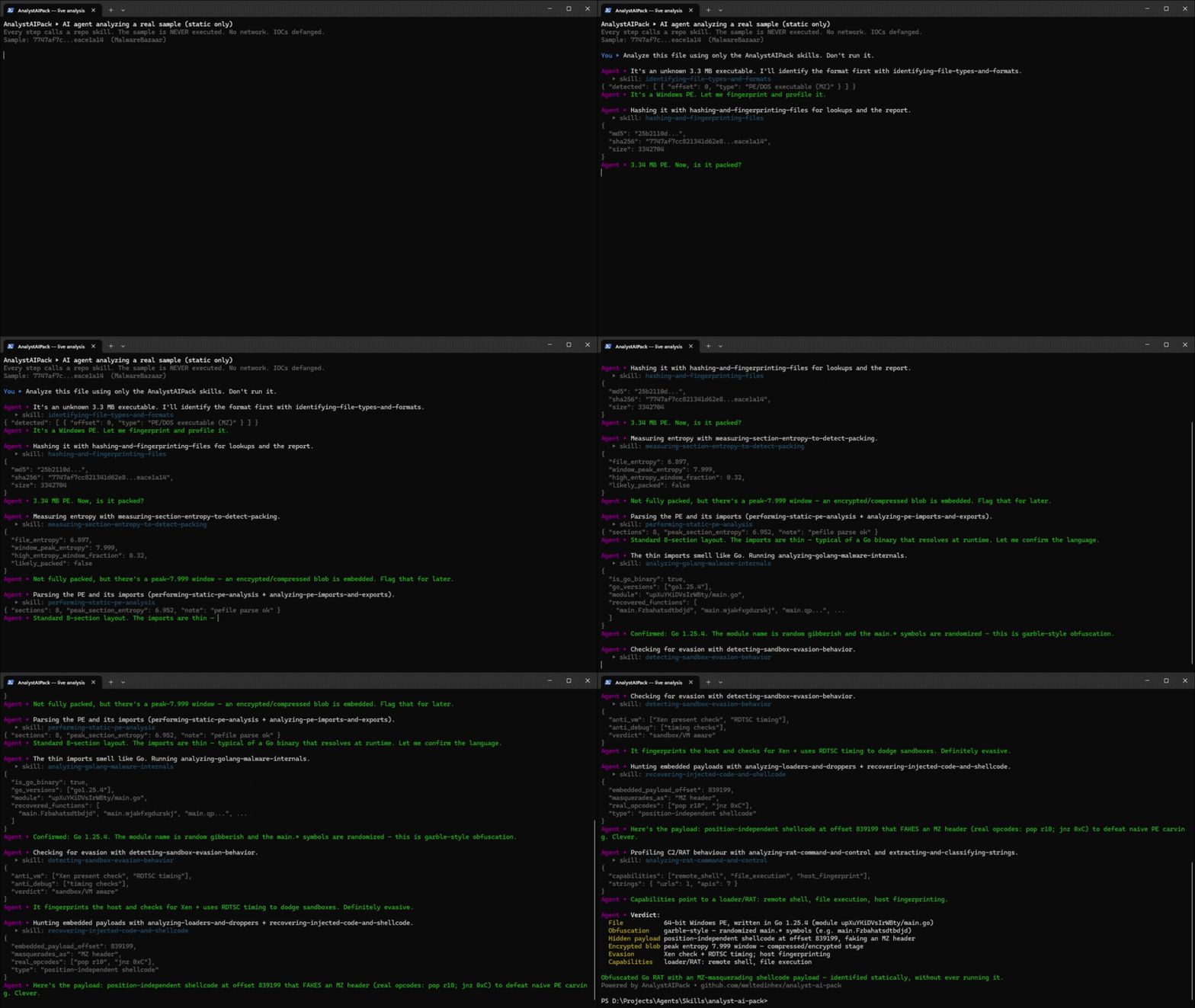
A worked example: from sample to detection
Each skill is a step; chained together they cover the full analyst loop. A typical investigation of a suspicious executable walks through skills like these:
| # | Stage | Skill | |---|---|---| | 1 | Triage the unknown file | triaging-an-unknown-sample | | 2 | Static PE inspection | performing-static-pe-analysis | | 3 | Spot packing via entropy | measuring-section-entropy-to-detect-packing | | 4 | Unpack to the OEP | manually-unpacking-a-packed-binary | | 5 | Recover the C2 config | extracting-cobalt-strike-beacon-config | | 6 | Defang and package IOCs | defanging-and-sharing-iocs | | 7 | Hunt the IOCs in traffic | hunting-cobalt-strike-traffic | | 8 | Write a durable detection | writing-sigma-detection-rules |
Driven directly from the CLI, the mechanical steps look like this:
# 1. Triage, then 5. recover the beacon config (read-only, never executes the sample)
python tools/analyst-pack.py run triaging-an-unknown-sample -- triage suspicious.exe
python tools/analyst-pack.py run extracting-cobalt-strike-beacon-config -- parse beacon.bin
7. Hunt the recovered indicators in proxy/Zeek logs, 8. emit a Sigma rule
python tools/analyst-pack.py run hunting-cobalt-strike-traffic -- hunt http.csv
Every script prints structured, defanged JSON you can feed into a report, a SIEM, or the next skill in the chain.
Format
Every skill follows the agentskills.io SKILL.md standard, so it works in Claude Code, GitHub Copilot, Cursor, Codex CLI, Gemini CLI, and other compatible agents.
skills/<skill-name>/
├── SKILL.md                  # frontmatter + procedure (When to Use, Workflow, ...)
├── scripts/analyst.py        # runnable tooling
├── references/api-reference.md
└── LICENSE
Skills map to MITRE ATT&CK, MITRE D3FEND, and MITRE CAR (for hunts) in frontmatter — frameworks chosen because they fit reverse engineering, malware analysis, and threat hunting better than compliance checklists.
Quick start
git clone https://github.com/meltedinhex/analyst-ai-pack.git
cd analyst-ai-pack
Validate skills and (re)build the catalog
python tools/lint-skills.py --all
python tools/build-index.py
(Re)build the browsable catalog and ATT&CK Navigator layer
python tools/build-catalog.py
python tools/build-navigator-layer.py
Point your agent at the skills/ directory, or load an individual SKILL.md. AI agents should read AGENTS.md first — it explains how to find, run, and safely chain skills.
Use with GitHub Copilot
Open this folder in VS Code. Copilot Chat automatically reads .github/copilot-instructions.md, so it knows the skills exist and how to run them safely. Then, in Agent mode, just ask:
- "Hunt for LOLBin abuse in events.csv" → uses
hunting-lolbin-abuse-on-windows - "Triage this unknown file and pull IOCs" → chains triage → IOC extraction
#file:skills/extracting-cobalt-strike-beacon-config/SKILL.md
Use this skill to analyze beacon.bin
No subscription beyond Copilot is required — the scripts are plain Python and run via Copilot's terminal tool (or directly with python tools/analyst-pack.py run …).
The analyst-pack CLI
A single front door to discover and run the library — unique to AnalystAIPack:
python tools/analyst-pack.py list --subdomain threat-hunting   # browse skills
python tools/analyst-pack.py search kerberos                   # full-text search
python tools/analyst-pack.py show hunting-lolbin-abuse-on-windows
python tools/analyst-pack.py run identifying-cryptographic-routines-in-binaries -- scan a.bin
python tools/analyst-pack.py stats                             # library statistics
python tools/analyst-pack.py lint                              # lint every skill
python tools/analyst-pack.py build                             # rebuild index/catalog/layer
Creating a skill
# Copy the scaffold
cp -r templates/skill-template skills/my-new-skill   # PowerShell: Copy-Item -Recurse
Edit SKILL.md, scripts/analyst.py, references/api-reference.md, then:
python tools/lint-skills.py skills/my-new-skill
python tools/build-index.py
Read CONTRIBUTING.md first — it covers the authoring checklist and the originality rules that keep AnalystAIPack's content genuinely its own.
Safety
These skills involve real malicious-code techniques. Sample-handling skills assume an isolated analysis lab and document safe handling, encrypted storage, and IOC defanging. AnalystAIPack ships no live malware samples. See SECURITY.md.
License
Apache-2.0 — see LICENSE. MITRE ATT&CK, D3FEND, and CAR are © MITRE and used under their respective terms.
Built and maintained by meltedinhex — malware analysis, reverse engineering, and threat-hunting notes.


