
AI-driven personal finance automation using n8n and Google Drive to extract and categorize PDF expenses into Google Sheets.
💸 AI Expense Tracker — n8n + Google Drive + Sheets



Automatically extract and organize expenses from bank statements (PDFs/images) into Google Sheets using AI, n8n, and a modern web interface. One-command Docker setup.
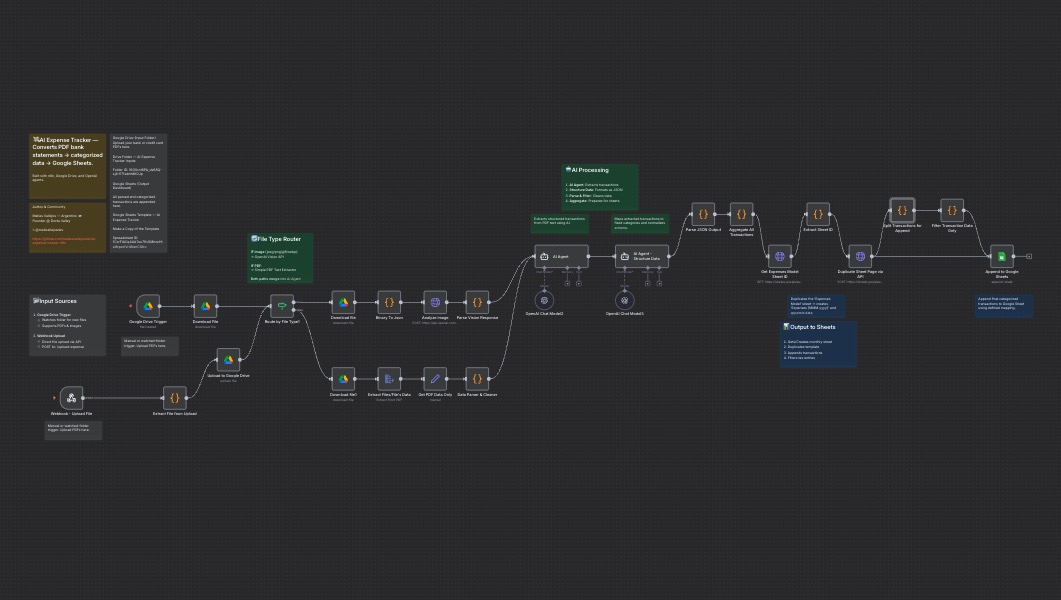
📘 Introduction
AI Expense Tracker is a low-code automation built with n8n that leverages OpenAI, Google Drive, and Google Sheets to automate personal finance tracking.
Two ways to use it:
- 🌐 Web App – Upload receipts and bank statements (PDFs or images) via a simple Next.js interface
- 📁 Google Drive – Drop files into a folder and let automation handle the rest
- Extract the data using AI (supports PDFs and images).
- Categorize each expense intelligently.
- Append the results to a structured Google Sheet dashboard.
✨ Key Features
- 🐳 Docker Support – One-command setup with Docker Compose. Works on any machine.
- 🌐 Web App Interface – Upload receipts and bank statements via a simple web UI (supports PDFs and images).
- Google Drive Integration – Drop your bank statement PDFs into a folder, and the system takes it from there.
- AI-Powered Parsing – Uses GPT-4o to read and structure your expenses into JSON.
- Categorization Agent – Classifies expenses into fixed categories (Supermarket, Gastronomy, etc.).
- Automatic Google Sheets Sync – Generates a new "Expenses {Month}" tab and appends all transactions.
- Open Source – Fully local, no external servers, and zero maintenance cost.
🚀 Quick Start (Docker - Recommended)
The easiest way to get started is with Docker Compose. This will set up both the n8n automation engine and the web app in one command.
Prerequisites
- Docker and Docker Compose installed.
- A Google Cloud Project with:
- A Google Sheet based on the provided template (
/templates/balance.xlsx).
Steps
- Clone the repository
git clone https://github.com/matiasvallejosdev/ai-expense-tracker-n8n.git
cd ai-expense-tracker-n8n- Configure environment variables
cp .env.example .env.env and add your Google Sheets dashboard URL:
NEXTPUBLICDASHBOARDURL=https://docs.google.com/spreadsheets/d/YOURSPREADSHEET_ID/edit- Create the n8n volume
docker volume create n8n_data- Start all services
docker-compose up -d- Access the applications
- Configure n8n credentials
/n8n/ai-expense-tracker-n8n.json
- Set up Google Drive OAuth2 and Google Sheets OAuth2 credentials
- Use the redirect URI: http://localhost:5678/rest/oauth2-credential/callback
- Upload your first expense
📖 Need help with Docker? Check out the Docker Guide for detailed explanations.
Managing Your Docker Application
# Stop all services
docker-compose down
View logs
docker-compose logs -f
View logs for specific service
docker-compose logs -f web-app
docker-compose logs -f n8n
Restart services
docker-compose restart
Rebuild and restart (after code changes)
docker-compose up --build -d
Stop and remove everything (including volumes - ⚠️ deletes n8n data)
docker-compose down -v
⚙️ Alternative Setup (Manual n8n)
If you prefer to run n8n manually without Docker:
Prerequisites
- n8n installed locally.
- A Google Cloud Project with:
- A Google Sheet based on the provided template (
/templates/balance.xlsx).
Steps
- Clone the repository
git clone https://github.com/matiasvallejosdev/ai-expense-tracker-n8n.git
cd ai-expense-tracker-n8n- Import the workflow
/n8n/ai-expense-tracker-n8n.json.
- Configure credentials
Google Drive OAuth2
* Google Sheets OAuth2
* Use the redirect URI:
http://localhost:5678/rest/oauth2-credential/callback- Connect your template
/templates/balance.xlsx to your Google Drive.
* Rename it if you wish, but keep a tab named “Expenses Model”.
- Set your folder trigger
- Run it
🗂️ Google Drive Folder (Input)
This is where you should upload your bank statement PDFs. 📁 Open the Drive FolderEach file you drop there (e.g. statement_visa.pdf) will trigger the workflow and automatically process it.
📊 Google Sheets Template (Output)
All categorized data will be appended automatically to this Google Sheets template: 📈 Open the Google Sheets TemplateOr click Make a Copy to create your own editable version.
🧩 Detailed Setup (Developers)
Tech Stack
Backend (n8n Workflow)
- n8n workflow automation
- OpenAI GPT-4o for text extraction and categorization
- Google Drive API
- Google Sheets API
- Next.js 16 (React 19)
- TypeScript
- Tailwind CSS 4
- Shadcn/ui components
- React Hook Form + Zod validation
- Docker multi-stage builds
Customization
- Customize Agents
AI Agent → parses raw text from PDF/image.
* AI Agent – Structure Data → converts it into a valid JSON array.
- Processing Flow
- Script Filters
IVA, Percepciones, Impuesto de Sellos, etc.) and USD duplicates.
- Web App Development
cd web-app
   npm install
npm run dev- Output Schema
Month | string | Month extracted from transaction date |
| Date | string | ISO date (YYYY-MM-DD) |
| Concept | string | Transaction detail |
| Payment_Method | string | Credit Card / Debit Card / Cash |
| Category | string | Expense category |
| Amount | number | Value of transaction |
| Currency | string | ARS / USD |
📊 Data Model
Fixed Taxonomy
| Currency | Payment Method | Expense Categories | Income Categories | | ------------ | ----------------------------- | ----------------------------------------------------------------------------------------------- | ------------------------------------------------ | | ARS, USD | Credit Card, Debit Card, Cash | Supermarket, Gastronomy, Services, Fashion, Transport, Technology, Home, Education, Sports, ... | Salary, Freelancing, Investment, Business, Extra |
You can extend these categories directly in the AI prompts or in the Google Sheet data validation lists.
🤖 Architecture Overview
Input Methods
Option 1: Web App (Next.js)
- User uploads file via web interface (http://localhost:3000)
- File sent to n8n webhook endpoint
- n8n processes the file
- User drops file in Google Drive folder
- n8n watches folder and detects new files
- n8n downloads and processes the file
Processing Pipeline (Both Methods)
- File Input → Web upload or Google Drive trigger
- Extract File Data → Converts PDF/image to text using OCR and AI
- Data Parser & Cleaner → Formats the raw text
- AI Agent (GPT-4o) → Extracts transactions from text
- AI Agent – Structure Data → Converts to JSON array
- Parse JSON Output → Validates structure
- Aggregate → Duplicate Sheet → Append to Sheet → Final output in your balance template
Everything runs locally on your machine through Docker — your data stays 100% private.
Docker Services
- n8n (port 5678) – Workflow automation engine
- web-app (port 3000) – Next.js frontend for file uploads
💡 Usage
Using the Web App (Recommended)
- Open the web interface at http://localhost:3000
- Upload your expense document:
- Wait for AI processing (usually 5-10 seconds)
- Check your Google Sheet – new transactions appear automatically!
Using Google Drive Trigger (Alternative)
- Upload PDF → Wait for execution → Open your Google Sheet.
- The system auto-creates a new sheet for each month:
Expenses Oct 2025- Filter, analyze, or connect to dashboards.
- Works perfectly with the included balance template dashboard.
🤝 Contributing
Contributions are welcome! If you want to improve parsing logic, add new categories, optimize the workflow, or enhance the web app:
- Fork the repository.
- Create a feature branch.
- Make your changes:
/n8n/
- Web app: Edit files in /web-app/
- Docker setup: Update docker-compose.yml or Dockerfile
- Test your changes with Docker:
docker-compose up --build- Commit and push your changes.
- Open a Pull Request.
- Include a redacted PDF/image example if your update changes extraction logic
- Test both input methods (web app and Google Drive) if modifying the processing pipeline
- Update the README if you add new features or change setup steps
📞 Contact
If you have questions, suggestions, or want to collaborate:
- Name: Matías Vallejos
- 🌐 matiasvallejos.com
- 𝕏 @mativallejosdev
📄 License
This project is open source and available under the MIT License.
🧠 Inspiration
“Control your money, or your money will control you.” — La Bolsa o la Vida
“Start thy purse to fattening.” — El Hombre Más Rico de Babilonia


