
💸 Get testnet Ether (ETH) to troubleshoot your DApp before going live 🚀
The eth-faucet is a developer tool to get testnet Ether (ETH) in order to test and troubleshoot your decentralized application (DApp) before going live on Ethereum mainnet, where you must use real ETH.
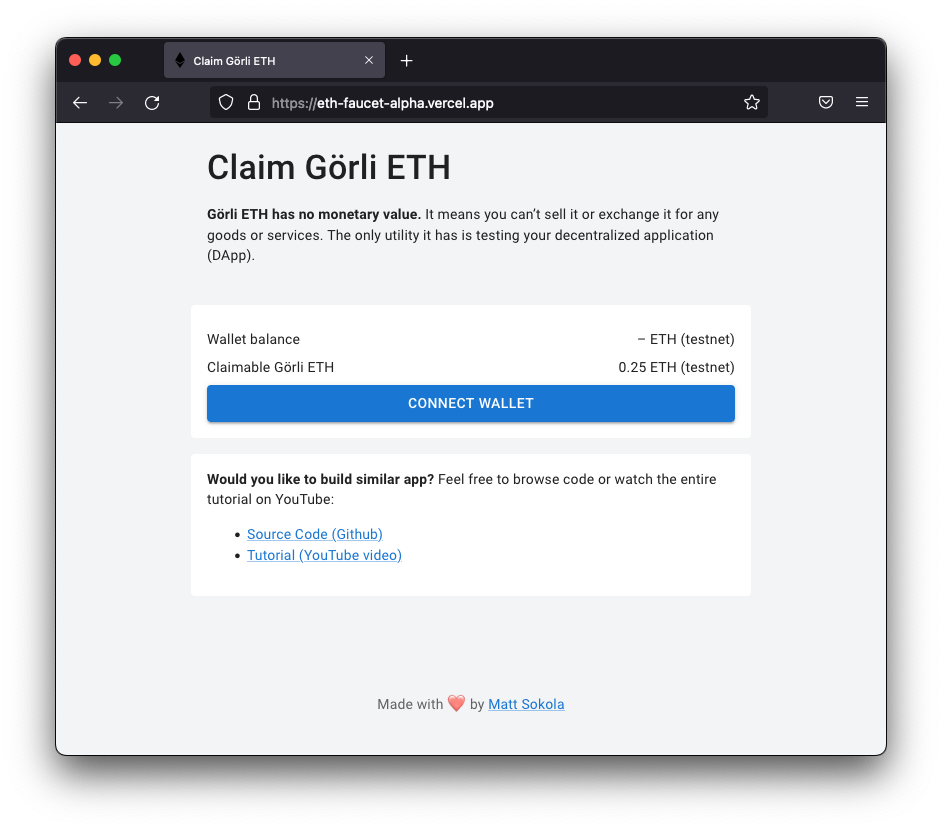
Live version: eth-faucet-alpha.vercel.app
Getting Started
- First, create a new Ethereum wallet:
yarn create-walletYou should receive wallet credentials printed to your console:
export WALLET_ADDRESS=0x0000000000000000000000000000000000000000
export WALLETMNEMONICPHRASE=fluffy kitten hates cats although it is a cat
export WALLETPRIVATEKEY=0x0000000000000000000000000000000000000000000000000000000000000000
Write those credentials down, you will need it!
- Now, you need to find the Ethereum API for Görli network. I’m using Infura and you can use it as well. Just create a free account and generate API keys for Görli network.
- Once you have your API keys, create a
.env.localfile, and specify the following variables:
WALLETPRIVATEKEY=0x0000000000000000000000000000000000000000000000000000000000000000
NEXTPUBLICETHAPIURL=https://goerli.infura.io/v3/00000000000000000000000000000000
NEXTPUBLICDEFAULTWALLETETH_AMOUNT=0.25 # Optional
NEXTPUBLICPRIVILEGEDWALLETETH_AMOUNT=1 # Optional- Finally, we can run our app:
yarn devOpen http://localhost:3000 with your browser to see it.
How to top up the wallet with Görli ETH?
You can use this faucet to request some testnet Ethereum.
How to change amount of distributed Görli ETH?
Set the NEXTPUBLICDEFAULTWALLETETH_AMOUNT variable in your .env file. For example:
NEXTPUBLICDEFAULTWALLETETH_AMOUNT=5 # 5 ETH per claimUse captcha
If you want to prevent bots from draining your wallet, you should use some captcha verification system. You can do it by setting NEXTPUBLICENABLE_CAPTCHA in your .env file. At the moment we support only Google ReCaptcha v3.
| Parameter | Type | Description | | :--------------------------- | :------------------------------- | :--------------------------- | | NEXTPUBLICENABLECAPTCHA | none (default), recaptchav3 | Enables captcha verification |
Google ReCaptcha v3
If you want to use Google ReCaptcha v3 to verify captchas. Just set NEXTPUBLICENABLECAPTCHA to recaptchav3, than add NEXTPUBLICRECAPTCHASITEKEY and RECAPTCHASECRETKEY in your .env file.
| Parameter | Type | Description | | :------------------------------- | :------- | :------------------------------ | | NEXTPUBLICRECAPTCHASITEKEY | string | Required. Front-end API key | | RECAPTCHASECRETKEY | string | Required. Back-end API key |
NEXTPUBLICENABLECAPTCHA=recaptchav3
NEXTPUBLICRECAPTCHASITEKEY=0000000000000000000000000000000000000000
RECAPTCHASECRETKEY=0000000000000000000000000000000000000000
You can create a new API Key here. It’s free of charge (there are some limits though).
Restricting users to claim Görli ETH once per day
If you want to restrict users from draining your wallet, you should enable transaction checks. You can do it by setting ENABLETRANSACTIONCHECKS in your .env file. The supported transaction history scanners you can find here:
| Parameter | Type | Description | | :-------------------------- | :------------------------------------- | :-------------------------------------------------------------------- | | ENABLETRANSACTIONCHECKS | none (default), etherscan, redis | Enables transaction checks to prevent users from draining your wallet |
Etherscan
To scan blockchain history for transactions you should use Etherscan History API. Just set ENABLETRANSACTIONCHECKS to etherscan and add ETHERSCANAPIKEY in your .env file.
| Parameter | Type | Description | | :------------------ | :------- | :------------------------------------------------ | | ETHERSCANAPIKEY | string | Required. Etherscan API key for Görli testnet |
ENABLETRANSACTIONCHECKS=etherscan
ETHERSCANAPIKEY=00000000000000000000000000000000
You can create a new API Key on Etherscan. It’s free of charge.
Redis
If you want to record transaction history in database I recommend to use Redis. Just set ENABLETRANSACTIONCHECKS to redis and add REDIS_URL in your .env file.
| Parameter | Type | Description | | :---------- | :------- | :------------------------------------ | | REDIS_URL | string | Required. Redis connection string |
ENABLETRANSACTIONCHECKS=redis
REDIS_URL=rediss://user:password@redis:6379
You can create a Redis database on Upstash.com. It’s free for the first 10.000 requests per month.
Privileged wallets
From now on, the faucet supports priviledged wallets. The riviledged wallet can receive higher amounts of tokens per request and the limits are not apply to them.
How to define amount of distributed Görli ETH to privileged wallets?
Set the NEXTPUBLICPRIVILEGEDWALLETETH_AMOUNT variable in your .env file. For example:
NEXTPUBLICPRIVILEGEDWALLETETH_AMOUNT=64 # 64 ETH per claimHow to define privileged wallets?
At the current moment, you will need to fork this repository and add wallet addresses into consts/wallets.ts file.
# Example
export const privilegedWallets = [
  "0x0000000000000000000000000000000000000000000000000000000000000001",
  "0x0000000000000000000000000000000000000000000000000000000000000002",
  "0x0000000000000000000000000000000000000000000000000000000000000003",
  ...,
  "0x0000000000000000000000000000000000000000000000000000000000009999"
]


