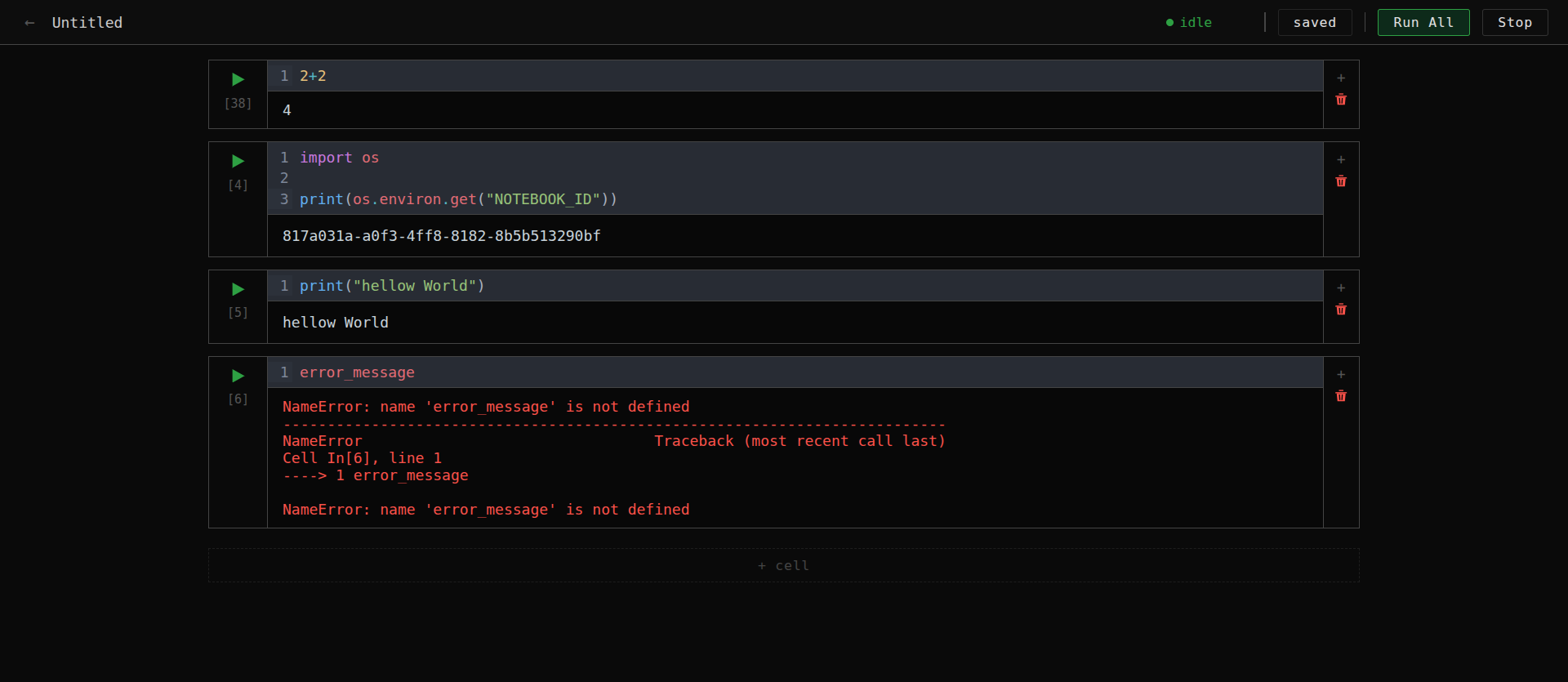
Architected a distributed notebook execution environment simulating Kaggle Kernels. Utilized the Kubernetes K8s API for dynamic pod orchestration and WebSockets for real-time streaming of code execution.
Kaggle Kernel Clone
A minimal, self-hosted notebook execution platform inspired by how Kaggle Kernels work under the hood. Write Python, run cells, see output — each notebook gets its own isolated Kubernetes pod.
What We're Building
Kaggle Kernels let you write and execute Python notebooks in the browser without setting up anything locally. Every time you start a session, Kaggle spins up a fresh, isolated environment just for your notebook. When you stop, it tears it down.
This project replicates that core mechanic — a real notebook interface backed by live Jupyter kernels running in Kubernetes pods, with a start/stop session model exactly like Kaggle.
Inspiration
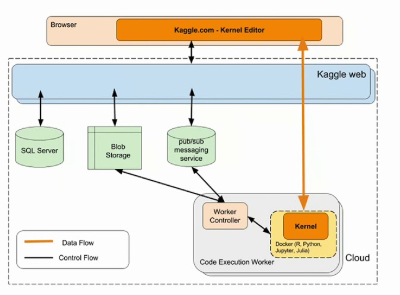
Inspired by the Kaggle infrastructure talk: How Kaggle Kernels Work — YouTube
The architecture they describe:
What We Built
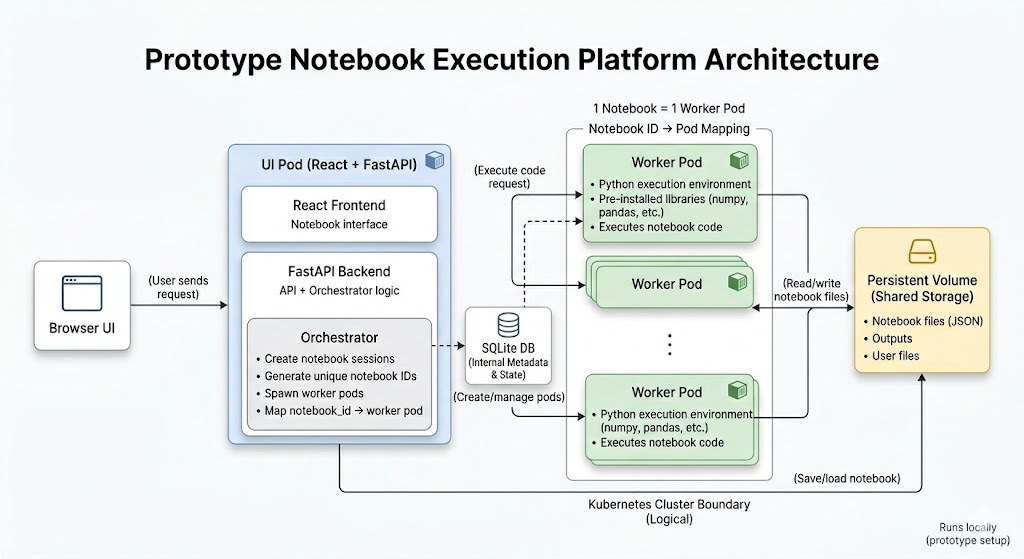
Our implementation of the same idea — notebook sessions mapped to Kubernetes pods, shared persistent storage, orchestrated through a FastAPI backend:
Architecture
Browser
  └── HTTP / WebSocket ──► UI Pod (FastAPI + React)
                                └── spawns ──► Worker Pod (Jupyter Kernel)
                                                   └── reads/writes ──► Persistent Volume
Components
UI Pod
Single Kubernetes deployment running two things:- React frontend — notebook editor with CodeMirror cells, real-time output rendering (text, HTML, images, errors), session controls in a sticky top bar
- FastAPI backend — REST API for notebook CRUD and session management, WebSocket endpoint that proxies streaming kernel output to the browser
- Orchestrator — uses the Kubernetes Python client to spawn and kill Worker Pods on demand. Tracks
notebook_id → podmapping in SQLite.
Worker Pod
One pod per notebook, created when you click Start Session, destroyed when you click Stop Session.- Runs an
ipykernelPython process - Variables and imports persist across cells within a session (like a real notebook)
- Exposes an internal HTTP API:
/execute(streaming),/interrupt,/restart,/status - The UI Pod proxies all execution through here — the browser never talks to Worker Pods directly
Persistent Volume
Shared storage mounted into every pod:/data/
├── metadata.db ← SQLite: notebook names, session state
├── notebooks/
│ └── {id}.ipynb ← standard Jupyter notebook format
└── files/Notebooks are saved as standard .ipynb files — portable and compatible with Jupyter.
Tech Stack
| Layer | Technology | |---|---| | Frontend | React 18, TypeScript, Vite, CodeMirror 6 | | Backend | FastAPI, SQLAlchemy, SQLite | | Kernel | ipykernel, jupyter-client | | Orchestration | Kubernetes Python client | | Packaging | Docker (multi-stage), Helm | | Local cluster | Minikube |
Project Structure
├── ui-pod/
│   ├── backend/              FastAPI app
│   │   ├── main.py
│   │   ├── orchestrator.py   Kubernetes pod lifecycle
│   │   ├── routers/
│   │   │   ├── notebooks.py
│   │   │   ├── sessions.py
│   │   │   └── execution.py  WebSocket + interrupt/restart
│   │   └── models.py
│   ├── frontend/             React app
│   │   └── src/
│   │       ├── components/
│   │       │   ├── NotebookTopBar.tsx
│   │       │   ├── NotebookPage.tsx
│   │       │   ├── NotebookEditor.tsx
│   │       │   └── Cell.tsx
│   │       └── api.ts
│   └── Dockerfile
├── worker-pod/
│   ├── main.py               FastAPI wrapper
│   ├── kernel_manager.py     ipykernel interface
│   └── Dockerfile
├── helm/kaggle-kernel/       Helm chart
│   ├── values.yaml
│   └── templates/
│       ├── ui-pod/
│       ├── storage/
│       └── rbac/
└── deploy.sh                 One-command local deploy
Running Locally with Minikube
Prerequisites
Install these before running:
1. Start Minikube
minikube start2. Deploy
# First deploy — builds Docker images and installs Helm chart
./deploy.sh --build
Subsequent deploys — reinstalls chart without rebuilding images
./deploy.sh
The script handles everything:
- Enables the ingress addon and waits for its webhook to be ready
- Builds both images directly into Minikube's Docker daemon (no registry push needed)
- Creates the
kaggle-kernelnamespace - Cleanly uninstalls any existing release
- Installs the Helm chart with Minikube-compatible overrides
- Starts a port-forward at
http://localhost:8080
3. Set Up Hosts File (for Ingress)
To use the ingress at http://notebook.local instead of the port-forward:
# Get your Minikube IP
minikube ip
Example output: 192.168.49.2
Add this line to your hosts file:
Linux / macOS — edit /etc/hosts:
192.168.49.2 notebook.localWindows — edit C:\Windows\System32\drivers\etc\hosts as Administrator:
192.168.49.2 notebook.localThen open http://notebook.local in your browser.
If you skip the hosts file step, the app is available athttp://localhost:8080via the port-forward thatdeploy.shstarts automatically.
4. Watch the Cluster
# Watch pods come up
kubectl get pods -n kaggle-kernel -w
Tail UI Pod logs
kubectl logs -n kaggle-kernel deployment/kaggle-kernel-ui -f
How It Works — Session Flow
- Create a notebook → saved as an
.ipynbfile, no pod yet - Click Start Session → Orchestrator spawns a Worker Pod in Kubernetes, status badge shows "starting"
- Session goes idle → Worker Pod is running, kernel is ready, badge turns green
- Run a cell → code sent over WebSocket → executed by ipykernel → output streams back in real time
- Click Stop Session → notebook auto-saved → Worker Pod killed → kernel state gone, outputs remain
Output
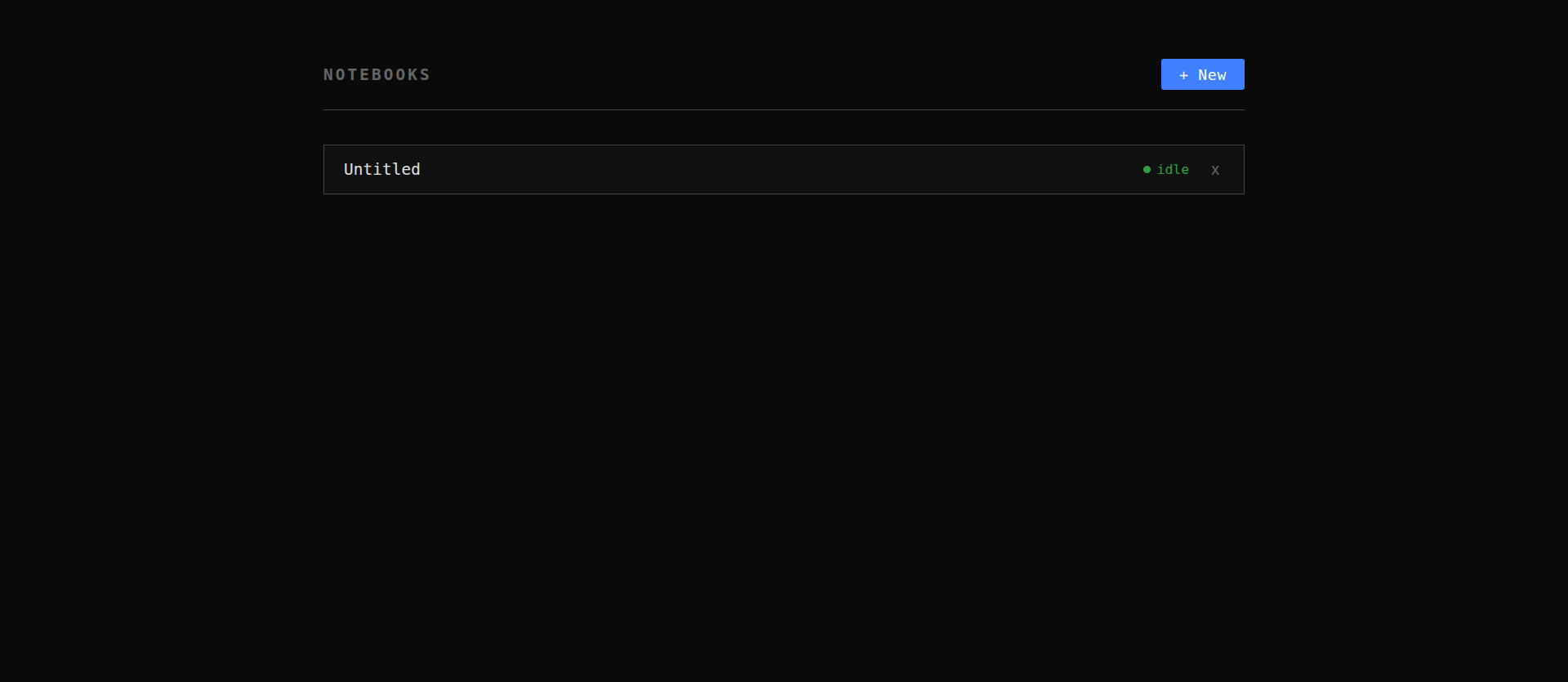
Notebook List
Notebook Editor