
Real-time macOS system metrics (power, battery, CPU, temp, fan, memory, network) in your zsh RPROMPT
PowerLens ⚡
Real-time system metrics in your zsh right prompt — power, battery, CPU, CPU temp, fan speed, memory, and network I/O, glanceable at a glance.




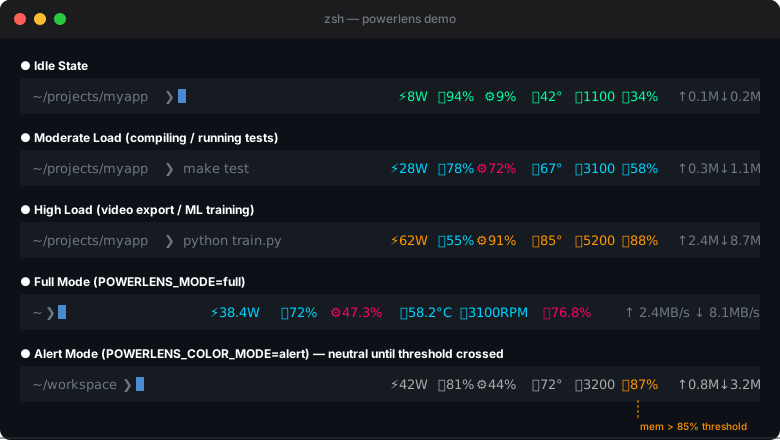
PowerLens is a lightweight Oh-My-Zsh plugin that embeds live system metrics into RPROMPT. A single background daemon collects all data every 2 seconds; the prompt reads a cached JSON file on each precmd — adding less than 5ms to prompt render time regardless of how many terminal windows you have open.
Features
| | | |---|---| | 7 metrics | Power (W) · Battery % · CPU % · CPU temp °C · Fan speed RPM · Memory % · Network ↑↓ MB/s | | Two color modes | multi — 4-level gradient per metric / alert — neutral until threshold | | Two display modes | compact — abbreviated values / full — with units and decimals | | Per-metric toggles | Show or hide any metric independently | | Singleton daemon | N terminal windows → 1 daemon process, never more | | Crash recovery | Stale data (>10s) auto-detected; daemon restarted silently | | SSH-aware | Daemon skipped in remote shells; shows -- gracefully | | macOS 12+ | Apple Silicon (arm64) and Intel (amd64), no sudo required |
Color Reference
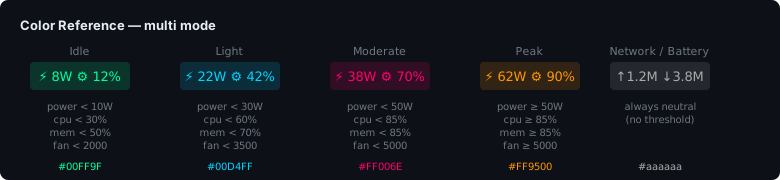
Each metric is colored independently. Thresholds are fully configurable.
Installation
Oh-My-Zsh
git clone https://github.com/luyangkk/powerlens.git \
  ~/.oh-my-zsh/custom/plugins/powerlens
Add powerlens to your plugins list in ~/.zshrc:
plugins=(... powerlens)Reload your shell:
source ~/.zshrcBuild from Source
If macOS blocks the pre-compiled binary (Gatekeeper), build it yourself — requires Go 1.21+:
cd ~/.oh-my-zsh/custom/plugins/powerlens
make install
Or remove the quarantine flag from the pre-built binary:
xattr -d com.apple.quarantine bin/powerlens-fetch-arm64   # Apple Silicon
xattr -d com.apple.quarantine bin/powerlens-fetch-amd64   # Intel
Configuration
All options are set in ~/.zshrc before the plugins=(...) line.
Display
POWERLENS_MODE=compact        # compact | full
POWERLENSCOLORMODE=multi    # multi   | alert
compact (default):
⚡38W 🔋87% ⚙34% 🌡55° 🌀1200 🧠62% ↑1.2M↓3.8Mfull:
⚡ 38.4W 🔋 87% ⚙ 34.2% 🌡 55.0°C 🌀 1200RPM 🧠 62.1% ↑ 1.2MB/s ↓ 3.8MB/sShow / Hide Metrics
POWERLENSSHOWBATTERY=true   # true | false
POWERLENSSHOWCPU=true
POWERLENSSHOWTEMP=true
POWERLENSSHOWFAN=true       # hidden automatically on fanless Macs
POWERLENSSHOWMEM=true
POWERLENSSHOWNET=true
Network Interface
POWERLENSNETIFACE=default # default | wifi | ethernet| Value | Behavior | |-------|----------| | default | Follows the default route — whichever interface the OS is routing traffic through (WiFi, Ethernet, or VPN). Icon updates automatically when the active interface changes. | | wifi | Always monitors the Wi-Fi interface. Falls back to 🌐 if Wi-Fi is inactive. | | ethernet | Always monitors the first wired Ethernet interface. Falls back to 🌐 if none is connected. |
The interface type is shown as an icon prefix on the network display:
- 📶 Wi-Fi
- 🔌 Ethernet
- 🌐 Other / VPN
Refresh Interval
POWERLENS_REFRESH=2 # seconds between daemon pollsColor Thresholds — multi Mode
Each metric has three thresholds that divide the four color levels (Idle → Light → Moderate → Peak):
# Power (Watts)
POWERLENSTHRESHPOWER_IDLE=10
POWERLENSTHRESHPOWER_LIGHT=30
POWERLENSTHRESHPOWER_MODERATE=50
CPU (%)
POWERLENSTHRESHCPU_IDLE=30
POWERLENSTHRESHCPU_LIGHT=60
POWERLENSTHRESHCPU_MODERATE=85
Memory (%)
POWERLENSTHRESHMEM_IDLE=50
POWERLENSTHRESHMEM_LIGHT=70
POWERLENSTHRESHMEM_MODERATE=85
CPU Temperature (°C)
POWERLENSTHRESHTEMP_IDLE=50
POWERLENSTHRESHTEMP_LIGHT=70
POWERLENSTHRESHTEMP_MODERATE=85
Fan Speed (RPM)
POWERLENSTHRESHFAN_IDLE=2000
POWERLENSTHRESHFAN_LIGHT=3500
POWERLENSTHRESHFAN_MODERATE=5000
Default values are tuned for Apple Silicon MacBooks. Adjust for your machine.
Alert Thresholds — alert Mode
In alert mode all metrics render in neutral gray (#aaaaaa) until a single threshold is crossed, then switch to orange (#FF9500):
POWERLENSALERTPOWER=50      # W
POWERLENSALERTCPU=80        # %
POWERLENSALERTMEM=85        # %
POWERLENSALERTTEMP=80       # °C
POWERLENSALERTFAN=4000      # RPM
How It Works
┌──────────────────────────────────────────────────────┐
│  Terminal 1      Terminal 2      Terminal 3           │
│  (precmd)        (precmd)        (precmd)             │
│      │               │               │               │
│      └───────────────┴───────────────┘               │
│                      │                               │
│              read metrics.json                       │
│              (only on mtime change)                  │
│                      │                               │
│      ┌───────────────▼──────────────────────┐        │
│      │  powerlens-fetch  (singleton daemon)  │        │
│      │  · IOKit → power, battery             │        │
│      │  · IOKit/SMC → CPU temp, fan speed    │        │
│      │  · gopsutil → CPU, memory, network    │        │
│      │  · writes metrics.json every 2s       │        │
│      └──────────────────────────────────────┘        │
└──────────────────────────────────────────────────────┘- The daemon is started by the first shell and shared across all subsequent shells (PID file singleton).
- Each
precmdchecks the file modification time — the JSON is re-parsed only when it actually changes. - The last shell to exit kills the daemon.
Behavior Reference
| Scenario | Display | |----------|---------| | Normal | Metrics with color | | Charging | 🔋 replaced with 🔌 | | Desktop Mac (no battery) | Battery element hidden | | Daemon crashed | ⚡ --W 🔋 --% ⚙ --% 🧠 --% ↑ -- ↓ -- → daemon auto-restarted | | SSH remote shell | Same degraded display, no daemon launched | | First network sample | ↑0.0M ↓0.0M (no previous snapshot to diff against) | | Fanless Mac (e.g. M1/M2 Air) | Fan metric hidden automatically |
Requirements
- macOS 12 (Monterey) or later
- Zsh 5.8+
- Oh-My-Zsh
Building
make arm64      # Apple Silicon
make amd64      # Intel
make universal  # Universal binary (lipo)
make all        # Both arm64 + amd64
make clean      # Remove built binaries
Open Questions / Roadmap
- [ ] Historical mini-graph using Unicode Braille (
⣀⣄⣆⣇⣗⣷⣿) in expanded mode - [ ] powerlevel10k geometry integration
- [ ] Multiple battery support (MagSafe + Thunderbolt)
- [ ] CI notarization via GitHub Actions
Contributing
Contributions are welcome! Please read CONTRIBUTING.md before submitting a pull request.
License
MIT — see LICENSE for details.


