
A Virtual Sales Agent that uses LangChain, LangGraph, and Gemini Flash to simulate customer interactions. Features include product inquiries, order management, and personalized recommendations through a user-friendly Streamlit interface.
Virtual Sales Agent powered by LangGraph, Streamlit & Gemini Flash
This project implements a Virtual Sales Agent that simulates customer interactions, providing information and support through a Streamlit interface. Using the power of LangChain, LangGraph, and a SQLite database, this agent can answer product questions, create orders, check order statuses, and offer personalized recommendations. These tools are divided into safe and sensitive categories. For sensitive tools, such as creating orders, a human-in-the-loop mechanism is implemented, requiring approval or denial before proceeding.
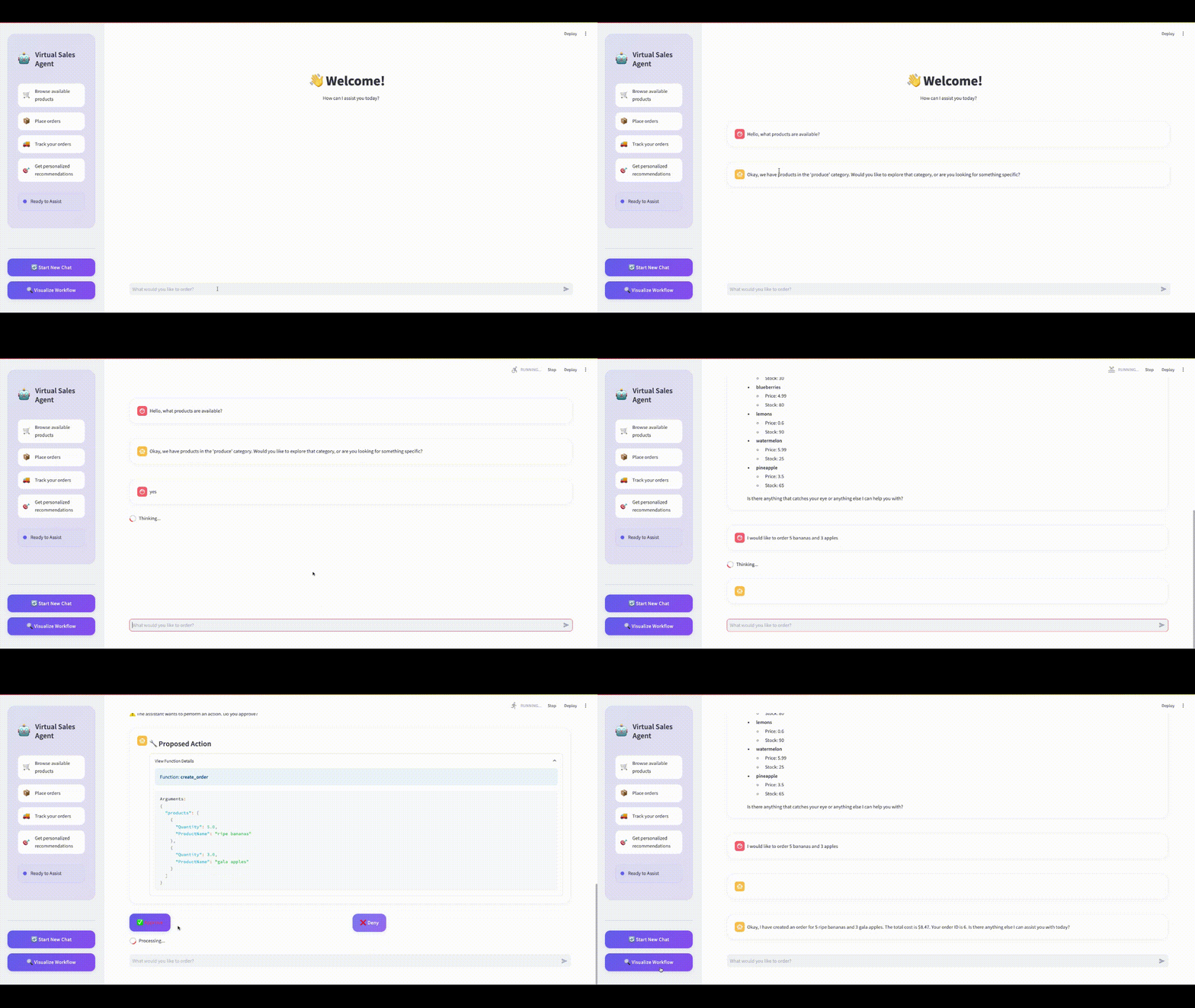
👉 Check out a quick demo of the Virtual Sales Agent in action in the Interface Preview section!
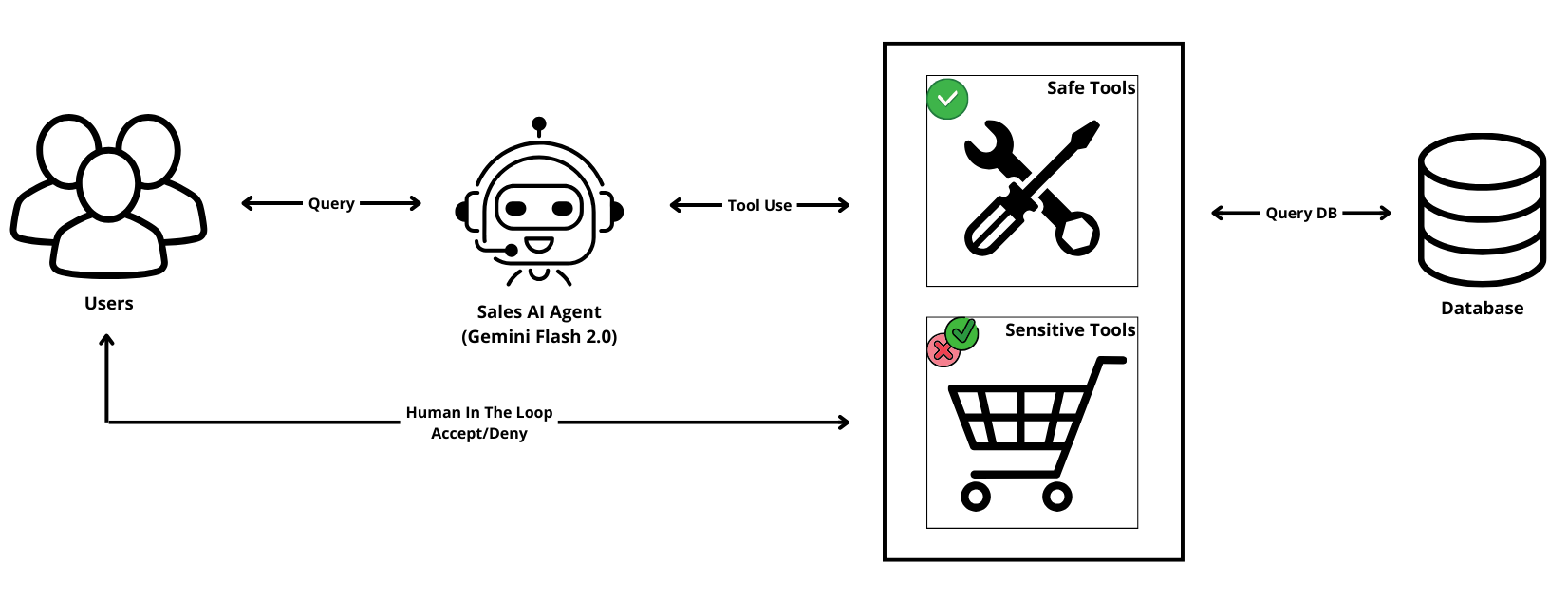
Table of Contents
- Key Features
- Built With
- Use Cases
- Project Structure
- Interface Preview
- Get Started
- Contributing
- Related Resources
- Future Plans
- License
Key Features
This virtual sales agent can assist customers with:
- Product Inquiries:
- Order Placement:
- Order Tracking:
- Personalized Recommendations:
Use Cases
This Virtual Sales Agent is ideal for:
- E-commerce websites to streamline customer service and increase sales.
- Customer support teams looking to automate routine tasks while maintaining user control.
- Sales teams to recommend personalized products based on purchase history.
Built With
- LangChain: Provides the framework for developing AI-powered conversational applications.
- LangGraph: Enables the creation of sophisticated, stateful agent workflows.
- SQLite: A lightweight database for managing product data and orders.
- Streamlit: Facilitates the development of interactive web applications for the agent interface.
- Gemini Flash 2.0: A fast and efficient large language model from Google for natural language understanding.
Project Structure
Here's a breakdown of the project's directory structure:
.
├── assets/
│   ├── agent_workflow.png    # Diagram
│   ├── demo.gif              # Demo gif
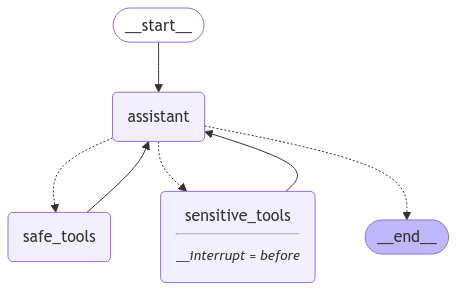
│   ├── graph.png             # Agent workflow diagram
│   └── style.css             # Streamlit custom styling
├── database/
│   ├── db/
│   │   ├── products.json         # Bot product data (initial)
│   │   └── schemas.sql           # SQL schema definitions
│   ├── db_manager.py             # Handles database interactions
│   └── config.py                 # Database connection configuration
├── virtualsalesagent/
│   ├── graph.py                  # LangGraph agent state machine and logic
│   ├── tools.py                  # Custom tools used by the agent
│   └── utils_functions.py        # Utility functions for the agent
├── env-example                   # Environment variables template
├── main.py                       # Main Streamlit app
├── README.md                     # This file!
├── requirements.txt              # Project dependencies
└── setup_database.py             # Script to initialize the database
Interface Preview
- 🎥 Demo GIF
- LangGraph Workflow
Get Started
Follow these steps to set up and run the Virtual Sales Agent:
Prerequisites
- Ensure you have Python 3.12 or later installed on your machine.
- We recommend using a virtual environment for managing dependencies.
Installation Steps
- Clone the Repository:
git clone https://github.com/lucasboscatti/sales-ai-agent-langgraph.git
cd virtual-sales-agent- Create a Virtual Environment:
python3 -m venv venv
   source venv/bin/activate    # Linux/Mac
venv\Scripts\activate # Windows- Install Dependencies:
pip install -r requirements.txt- Environment Configuration:
.env-example file to .env.
- Set up your API keys:
- Google Gemini Flash: Requires a GOOGLEAPIKEY, along with your GOOGLEAPPLICATIONCREDENTIALS (path to your credentials file), GCPPROJECTID and REGION. Obtain these from your Google Cloud Platform (GCP) account at Google AI Studio.
- LangSmith: Create a LangSmith account and get your LANGCHAINAPI_KEY. This is for monitoring and debugging agent interactions.
- Load environment variables:
source .env- Initialize the Database:
python3 setup_database.py- Launch the Streamlit App:
streamlit run main.pyThis will open the application in your web browser, and you can start interacting with the Virtual Sales Agent.
Contributing
We welcome contributions to improve this project! Here’s how you can help:
- Fork the repository and create a feature branch.
- Follow Python best practices (e.g., PEP 8).
- Submit a pull request with a clear description of your changes.
- For bug reports or feature requests, please open an issue.
Related Resources
Future Plans
- Fuzzy logic for product names matching
License
This project is licensed under the MIT License. See the LICENSE file for more details.


