
Unified management and routing for llama.cpp, MLX and vLLM models with web dashboard.
llamactl


Unified management and routing for llama.cpp, MLX and vLLM models with web dashboard.
Features
🚀 Easy Model Management
- Built-in Model Downloader: Download GGUF and Safetensors models directly from HuggingFace for llama.cpp, vLLM, and MLX backends
- Dynamic Multi-Model Instances: llama.cpp router mode - serve multiple models from a single instance with on-demand loading
- Smart Resource Management: Automatic idle timeout, LRU eviction, instance groups with per-group limits, and configurable instance limits
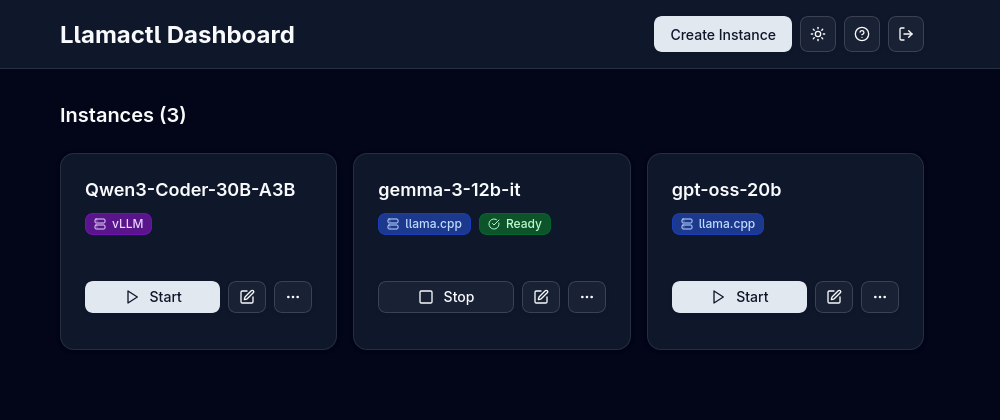
- Web Dashboard: Modern React UI for managing instances, monitoring health, and viewing logs
- API Compatible: OpenAI chat completions and resources endpoints, Anthropic messages endpoint (depending on backend) - route requests to different models by instance name
- Multi-Backend Support: Native support for llama.cpp, MLX (Apple Silicon optimized), and vLLM
- Docker Ready: Run backends in containers with full GPU support
- Remote Instances: Deploy instances on remote hosts
- Central Management: Manage everything from a single dashboard with automatic routing
Quick Start
- Install a backend (llama.cpp, MLX, or vLLM) - see Prerequisites below
- Download llamactl for your platform
- Run
llamactland open http://localhost:8080 - Create an instance and start inferencing!
Prerequisites
Backend Dependencies
For llama.cpp backend: You need llama-server from llama.cpp installed:
# Homebrew (macOS)
brew install llama.cpp
Or build from source - see llama.cpp docs
Or use Docker - no local installation required
For MLX backend (macOS only): You need MLX-LM installed:
# Install via pip (requires Python 3.8+)
pip install mlx-lm
Or in a virtual environment (recommended)
python -m venv mlx-env
source mlx-env/bin/activate
pip install mlx-lm
For vLLM backend: You need vLLM installed:
# Install via pip (requires Python 3.8+, GPU required)
pip install vllm
Or in a virtual environment (recommended)
python -m venv vllm-env
source vllm-env/bin/activate
pip install vllm
Or use Docker - no local installation required
Docker Support
llamactl can run backends in Docker containers, eliminating the need for local backend installation:
backends:
  llama-cpp:
    docker:
      enabled: true
  vllm:
    docker:
      enabled: true
Installation
Option 1: Download Binary (Recommended)
# Linux/macOS - Get latest version and download
LATESTVERSION=$(curl -s https://api.github.com/repos/lordmathis/llamactl/releases/latest | grep '"tagname":' | sed -E 's/."([^"]+)"./\1/')
curl -L https://github.com/lordmathis/llamactl/releases/download/${LATESTVERSION}/llamactl-${LATESTVERSION}-$(uname -s | tr '[:upper:]' '[:lower:]')-$(uname -m).tar.gz | tar -xz
sudo mv llamactl /usr/local/bin/
Or download manually from the releases page:
https://github.com/lordmathis/llamactl/releases/latest
Windows - Download from releases page
Option 2: Docker (No local backend installation required)
# Clone repository and build Docker images
git clone https://github.com/lordmathis/llamactl.git
cd llamactl
mkdir -p data/llamacpp data/vllm models
Build and start llamactl with llama.cpp CUDA backend
docker-compose -f docker/docker-compose.yml up llamactl-llamacpp -d
Build and start llamactl with vLLM CUDA backend
docker-compose -f docker/docker-compose.yml up llamactl-vllm -d
Build from source using multi-stage build
docker build -f docker/Dockerfile.source -t llamactl:source .
Note: Dockerfiles are configured for CUDA. Adapt base images for other platforms (CPU, ROCm, etc.).
Option 3: Build from Source
Requires Go 1.24+ and Node.js 22+git clone https://github.com/lordmathis/llamactl.git
cd llamactl
cd webui && npm ci && npm run build && cd ..
go build -o llamactl ./cmd/serverUsage
- Open http://localhost:8080
- Click "Create Instance"
- Choose backend type (llama.cpp, MLX, or vLLM)
- Configure your model and options (ports and API keys are auto-assigned)
- Start the instance and use it with any OpenAI-compatible client
Configuration
llamactl works out of the box with sensible defaults. Configuration is loaded with the following precedence:
Defaults < .env file < Configuration file < LLAMACTL_* environment variablesConfig files support ${VAR} and ${VAR:-default} placeholders, and a .env file is automatically loaded.
server:
  host: "0.0.0.0"                # Server host to bind to
  port: 8080                     # Server port to bind to
  allowed_origins: ["*"]         # Allowed CORS origins (default: all)
  allowed_headers: ["*"]         # Allowed CORS headers (default: all)
  enable_swagger: false          # Enable Swagger UI for API docs
backends:   llama-cpp:     command: "llama-server"     args: []     environment: {}               # Environment variables for the backend process     docker:       enabled: false       image: "ghcr.io/ggml-org/llama.cpp:server"       args: ["run", "--rm", "--network", "host", "--gpus", "all", "-v", "~/.local/share/llamactl/llama.cpp:/root/.cache/llama.cpp"]       environment: {}             # Environment variables for the container
vllm:     command: "vllm"     args: ["serve"]     environment: {}               # Environment variables for the backend process     docker:       enabled: false       image: "vllm/vllm-openai:latest"       args: ["run", "--rm", "--network", "host", "--gpus", "all", "--shm-size", "1g", "-v", "~/.local/share/llamactl/huggingface:/root/.cache/huggingface"]       environment: {}             # Environment variables for the container
mlx:     command: "mlx_lm.server"     args: []     environment: {}               # Environment variables for the backend process
data_dir: ~/.local/share/llamactl  # Main data directory (database, instances, logs), default varies by OS
instances:   port_range: [8000, 9000]                        # Port range for instances   logs_dir: ~/.local/share/llamactl/logs          # Logs directory (platform dependent)   autocreatedirs: true                          # Auto-create data/config/logs dirs if missing   max_instances: -1                               # Max instances (-1 = unlimited)   maxrunninginstances: -1                       # Max running instances (-1 = unlimited)   enablelrueviction: true                       # Enable LRU eviction for idle instances   defaultidletimeout: 30                        # Default idle timeout in minutes (0 = no timeout)   defaultautorestart: true                      # Auto-restart new instances by default   defaultmaxrestarts: 3                         # Max restarts for new instances   defaultrestartdelay: 5                        # Restart delay (seconds) for new instances   defaultondemand_start: true                   # Default on-demand start setting   ondemandstart_timeout: 120                    # Default on-demand start timeout in seconds   group_limits: {}                                # Per-group instance limits (e.g., large: 1, small: 3)   timeoutcheckinterval: 5                       # Idle instance timeout check in minutes   logrotationenabled: true                      # Enable log rotation (default: true)   logrotationmax_size: 100                      # Max log file size in MB before rotation (default: 100)   logrotationcompress: false                    # Compress rotated log files (default: false)
database:   path: ~/.local/share/llamactl/llamactl.db  # Database file path (platform dependent)   maxopenconnections: 25                   # Maximum open database connections   maxidleconnections: 5                    # Maximum idle database connections   connectionmaxlifetime: 5m                # Connection max lifetime
auth:   requireinferenceauth: true   # Require auth for inference endpoints, API keys are created in web UI   requiremanagementauth: true  # Require auth for management endpoints   management_keys: []            # Keys for management endpoints
For detailed configuration options including environment variables, file locations, and advanced settings, see the Configuration Guide.
License
MIT License - see LICENSE file.


