
The SOTA Open-Source Browser Agent for autonomously performing complex tasks on the web





Index
Index is a state-of-the-art open-source browser agent that autonomously executes complex web tasks. It turns any website into an accessible API and can be seamlessly integrated with just a few lines of code.
- [x] Powered by reasoning LLMs with vision capabilities.
- [x]
pip install lmnr-indexand use it in your project - [x]
index runto run the agent in the interactive CLI - [x] Supports structured output via Pydantic schemas for reliable data extraction.
- [x] Index is also available as a serverless API.
- [x] You can also try out Index via Chat UI.
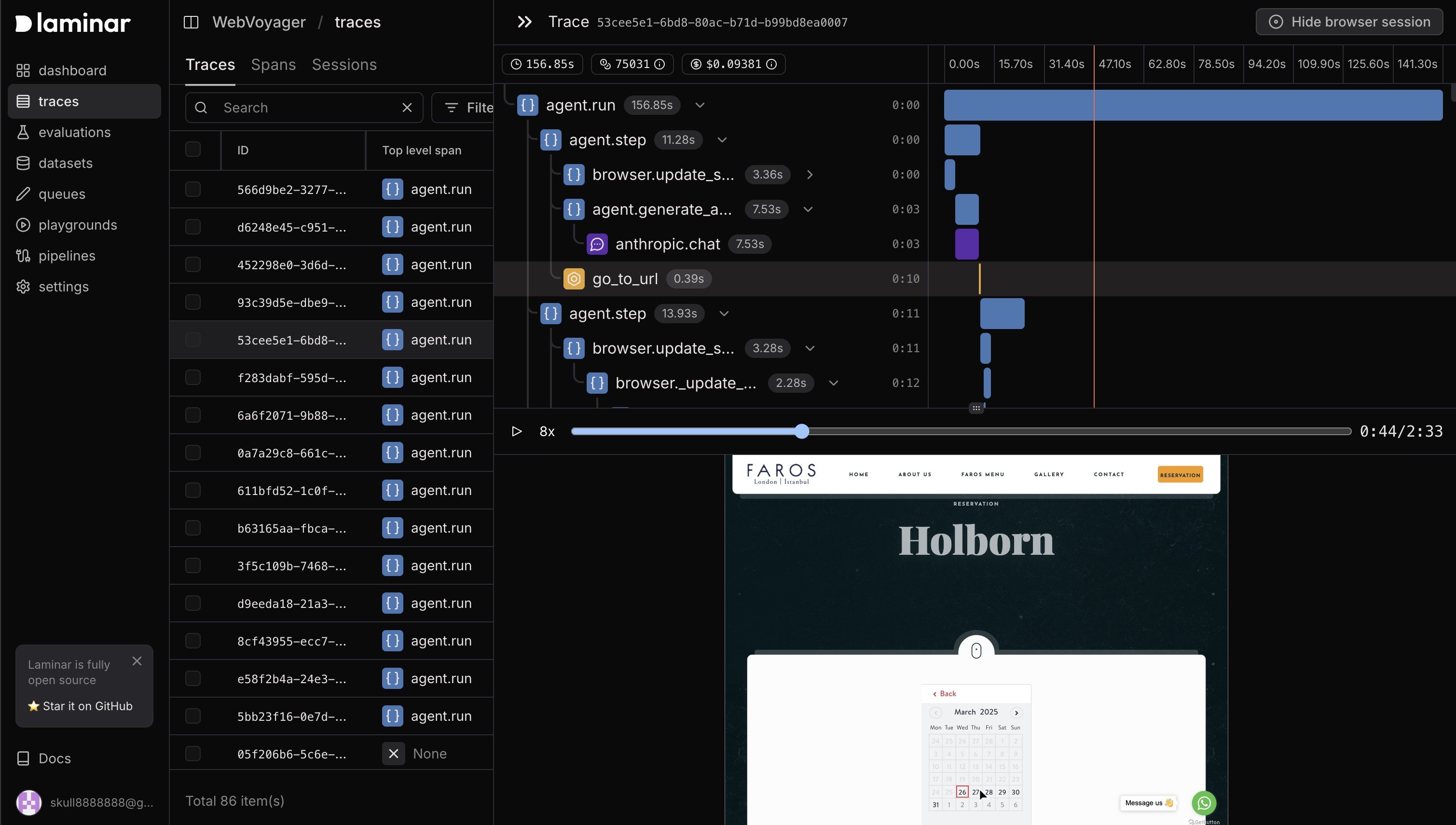
- [x] Supports advanced browser agent observability powered by open-source platform Laminar.
https://github.com/user-attachments/assets/2b46ee20-81b6-4188-92fb-4d97fe0b3d6a
Documentation
Check out full documentation here
Quickstart
Install dependencies
pip install lmnr-index 'lmnr[all]'
Install playwright
playwright install chromium
Setup model API keys
Setup your model API keys in .env file in your project root:
GEMINIAPIKEY= ANTHROPICAPIKEY= OPENAIAPIKEY= Optional, to trace the agent's actions and record browser session
LMNRPROJECTAPI_KEY=Run Index with code
import asyncio
from index import Agent, GeminiProvider
from pydantic import BaseModel
from lmnr import Laminar
import os
to trace the agent's actions and record browser session
Laminar.initialize()
Define Pydantic schema for structured output
class NewsSummary(BaseModel):
    title: str
    summary: str
async def main():
llm = GeminiProvider(model="gemini-2.5-pro-preview-05-06")     agent = Agent(llm=llm)
# Example of getting structured output     output = await agent.run(         prompt="Navigate to news.ycombinator.com, find a post about AI, extract its title and provide a concise summary.",         output_model=NewsSummary     )          summary = NewsSummary.model_validate(output.result.content)     print(f"Title: {summary.title}")     print(f"Summary: {summary.summary}")      if name == "main":     asyncio.run(main())
Run Index with CLI
Index CLI features:
- Browser state persistence between sessions
- Follow-up messages with support for "give human control" action
- Real-time streaming updates
- Beautiful terminal UI using Textual
index runOutput will look like this:
Loaded existing browser state
╭───────────────────── Interactive Mode ─────────────────────╮
│ Index Browser Agent Interactive Mode │
│ Type your message and press Enter. The agent will respond. │
│ Press Ctrl+C to exit. │
╰────────────────────────────────────────────────────────────╯
Choose an LLM model:
- Gemini 2.5 Flash
- Claude 3.7 Sonnet
- OpenAI o4-mini
Select model [1/2] (1): 3 Using OpenAI model: o4-mini Loaded existing browser state
Your message: go to lmnr.ai, summarize pricing page
Agent is working... Step 1: Opening lmnr.ai Step 2: Opening Pricing page Step 3: Scrolling for more pricing details Step 4: Scrolling back up to view pricing tiers Step 5: Provided concise summary of the three pricing tiers
Running CLI with a personal Chrome instance
You can use Index with personal Chrome browser instance instead of launching a new browser. Main advantage is that all your existing logged-in sessions will be available.
# Basic usage with default Chrome path
index run --local-chrome
Use Index via API
The easiest way to use Index in production is with serverless API. Index API manages remote browser sessions, agent infrastructure and browser observability. To get started, create a project API key in Laminar.
Install Laminar
pip install lmnrUse Index via API
from lmnr import Laminar, LaminarClient
you can also set LMNRPROJECTAPI_KEY environment variable
Initialize tracing
Laminar.initialize(projectapikey="yourapikey")
Initialize the client
client = LaminarClient(projectapikey="yourapikey")
for chunk in client.agent.run(     stream=True,     model_provider="gemini",     model="gemini-2.5-pro-preview-05-06",     prompt="Navigate to news.ycombinator.com, find a post about AI, and summarize it" ):     print(chunk)
Browser agent observability
Both code run and API run provide advanced browser observability. To trace Index agent's actions and record browser session you simply need to initialize Laminar tracing before running the agent.
from lmnr import Laminar
Laminar.initialize(projectapikey="yourapikey")
Then you will get full observability on the agent's actions synced with the browser session in the Laminar platform. Learn more about browser agent observability in the documentation.
Made with ❤️ by the Laminar team


