
Terminal UI for visualizing NASA's Deep Space Network in real-time
ls-horizons
A terminal UI for visualizing NASA's Deep Space Network in real-time.
Note: This project is under active development. Features may change and bugs are expected.

Features
- Real-time DSN monitoring — Live data from NASA's Deep Space Network XML feed
- Pass planning — Computed visibility windows for all three DSN complexes using JPL Horizons ephemeris
- Elevation sparkline — Real-time ±2h elevation trace with truecolor gradient in Mission view
- Real star catalog — 150+ bright stars with accurate J2000 coordinates rendered in the sky view
- Astronomical projection — Proper RA/Dec to Az/El conversion using GMST/LST calculations
- JPL Horizons integration — Trajectory path arcs and geocentric RA/Dec for pass planning
- Signal propagation visualizer — Animated light-time display showing one-way/round-trip delay with pulse animation
- Mission Spotlight — Curated mission profiles with live phase tracking, MET countdown, crew info, and timeline rail (Voyager 1)
- Four view modes:
- Derived metrics:
- Event detection — Tracks link handoffs between complexes, new acquisitions, and signal losses
- Headless mode — JSON export and text summaries for scripting and monitoring
Screenshots
Dashboard View
Real-time status of all three DSN complexes with active spacecraft table showing antennas, bands, data rates, distances, and struggle indicators.
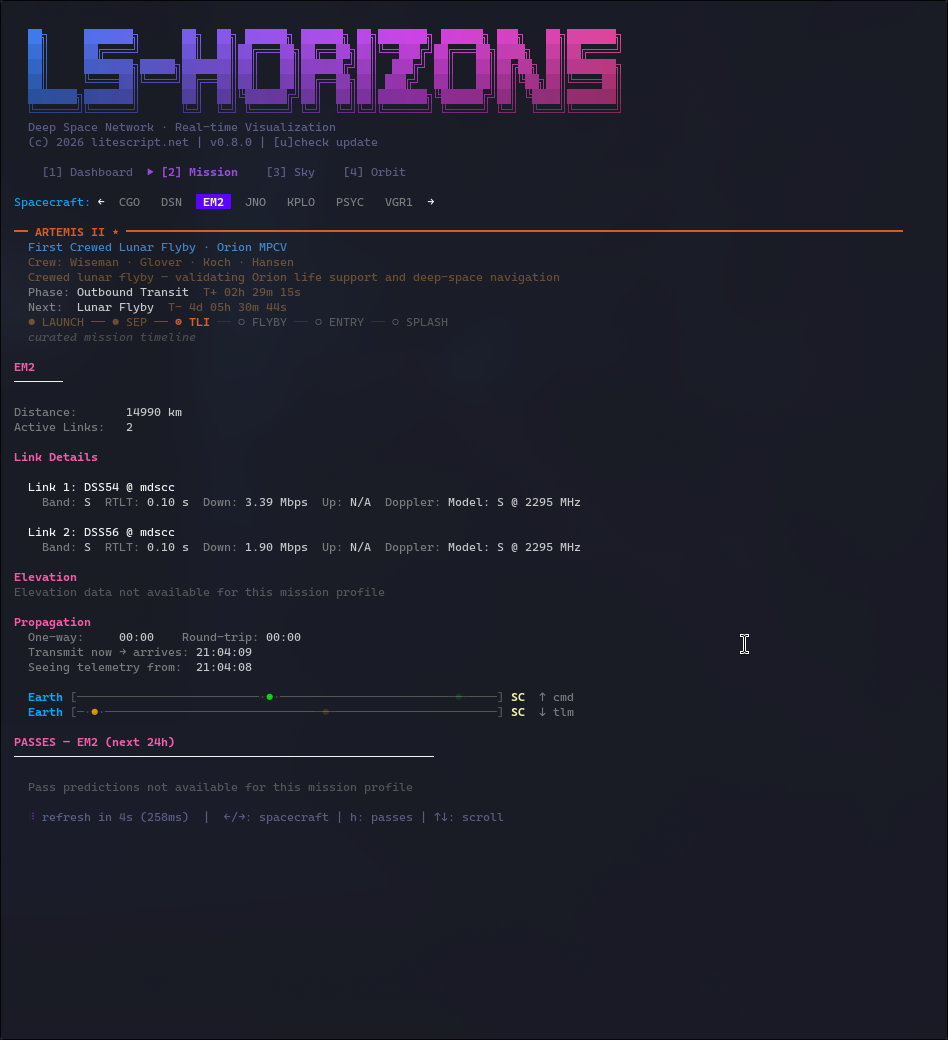
Mission Detail View
Deep dive into individual spacecraft with link details, pass schedules, elevation sparkline, and signal propagation visualizer showing light-time delay with animated pulse. PressEnter from Dashboard to jump directly here. Curated missions (like Voyager 1) show a spotlight panel with phase, MET, and timeline rail — clearly labeled as schedule-derived data.
Sky View
Animated celestial view with real star positions, spacecraft locations, and trajectory path arcs. Smooth camera transitions when cycling between spacecraft.
Orbit View
Solar system visualization showing planets at real positions (via JPL Horizons) and active spacecraft with their trajectories. Toggle star background witht.

Installation
Requirements
- Terminal with truecolor support — The UI uses 24-bit color for gradients and styling. Most modern terminals work fine (iTerm2, Alacritty, Kitty, Windows Terminal, GNOME Terminal, etc.). Basic terminals like older xterm or screen may have limited color support.
- Go 1.21+ — For building from source
From source
go install github.com/litescript/ls-horizons/cmd/ls-horizons@latestMake sure your Go bin directory is on your PATH:
export PATH="$(go env GOPATH)/bin:$PATH"Build locally
git clone https://github.com/litescript/ls-horizons.git
cd ls-horizons
go build -o ls-horizons ./cmd/ls-horizons
Pre-built binaries
Pre-built binaries are available in os-builds/. These are statically linked with no dependencies. Note that they may lag behind the latest source.
Linux (x64):
./os-builds/linux-amd64/ls-horizonsmacOS ARM (Apple Silicon):
./os-builds/mac-arm/ls-horizonsWindows (x64):
.\os-builds\windows-amd64\ls-horizons.exeWindows users: Use Windows Terminal for best results. It's included by default on Windows 11, or install free from the Microsoft Store on Windows 10. The legacy cmd.exe and PowerShell windows have limited color support and may not render correctly. Windows Terminal defaults to a dark background; the legacy blue PowerShell background will look odd with this app.
Usage
Interactive TUI
# Launch with default 5-second refresh
ls-horizons
Custom refresh interval
ls-horizons --refresh 30s
Use specific ephemeris source
ls-horizons --ephem horizons   # JPL Horizons (default)
ls-horizons --ephem dsn        # DSN-derived only
ls-horizons --ephem auto       # Horizons with fallback
Keybindings:
| Key | Action | |-----|--------| | 1 or d | Dashboard view | | 2 or m | Mission detail view | | 3 or s | Sky view | | 4 or o | Orbit view | | Tab | Cycle through views | | Enter | Open Mission view for selected spacecraft (Dashboard) | | j/k or ↑/↓ | Navigate lists | | [/] or ←/→ | Cycle spacecraft (Mission/Sky/Orbit) | | h | Toggle pass panel (Mission view) | | l | Toggle labels (Sky view) | | c | Cycle complex filter (Sky view) | | p | Toggle trajectory path (Sky view) | | t | Toggle star background (Orbit view) | | u | Check for updates | | q | Quit |
Headless Mode
# Print summary table once
ls-horizons --summary
Summary with ASCII mini sky view
ls-horizons --summary --mini-sky
Watch mode: refresh every 30 seconds
ls-horizons --summary --watch 30s
Single-line "now playing" mode
ls-horizons --now
Show card for specific spacecraft
ls-horizons --sc VGR1
Show only changes between fetches
ls-horizons --diff --watch 30s
Beep on important events (TTY only)
ls-horizons --summary --watch 30s --beep
Show event log
ls-horizons --events
Export JSON snapshot to file
ls-horizons --snapshot-path snapshot.json
Export JSON to stdout (for piping)
ls-horizons --snapshot-path -
All Flags
| Flag | Default | Description | |------|---------|-------------| | --refresh | 5s | Data refresh interval (1s - 5m) | | --ephem | auto | Ephemeris source: horizons, dsn, or auto | | --summary | false | Print text summary instead of TUI | | --mini-sky | false | Show ASCII mini sky view | | --now | false | Single-line now-playing mode | | --sc | "" | Show card for specific spacecraft | | --diff | false | Show only changes between fetches | | --beep | false | Beep on important events (TTY only) | | --events | false | Show event log | | --watch | 0 | Repeat output at interval | | --snapshot-path | "" | Export JSON to file (- for stdout) | | --log-level | info | Log level (debug, info, warn, error) | | -l, --log-file | "" | Write logs to file (e.g., ~/ls-horizons.log) |
Data Sources
NASA Deep Space Network
Live telemetry data from NASA's publicly available DSN feed:
https://eyes.nasa.gov/dsn/data/dsn.xmlThe DSN consists of three antenna complexes positioned roughly 120° apart around Earth:
- Goldstone (GDSCC) — Mojave Desert, California, USA
- Canberra (CDSCC) — Tidbinbilla, Australia
- Madrid (MDSCC) — Robledo de Chavela, Spain
JPL Horizons
Spacecraft trajectory data from NASA/JPL's Horizons system:
https://ssd.jpl.nasa.gov/api/horizons.apiUsed for computing accurate sky positions, trajectory path arcs, and range/light-time estimates when DSN data is unavailable. Supports 45+ spacecraft with NAIF SPICE ID mappings including Voyager 1/2, JWST, Mars rovers, Juno, New Horizons, and more.
Yale Bright Star Catalog
Star positions sourced from the Yale Bright Star Catalog and IAU star names. The sky view renders 150+ stars down to magnitude ~4.5, with brightness-based rendering (brighter stars get larger glyphs).
Architecture
cmd/ls-horizons/        Entry point and CLI flags
internal/
├── astro/              Astronomical calculations
│   ├── coords.go       RA/Dec ↔ Az/El transforms, GMST/LST
│   ├── frames.go       Coordinate frame conversions (ecliptic, etc.)
│   ├── visibility.go   Ground station visibility calculations
│   ├── sun.go          Sun position calculations
│   └── stars.go        Star catalog with 150+ bright stars
├── dsn/
│   ├── models.go       Data structures (Station, Antenna, Link, etc.)
│   ├── parser.go       XML feed parsing
│   ├── fetcher.go      HTTP client with retry logic
│   ├── derive.go       Distance, velocity, struggle index
│   ├── passplan.go     Pass planning with elevation thresholds
│   ├── elevtrace.go    Elevation trace computation for sparklines
│   ├── spacecraft.go   Spacecraft catalog with mission metadata
│   ├── spacecraft_view.go  Multi-antenna tracking abstraction
│   ├── solarsystem.go  Solar system cache with planet positions
│   ├── observer.go     DSN complex observer locations
│   └── export.go       JSON and text export
├── ephem/              Ephemeris providers
│   ├── provider.go     EphemerisProvider interface
│   ├── horizons.go     JPL Horizons API client (ephemeris + RA/Dec)
│   ├── dsn_provider.go DSN-derived fallback
│   └── targets.go      NAIF SPICE ID mappings (45+ spacecraft)
├── state/
│   └── state.go        Thread-safe state with pass plan and elevation trace caching
├── missions/           Mission spotlight layer
│   ├── models.go       MissionProfile, SpotlightState, DataProvenance
│   ├── catalog.go      Curated profiles (Voyager 1)
│   ├── aliases.go      Spacecraft name/code resolution
│   ├── runtime.go      Live phase/MET/countdown computation
│   └── viewmodel.go    Display formatting helpers
├── ui/
│   ├── ui.go           Bubble Tea main model with request queue
│   ├── dashboard.go    Dashboard view with Enter→Mission flow and spotlight badges
│   ├── mission_detail.go  Mission view with pass panel, elevation sparkline, and spotlight
│   ├── sky_view.go     Sky projection with braille arc rendering
│   └── solarsystem_view.go  Orbit view with ecliptic projection and mission HUD
├── logging/
│   └── logging.go      Structured logging
└── version/
    └── version.go      Version and update checking
Why "ls-horizons"?
A play on the Unix ls command — this tool lets you "list" what's happening at the horizons of our solar system. Also a nod to NASA's New Horizons mission to Pluto and beyond.
Changelog
- 0.9.1 — Retire completed Artemis II mission profile from spotlight catalog
- 0.9.0 — Mission Spotlight: curated Artemis II & Voyager 1 profiles with live phase/MET/countdown, crew display, timeline rail, data provenance labels, and graceful handling of unsupported ephemeris lookups
- 0.8.0 — Signal propagation delay visualizer, ephemeris range/light-time fallback via Horizons
- 0.7.3 — Fix orbit trace mismatch when rapidly switching focused spacecraft
- 0.7.2 — Fix Mission tab spacecraft selection, fix "pass in now" grammar
- 0.7.1 — Only shimmer update result, not "checking" state
- 0.7.0 — Seamless in-app restart after update (Unix), Windows graceful fallback
- 0.6.0 — Update check UX with shimmer reveal animation, in-app update install
- 0.5.0 — Elevation sparkline in Mission view, per-spacecraft caching
- 0.4.0 — Visibility engine, sun separation angle, Doppler modeling
- 0.3.0 — JPL Horizons ephemeris integration, trajectory path arcs,
--ephemflag - 0.2.0 — Real star catalog, astronomical projection, SpacecraftView abstraction
- 0.1.0 — Initial release: TUI dashboard, sky view, headless modes, event tracking
Contributing
Contributions welcome! Please:
- Fork the repository
- Create a feature branch
- Run tests:
go test ./...andgo vet ./... - Submit a pull request
License
MIT License — see LICENSE for details.
Acknowledgments
- NASA/JPL for the public DSN data feed and Horizons ephemeris system
- Yale Bright Star Catalog for star position data
- Bubble Tea for the excellent TUI framework
- Lip Gloss for terminal styling


