
Universal provider proxy for OpenAI Codex — use any LLM with Codex CLI, App, and SDK
make codex open!
npm install -g @bitkyc08/opencodex · ocx start · localhost:10100


English · 한국어 · 简体中文 · 📖 Full documentation →
Use Claude, Gemini, Grok, GLM, DeepSeek, Kimi, Qwen, Ollama, or any other LLM with Codex — without waiting for OpenAI to add support.
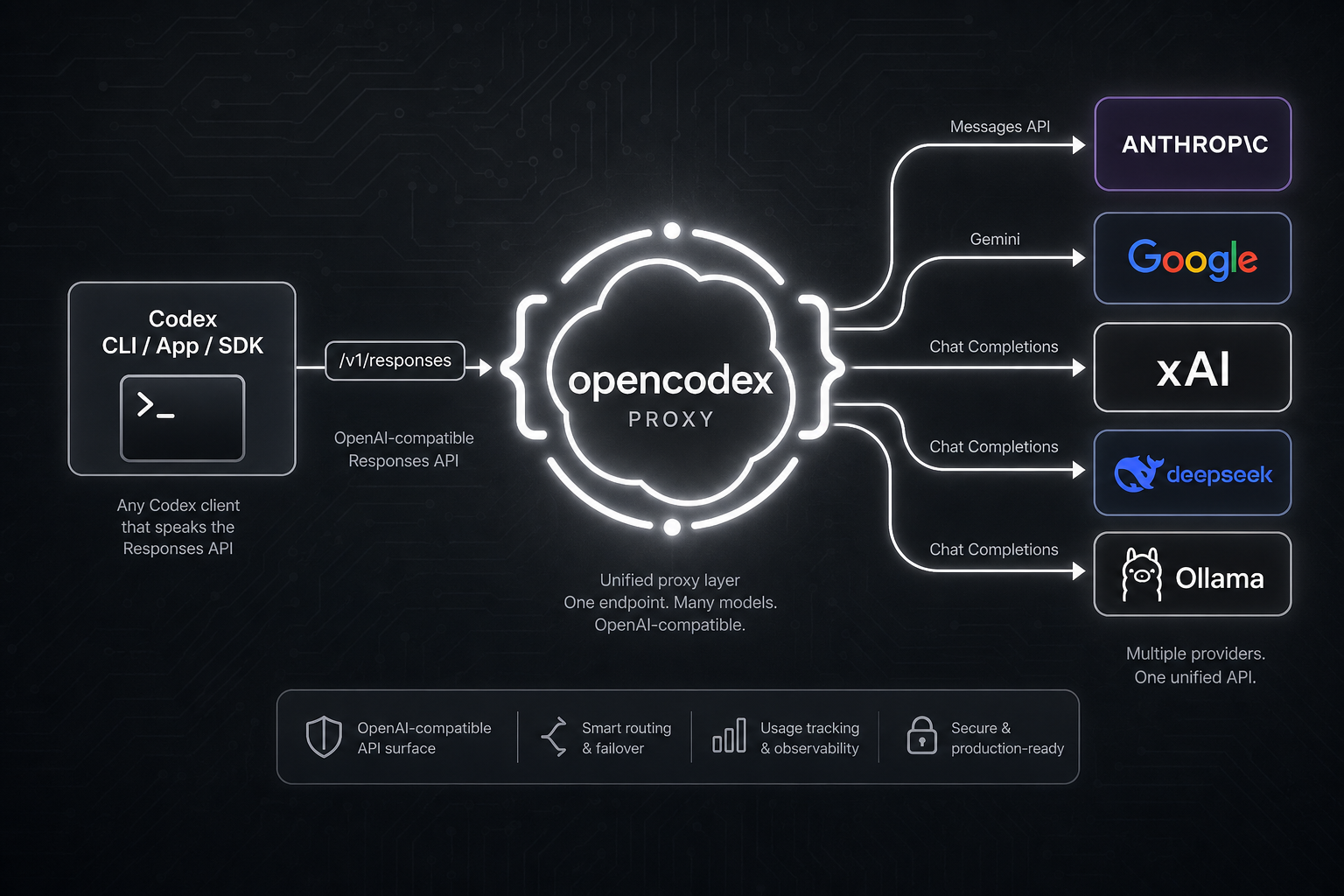
opencodex is a lightweight local proxy that translates Codex's Responses API into whatever your provider speaks. Streaming, tool calls, reasoning tokens, images — everything works, in both directions.

Codex, running any model. Pick a provider and go — same Codex workflow, different brain.
It can also manage a ChatGPT account pool for Codex auth. Add multiple ChatGPT / Codex accounts, refresh their 5h / weekly / 30d quota in the dashboard, and let new sessions auto-route to the lowest-usage healthy account. Existing Codex threads stay pinned to the account that started them, so long SSH, tmux, or mobile-connected sessions do not jump accounts mid-conversation.
Codex CLI / App / SDK ──/v1/responses──▶ opencodex ──▶ Any provider
                                              │
              Anthropic · Google · xAI · Kimi · Ollama Cloud · Groq
              OpenRouter · Azure · DeepSeek · GLM · …and OpenAI itself
flowchart LR
codex[Codex session<br/>CLI, App, SSH, mobile] --> proxy[opencodex]
proxy --> existing{Existing thread?}
existing -->|yes| pinned[Keep the same<br/>ChatGPT account]
existing -->|new session| quota[Refresh quota<br/>5h, weekly, 30d]
quota --> pick[Pick lowest-usage<br/>healthy account]
pick --> upstream[ChatGPT / Codex backend]
pinned --> upstream
upstream --> outcomes[Quota / auth outcome]
outcomes -->|429| cooldown[Cooldown + failover]
outcomes -->|401 / 403| reauth[Mark reauth needed]
cooldown --> quotaSupported platforms
| OS | Status | Service manager | |---|---|---| | macOS (arm64 / x64) | Fully supported | launchd | | Linux (x64 / arm64) | Fully supported | systemd (user unit) | | Windows (x64) | Fully supported | Task Scheduler |
Requires Node 18+. The Bun runtime is bundled automatically on npm install — no separate Bun install needed. All three platforms work natively (no WSL needed on Windows).
Quick start
# Install (bundles the Bun runtime automatically — only Node 18+ required)
npm install -g @bitkyc08/opencodex
Interactive setup (writes config, injects into Codex, and offers autostart shim install)
ocx init
Start the proxy
ocx start
If you skipped it during init, install the on-demand autostart shim later
ocx codex-shim install
Use Codex normally — it now routes through opencodex
codex "Write a hello world in Rust"
"bundled Bun runtime is missing" error?
opencodex bundles the Bun runtime as a dependency and runs it via a Node launcher, so you do not need to install Bun yourself. If you see a "bundled Bun runtime is missing" error, the install skipped lifecycle scripts or optional dependencies. Reinstall without those flags:
npm install -g @bitkyc08/opencodex # no --ignore-scripts, no --omit=optionalAdd a provider
The fastest way to add a provider is through the web dashboard:
ocx guiThis opens the dashboard at http://localhost:10100. From there:
- Click "Add Provider"
- Pick from 40+ built-in providers — or enter a custom OpenAI-compatible endpoint
- Paste your API key (or log in via OAuth for Anthropic, xAI, and Kimi)
- Models are auto-discovered from the provider's
/v1/modelsendpoint
You can also add providers through ocx init (interactive CLI) or by editing ~/.opencodex/config.json directly.
Model routing
Target any configured provider and model using the provider/model syntax:
# Use Claude Opus through Anthropic
codex -m "anthropic/claude-opus-4-8" "Explain this stack trace"
Use Gemini through Google
codex -m "google/gemini-3-pro" "Write unit tests for auth.ts"
Use GLM through Ollama Cloud
codex -m "ollama-cloud/glm-5.2" "Write a SQL migration"
Use a local model through Ollama
codex -m "ollama/llama3" "Refactor this function"
When you omit the provider/ prefix, opencodex routes to the default provider — or auto-matches based on the model name pattern (e.g., claude- routes to Anthropic, gpt- routes to OpenAI).
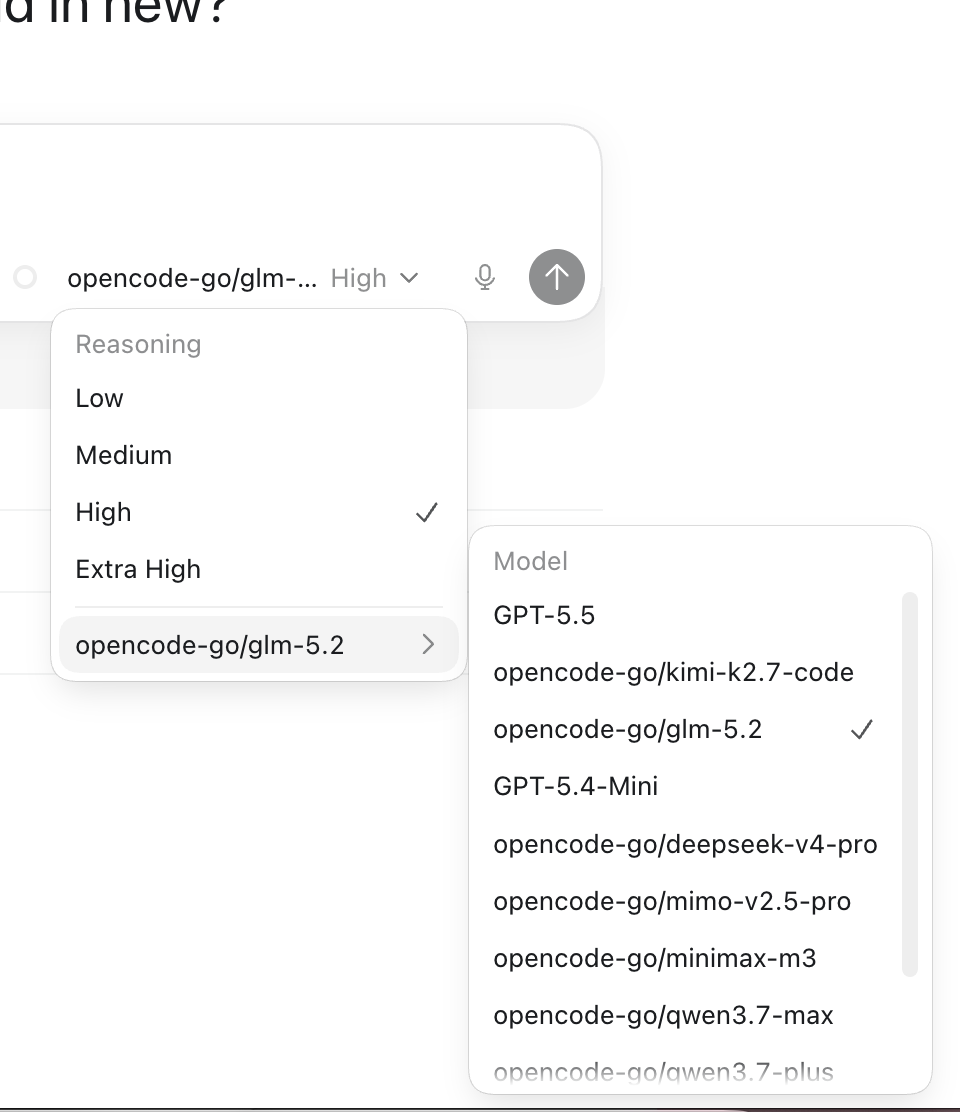
Routed models also appear in the Codex App model picker with per-model reasoning effort controls:
Current Codex builds can expose low, medium, high, xhigh, max, and ultra reasoning controls when a model advertises them. opencodex keeps xhigh and max distinct unless a provider config explicitly maps one to the other. ultra mirrors upstream Codex semantics: it selects maximum reasoning plus proactive multi-agent delegation in the client, and is converted to max before any request reaches a provider. Routed models advertise it only when a provider config opts in via reasoningEfforts.
GPT-5.6 Sol/Terra/Luna are seeded as rollout-ready catalog entries for the OpenAI API key and OpenRouter presets (gpt-5.6-sol, gpt-5.6-terra, gpt-5.6-luna; OpenRouter uses openai/...). They remain preview-gated by upstream availability; opencodex only prepares the routing and catalog metadata for accounts and providers that can serve them.
ChatGPT account pool
Open Codex Auth in the dashboard to add pool accounts and choose which account should handle the next Codex session. opencodex keeps two separate behaviors:
- Existing sessions keep affinity. A thread id is bound to the selected account and reused on
- New sessions can auto-route. When auto-switch is enabled, opencodex compares the hottest known
- Quota lookup is built in. The dashboard can refresh all account quotas in one click, and the
- Failures fail closed. Token failures mark reauthentication instead of falling back to another
Highlights
- Use any LLM with Codex. 5 protocol adapters cover Anthropic Messages, Google Gemini, Azure, OpenAI Responses passthrough, and every OpenAI-compatible Chat Completions endpoint — that's 40+ providers out of the box.
- Pool ChatGPT accounts safely. Keep existing Codex threads on one account while new sessions
- Log in once, skip the API key. OAuth support for xAI, Anthropic, and Kimi means you can authenticate with your existing account. Tokens auto-refresh. Or forward your
codex login, paste an API key, or use${ENV_VAR}references — your call. - Works everywhere Codex does. Injects into Codex CLI, TUI, App, and SDK automatically. Routed models show up in Codex's model picker just like native ones.
- History-safe injection. On local installs the proxy points Codex's own built-in
openaiprovider at itself via a singleopenaibaseurlline — new threads keep their native provider tag, so ongoing chat history is never remapped and an unclean shutdown can't hide it. (Threads re-tagged by older versions are migrated back once on the first start; remote/LAN binds use a dedicated provider entry instead, since they need an API-key header.) - Delegate to the right model. Feature up to five routed or native models in Codex's subagent picker from the dashboard or config — route complex tasks to a reasoning model, fast tasks to a cheap one. On the v2 multi-agent surface (GPT-5.6 Sol/Terra) the proxy injects compact delegation guidance: a preferred sub-agent model and effort (
injectionModel/injectionEffort), the featured-model roster with the effort ladder each supports, and theforkturnsrules that make cross-modelspawnagentcalls actually stick. Want your own wording? SetinjectionPromptwith{{model}}/{{effort}}/{{roster}}placeholders. - Prepare for preview-gated OpenAI rollouts. GPT-5.6 Sol/Terra/Luna entries ship with the exact upstream spec (Sol/Terra reach
ultra, Luna caps atmax; 372k usable context) for ChatGPT passthrough, OpenAI API key, and OpenRouter routes when upstream access is available. - Give any model superpowers. Non-OpenAI models get real web search and image understanding via a
gpt-5.4-minisidecar over your ChatGPT login. - Generate images natively. Codex's standalone
imagegentool usesPOST /v1/images/generationsfor generation andPOST /v1/images/editsfor edits; it is separate from the hosted Responsesimagegenerationtool. - See what's happening. The web dashboard shows providers, OAuth status, model selection, and a live request log, including cached/cache-write token counts when upstream reports them — no more guessing why a request failed.
- Runs in the background. Install as a system service (launchd / systemd / Task Scheduler) and forget about it. The proxy starts on boot and stays out of your way.
- Clean exit, zero residue.
ocx stop(or the dashboard's Stop button) shuts down the proxy, stops the background service if one is installed, and restores Codex to its original configuration. Plaincodexworks exactly as it did before — no leftover config, no orphaned processes.
Providers & adapters
| Provider | Adapter | Auth | |---|---|---| | OpenAI (ChatGPT login) | openai-responses | forward (no key) | | OpenAI (API key) | openai-responses | key | | Umans AI Coding Plan | anthropic | key | | Anthropic Claude | anthropic | oauth / key | | xAI Grok | openai-chat | oauth / key | | Kimi (Moonshot) | openai-chat | oauth / key | | Google Gemini | google | key | | Azure OpenAI | azure-openai | key | | Cursor (experimental) | cursor | dashboard/local config; live transport; unsafe native local exec is opt-in | | Ollama Cloud + 17-provider catalog | openai-chat | key | | Ollama / vLLM / LM Studio (local) | openai-chat | key (usually blank) | | Any OpenAI-compatible endpoint | openai-chat | key |
Plus DeepSeek, Groq, OpenRouter, Together, Fireworks, Cerebras, Mistral, Hugging Face, NVIDIA NIM, MiniMax, Qwen Portal, and more. See the full list with ocx init or in the provider docs.
Cursor support is a staged experimental bridge: it appears in ocx init and the dashboard Add Provider picker as a local config with Cursor's static public model catalog. Live HTTP/2 transport is enabled when a Cursor access token is configured. Cursor server-driven native read/write/delete/ls/grep/shell/fetch execution is disabled by default because it bypasses Codex's approval and sandbox path; set unsafeAllowNativeLocalExec: true only for trusted local experiments. MCP, screen recording, and computer-use are exposed through executor hooks; when no local executor is configured, opencodex returns typed no-executor results instead of policy-blocking the request. Cursor OAuth and live model discovery are enabled for the experimental Cursor adapter.
CLI
ocx init                       # interactive setup
ocx start [--port 10100]       # start the proxy; falls back to a free port if busy
ocx stop                       # stop + restore native Codex
ocx restore                    # restore without stopping (alias: ocx eject)
ocx uninstall                  # remove service/shim/config and restore native Codex
ocx ensure                     # start if needed + refresh Codex config/cache
ocx sync                       # refresh models + re-inject into Codex
ocx codex-shim install         # run ocx ensure whenever codex is launched
ocx status                     # is the proxy running?
ocx login <provider>          # OAuth login (xai, anthropic, kimi, cursor, ...)
ocx logout <provider>          # remove a stored login
ocx gui                        # open the web dashboard
ocx service [install|start|stop|status|uninstall]   # install/update/start background service
ocx update [--tag preview]     # update opencodex; preview installs stay on @preview
Autostart: service vs shim
opencodex has two ways to auto-start the proxy:
| | ocx service / ocx service install | ocx codex-shim install | |---|---|---| | How | OS service manager (launchd / systemd / schtasks) | Wraps script launchers for codex; real codex.exe is left untouched | | When | Always running after login | On-demand — runs ocx ensure when codex is launched | | Restart | Auto-restarts on crash | Starts once per codex invocation | | Codex updates | Unaffected | Repairs on next ocx codex-shim install or ocx update | | Remove | ocx service uninstall | ocx codex-shim uninstall |
Use the service for always-on proxy (recommended for development machines). Use the shim for lightweight, on-demand proxy startup without a background daemon. Shim autostart is enabled by default and can be disabled from the GUI dashboard. If the configured proxy port is already busy, ocx start automatically picks another free local port and updates Codex to use it.
Uninstall
Before removing the npm package, clean up local state:
ocx uninstall
npm uninstall -g @bitkyc08/opencodex
ocx uninstall stops the proxy, removes any installed service, removes the Codex shim, restores native Codex config/catalog/history, and deletes ~/.opencodex.
Configuration
Config lives at ~/.opencodex/config.json. If the file cannot be parsed (e.g. truncated or manually broken JSON), opencodex backs it up to config.json.invalid-<timestamp>, prints a warning, and falls back to defaults — so your original file is never silently lost.
Here's a typical multi-provider setup:
{
  "port": 10100,
  "defaultProvider": "anthropic",
  "providers": {
    "anthropic": {
      "adapter": "anthropic",
      "baseUrl": "https://api.anthropic.com",
      "authMode": "oauth",
      "defaultModel": "claude-sonnet-4-6"
    },
    "ollama-cloud": {
      "adapter": "openai-chat",
      "baseUrl": "https://ollama.com/v1",
      "apiKey": "${OLLAMAAPIKEY}",
      "defaultModel": "glm-5.2"
    }
  }
}
Provider entries can also annotate routed catalog metadata. Use contextWindow for a provider-wide Codex-visible context cap, modelContextWindows for model-specific caps, and modelInputModalities for model-specific catalog input hints such as ["text"] or ["text", "image"]. Context values cap live /models metadata; they never raise a smaller live context window. The bundled GPT-5.6 Sol/Terra/Luna fallback metadata uses a 372,000-token usable context window for OpenAI API key and OpenRouter catalog entries; it does not bypass upstream preview access. See the configuration reference for the full field list.
GLM-5.2 1M context via Z.AI: through theopenai-chatadapter, bothglm-5.2
andglm-5.2[1m]work — opencodex strips the trailing[1m]suffix before
sending the request, since OpenAI-compatible endpoints reject the bracketed id
(Z.AI 400 code 1211). The [1m] suffix is a Claude-Code / Anthropic-endpoint
convention; to use it natively, point the anthropic adapter at Z.AI's coding
base (https://api.z.ai/api/coding/paas/v4). Set the 1M context window via the
model catalog (modelContextWindows), not the model name.
Local models work too. Point opencodex at any OpenAI-compatible server running on your machine:
{
  "port": 10100,
  "defaultProvider": "ollama",
  "providers": {
    "ollama": {
      "adapter": "openai-chat",
      "baseUrl": "http://localhost:11434/v1",
      "authMode": "key",
      "apiKey": "",
      "defaultModel": "llama3"
    },
    "vllm": {
      "adapter": "openai-chat",
      "baseUrl": "http://localhost:8000/v1",
      "authMode": "key",
      "apiKey": "",
      "defaultModel": "Qwen/Qwen3-32B"
    }
  }
}
WebSocket transport is off by default. Set "websockets": true only if you want Codex to advertise and use the Responses WebSocket path instead of HTTP/SSE.
Remote access
By default opencodex binds to 127.0.0.1 (loopback) and requires no extra authentication. If you set "hostname": "0.0.0.0" to expose the proxy on the LAN, opencodex requires a bearer token to protect both the management API (/api/*) and the data-plane (/v1/responses, /v1/images/generations, and /v1/images/edits):
export OPENCODEXAPIAUTH_TOKEN="your-secret-token"
ocx start
The proxy refuses to start without this variable when binding beyond loopback. If you install a background service for LAN access, export the same variable before ocx service install so the service manager receives it. Clients (scripts, remote machines) must include the token in every request:
x-opencodex-api-key: your-secret-tokenThe token is compared in constant time to prevent timing attacks.
opencodex automatically remaps Codex resume history so old OpenAI chats and opencodex-created project threads stay visible in Codex App while the proxy is active. opencodex records the original provider/source metadata in ~/.opencodex/codex-history-backup.json. ocx stop / ocx restore restores backed-up OpenAI rows to OpenAI, and ejects any remaining opencodex user threads to OpenAI as well so native Codex does not try to resume a thread whose provider no longer exists in config.toml.
If you tested an older development build where syncResumeHistory already remapped history before backup support existed, you can also run the explicit recovery command:
ocx recover-history --legacy-openaiSee the Configuration reference for every field.
Documentation
The public docs — install, providers, routing, sidecars, Codex integration, Codex App model picker, and CLI/config reference — are built from docs-site/ and published to lidge-jun.github.io/opencodex.
Maintainer source-of-truth notes live under structure/. Historical investigations remain under docs/.
Development
git clone https://github.com/lidge-jun/opencodex.git
cd opencodex
bun install
bun run dev:proxy    # start the proxy API in dev mode
bun run dev:gui      # start the dashboard dev server in another terminal
bun x tsc --noEmit   # typecheck
bun run dev remains an alias for bun run dev:proxy for compatibility. In a source checkout, the proxy API exposes /healthz, /v1/responses, POST /v1/images/generations, POST /v1/images/edits, and /api/*; GET / serves the packaged dashboard only after bun run build:gui has produced gui/dist. While hacking on the dashboard, run the frontend separately:
bun run dev:guiSee Contributing.
Disclaimer
opencodex is an independent, community-maintained project and is not affiliated with or endorsed by OpenAI, Anthropic, or any other provider.
Some providers — notably Anthropic (Claude) — may suspend or restrict accounts that route API traffic through third-party proxies. Use at your own risk (UAYOR). Before connecting a provider, review its Terms of Service to confirm that proxy-based access is permitted. The opencodex maintainers are not responsible for any account actions taken by upstream providers.
License
MIT


