
LangChain 🔌 MCP
LangChain MCP Adapters
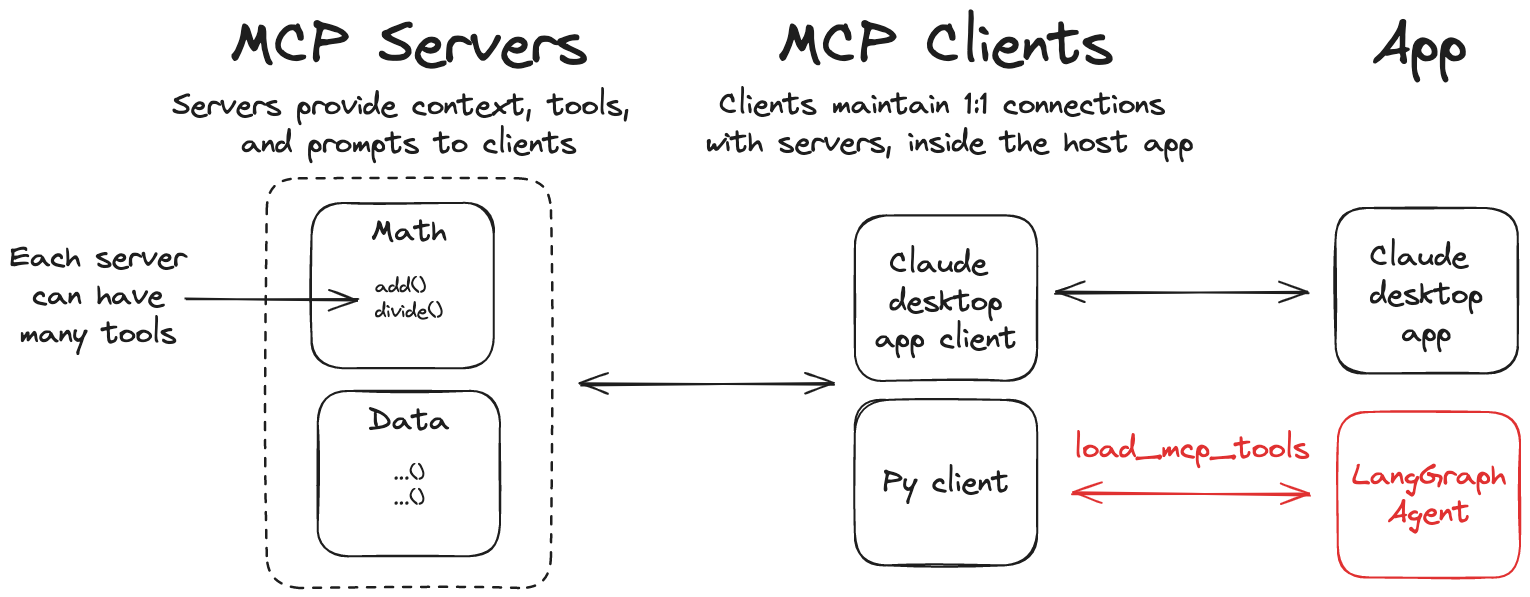
This library provides a lightweight wrapper that makes Anthropic Model Context Protocol (MCP) tools compatible with LangChain and LangGraph.
[!note]
A JavaScript/TypeScript version of this library is also available at langchainjs.
Features
- 🛠️ Convert MCP tools into LangChain tools that can be used with LangGraph agents
- 📦 A client implementation that allows you to connect to multiple MCP servers and load tools from them
Installation
pip install langchain-mcp-adaptersQuickstart
Here is a simple example of using the MCP tools with a LangGraph agent.
pip install langchain-mcp-adapters langgraph "langchain[openai]"
export OPENAIAPIKEY=<yourapikey>
Server
First, let's create an MCP server that can add and multiply numbers.
# math_server.py
from mcp.server.fastmcp import FastMCP
mcp = FastMCP("Math")
@mcp.tool() def add(a: int, b: int) -> int:     """Add two numbers"""     return a + b
@mcp.tool() def multiply(a: int, b: int) -> int:     """Multiply two numbers"""     return a * b
if name == "main":     mcp.run(transport="stdio")
Client
# Create server parameters for stdio connection
from mcp import ClientSession, StdioServerParameters
from mcp.client.stdio import stdio_client
from langchainmcpadapters.tools import loadmcptools from langchain.agents import create_agent
server_params = StdioServerParameters(     command="python",     # Make sure to update to the full absolute path to your math_server.py file     args=["/path/to/math_server.py"], )
async with stdioclient(serverparams) as (read, write):     async with ClientSession(read, write) as session:         # Initialize the connection         await session.initialize()
# Get tools         tools = await loadmcptools(session)
# Create and run the agent         agent = create_agent("openai:gpt-4.1", tools)         agent_response = await agent.ainvoke({"messages": "what's (3 + 5) x 12?"})
Multiple MCP Servers
The library also allows you to connect to multiple MCP servers and load tools from them:
Server
# math_server.py
...
weather_server.py
from typing import List
from mcp.server.fastmcp import FastMCP
mcp = FastMCP("Weather")
@mcp.tool() async def get_weather(location: str) -> str:     """Get weather for location."""     return "It's always sunny in New York"
if name == "main":     mcp.run(transport="http")
python weather_server.pyClient
from langchainmcpadapters.client import MultiServerMCPClient
from langchain.agents import create_agent
client = MultiServerMCPClient(     {         "math": {             "command": "python",             # Make sure to update to the full absolute path to your math_server.py file             "args": ["/path/to/math_server.py"],             "transport": "stdio",         },         "weather": {             # Make sure you start your weather server on port 8000             "url": "http://localhost:8000/mcp",             "transport": "http",         }     } ) tools = await client.get_tools() agent = create_agent("openai:gpt-4.1", tools) math_response = await agent.ainvoke({"messages": "what's (3 + 5) x 12?"}) weather_response = await agent.ainvoke({"messages": "what is the weather in nyc?"})
[!note]
Example above will start a new MCP ClientSession for each tool invocation. If you would like to explicitly start a session for a given server, you can do:
>
> > client = MultiServerMCPClient({...}) > async with client.session("math") as session: > tools = await loadmcptools(session) >> from langchainmcpadapters.tools import loadmcptools
Streamable HTTP
MCP now supports streamable HTTP transport.
To start an example streamable HTTP server, run the following:
cd examples/servers/streamable-http-stateless/
uv run mcp-simple-streamablehttp-stateless --port 3000
Alternatively, you can use FastMCP directly (as in the examples above).
To use it with Python MCP SDK streamablehttp_client:
# Use server from examples/servers/streamable-http-stateless/
from mcp import ClientSession from mcp.client.streamablehttp import streamablehttpclient
from langchain.agents import create_agent from langchainmcpadapters.tools import loadmcptools
async with streamablehttpclient("http://localhost:3000/mcp") as (read, write, ):     async with ClientSession(read, write) as session:         # Initialize the connection         await session.initialize()
# Get tools         tools = await loadmcptools(session)         agent = create_agent("openai:gpt-4.1", tools)         math_response = await agent.ainvoke({"messages": "what's (3 + 5) x 12?"})
Use it with MultiServerMCPClient:
# Use server from examples/servers/streamable-http-stateless/
from langchainmcpadapters.client import MultiServerMCPClient
from langchain.agents import create_agent
client = MultiServerMCPClient(     {         "math": {             "transport": "http",             "url": "http://localhost:3000/mcp"         },     } ) tools = await client.get_tools() agent = create_agent("openai:gpt-4.1", tools) math_response = await agent.ainvoke({"messages": "what's (3 + 5) x 12?"})
Passing runtime headers
When connecting to MCP servers, you can include custom headers (e.g., for authentication or tracing) using the headers field in the connection configuration. This is supported for the following transports:
ssehttp(orstreamable_http)
Example: passing headers with MultiServerMCPClient
from langchainmcpadapters.client import MultiServerMCPClient
from langchain.agents import create_agent
client = MultiServerMCPClient(     {         "weather": {             "transport": "http",             "url": "http://localhost:8000/mcp",             "headers": {                 "Authorization": "Bearer YOUR_TOKEN",                 "X-Custom-Header": "custom-value"             },         }     } ) tools = await client.get_tools() agent = create_agent("openai:gpt-4.1", tools) response = await agent.ainvoke({"messages": "what is the weather in nyc?"})
Onlysseandhttptransports support runtime headers. These headers are passed with every HTTP request to the MCP server.
Tool error handling
MCP distinguishes a tool execution error (CallToolResult(isError=True), e.g. "project not found") from a protocol/transport failure. By default, an execution error is returned to the model as a ToolMessage with status="error", so the agent can see what went wrong and self-correct instead of the run crashing:
client = MultiServerMCPClient({...})
tools = await client.gettools()  # handletool_errors=True by default
To restore the legacy behavior — raising a ToolException on execution errors — set handletoolerrors=False:
client = MultiServerMCPClient({...}, handletoolerrors=False)
or, at the tool-loading level:
tools = await loadmcptools(session, handletoolerrors=False)
The error's content blocks are preserved verbatim on the ToolMessage. The one exception: if the MCP error has no content at all, a minimal placeholder text block is substituted so the tool message isn't empty (a fragile shape for some model providers) — this placeholder is adapter-generated, not server-provided error detail.
>
Transport/session failures and content-conversion errors (e.g. unsupported audio content) always raise regardless of this setting; only MCP execution errors (isError=True) are governed by it.
Using with LangGraph StateGraph
from langchainmcpadapters.client import MultiServerMCPClient
from langgraph.graph import StateGraph, MessagesState, START
from langgraph.prebuilt import ToolNode, tools_condition
from langchain.chatmodels import initchat_model model = initchatmodel("openai:gpt-4.1")
client = MultiServerMCPClient(     {         "math": {             "command": "python",             # Make sure to update to the full absolute path to your math_server.py file             "args": ["./examples/math_server.py"],             "transport": "stdio",         },         "weather": {             # make sure you start your weather server on port 8000             "url": "http://localhost:8000/mcp",             "transport": "http",         }     } ) tools = await client.get_tools()
def call_model(state: MessagesState):     response = model.bind_tools(tools).invoke(state["messages"])     return {"messages": response}
builder = StateGraph(MessagesState) builder.addnode(callmodel) builder.add_node(ToolNode(tools)) builder.addedge(START, "callmodel") builder.addconditionaledges(     "call_model",     tools_condition, ) builder.addedge("tools", "callmodel") graph = builder.compile() math_response = await graph.ainvoke({"messages": "what's (3 + 5) x 12?"}) weather_response = await graph.ainvoke({"messages": "what is the weather in nyc?"})
Using with LangGraph API Server
[!TIP]
Check out this guide on getting started with LangGraph API server.
If you want to run a LangGraph agent that uses MCP tools in a LangGraph API server, you can use the following setup:
# graph.py
from contextlib import asynccontextmanager
from langchainmcpadapters.client import MultiServerMCPClient
from langchain.agents import create_agent
async def make_graph():     client = MultiServerMCPClient(         {             "weather": {                 # make sure you start your weather server on port 8000                 "url": "http://localhost:8000/mcp",                 "transport": "http",             },             # ATTENTION: MCP's stdio transport was designed primarily to support applications running on a user's machine.             # Before using stdio in a web server context, evaluate whether there's a more appropriate solution.             # For example, do you actually need MCP? or can you get away with a simple @tool?             "math": {                 "command": "python",                 # Make sure to update to the full absolute path to your math_server.py file                 "args": ["/path/to/math_server.py"],                 "transport": "stdio",             },         }     )     tools = await client.get_tools()     agent = create_agent("openai:gpt-4.1", tools)     return agent
In your langgraph.json make sure to specify makegraph as your graph entrypoint:
{
  "dependencies": ["."],
  "graphs": {
    "agent": "./graph.py:make_graph"
  }
}


