
A Kubernetes media gateway for WebRTC. Contact: info@l7mp.io










Note: This page documents the latest development version of STUNner. See the documentation for the stable version here.
STUNner: A Kubernetes media gateway for WebRTC
Ever wondered how to deploy your WebRTC infrastructure into the cloud? Frightened away by the complexities of Kubernetes container networking, and the surprising ways in which it may interact with your UDP/RTP media? Read through the endless stream of Stack Overflow questions asking how to scale WebRTC services with Kubernetes, just to get (mostly) insufficient answers? Want to safely connect users behind a NAT without relying on expensive third-party TURN services?
Worry no more! STUNner allows you to deploy any WebRTC service into Kubernetes, smoothly integrating it into the cloud-native ecosystem. STUNner exposes a standards-compliant STUN/TURN gateway for clients to access your virtualized WebRTC infrastructure running in Kubernetes, maintaining full browser compatibility and requiring minimal or no modification to your existing WebRTC codebase. STUNner supports the Kubernetes Gateway API so you can configure it in the familiar YAML-engineering style via Kubernetes manifests.
Table of Contents
Description
WebRTC lacks a virtualization story: there is no easy way to deploy a WebRTC media service into Kubernetes to benefit from the resiliency, scalability, and high availability features we have come to expect from modern network services. Worse yet, the entire industry relies on a handful of public STUN servers and hosted TURN services to connect clients behind a NAT/firewall, which may create a useless dependency on externally operated services, introduce a performance bottleneck, raise security concerns, and come with a non-trivial price tag.
The main goal of STUNner is to allow anyone to deploy their own WebRTC infrastructure into Kubernetes, without relying on any external service other than the cloud-provider's standard hosted Kubernetes offering. STUNner can act as a standalone STUN/TURN server that WebRTC clients and media servers can use as a scalable NAT traversal facility (headless model), or it can act as a gateway for ingesting WebRTC media traffic into the Kubernetes cluster by exposing a public-facing STUN/TURN server that WebRTC clients can connect to (media-plane model). This makes it possible to deploy WebRTC application servers and media servers into ordinary Kubernetes pods, taking advantage of the full cloud native feature set to manage, scale, monitor and troubleshoot the WebRTC infrastructure like any other Kubernetes workload.
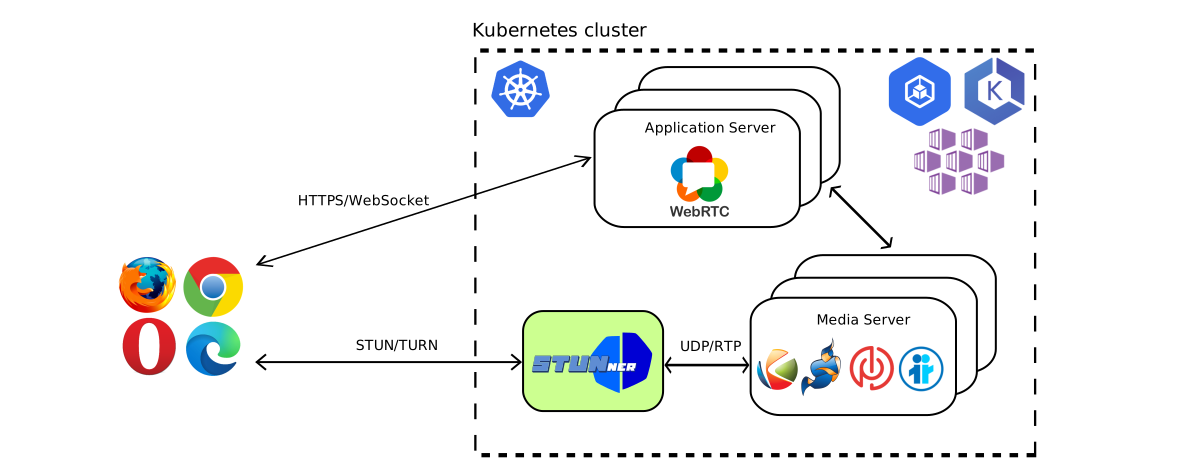
Don't worry about the performance implications of processing all your media through a TURN server: STUNner is extremely fast, it is co-located with your media server pool so you don't pay the round-trip time to a far-away public STUN/TURN server, and it can be easily scaled up if needed just like any other "normal" Kubernetes service.
STUNner comes in multiple flavors. The open-source **STUNner free tier** will suit simple WebRTC applications. Certain advanced features are however available only in STUNner's paid premium editions. The STUNner member tier includes the premium features targeted for small and medium scale operations, while the fully featured **STUNner enterprise tier** is optimized for large-scale deployments. See here for up-to-date info on how to purchase a license.
Features
Kubernetes has been designed and optimized for the typical HTTP/TCP Web workload, which makes streaming workloads, and especially UDP/RTP based WebRTC media, feel like a foreign citizen. STUNner aims to change this state-of-the-art, by exposing a single public STUN/TURN server port for ingesting all media traffic into a Kubernetes cluster in a controlled and standards-compliant way.
- Seamless integration with Kubernetes. STUNner can be deployed into any Kubernetes cluster,
- Secure perimeter defense. No need to open thousands of UDP/TCP ports on your media server for
hostNetwork/hostPort services typically recommended as a prerequisite to containerizing
your WebRTC media plane: with STUNner your media servers will run in ordinary unprivileged
Kubernetes pods exposed on single gateway service.
- No reliance on external services for NAT traversal. Can't afford a hosted TURN
- Scale your WebRTC infrastructure. Tired of manually provisioning your WebRTC media servers?
kubectl scale
command. Better yet, you can use the built in Kubernetes horizontal autoscaler to automatically
resize your workload based on demand.
- Minimal client-side configuration. STUNner comes with a built-in authentication
PeerConnection JavaScript
API and
your clients will readily start using your Kubernetes-based WebRTC service via STUNner.
- Carrier-grade performance. Written in pure Go using the battle-tested
The main use of STUNner is as a Kubernetes-native gateway service for ingesting and load-balancing clients' media connections across a pool of WebRTC media servers hosted in ordinary Kubernetes pods. STUNner however is also usable to deploy a scalable STUN server pool or as a public Kubernetes-based TURN service.
Getting Started
With a minimal understanding of WebRTC and Kubernetes, deploying STUNner should take less than 5 minutes, in five simple steps.
- Customize STUNner and deploy it into your Kubernetes cluster.
- Optionally deploy a WebRTC media server.
- Set STUNner as the ICE server in your WebRTC clients.
- ...
- Profit!!
The simplest way to deploy STUNner is through Helm. STUNner configuration parameters are available for customization as Helm Values.
helm repo add stunner https://l7mp.io/stunner
helm repo update
helm install stunner stunner/stunner --create-namespace --namespace=stunner-system
Find out more about the charts in the STUNner-helm repository.
Usage
STUNner comes with a wide selection of tutorials and demos that teach you how to deploy all kinds of WebRTC services into Kubernetes. The first couple of tutorials present the basic concepts, especially the use of the Kubernetes Gateway API to configure STUNner and the turncat utility to test it. Each subsequent demo showcases a specific WebRTC application, from desktop streaming and video-conferencing to cloud-gaming, and goes from a clean Kubernetes cluster to a working and usable publicly available WebRTC service in 5-10 minutes using a purely declarative configuration.
- Opening a UDP tunnel via STUNner: This tutorial shows
- Video-conferencing with LiveKit: This tutorial helps you deploy
- Video-conferencing with Janus: This tutorial helps you deploy a
- Video-conferencing with Elixir WebRTC: This tutorial helps
- Video-conferencing with Jitsi: This tutorial helps you deploy a
- Video-conferencing with mediasoup: This tutorial helps you
- Cloud-gaming with Cloudretro: This tutorial lets you play
- Remote desktop access with Neko: This demo showcases STUNner
- One to one video call with Kurento: This tutorial
- Magic mirror with Kurento: This tutorial has been
Documentation
The documentation of the stable release can be found here. The documentation for the latest development release can be found here.
Help
STUNner development is coordinated in Discord, feel free to join.
License
Copyright 2021-2026 by its authors. Some rights reserved. See AUTHORS.
MIT License - see LICENSE for full text.


