
DNS Synchronization Service for BIND9



Bindizr is a Rust-based DNS control plane that manages zones and records via an HTTP API or CLI, stores data in a database backend (MySQL, PostgreSQL, or SQLite), and propagates changes to BIND9 secondary servers via AXFR/IXFR using DNS Catalog Zones.
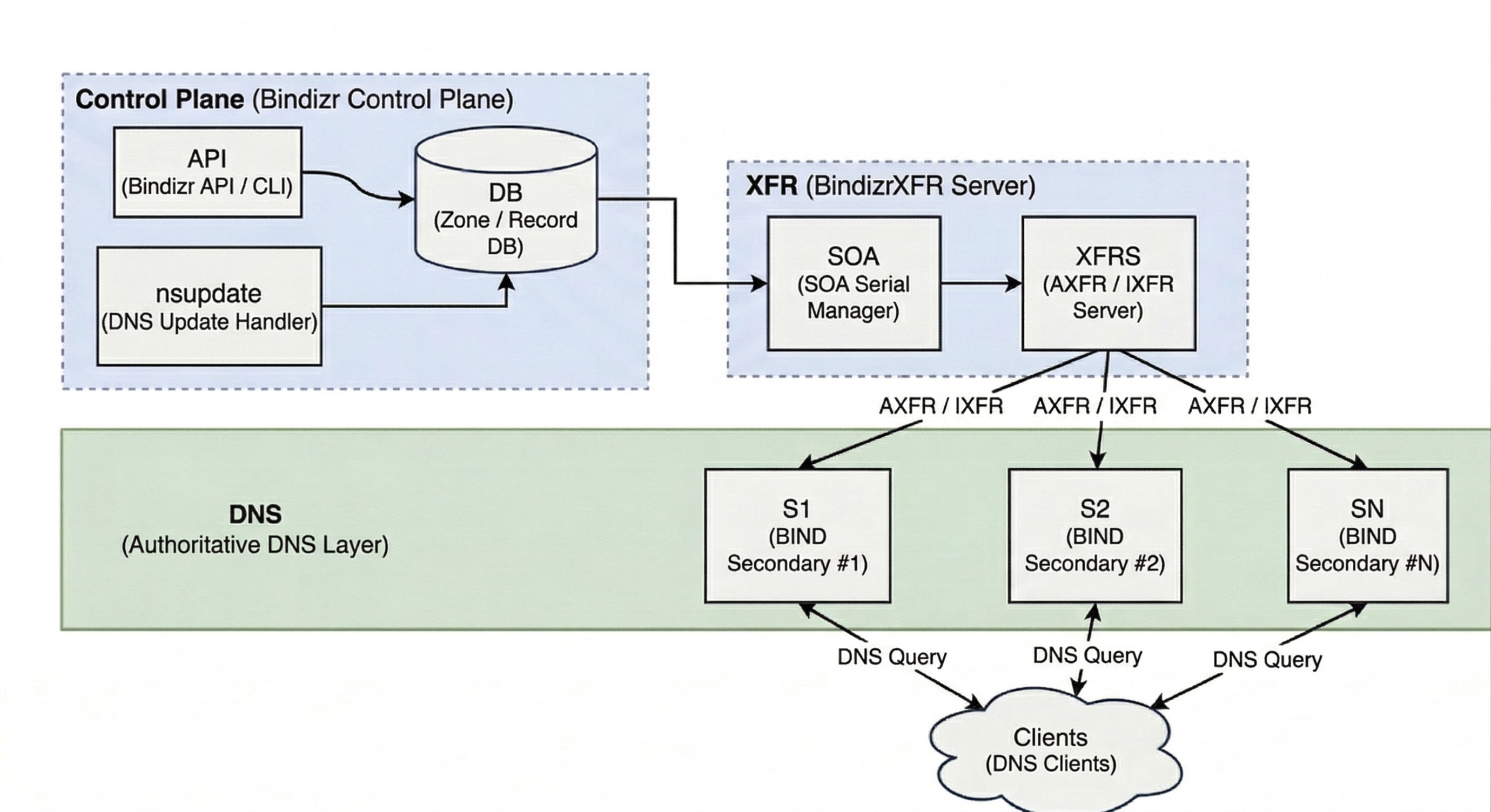
Bindizr owns the zone data and the transfer path; standard BIND9 secondaries discover zones through the catalog zone (RFC 9432) and answer client queries. Adding it in front of BIND9 costs nothing on the query path — Bindizr + BIND9 serves 62,448 QPS against native BIND9's 61,629.
Features
- Zone and Record Management — full CRUD through the HTTP API or CLI, including bulk inserts, BIND master-file import/export, and dry-run diff previews.
- Multiple Database Backends — MySQL, PostgreSQL, or SQLite.
- Zone Transfers (AXFR/IXFR) — automatic SOA serial management and an optional per-serial zone cache.
- Automatic Zone Provisioning — DNS Catalog Zones (RFC 9432) let secondaries discover created and deleted zones without configuration changes.
- DNS NOTIFY — configurable retries and timeouts, plus a sync/async apply mode that batches NOTIFYs under load.
- nsupdate (Dynamic Update) — RFC 2136 dynamic updates with TSIG-signed requests, managed keys, and per-zone update policies.
- Zone History — per-serial snapshots with diffs between serials and rollback.
- Observability — health probe, Prometheus metrics at
/metrics, andbindizr doctorend-to-end diagnostics.
Quick Start
Pick one. Each is walked through in full on the documentation site.
Kubernetes
The chart can bring its own PostgreSQL for a first look; in production, point it at your database instead.
$ helm install bindizr oci://registry-1.docker.io/kweonminsung/bindizr-chart \
  --version 0.1.0-beta.6 --set postgresql.enabled=true
Docker Swarm
Brings up Bindizr, PostgreSQL, and BIND9 on an overlay network.
$ docker stack deploy -c docker-compose.yml bindizrPackage install
$ sudo dpkg -i bindizr*amd64.deb    # Debian, Ubuntu
$ sudo rpm -i bindizr-*.x86_64.rpm    # Fedora, CentOS, RHEL
The package ships a placeholder database URL, so set yours in /etc/bindizr/bindizr.conf.toml before starting. BIND9 has to be pointed at the catalog zone as well — the manual installation guide covers both.
$ sudo systemctl enable --now bindizrHowever you installed it, this checks the whole path end to end:
$ bindizr doctorAPI authentication is on by default for Helm and package installs — the Compose stack ships with it off. Create a token before calling the API:
$ bindizr token createDocumentation
Deployment, configuration, the CLI, the HTTP API, and the benchmarks are all at kweonminsung.github.io/bindizr.
Contributing
Bug reports, documentation fixes, and pull requests are welcome — see CONTRIBUTING.md for the development setup, the test and lint commands, and the project conventions a review will check against.
License
This project is licensed under the Apache License 2.0.


