
Secure GitHub actions with 1 line of code



BOLT:Secure GitHub Actions Runtime with 1 line of code
BOLT is an egress-filter and runtime security tool for your GitHub Actions environment.
Usage
Add this step to jobs in your GitHub workflow file(s) to secure your runner:
- name: Setup Bolt
  uses: koalalab-inc/bolt@v1
BOLT is packaged as a GitHub Action, which means you can easily add it to your workflows and start controlling the egress traffic from your pipelines.
[!NOTE]>
Supports both public and private repositories
Why use BOLT?
Ther aftermath of Solarwinds breach has led to an increase in software supply chain attacks.
CI/CD pipelines are the infrastructure of which the software is built, they are the keys to the cloud kingdom, and are high-leverage attack surfaces.
OWASP top 10 CI/CD and CISA+NSA's joint guidance on defending CI/CD are really great starting points to understand the threat vectors surrounding CI/CD. An adaption of the same for GitHub environment would look a little like:
and specifically focussing on the CI runtime threat vectors(and their solution):
BOLT covers both the threat vectors by
- Transparent Egress filtering mechanism which allows traffic only to trusted
- Detection of actions with Sudo permissions to prevent against file-tampering
How to use Bolt - Video Introduction
https://github.com/koalalab-inc/bolt/assets/2908925/7bf51186-e673-4bed-9b56-ae15c7ab9154
Usage
You can start using Bolt by adding the koalalab-inc/bolt action as the first step in the jobs you want to monitor. The action will install and start the Bolt service on the runner. Checkout the configuration options and defaults here.
- name: Setup Bolt
  uses: koalalab-inc/bolt@v1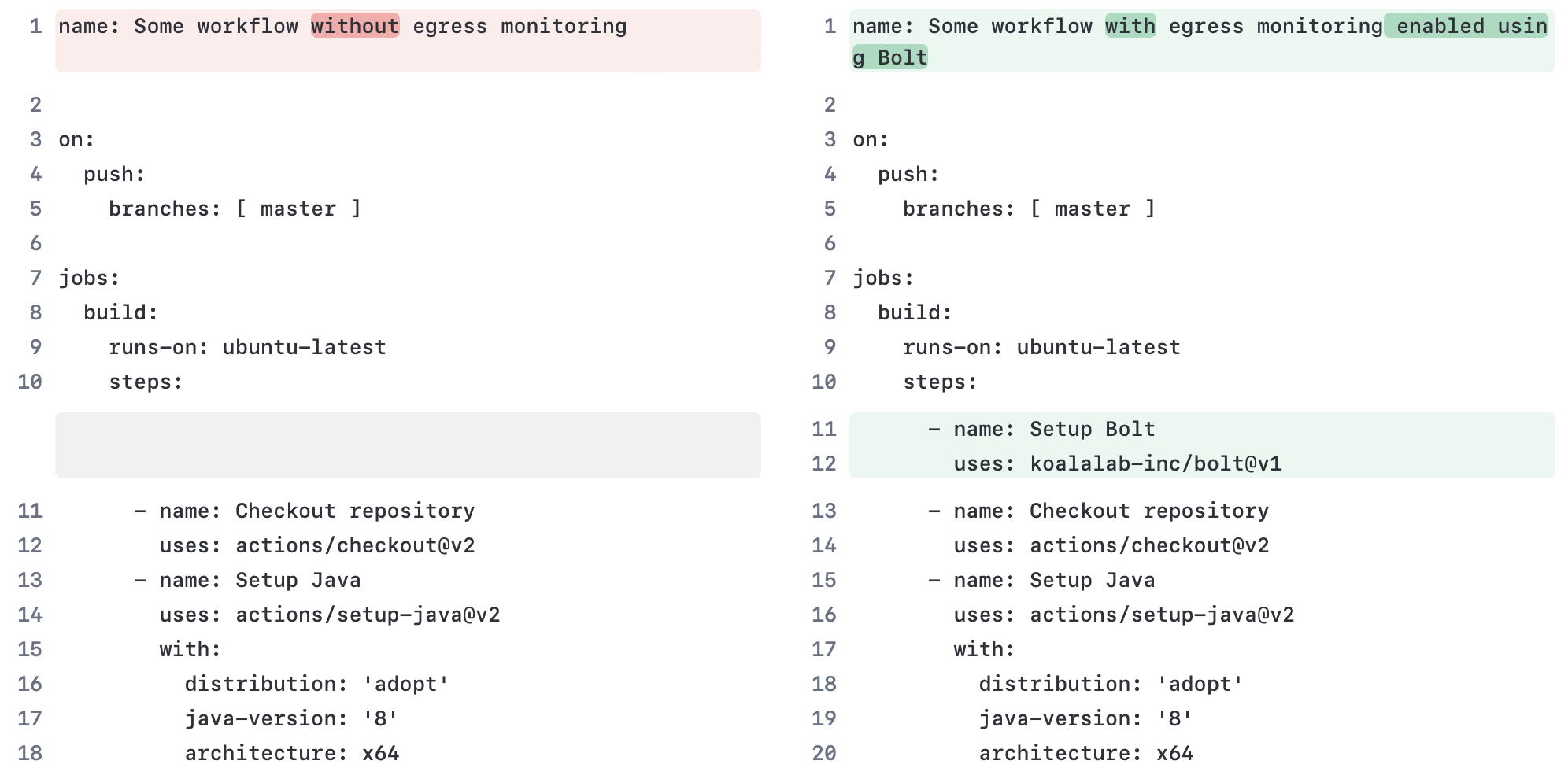
Configure
You can configuree the Bolt action using inputs. Here is an example of how to configure the action.
- name: Setup Bolt
  uses: koalalab-inc/bolt@v1
  with:
    mode: 'audit'
    egress_rules: |
      - name: 'Allow GitHub subs'
        destination: '*.github.com'
        action: 'allow'
    disablepasswordlesssudo: 'false'
    default_policy: 'block-all'
    allow_http: 'false'
    graceful: 'true'
| Option | Description | | --------------------------- | ----------------------------------------------------------------------------------------------------- | | mode | Configure the mode of operation for the Bolt gateway. It can be audit or active. Default: audit | | egress_rules | A list of custom egress rules to be applied. Default: []. | | disablepasswordlesssudo | Whether to disable passwordless sudo or not. Default: false | | allow_http | Whether to allow non-secure HTTP requests or not. Default: false | | default_policy | It can be either block-all or allow-all. Default: block-all | | graceful | Whether to gracefully fail in case of unsupported platforms or not. Default: true |
Custom Egress Policy
You can define custom egress rules to control the egress traffic from your pipelines. Here is an example of how to define custom egress rules.
In audit mode, the Bolt gateway will log the egress traffic as per the defined rules. In active mode, the Bolt gateway will enforce the defined rules.
Egress rule options: | Option | Description | ---------------------------------|--------------------------------- | name | A name for the rule | | destination | The destination domain or IP address. * wilcard is supported in destination. | | action | The action to be taken. It can be allow or block |
It is an ordered list of rules. The first rule that matches the destination will be applied.
- name: Setup Bolt
  uses: koalalab-inc/bolt@v1
  with:
    mode: 'audit'
    default_policy: 'block-all'
    allow_http: 'false'
    egress_rules: |
      - name: 'Allow GitHub subdomains'
        destination: '*.github.com'
        action: 'allow'
      - name: 'Block api subdomain'
        destination: 'api.example.com'
        action: 'block'
      - name: 'Allow other subdomains'
        destination: '*.example.com'
        action: 'allow'
Report in workflow logs
Once the job is over, bolt will add a egress traffic report to the job summary. The report will show the egress traffic and the rules that were applied. A sample report is shown below.
⚡ Egress Report - powered by Bolt
🛠️ Bolt Configuration
| Mode | audit |
| Allow HTTP | false |
| Default Policy | block-all |
📝 Egress rules
- destination: google.com action: block name: Block Google - destination: ifconfig.me
action: allow name: Allow ifconfig.meEgress Traffic
NOTE: Running in Audit mode. Unknown/unverified destinations will be blocked in Active mode.
🚨 Unknown Destinations
| Destination | Scheme | Rule | Action |
|---|---|---|---|
| www.google.com | https | Default Policy - block-all | Unknown Destination |
✅ Known Destinations
| Destination | Scheme | Rule | Action |
|---|---|---|---|
| github.com | https | Reqd by Github Action | ✅ |
| pipelinesghubeus6.actions.githubusercontent.com | https | Reqd by Github Action | ✅ |
| results-receiver.actions.githubusercontent.com | https | Reqd by Github Action | ✅ |
| ifconfig.me | https | Allow ifconfig.me | ✅ |
| api.github.com | https | Reqd by Github Action | ✅ |
View detailed analysis of this run on Koalalab!
This report was generated using this workflow file: bolt-sample.yml
[!NOTE]>
We have removed SSL inspection features from Bolt. It had some compatibility
issues with certain package managers. We will soon release a new version with
improved SSL inspection capabilities.
Usage and Limitations
BOLT is available to use for private as well as public repository on GitHub hosted ubuntu runners. Contact us if you want to use BOLT on self-hosted runners.


