
A tool to download and set desktop wallpapers from Reddit
Redpaper
Overview
Redpaper is a simple tool that is used to download and set new wallpapers. It gets the images from reddit.com.If you frequently search for, download and set wallpapers, or like to give you system a new look, you this tool is for you. When you want to change the wallpaper, you simply run Redpaper's download tool and it will scout Reddit for the best wallpaper of the day and download them. You can then change the wallpaper using it.
Installation
If you are running Arch or Arch-based distro, you can install from aur:yay -S redpaper-git
Redpaper only works on Linux systems at the moment, therefor only people running Linux can use it.
Dependencies
- Python 3.6 or later
- Python3-pip
- Requests
- Pillow
- PyGObject
- xwallpaper (only if you use tiling window managers)
python3 in your terminal. If you get no errors, then you can proceed. If you get an error, you should visit python.org to get it. Pip comes by default with Python. If for some reason you don't have it, you can run: https://bootstrap.pypa.io/get-pip.py -o get-pip.pyget-pip.pyProcedure
When the first two dependencies have been met, you can run the following command to do the install:clone https://github.com/keystroke3/redpaper.git && cd redpaper && sudo sh install.shTiling window managers
If you are running a tiling window manager like i3, bspwm etc.. you will need to add this to your autostart files e.g. ~/.config/bspwm/bspwmrc if you are using bspwm:$HOME/.redpaper/wallapaper.shUsage
To use, simply runredpaper in the terminal.
Once the installation is complete, you can use Redpaper in two ways, with command mode and with
and with interactive shell.
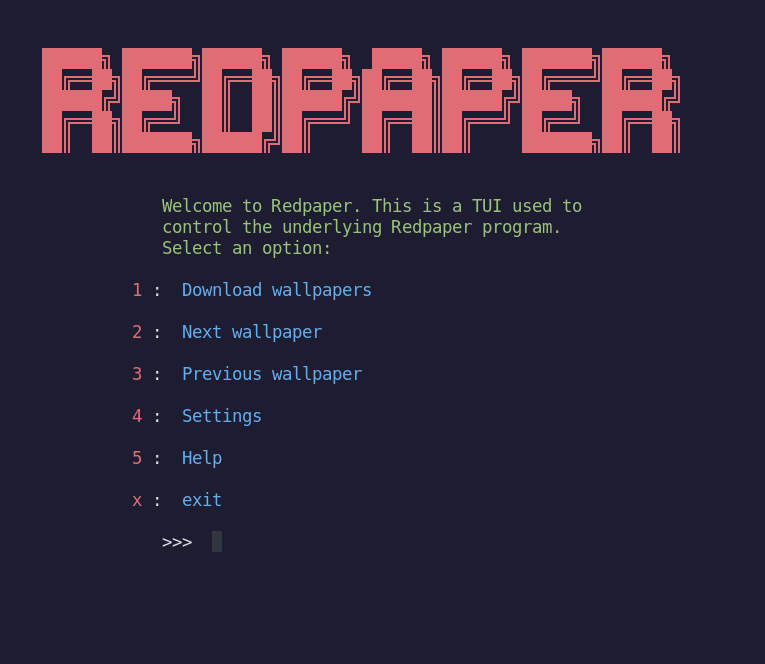
Interactive mode (TUI)
You can also run redpaper in interactive mode, that does not involve typing commands. To actaivate this mode, simply run redpaper without any arguments to bring it up.Command Line Mode (CLI)
You can run the redpaper command with arguments to perform tasks. You can also pass a file name, folder name or list of folder names that contain images, in the formredpaper FILE redpaper FOLDER1, FOLDER2...
The list of arguments can be
listed by running redpaper -h or redpaper --help
Options
| flag | name | Descritpion |-|-|-| | -d | --download | Downloads new wallpapers | -c | --change | sets the next image in list as wallapper. Sets the first one in the list after a the list has been updated or at EOL | -b | --back | Sets the previous image in the list as wallpaper | -a | --all | Download new wallpapers and set the first one | -l | --limit LIMIT | Number of wallpapers to look for. This is not the number of file that will be downloaded. A check is done to make sure the images are 16:9 aspect ratio or close to it. Default = 5 | -p | --path PATH | Sets the download location for new wallpapers. | -i | --image IMAGE | Sets a specified image as wallpaper. | -r | --sub STRING |Sets a user specified subreddit(s) as source | -f | --folder [FOLDER ...] | Uses images stored in the specified folder. Multiple folders can be added | -s | --settings | change settings permanently. Use this in combination with other modifier flags to make them modifications permanent. E.g.redpaper -sl 10 will set the look up limit to 10.
Keep in mind that settings will be ignored when the alternative value is passed as an argument in command mode. The behavior of the program can be slightly modified by the user. Currently, there are only a few changes that can be made. The settings are:


