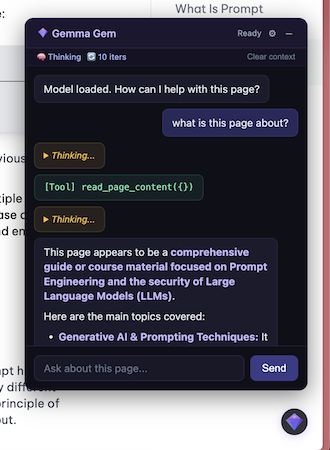
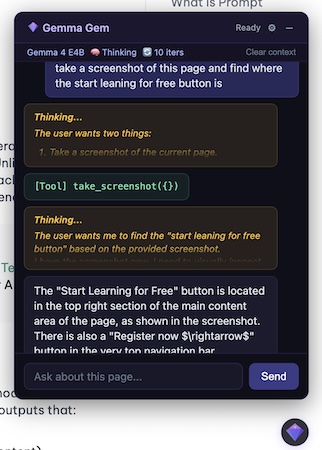
Gemma Gem runs Google's Gemma 4 model entirely on-device via WebGPU — no API keys, no cloud, no data leaving your machine.
Gemma Gem
Your personal AI assistant living right inside the browser. Gemma Gem runs Google's Gemma 4 model entirely on-device via WebGPU — no API keys, no cloud, no data leaving your machine. It can read pages, click buttons, fill forms, run JavaScript, and answer questions about any site you visit.
Requirements
- Chrome with WebGPU support
- ~500MB disk for E2B model, ~1.5GB for E4B (cached after first run)
Setup
pnpm install
pnpm build
Load the extension in chrome://extensions (developer mode) from .output/chrome-mv3-dev/.
Usage
- Navigate to any page
- Click the gem icon (bottom-right corner) to open the chat
- Wait for model to load (progress shown on icon + chat)
- Ask questions about the page or request actions
Architecture
Offscreen Document          Service Worker           Content Script
(Gemma 4 + Agent Loop)  <-> (Message Router)    <-> (Chat UI + DOM Tools)
       |                         |
  WebGPU inference          Screenshot capture
Token streaming JS execution- Offscreen document: Hosts the model via
@huggingface/transformers+ WebGPU. Runs the agent loop. - Service worker: Routes messages between content scripts and offscreen document. Handles
takescreenshotandrunjavascript. - Content script: Injects gem icon + shadow DOM chat overlay. Executes DOM tools (
readpagecontent,clickelement,typetext,scroll_page).
Tools
| Tool | Description | Runs in | |------|-------------|---------| | readpagecontent | Read text/HTML of the page or a CSS selector | Content script | | take_screenshot | Capture visible page as PNG | Service worker | | click_element | Click an element by CSS selector | Content script | | type_text | Type into an input by CSS selector | Content script | | scroll_page | Scroll up/down by pixel amount | Content script | | run_javascript | Execute JS in the page context with full DOM access | Service worker |
Settings
Click the gear icon in the chat header:
- Model: Switch between Gemma 4 E2B (~500MB) and E4B (~1.5GB). Selection persists across sessions.
- Thinking: Toggle native Gemma 4 thinking
- Max iterations: Cap on tool call loops per request
- Shortcuts: Rebind the keyboard shortcuts that toggle and close the chat. Click a shortcut field, press the key combination you want, and it's saved. The
↺button resets a shortcut to its default. Defaults: Alt+G toggles the chat, Escape closes it. Bindings persist across sessions. - Clear context: Reset conversation history for the current page
- Disable on this site: Disable the extension per-hostname (persisted)
Keyboard Shortcuts
| Shortcut | Action | Default | |----------|--------|---------| | Toggle chat | Open/close the chat overlay from anywhere on the page | Alt+G | | Close chat | Close the overlay when it's open | Escape |
Both are rebindable from the gear-icon settings panel (see Shortcuts above).
Development
pnpm build              # Development build (with logging, source maps)
pnpm build:prod         # Production build (logging silenced, minified)
Tech Stack
- WXT — Chrome extension framework (Vite-based)
- @huggingface/transformers — Browser ML inference
- marked — Markdown rendering in chat
- Gemma 4 E2B / E4B (
onnx-community/gemma-4-E2B-it-ONNX,onnx-community/gemma-4-E4B-it-ONNX) — q4f16 quantization, 128K context
Debugging
All logs are prefixed with [Gemma Gem]. In development builds, info/debug/warn logs are active. Production builds only log errors.
- Service worker logs:
chrome://extensions→ Gemma Gem → "Inspect views: service worker" - Offscreen document logs:
chrome://extensions→ Gemma Gem → "Inspect views: offscreen.html" - Content script logs: Open DevTools on any page → Console
- All extension pages:
chrome://inspect#otherlists all inspectable extension contexts (service worker, offscreen document, etc.)
Hardware Requirements (WebGPU)
Estimated minimal requirements (not benchmarked on real devices)
| | E2B (~500 MB) | E4B (~1.5 GB) | |---|---|---| | GPU VRAM / Shared Memory | 4 GB | 6 GB | | System RAM | 6-8 GB | 8-16 GB | | Browser | Chrome 113+ / Edge 113+ with WebGPU | Same | | GPU Feature | shader-f16 required | Same |
- Integrated GPUs: Intel Xe (Arc), Apple M1+, Qualcomm Adreno work with sufficient shared memory
- Discrete GPUs: Any with 4 GB+ VRAM (e.g. GTX 1650, RX 6500 XT)
- Mobile: iPhone A14+, Snapdragon 8 Gen 1+ (slow)
- Performance: Slow on integrated GPUs, normal on mid-range discrete GPUs, fast on high-end GPUs
- At long contexts (128K), KV cache adds 10-20% memory overhead on top of model weights