
tbls is a CI-Friendly tool to document a database, written in Go.






tbls (pronounced /ˈteɪbl̩z/) is a CI-Friendly tool to document a database, written in Go.
Key features of tbls are:
- Document a database automatically in GFM format. Output database schema in many formats.
- Single binary = CI-Friendly.
- Support many databases.
- Work as linter for database
Table of Contents
- Quick Start - Install - Getting Started - Document a database - Diff database and (document or database) - Lint a database - Measure document coverage - Continuous Integration - Configuration - Name - Description - Labels - DSN - Support Datasource - Document path - Document format - ER diagram - Filter tables - Lint - Comments - Relations - Viewpoints - Dictionary - Personalized Templates - Required Version - Expand environment variables - Output formats - Command arguments - Environment variables
Quick Start
Document a database with one command.
$ tbls doc postgres://dbuser:dbpass@hostname:5432/dbnameUsing docker image.
$ docker run --rm -v $PWD:/work -w /work ghcr.io/k1low/tbls doc postgres://dbuser:dbpass@hostname:5432/dbnameInstall
deb:
$ export TBLS_VERSION=X.X.X
$ curl -o tbls.deb -L https://github.com/k1LoW/tbls/releases/download/v$TBLSVERSION/tbls$TBLSVERSION-1amd64.deb
$ dpkg -i tbls.deb
RPM:
$ export TBLS_VERSION=X.X.X
$ yum install https://github.com/k1LoW/tbls/releases/download/v$TBLSVERSION/tbls$TBLSVERSION-1amd64.rpm
Homebrew:
$ brew install tblsMacPorts:
$ sudo port install tblsaqua:
$ aqua g -i k1LoW/tblsManually:
Download binary from releases page
go install:
$ go install github.com/k1LoW/tbls@latestDocker:
$ docker pull ghcr.io/k1low/tbls:latestOn GitHub Actions:
# .github/workflows/doc.yml
name: Document
on:   push:     branches:       - main
jobs:   doc:     runs-on: ubuntu-latest     steps:       -         name: Checkout .tbls.yml         uses: actions/checkout@v3       -         uses: k1low/setup-tbls@v1       -         name: Run tbls for generate database document         run: tbls doc
:octocat: A GitHub Action for tbls is here.
Temporary:
$ source <(curl https://raw.githubusercontent.com/k1LoW/tbls/main/use)$ curl -sL https://raw.githubusercontent.com/k1LoW/tbls/main/use > /tmp/use-tbls.tmp && . /tmp/use-tbls.tmpGetting Started
Document a database
Add .tbls.yml (or tbls.yml) file to your repository.
# .tbls.yml
DSN (Database Source Name) to connect database
dsn: postgres://dbuser:dbpass@localhost:5432/dbname
Path to generate document
Default is dbdoc
docPath: doc/schema
Notice: If you are using a symbol such as#<in database password, URL-encode the password
Run tbls doc to analyzes the database and generate document in GitHub Friendly Markdown format.
$ tbls docCommit .tbls.yml and the document.
$ git add .tbls.yml doc/schema
$ git commit -m 'Add database document'
$ git push origin main
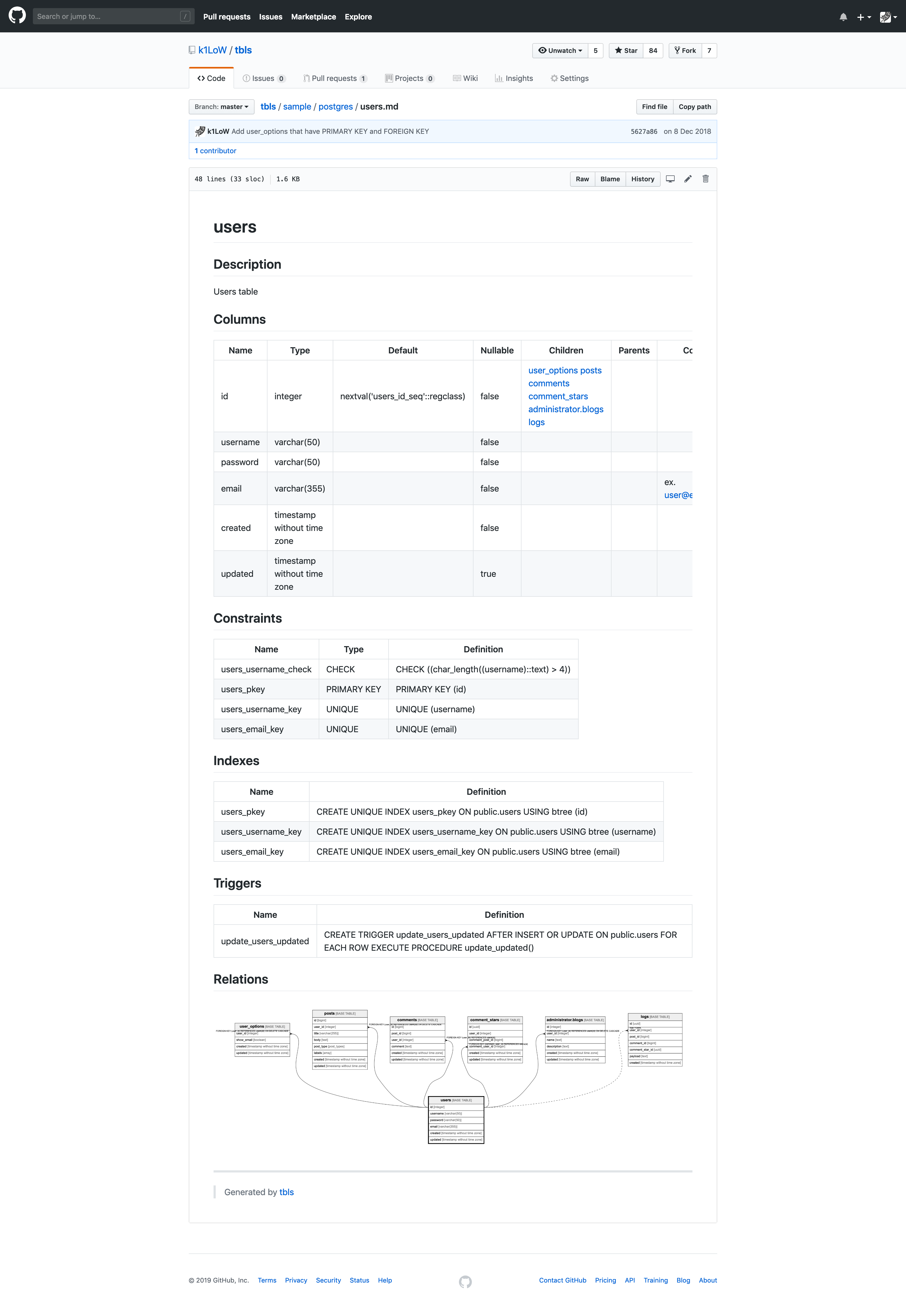
View the document on GitHub.
Diff database and (document or database)
Update database schema.
$ psql -U dbuser -d dbname -h hostname -p 5432 -c 'ALTER TABLE users ADD COLUMN phone_number varchar(15);'
Password for user dbuser:
ALTER TABLE
tbls diff shows the difference between database schema and generated document.
$ tbls diff
diff postgres://dbuser:*@hostname:5432/dbname doc/schema/README.md
--- postgres://dbuser:*@hostname:5432/dbname
+++ doc/schema/README.md
@@ -4,7 +4,7 @@
| Name | Columns | Comment | Type |  | ---- | ------- | ------- | ---- | -| users | 7 | Users table | BASE TABLE | +| users | 6 | Users table | BASE TABLE |  | user_options | 4 | User options table | BASE TABLE |  | posts | 8 | Posts table | BASE TABLE |  | comments | 6 | Comments<br />Multi-line<br />table<br />comment | BASE TABLE | diff postgres://dbuser:*@hostname:5432/dbname doc/schema/users.md --- postgres://dbuser:*@hostname:5432/dbname +++ doc/schema/users.md @@ -14,7 +14,6 @@  | email | varchar(355) |  | false |  |  | ex. user@example.com |  | created | timestamp without time zone |  | false |  |  |  |  | updated | timestamp without time zone |  | true |  |  |  | -| phone_number | varchar(15) |  | true |  |  |  |
## Constraints
And, tbls diff support for diff checking between database and other database
$ tbls diff postgres://dbuser:@local:5432/dbname postgres://dbuser:@production:5432/dbnameNotice: tbls diff shows the difference Markdown documents only.
Re-generating database documentation
Existing documentation can re-generated using either --force or --rm-dist flag.
--force forces overwrite of the existing documents. It does not, however, remove files of removed tables.
$ tbls doc --force--rm-dist removes files in docPath before generating the documents.
$ tbls doc --rm-distLint a database
Add linting rule to .tbls.yml following
# .tbls.yml
lint:
  requireColumnComment:
    enabled: true
    exclude:
      - id
      - created
      - updated
  columnCount:
    enabled: true
    max: 10
Run tbls lint to check the database according to lint: rules
$ tbls lint
users.username: column comment required.
users.password: column comment required.
users.phone_number: column comment required.
posts.user_id: column comment required.
posts.title: column comment required.
posts.labels: column comment required.
comments.post_id: column comment required.
commentstars.userid: column comment required.
post_comments.comment: column comment required.
posts: too many columns. [12/10]
comments: too many columns. [11/10]
11 detected
Measure document coverage
tbls coverage measure and show document coverage (description, comments).
$ tbls coverage
Table                       Coverage
All tables                  16.1%
 public.users               20%
 public.user_options        37.5%
 public.posts               35.3%
 public.comments            14.3%
 public.comment_stars       0%
 public.logs                12.5%
 public.post_comments       87.5%
 public.postcommentstars  0%
 public.CamelizeTable       0%
 public.hyphen-table        0%
 administrator.blogs        0%
 backup.blogs               0%
 backup.blog_options        0%
 time.bar                   0%
 time.hyphenated-table      0%
 time.referencing           0%
Continuous Integration
Continuous integration using tbls.
- Commit the document using
tbls doc. - Update the database schema in the development cycle.
- Check for document updates by running
tbls diffortbls lintin CI. - Return to 1.
# .travis.yml
language: go
install:   - source <(curl -sL https://raw.githubusercontent.com/k1LoW/tbls/main/use) script:   - tbls diff   - tbls lint
Tips: If your CI based on Debian/Ubuntu (/bin/sh -> dash), you can use the following install commandcurl -sL https://raw.githubusercontent.com/k1LoW/tbls/main/use > use-tbls.tmp && . ./use-tbls.tmp && rm ./use-tbls.tmp
Tips: If the order of the columns does not match, you can use the --sort option.
Configuration
Name
name: is used to specify the database name of the document.
# .tbls.yml
name: mydatabase
Description
desc: is used to specify the database description.
# .tbls.yml
desc: This is My Database
Labels
labels: is used to label the database or tables.
label database:
# .tbls.yml
labels:
  - cmdb
  - analytics
label tables:
# .tbls.yml
comments:
  -
    table: users
    labels:
      - user
      - privacy data
label columns:
# .tbls.yml
comments:
  -
    table: users
    columnLabels:
      email:
        - secure
        - encrypted
DSN
dsn: (Data Source Name) is used to connect to database.
# .tbls.yml
dsn: my://dbuser:dbpass@hostname:3306/dbname
Support Datasource
tbls supports the following databases/datasources.
PostgreSQL:
# .tbls.yml
dsn: postgres://dbuser:dbpass@hostname:5432/dbname
# .tbls.yml
dsn: pg://dbuser:dbpass@hostname:5432/dbnameWhen you want to disable SSL mode, add "?sslmode=disable" For example:
dsn: pg://dbuser:dbpass@hostname:5432/dbname?sslmode=disableMySQL:
# .tbls.yml
dsn: mysql://dbuser:dbpass@hostname:3306/dbname
# .tbls.yml
dsn: my://dbuser:dbpass@hostname:3306/dbnameWhen you want to hide AUTO_INCREMENT clause on the table definitions, add "?hideautoincrement". For example:
dsn: my://dbuser:dbpass@hostname:3306/dbname?hideautoincrementMariaDB:
# .tbls.yml
dsn: mariadb://dbuser:dbpass@hostname:3306/dbname
# .tbls.yml
dsn: maria://dbuser:dbpass@hostname:3306/dbnameSQLite:
# .tbls.yml
dsn: sqlite:///path/to/dbname.db
# .tbls.yml
dsn: sq:///path/to/dbname.dbBigQuery:
# .tbls.yml
dsn: bigquery://project-id/dataset-id?creds=/path/to/googleapplicationcredentials.json
# .tbls.yml
dsn: bq://project-id/dataset-id?creds=/path/to/googleapplicationcredentials.jsonTo set GOOGLEAPPLICATIONCREDENTIALS environment variable, you can use
export GOOGLEAPPLICATIONCREDENTIALSorexport GOOGLEAPPLICATIONCREDENTIALS_JSON- Add query to DSN
?googleapplicationcredentials=/path/to/client_secrets.json
- ?credentials=/path/to/client_secrets.json
- ?creds=/path/to/client_secrets.json
Required permissions: bigquery.datasets.get bigquery.tables.get bigquery.tables.list
Also, you can use impersonate service account using environment variables below.
GOOGLEIMPERSONATESERVICE_ACCOUNT: Email of service accountGOOGLEIMPERSONATESERVICEACCOUNTLIFETIME: You can use impersonate service account within this lifetime. This value must be readable from https://github.com/k1LoW/duration .
Cloud Spanner:
# .tbls.yml
dsn: spanner://project-id/instance-id/dbname?creds=/path/to/googleapplicationcredentials.json
To set GOOGLEAPPLICATIONCREDENTIALS environment variable, you can use
export GOOGLEAPPLICATIONCREDENTIALSorexport GOOGLEAPPLICATIONCREDENTIALS_JSON- Add query to DSN
?googleapplicationcredentials=/path/to/client_secrets.json
- ?credentials=/path/to/client_secrets.json
- ?creds=/path/to/client_secrets.json
Also, you can use impersonate service account using environment variables below.
GOOGLEIMPERSONATESERVICE_ACCOUNT: Email of service accountGOOGLEIMPERSONATESERVICEACCOUNTLIFETIME: You can use impersonate service account within this lifetime. This value must be readable from https://github.com/k1LoW/duration .
# .tbls.yml
dsn: redshift://dbuser:dbpass@hostname:5432/dbname
# .tbls.yml
dsn: rs://dbuser:dbpass@hostname:5432/dbnameMicrosoft SQL Server:
# .tbls.yml
dsn: mssql://DbUser:SQLServer-DbPassw0rd@hostname:1433/testdb
# .tbls.yml
dsn: sqlserver://DbUser:SQLServer-DbPassw0rd@hostname:1433/testdb# .tbls.yml
dsn: ms://DbUser:SQLServer-DbPassw0rd@localhost:1433/testdbAmazon DynamoDB:
# .tbls.yml
dsn: dynamodb://us-west-2
# .tbls.yml
dsn: dynamo://ap-northeast-1?awsaccesskeyid=XXXXXxxxxxxxXXXXXXX&awssecretaccesskey=XXXXXxxxxxxxXXXXXXXTo set AWS credentials, you can use
- Use default credential provider chain of AWS SDK for Go
- Add query to DSN
?awsaccesskeyid=XXXXXxxxxxxxXXXXXXX&awssecretaccesskey=XXXXXxxxxxxxXXXXXXX
Snowflake (Experimental):
---
.tbls.yml
dsn: snowflake://user:password@myaccount/mydb/myschema
See also: https://pkg.go.dev/github.com/snowflakedb/gosnowflake
MongoDB:
# .tbls.yml
dsn: mongodb://mongoadmin:secret@localhost:27017/test
# .tbls.yml
dsn: mongodb://mongoadmin:secret@localhost:27017/test?sampleSize=20If a field has multiple types, the multipleFieldType query can be used to list all the types.
# .tbls.yml
dsn: mongodb://mongoadmin:secret@localhost:27017/test?sampleSize=20&multipleFieldType=trueClickHouse:
# .tbls.yml
dsn: clickhouse://dbuser:dbpass@hostname:9000/dbname
See also: https://pkg.go.dev/github.com/ClickHouse/clickhouse-go
Databricks (Experimental):
Personal Access Token (PAT) Authentication:
# .tbls.yml dsn: databricks://yourdatabricksworkspaceid.cloud.databricks.com:443/sql/1.0/warehouses/yourwarehouseid?catalog=yourcatalog&schema=yourschema&token=yourtokenOAuth Client Credentials Authentication:
# .tbls.yml dsn: databricks://yourdatabricksworkspaceid.cloud.databricks.com:443/sql/1.0/warehouses/yourwarehouseid?catalog=yourcatalog&schema=yourschema&clientid=yourclientid&clientsecret=yourclient_secretRequired parameters:
yourdatabricksworkspace_id: databricks workspace IDyourwarehouseid: databricks sql warehouse IDyour_catalog: Unity Catalog name
your_schema: Schema/database name within the catalog. If not specified all tables in the catalogue will be documented and generated table references will include schema name.
- PAT Authentication:
token- Personal access token for authentication - OAuth Authentication:
clientidandclientsecret- OAuth M2M client credentials
JSON:
The JSON file output by the tbls out -t json command can be read as a datasource (JSON Schema is here).
---
.tbls.yml
dsn: json://path/to/testdb.json
HTTP:
---
.tbls.yml
dsn: https://hostname/path/to/testdb.json
---
.tbls.yml
dsn:
url: https://hostname/path/to/testdb.json
headers:
Authorization: token GITHUBOAUTHTOKENGitHub:
---
.tbls.yml
dsn: github://k1LoW/tbls/sample/mysql/schema.json
External database driver
tbls can integrate with external database drivers. If an executable with the pattern tbls-driver-* is on the PATH, tbls will recognize the corresponding scheme.
For example, if you have an executable named tbls-driver-foodb, tbls will recognize the foodb:// scheme.
tbls-driver-foodb receives the DSN at runtime via the environment variable TBLSDSN. By outputting schema.json via STDOUT, tbls will work with it.
Document path
tbls doc generates document in the directory specified by docPath:.
# .tbls.yml
Default is dbdoc
docPath: doc/schema
Document format
format: is used to change the document format.
# .tbls.yml
format:
  # Adjust the column width of Markdown format table
  # Default is false
  adjust: true
  # Sort the order of table list and columns
  # Default is false
  sort: false
  # Display sequential numbers in table rows
  # Default is false
  number: false
  # The comments for each table in the Tables section of the index page will display the text up to the first double newline (first paragraph).
  # Default is false
  showOnlyFirstParagraph: true
  # Hide table columns without values
  # Default is false
  hideColumnsWithoutValues: true
  # It can be boolean or array
  # hideColumnsWithoutValues: ["Parents", "Children"]
ER diagram
tbls doc generate ER diagram images at the same time.
# .tbls.yml
er:
  # Skip generation of ER diagram
  # Default is false
  skip: false
  # ER diagram image format (png, jpg, svg, mermaid)
  # Default is svg
  format: svg
  # Add table/column comment to ER diagram
  # Default is false
  comment: true
  # Hide relation definition from ER diagram
  # Default is false
  hideDef: true
  # Show column settings in ER diagram. If this section is not set, all columns will be displayed (default).
  showColumnTypes:
    # Show related columns
    related: true
    # Show primary key columns
    primary: true
  # Distance between tables that display relations in the ER
  # Default is 1
  distance: 2
  # ER diagram (png/jpg) font (font name, font file, font path or keyword)
  # Default is "" (system default)
  font: M+
It is also possible to personalize the output by providing your own templates. See the Personalized Templates section below.
Lint
tbls lint work as linter for database.
# .tbls.yml
lint:
  # require table comment
  requireTableComment:
    enabled: true
    # all commented, or all uncommented.
    allOrNothing: false
  # require column comment
  requireColumnComment:
    enabled: true
    # all commented, or all uncommented.
    allOrNothing: true
    # exclude columns from warnings
    exclude:
      - id
      - created_at
      - updated_at
    # exclude tables from warnings
    excludeTables:
      - logs
      - comment_stars
  # require index comment
  requireIndexComment:
    enabled: true
    # all commented, or all uncommented.
    allOrNothing: false
    # exclude indexes from warnings
    exclude:
      - userididx
    # exclude tables from warnings
    excludeTables:
      - logs
      - comment_stars
  # require constraint comment
  requireConstraintComment:
    enabled: true
    # all commented, or all uncommented.
    allOrNothing: false
    # exclude constrains from warnings
    exclude:
      - uniqueusername
    # exclude tables from warnings
    excludeTables:
      - logs
      - comment_stars
  # require trigger comment
  requireTriggerComment:
    enabled: true
    # all commented, or all uncommented.
    allOrNothing: false
    # exclude triggers from warnings
    exclude:
      - update_count
    # exclude tables from warnings
    excludeTables:
      - logs
      - comment_stars
  # require table labels
  requireTableLabels:
    enabled: true
    # all commented, or all uncommented.
    allOrNothing: false
    # exclude tables from warnings
    exclude:
      - logs
  # find a table that has no relation
  unrelatedTable:
    enabled: true
    # all related, or all unrelated.
    allOrNothing: true
    # exclude tables from warnings
    exclude:
      - logs
  # check max column count
  columnCount:
    enabled: true
    max: 10
    # exclude tables from warnings
    exclude:
      - user_options
  # require columns
  requireColumns:
    enabled: true
    columns:
      -
        name: created
      -
        name: updated
        exclude:
          - logs
          - CamelizeTable
  # check duplicate relations
  duplicateRelations:
    enabled: true
  # check if the foreign key columns have an index
  requireForeignKeyIndex:
    enabled: true
    exclude:
      - comments.user_id
  # checks if labels are in BigQuery style (https://cloud.google.com/resource-manager/docs/creating-managing-labels#requirements)
  labelStyleBigQuery:
    enabled: true
    exclude:
      - schema_migrations
  # checks if tables are included in at least one viewpoint
  requireViewpoints:
    enabled: true
    exclude:
      - schema_migrations
Filter tables
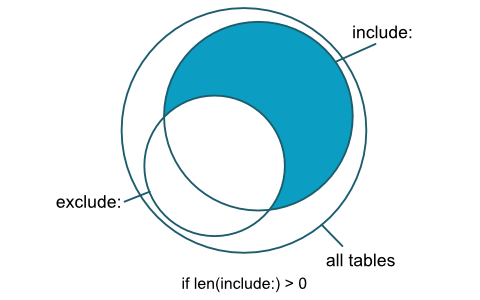
include: and exclude: are used to filter target tables from tbls *.
# .tbls.yml
include:
  - someprefix*
exclude:
  - someprefixlogs
  - CamelizeTable
lintExclude: is used to exclude tables from tbls lint.
# .tbls.yml
lintExclude:
  - CamelizeTable
Filter logic
- Add tables/functions from include
- Remove tables/functions from exclude
schema.MyTable > schema. or schema.MyT > schema.*), include the table(s)/function(s). If include is equally or less specific than exclude, exclude wins.
- Result
Comments
comments: is used to add table/column comment to database document without ALTER TABLE.
For example, you can add comment about VIEW TABLE or SQLite tables/columns.
Notice: Comments defined in .tbls.yml will override existing comments in the schema.
# .tbls.yml
comments:
  -
    table: users
    # table comment
    tableComment: Users table
    # column comments
    columnComments:
      email: Email address as login id. ex. user@example.com
    # labels for tables
    labels:
      - privary data
      - backup:true
  -
    table: post_comments
    tableComment: post and comments View table
    columnComments:
      id: comments.id
      title: posts.title
      post_user: posts.users.username
      comment_user: comments.users.username
      created: comments.created
      updated: comments.updated
  -
    table: posts
    # index comments
    indexComments:
      postsuserid_idx: user.id index
    # constraints comments
    constraintComments:
      postsidpk: PRIMARY KEY
    # triggers comments
    triggerComments:
      updatepostsupdated: Update updated when posts update
Relations
relations: is used to add or override table relation to database document without FOREIGN KEY.
You can create ER diagrams with relations without having foreign key constraints.
relations:
  -
    table: logs
    columns:
      - user_id
    parentTable: users
    parentColumns:
      - id
    # Relation definition
    # Default is Additional Relation
    def: logs->users
  -
    table: logs
    columns:
      - post_id
    parentTable: posts
    parentColumns:
      - id
  -
    table: logs
    columns:
      - comment_id
    parentTable: comments
    parentColumns:
      - id
  -
    table: logs
    columns:
      - commentstarid
    parentTable: comment_stars
    parentColumns:
      - id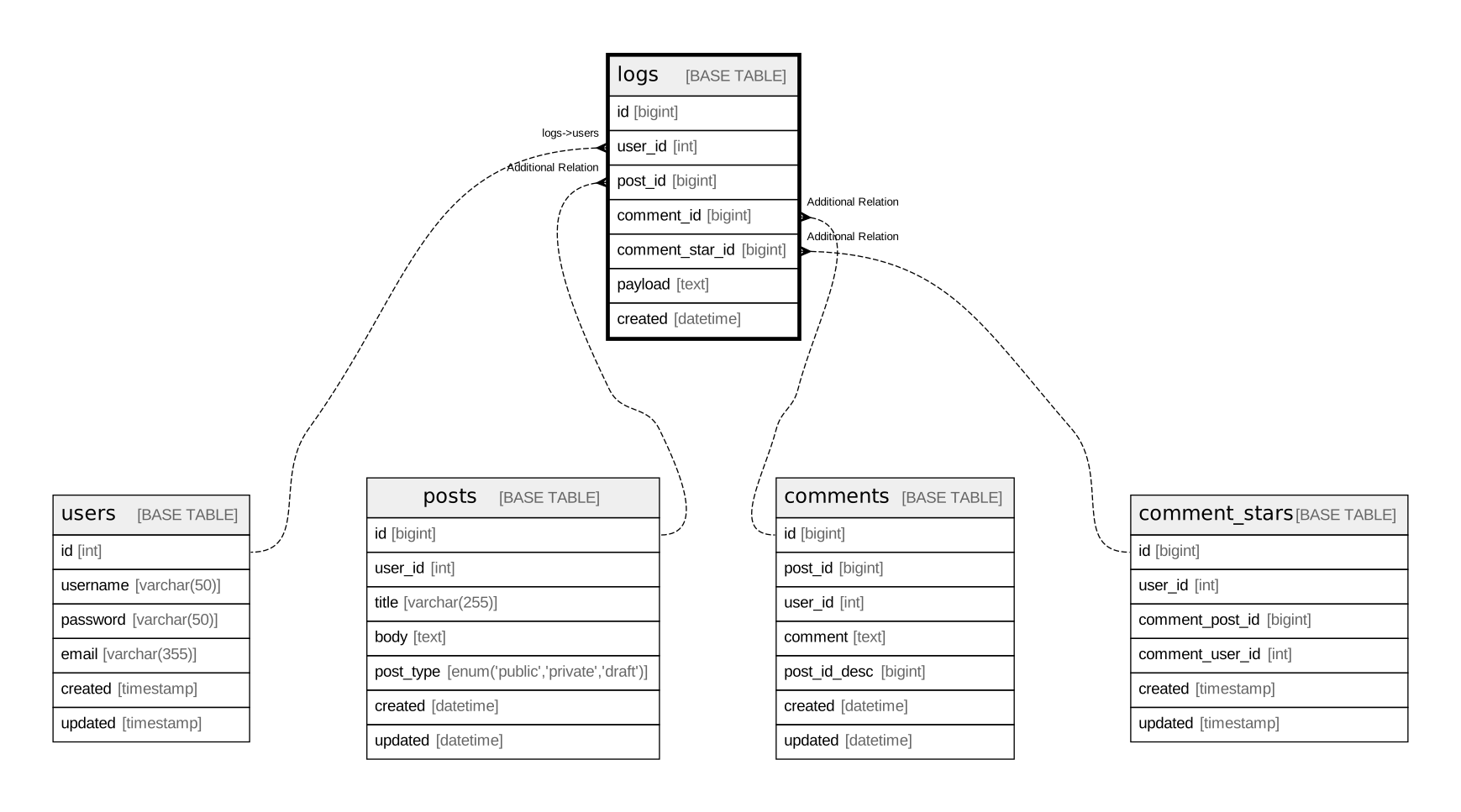
Override relations
If you want to override an existing relation, set the override: to true.
relations:
  -
    table: posts
    columns:
      - user_id
    cardinality: zero or one
    parentTable: users
    parentColumns:
      - id
    parentCardinality: one or more
    override: true
    def: posts->users
Automatically detect relations
detectVirtualRelations: if enabled, automatically detect relations from table and column names.
detectVirtualRelations:
  enabled: true
  strategy: default
Supported strategies
| strategy name | relation from | relation to | | :-- | :-- | :-- | | default | sometable.userid | users.id | | singularTableName | sometable.userid | user.id | | identical | sometable.userid | users.user_id | | identicalSingularTableName | sometable.userid | user.user_id | | invertedSingularTableName | sometable.iduser | user.id |
Dictionary
dict: is used to replace title/table header of database document
# .tbls.yml

dict:
  Tables: テーブル一覧
  Description: 概要
  Columns: カラム一覧
  Indexes: INDEX一覧
  Constraints: 制約一覧
  Triggers: トリガー
  Relations: ER図
  Name: 名前
  Comment: コメント
  Type: タイプ
  Default: デフォルト値
  Children: 子テーブル
  Parents: 親テーブル
  Definition: 定義
  Table Definition: テーブル定義
Personalized Templates
It is possible to provide your own templates to personalize the documentation generated by tbls by adding a templates: section to your configuration. For example:
templates:
  dot:
    schema: 'templates/schema.dot.tmpl'
    table: 'templates/table.dot.tmpl'
  puml:
    schema: 'templates/schema.puml.tmpl'
    table: 'templates/table.puml.tmpl'
  md:
    index: 'templates/index.md.tmpl'
    table: 'templates/table.md.tmpl'
A good starting point to design your own template is to modify a copy the default ones for Dot, PlantUML and markdown.
Required Version
The requiredVersion setting defines a version constraint string. This defines which version of tbls can be used in the configuration.
requiredVersion: '>= 1.42, < 2'Expand environment variables
All configuration values can be set by expanding the environment variables.
# .tbls.yml
dsn: my://${MYSQLUSER}:${MYSQLPASSWORD}@hostname:3306/${MYSQL_DATABASE}
Viewpoints
Viewpoints of your database schema based on concerns of your domain and add description to them. You can also define groups of tables within viewpoints.# .tbls.yml
viewpoints: - id: comments-on-post name: comments on post desc: Users can comment on each post multiple times and put a star on each comment. tables: - users - posts - comments - comment_stars - post_comments - postcommentstars groups: - name: Comments desc: Tables about comments tables: - posts - comments - post_comments - name: Stars desc: Tables about stars tables: - comment_stars - postcommentstars
id is optional. When set, it is used as the suffix of the viewpoint output file name (e.g. viewpoint-comments-on-post.md) instead of the index, so the file name stays stable regardless of the viewpoint order. id must be unique and must not contain path separators (/ or \). It is also used to specify the viewpoint in tbls out --viewpoint.
Output formats
tbls out output in various formats.
Markdown:
$ tbls out -t md -o schema.mdDOT:
$ tbls out -t dot -o schema.dotPlantUML:
$ tbls out -t plantuml -o schema.pumlMermaid:
$ tbls out -t mermaid -o schema.mmdImage (svg, png, jpg):
$ tbls out -t svg --table users --distance 2 -o users.svgViewpoint:
Output only the schema of a specific viewpoint by specifying its id (or index).
$ tbls out -t svg --viewpoint comments-on-post -o comments-on-post.svgWith -t md, the viewpoint document (including groups and the ER diagram inlined as Mermaid) is generated instead of a plain schema document.
$ tbls out -t md --viewpoint comments-on-post -o comments-on-post.mdJSON:
$ tbls out -t json -o schema.jsonTips:>tbls doccan loadschema.jsonas DSN.
>> $ tbls doc json:///path/to/schema.json
YAML:
$ tbls out -t yaml -o schema.yamlExcel:
$ tbls out -t xlsx -o schema.xlsx.tbls.yml:
$ tbls out -t config -o .tbls.new.ymlCommand arguments
tbls subcommands (doc,diff, etc) accepts arguments and options
$ tbls doc my://root:mypass@localhost:3306/testdb doc/schemaYou can check available arguments and options using tbls help [COMMAND].
$ tbls help doc
'tbls doc' analyzes a database and generate document in GitHub Friendly Markdown format.
Usage:   tbls doc [DSN] [DOC_PATH] [flags]
Flags:   -j, --adjust-table       adjust column width of table   -b, --base-url string    base url for links   -c, --config string      config file path   -t, --er-format string   ER diagrams output format (png, svg, jpg, mermaid). default: svg   -f, --force              force   -h, --help               help for doc       --rm-dist            remove files in docPath before generating documents       --sort               sort       --when string        command execute condition       --without-er         no generate ER diagrams
Output Schema data
tbls doc also output schema data (schema.json) to same directory as the generated schema document.
To disable output of schema data, set disableOutputSchema: to true in .tbls.yml file.
Environment variables
tbls accepts environment variables TBLSDSN and TBLSDOC_PATH
$ env TBLSDSN=my://root:mypass@localhost:3306/testdb TBLSDOC_PATH=doc/schema tbls doc


