
Highly configurable prompt builder for Bash, ZSH and PowerShell written in Go.
Go Bullet Train (GBT) =====================
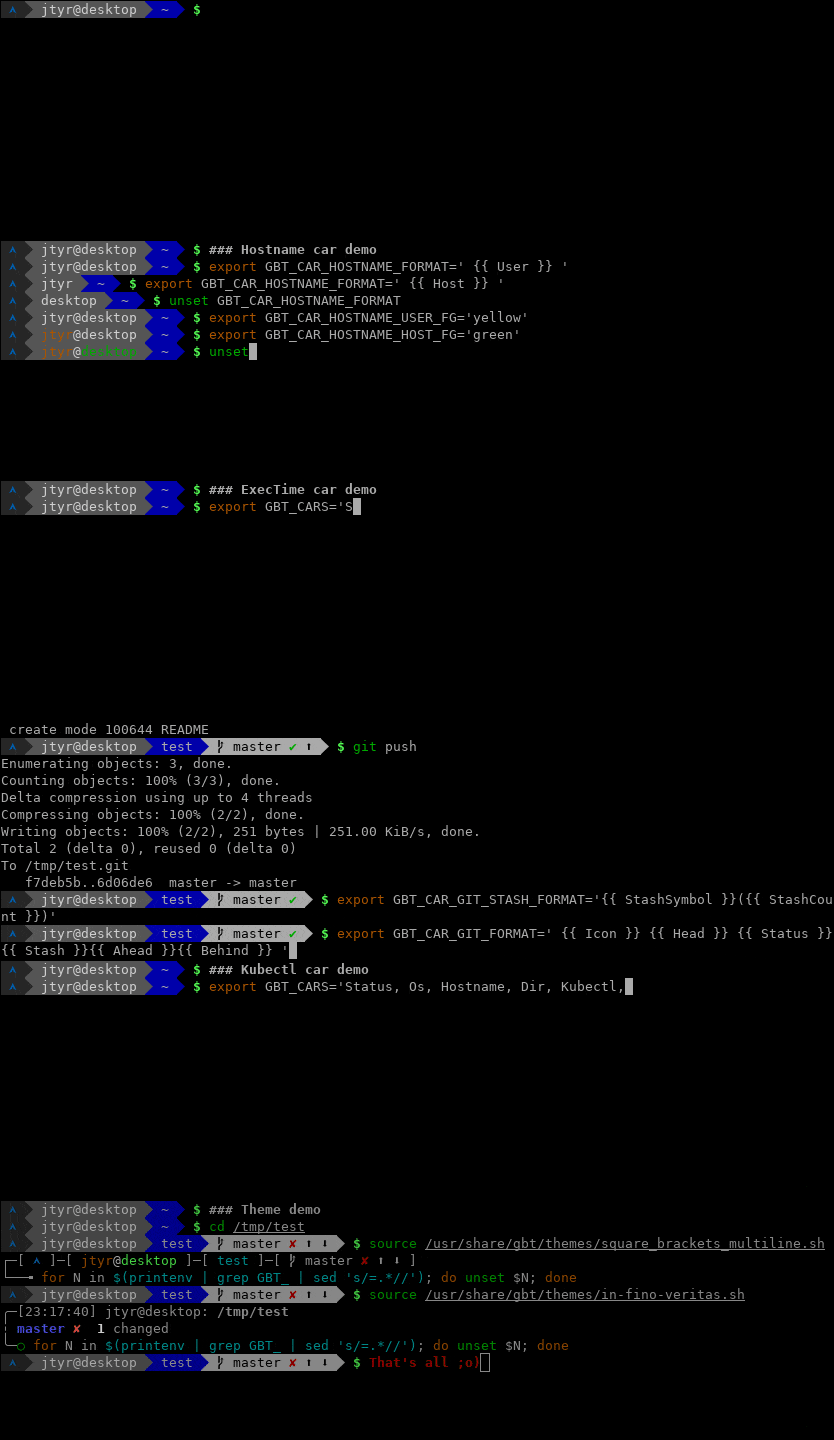
Highly configurable prompt builder for Bash, ZSH and PowerShell written in Go. It's inspired by the Oh My ZSH Bullet Train theme but runs significantly faster.
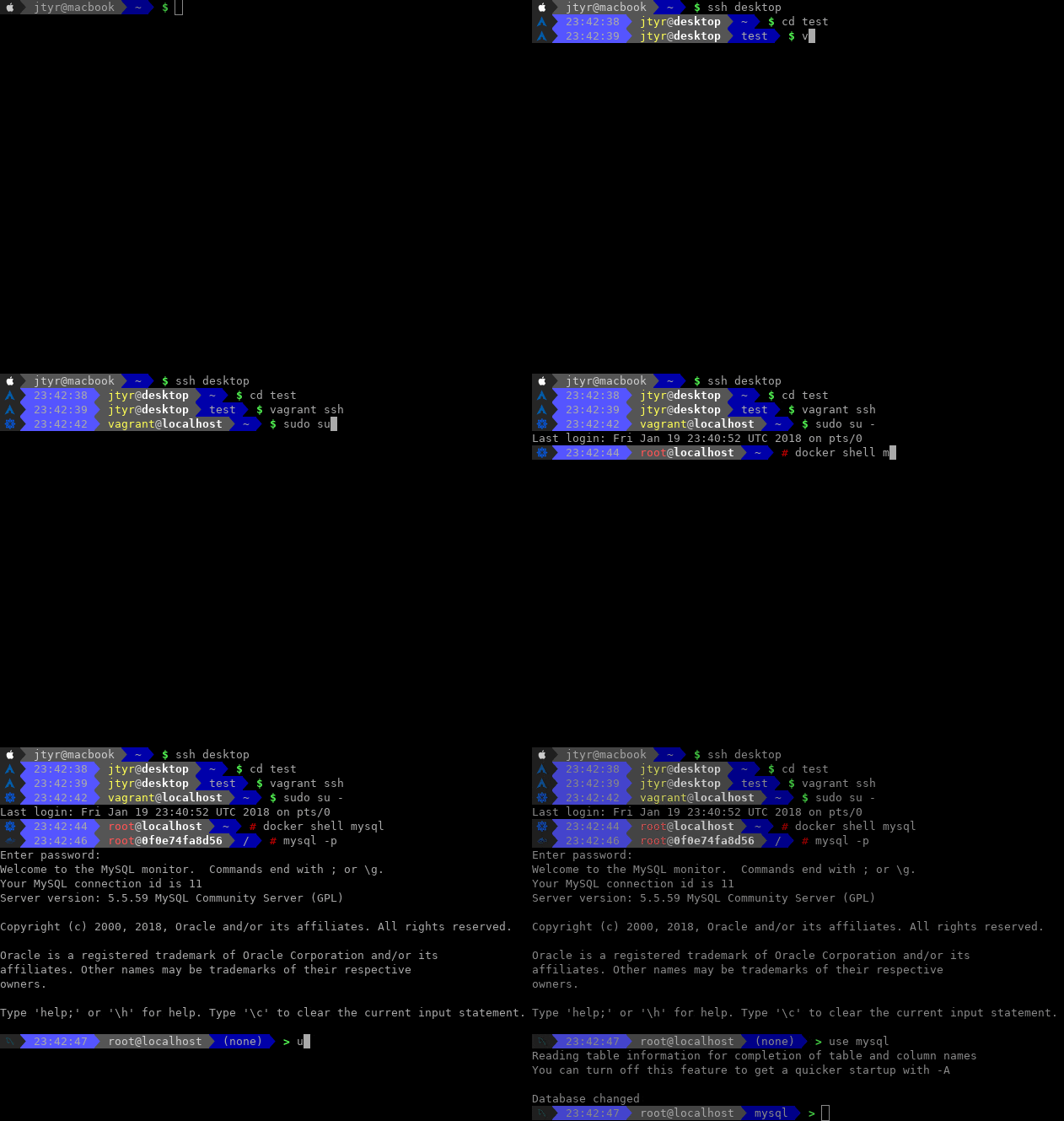
GBT comes with an interesting feature called prompt forwarding which allows to forward user-defined prompt to a remote machine and have the same-looking prompt across all machines via SSH but also in Docker, Kubectl, Vagrant, MySQL or in Screen without the need to install anything remotely.
All the above works well on Linux (Terminator, Konsole, Gnome Terminal), Mac (Terminal, iTerm), Android (Termux) and Windows (PowerShell, Windows Terminal).




Table of contents
- Installation - Arch Linux - CentOS/RHEL - Ubuntu/Debian - Mac - Windows - Android - From the source code - Activation - Fonts and colors - Colors - Formatting - Train variables - Cars variables -
Aws car
- Azure car
- Custom car
- Dir car
- ExecTime car
- Gcp car
- Git car
- Hostname car
- Kubectl car
- Os car
- PyVirtEnv car
- Sign car
- Status car
- Time car
- Principle
- Additional settings
- MacOS users
- Limitations
Setup
In order to setup GBT on your machine, you have to install it, activate it and setup a special font in your terminal (optional).
Installation
Arch Linux
yaourt -S gbtOr install gbt-git if you would like to run the latest greatest from the master branch.
CentOS/RHEL
Packages hosted by Packagecloud:
echo '[gbt]
name=GBT YUM repo
baseurl=https://packagecloud.io/gbt/release/el/7/$basearch
gpgkey=https://packagecloud.io/gbt/release/gpgkey
       https://packagecloud.io/gbt/release/gpgkey/gbt-release-4C6E79EFF45439B6.pub.gpg
gpgcheck=1
repo_gpgcheck=1' | sudo tee /etc/yum.repos.d/gbt.repo >/dev/null
sudo yum install gbt
Use the exact repository definition from above for all RedHat-based distribution regardless its version.
Ubuntu/Debian
Packages hosted by Packagecloud:
curl -L https://packagecloud.io/gbt/release/gpgkey | sudo apt-key add -
echo 'deb https://packagecloud.io/gbt/release/ubuntu/ xenial main' | sudo tee /etc/apt/sources.list.d/gbt.list >/dev/null
sudo apt-get update
sudo apt-get install gbt
Use the exact repository definition from above for all Debian-based distribution regardless its version.
Mac
Using brew:
brew tap jtyr/repo
brew install gbtgbt-git if you would like to run the latest greatest from the
master branch:
brew tap jtyr/repo
brew install --HEAD gbt-git
Windows
Using choco:
choco install gbtUsing scoop:
scoop install gbtOr manually by copying the gbt.exe file into a directory listed in the PATH environment variable (e.g. C:\Windows\system32).
Android
Install Termux from Google Play Store and then type this in the Termux app:
apt update
apt install gbt
From the source code
Make sure Go is installed and then run the following on Linux and Mac:
mkdir ~/go
export GOPATH=~/go
export PATH="$PATH:$GOPATH/bin"
go get github.com/jtyr/gbt/cmd/gbt
Or the following on Windows using PowerShell:
mkdir ~/go
$Env:GOPATH = '~/go'
$Env:PATH = "~/go/bin;$Env:PATH"
go install github.com/jtyr/gbt/cmd/gbt@latest
Activation
After GBT is installed, it can be activated by calling it from the shell prompt variable:
# For Bash
PS1='$(gbt $?)'
For ZSH
PROMPT='$(gbt $?)'
If you are using ZSH together with some shell framework (e.g. Oh My ZSH), your shell is processing a fair amount of shell scripts upon ever prompt appearance. You can speed up your shell by removing the framework dependency from your configuration and replacing it with GBT and a simple ZSH configuration. Combining pure ZSH configuration with GBT will provide the best possible performance for your shell.
To activate GBT in PowerShell, run the following in the console or store it to the PowerShell profile file (echo $profile):
function prompt {
    $rc = [int]$(-Not $?)
    $Env:GBT_SHELL = 'plain'
    $Env:PWD = get-location
    $Env:GBTCARCUSTOM_EXECUTOR='powershell.exe'
    $Env:GBTCARCUSTOMEXECUTORPARAM='-Command'
    $gbt_output = & @({gbt $rc},{gbt.exe $rc})[$PSVersionTable.PSVersion.Major -lt 6 -or $IsWindows] | Out-String
    $gbtoutput = $gbtoutput -replace ([Environment]::NewLine + '$'), ''
    Write-Host -NoNewline $gbt_output
    return [char]0
}
Needed only on Windows
[console]::InputEncoding = [console]::OutputEncoding = New-Object System.Text.UTF8Encoding
Fonts and colors
Although GBT can be configured to use only ASCII characters (see basic theme), the default configuration uses some UTF-8 characters which require special font. In order to display all characters of the default prompt correctly, the shell should support UTF-8 and Nerd fonts (or at least the DejaVuSansMono Nerd font) should be installed. On Linux, you can install it like this:
mkdir ~/.fonts
curl -L -o ~/.fonts/DejaVuSansMonoNerdFontCompleteMono.ttf https://github.com/ryanoasis/nerd-fonts/raw/master/patched-fonts/DejaVuSansMono/Regular/complete/DejaVu%20Sans%20Mono%20Nerd%20Font%20Complete%20Mono.ttf
fc-cache
On Mac, it can be installed via brew:
brew tap homebrew/cask-fonts
brew install --cask font-dejavu-sans-mono-nerd-font
On Windows, it can be installed via choco:
choco install font-nerd-DejaVuSansMonoOr via scoop:
scoop bucket add nerd-fonts
scoop install DejaVuSansMono-NF
Or just download the font, open it and then install it.
Once the font is installed, it has to be set in the terminal application to render all prompt characters correctly. Search for the font name DejaVuSansMono Nerd Font Mono on Linux and Mac and DejaVuSansMono NF on Windows.
In order to have the Nerd font in Termux on Android, you have to install Termux:Styling application. Then longpress the terminal screen and select MORE... → Style → CHOOSE FONT and there choose the DejaVu font.
Some Unix terminals might not use 256 color palette by default. In such case try to set the following:
export TERM='xterm-256color'Configuration
The prompt (train) is assembled from several elements (cars). The look and behavior of whole train as well as each car can be influenced by a set of environment variables. To set the environment variable, use export in the Linux and Mac shell and $Env: on Windows.
Colors
The value of all BG and FG variables defines the background and foreground color of the particular element. The value of the color can be specified in 3 ways:
Color name
Only a limited number of named colors is supported:
blackredgreenyellowbluemagentacyanlightgraydarkgraylightredlightgreenlightyellowlightbluelightmagentalightcyanwhitedefault(default color of the terminal)
# Set the background color of the Dir car to red
export GBTCARDIR_BG='red'
Set the foreground color of the Dir car to white
export GBTCARDIR_FG='white'
Color number
Color can also by expressed by a single number in the range from 0 to 255. The color of each number in that range is visible in the 256-color lookup table on Wikipedia. The named colors described above are the first 16 numbers from the lookup table.
Examples:
# Set the background color of the Dir car to red
export GBTCARDIR_BG='1'
Set the foreground color of the Dir car to white
export GBTCARDIR_FG='15'
RGB color
Arbitrary color can be expressed in the form of RGB triplet.
Examples:
# Set the background color of the Dir car to red
export GBTCARDIR_BG='170;0;0'
Set the foreground color of the Dir car to white
export GBTCARDIR_FG='255;255;255'
Color scheme resistance
GBT is using 8-bit color palette to color individual cars of the train. First 16 colors (Standart and High-intensity colors) of the palette are prone to a change if the terminal is using some color scheme (e.g. Solarized)). That means that if one GBT train uses mixture of the first 16 and the remaining 240 colors, the look might be inconsistent because some of the colors might change (depending on the color scheme) and some not. Luckily the first 16 colors can be found in the remaining 240 colors and therefore GBT can automatically convert the first 16 colors into higher colors which provides consistent look regardless the color scheme. This works automatically for color names as well as for color numbers. If needed, the automatic conversion can be disabled with the following variable:
export GBTFORCEHIGHER_COLORS='0'Formatting
Formatting is done via _FM variables. The possible values are:
normal
dim
bold
underline
blink
invert
hide
none
Multiple formattings can be combined into comma-separated list.
Examples:
# Set the directory name to be bold
  export GBTCARDIR_FM='bold'
  # Set the directory name to be bold and underlined
  export GBTCARDIR_FM='bold,underline'
Train variables
GBT_CARS='Status, Os, Hostname, Dir, Git, Sign'
To add a new car into the train, the whole variable must be redefined. For example in order to add the Time car into the default set of cars between the Os and Hostname car, the variable should look like this:
export GBT_CARS='Status, Os, Time, Hostname, Dir, Git, Sign'GBT_RCARS='Time'
GBT_CARS but for the right hand side prompt.
# Add the Custom car into the right hand site car to have the separator visible
  export GBT_RCARS='Custom, Time'
  # Make the Custom car to be invisible (zero length text)
  export GBTCARCUSTOM_BG='default'
  export GBTCARCUSTOM_FORMAT=''
  # Show only time
  export GBTCARTIME_FORMAT=' {{ Time }} '
  # Set the right hand side prompt (ZSH only)
RPROMPT='$(gbt -right)'GBT_SEPARATOR=''
GBT_RSEPARATOR=''
GBT_SEPARATOR but for the right hand side prompt.
GBTCARBG
GBTCARFG
GBTCARFM
GBTBEGINNINGBG='default'
GBTBEGINNINGFG='default'
GBTBEGINNINGFM='none'
GBTBEGINNINGTEXT=''
GBT_SHELL
zsh, bash or
plain. By default, the value is extracted from the $SHELL environment
variable. Set this variable to bash if your default shell is ZSH but you
want to test GBT in Bash:
export GBT_SHELL='bash'
bashplain, no shell-specific decoration is included in the output
text. That's suitable for displaying the GBT-generated string in the console
output.
GBT_DEBUG='0'
Cars variables
Aws car
Car that displays information about the local AWS configuration.
GBTCARAWS_BG='166'
GBTCARAWS_FG='white'
GBTCARAWS_FM='none'
GBTCARAWS_FORMAT=' {{ Icon }} {{ Project }} '
GBTCARAWSICONBG
{{ Icon }} element.
GBTCARAWSICONFG
{{ Icon }} element.
GBTCARAWSICONFM
{{ Icon }} element.
GBTCARAWS_IC
{{ Icon }} element.
GBTCARAWSPROFILEBG
{{ Profile }} element.
GBTCARAWSPROFILEFG
{{ Profile }} element.
GBTCARAWSPROFILEFM
{{ Profile }} element.
GBTCARAWSPROFILETEXT
{{ Profile }} element specifying the configured profile.
GBTCARAWSREGIONBG
{{ Region }} element.
GBTCARAWSREGIONFG
{{ Region }} element.
GBTCARAWSREGIONFM
{{ Region }} element.
GBTCARAWSREGIONTEXT
{{ Region }} element specifying the configured region.
GBTCARAWS_DISPLAY
GBT_CARS).
GBTCARAWS_WRAP='0'
GBTCARAWSSEPTEXT
GBTCARAWSSEPBG
GBTCARAWSSEPFG
GBTCARAWSSEPFM
Azure car
Car that displays information about the local Azure configuration.
GBTCARAZURE_BG='32'
GBTCARAZURE_FG='white'
GBTCARAZURE_FM='none'
GBTCARAZURE_FORMAT=' {{ Icon }} {{ Subscription }} '
GBTCARAZUREICONBG
{{ Icon }} element.
GBTCARAZUREICONFG
{{ Icon }} element.
GBTCARAZUREICONFM
{{ Icon }} element.
GBTCARAZURE_IC
{{ Icon }} element.
GBTCARAZURECLOUDBG
{{ Cloud }} element.
GBTCARAZURECLOUDFG
{{ Cloud }} element.
GBTCARAZURECLOUDFM
{{ Cloud }} element.
GBTCARAZURECLOUDTEXT
{{ Cloud }} element specifying the configured cloud.
GBTCARAZURESUBSCRIPTIONBG
{{ Subscription }} element.
GBTCARAZURESUBSCRIPTIONFG
{{ Subscription }} element.
GBTCARAZURESUBSCRIPTIONFM
{{ Subscription }} element.
GBTCARAZURESUBSCRIPTIONTEXT
{{ Subscription }} element specifying the configured
subscription.
GBTCARAZUREUSERNAMEBG
{{ UserName }} element.
GBTCARAZUREUSERNAMEFG
{{ UserName }} element.
GBTCARAZUREUSERNAMEFM
{{ UserName }} element.
GBTCARAZUREUSERNAMETEXT
{{ UserName }} element specifying the configured user
name.
GBTCARAZUREUSERTYPEBG
{{ UserType }} element.
GBTCARAZUREUSERTYPEFG
{{ UserType }} element.
GBTCARAZUREUSERTYPEFM
{{ UserType }} element.
GBTCARAZUREUSERTYPETEXT
{{ UserType }} element specifying the configured user
type.
GBTCARAZURESTATEBG
{{ State }} element.
GBTCARAZURESTATEFG
{{ State }} element.
GBTCARAZURESTATEFM
{{ State }} element.
GBTCARAZURESTATETEXT
{{ State }} element specifying the configured
subscription state.
GBTCARAZUREDEFAULTSGROUP_BG
{{ DefaultsGroup }} element.
GBTCARAZUREDEFAULTSGROUP_FG
{{ DefaultsGroup }} element.
GBTCARAZUREDEFAULTSGROUP_FM
{{ DefaultsGroup }} element.
GBTCARAZUREDEFAULTSGROUP_TEXT
{{ DefaultsGroup }} element specifying the configured
default resource group.
GBTCARAZURE_DISPLAY
GBT_CARS).
GBTCARAZURE_WRAP='0'
GBTCARAZURESEPTEXT
GBTCARAZURESEPBG
GBTCARAZURESEPFG
GBTCARAZURESEPFM
Custom car
The main purpose of this car is to provide the possibility to create car with custom text.
GBTCARCUSTOM_BG='yellow'
GBTCARCUSTOM_FG='default'
GBTCARCUSTOM_FM='none'
GBTCARCUSTOM_FORMAT=' {{ Text }} '
GBTCARCUSTOMTEXTBG
{{ Text }} element.
GBTCARCUSTOMTEXTFG
{{ Text }} element.
GBTCARCUSTOMTEXTFM
{{ Text }} element.
GBTCARCUSTOMTEXTTEXT='?'
{{ Text }} element.
GBTCARCUSTOMTEXTCMD
{{ Text }} element will be replaced by standard output of the command
specified in this variable. Content of the GBTCARCUSTOMTEXTTEXT variable
takes precedence over this variable.
# Show 1 minute loadavg as the content of the Text element
export GBTCARCUSTOMTEXTCMD="uptime | sed -e 's/.load average: //' -e 's/,.//'"GBTCARCUSTOMTEXTEXECUTOR='sh'
TEXTCMD).
GBTCARCUSTOMTEXTEXECUTOR='-c'
TEXTCMD).
GBTCARCUSTOM_DISPLAY='1'
GBT_CARS).
GBTCARCUSTOMDISPLAYCMD
GBTCARCUSTOM_DISPLAY variable takes
precedence over this variable.
GBTCARCUSTOMDISPLAYEXECUTOR='sh'
TEXTCMD).
GBTCARCUSTOMDISPLAYEXECUTOR='-c'
TEXTCMD).
# Show percentage of used disk space of the root partition
  export GBTCARCUSTOMTEXTCMD="df -h --output=pcent / | tail -n1 | sed -re 's/\s//g' -e 's/%/%%/'"
  # Display the car only if the percentage is above 90%
export GBTCARCUSTOMDISPLAYCMD="[[ $(df -h --output=pcent / | tail -n1 | sed -re 's/\s//g' -e 's/%//') -gt 70 ]] && echo YES"GBTCARCUSTOM_WRAP='0'
GBTCARCUSTOM_EXECUTOR='sh'
TEXTCMD and DISPLAYCMD).
GBTCARCUSTOM_EXECUTOR='-c'
TEXTCMD
and DISPLAYCMD).
GBTCARCUSTOMSEPTEXT
GBTCARCUSTOMSEPBG
GBTCARCUSTOMSEPFG
GBTCARCUSTOMSEPFM
Multiple Custom cars can be used in the GBT_CARS variable. Just add some identifier behind the car name. To set properties of the new car, just add the same identifier into the environment variable:
# Adding Custom and Custom1 car
export GBT_CARS='Status, Os, Custom, Custom1, Hostname, Dir, Git, Sign'
The text of the default Custom car
export GBTCARCUSTOMTEXTTEXT='default'
The text of the Custom1 car
export GBTCARCUSTOM1TEXTTEXT='1'
Set different background color for the Custom1 car
export GBTCARCUSTOM1_BG='magenta'
Dir car
Car that displays current directory name.
GBTCARDIR_BG='blue'
GBTCARDIRFG='lightgray'
GBTCARDIR_FM='none'
GBTCARDIR_FORMAT=' {{ Dir }} '
GBTCARDIRDIRBG
{{ Dir }} element.
GBTCARDIRDIRFG
{{ Dir }} element.
GBTCARDIRDIRFM
{{ Dir }} element.
GBTCARDIRDIRTEXT
{{ Dir }} element. The directory name.
GBTCARDIR_DIRSEP
GBTCARDIR_HOMESIGN='~'
GBTCARDIR_DEPTH='1'
GBTCARDIR_N
1 to display only the first character of the
directory name when using GBTCARDIR_DEPTH with value grater than one.
GBTCARDIR_DISPLAY='1'
GBT_CARS).
GBTCARDIR_WRAP='0'
GBTCARDIRSEPTEXT
GBTCARDIRSEPBG
GBTCARDIRSEPFG
GBTCARDIRSEPFM
ExecTime car
Car that displays how long each shell command run.
GBTCAREXECTIMEBG='lightgray'
GBTCAREXECTIME_FG='black'
GBTCAREXECTIME_FM='none'
GBTCAREXECTIME_FORMAT=' {{ Time }} '
GBTCAREXECTIMEDURATIONBG
{{ Duration }} element.
GBTCAREXECTIMEDURATIONFG
{{ Duration }} element.
GBTCAREXECTIMEDURATIONFM
{{ Duration }} element.
GBTCAREXECTIMEDURATIONTEXT
{{ Duration }} element. The duration of the execution
time (e.g 1h8m19s135ms for precision set to 3).
GBTCAREXECTIMESECONDSBG
{{ Seconds }} element.
GBTCAREXECTIMESECONDSFG
{{ Seconds }} element.
GBTCAREXECTIMESECONDSFM
{{ Seconds }} element.
GBTCAREXECTIMESECONDSTEXT
{{ Seconds }} element. The execution time in seconds
(e.g. 4099.1358 for precision set to 4).
GBTCAREXECTIMETIMEBG
{{ Time }} element.
GBTCAREXECTIMETIMEFG
{{ Time }} element.
GBTCAREXECTIMETIMEFM
{{ Time }} element.
GBTCAREXECTIMETIMETEXT
{{ Time }} element. The execution time (e.g.
01:08:19.1358 for precision set to 4).
GBTCAREXECTIME_PRECISION='0'
GBTCAREXECTIME_SECS
GBTCAREXECTIME_BELL='0'
0 disables the bell (default).
GBTCAREXECTIME_DISPLAY='1'
GBT_CARS).
GBTCAREXECTIME_WRAP='0'
GBTCAREXECTIMESEPTEXT
GBTCAREXECTIMESEPBG
GBTCAREXECTIMESEPFG
GBTCAREXECTIMESEPFM
In order to allow this car to calculate the execution time, the following must be loaded in the shell:
# For Bash
source /usr/share/gbt/sources/exectime/bash.sh
For ZSH
source /usr/share/gbt/sources/exectime/zsh.sh
On macOS the date command does not support %N format for milliseconds and you need to override the environment variable GBT_SOURCEDATE_ARG='+%s.
Gcp car
Car that displays information about the local GCP configuration.
GBTCARGCP_BG='33'
GBTCARGCP_FG='white'
GBTCARGCP_FM='none'
GBTCARGCP_FORMAT=' {{ Icon }} {{ Project }} '
GBTCARGCPICONBG
{{ Icon }} element.
GBTCARGCPICONFG
{{ Icon }} element.
GBTCARGCPICONFM
{{ Icon }} element.
GBTCARGCP_IC
{{ Icon }} element.
GBTCARGCPACCOUNTBG
{{ Account }} element.
GBTCARGCPACCOUNTFG
{{ Account }} element.
GBTCARGCPACCOUNTFM
{{ Account }} element.
GBTCARGCPACCOUNTTEXT
{{ Account }} element specifying the configured account.
GBTCARGCPCONFIGBG
{{ Config }} element.
GBTCARGCPCONFIGFG
{{ Config }} element.
GBTCARGCPCONFIGFM
{{ Config }} element.
GBTCARGCPCONFIGTEXT
{{ Config }} element specifying the active
configuration.
GBTCARGCPPROJECTBG
{{ Project }} element.
GBTCARGCPPROJECTFG
{{ Project }} element.
GBTCARGCPPROJECTFM
{{ Project }} element.
GBTCARGCPPROJECTTEXT
{{ Project }} element specifying the configured project.
GBTCARGCPPROJECTALIASES
my-dev-project-123456 to dev and the project my-prod-project-654321 to
prod.
export GBTCARGCPPROJECTALIASES='
    my-dev-project-123456=dev,
    my-prod-project-654321=prod,
'GBTCARGCP_DISPLAY
GBT_CARS).
GBTCARGCP_WRAP='0'
GBTCARGCPSEPTEXT
GBTCARGCPSEPBG
GBTCARGCPSEPFG
GBTCARGCPSEPFM
Git car
Car that displays information about a local Git repository. This car is displayed only if the current directory is a Git repository.
GBTCARGITBG='lightgray'
GBTCARGIT_FG='black'
GBTCARGIT_FM='none'
GBTCARGIT_FORMAT=' {{ Icon }} {{ Head }} {{ Status }}{{ Ahead }}{{ Behind }} '
GBTCARGITICONBG
{{ Icon }} element.
GBTCARGITICONFG
{{ Icon }} element.
GBTCARGITICONFM
{{ Icon }} element.
GBTCARGIT_IC
{{ Icon }} element.
GBTCARGITHEADBG
{{ Head }} element.
GBTCARGITHEADFG
{{ Head }} element.
GBTCARGITHEADFM
{{ Head }} element.
GBTCARGITHEADTEXT
{{ Head }} element - branch, tag name or the
commit ID.
GBTCARGITSTATUSBG
{{ Status }} element.
GBTCARGITSTATUSFG
{{ Status }} element.
GBTCARGITSTATUSFM
{{ Status }} element.
GBTCARGITSTATUSFORMAT
{{ Status }} element. The content is either
{{ StatusDirty }} or {{ StatusClean }} depending on the state of the
local Git repository.
GBTCARGITSTATUSDIRTY_BG
{{ StatusDirty }} element.
GBTCARGITSTATUSDIRTY_FG='red'
{{ StatusDirty }} element.
GBTCARGITSTATUSDIRTY_FM
{{ StatusDirty }} element.
GBTCARGITSTATUSDIRTY_TEXT='✘'
{{ StatusDirty }} element.
GBTCARGITSTATUSCLEAN_BG
{{ StatusClean }} element.
GBTCARGITSTATUSCLEAN_FG='green'
{{ StatusClean }} element.
GBTCARGITSTATUSCLEAN_FM
{{ StatusClean }} element.
GBTCARGITSTATUSCLEAN_TEXT='✔'
{{ StatusClean }} element.
GBTCARGITSTATUSADDED_BG
{{ StatusAdded }} element.
GBTCARGITSTATUSADDED_FG
{{ StatusAdded }} element.
GBTCARGITSTATUSADDED_FM
{{ StatusAdded }} element.
GBTCARGITSTATUSADDED_FORMAT='{{ StatusAddedSymbol }}'
{{ StatusAdded }} element. It can be
{{ StatusAddedSymbol }} or {{ StatusAddedCount }}.
GBTCARGITSTATUSADDEDSYMBOLBG
{{ StatusAddedSymbol }} element.
GBTCARGITSTATUSADDEDSYMBOLFG
{{ StatusAddedSymbol }} element.
GBTCARGITSTATUSADDEDSYMBOLFM
{{ StatusAddedSymbol }} element.
GBTCARGITSTATUSADDEDSYMBOLTEXT=' ⟴'
{{ StatusAddedSymbol }} element.
GBTCARGITSTATUSADDEDCOUNTBG
{{ StatusAddedCount }} element.
GBTCARGITSTATUSADDEDCOUNTFG
{{ StatusAddedCount }} element.
GBTCARGITSTATUSADDEDCOUNTFM
{{ StatusAddedSymbol }} element.
GBTCARGITSTATUSADDEDCOUNTTEXT
{{ StatusAddedCount }} element. By default it contains
a number of added files.
GBTCARGITSTATUSCOPIED_BG
{{ StatusCopied }} element.
GBTCARGITSTATUSCOPIED_FG
{{ StatusCopied }} element.
GBTCARGITSTATUSCOPIED_FM
{{ StatusCopied }} element.
GBTCARGITSTATUSCOPIED_FORMAT='{{ StatusCopiedSymbol }}'
{{ StatusCopied }} element. It can be
{{ StatusCopiedSymbol }} or {{ StatusCopiedCount }}.
GBTCARGITSTATUSCOPIEDSYMBOLBG
{{ StatusCopiedSymbol }} element.
GBTCARGITSTATUSCOPIEDSYMBOLFG
{{ StatusCopiedSymbol }} element.
GBTCARGITSTATUSCOPIEDSYMBOLFM
{{ StatusCopiedSymbol }} element.
GBTCARGITSTATUSCOPIEDSYMBOLTEXT=' ⥈'
{{ StatusCopiedSymbol }} element.
GBTCARGITSTATUSCOPIEDCOUNTBG
{{ StatusCopiedCount }} element.
GBTCARGITSTATUSCOPIEDCOUNTFG
{{ StatusCopiedCount }} element.
GBTCARGITSTATUSCOPIEDCOUNTFM
{{ StatusCopiedSymbol }} element.
GBTCARGITSTATUSCOPIEDCOUNTTEXT
{{ StatusCopiedCount }} element. By default it contains
a number of files copied.
GBTCARGITSTATUSDELETED_BG
{{ StatusDeleted }} element.
GBTCARGITSTATUSDELETED_FG
{{ StatusDeleted }} element.
GBTCARGITSTATUSDELETED_FM
{{ StatusDeleted }} element.
GBTCARGITSTATUSDELETED_FORMAT='{{ StatusDeletedSymbol }}'
{{ StatusDeleted }} element. It can be
{{ StatusDeletedSymbol }} or {{ StatusDeletedCount }}.
GBTCARGITSTATUSDELETEDSYMBOLBG
{{ StatusDeletedSymbol }} element.
GBTCARGITSTATUSDELETEDSYMBOLFG
{{ StatusDeletedSymbol }} element.
GBTCARGITSTATUSDELETEDSYMBOLFM
{{ StatusDeletedSymbol }} element.
GBTCARGITSTATUSDELETEDSYMBOLTEXT=' ➖'
{{ StatusDeletedSymbol }} element.
GBTCARGITSTATUSDELETEDCOUNTBG
{{ StatusDeletedCount }} element.
GBTCARGITSTATUSDELETEDCOUNTFG
{{ StatusDeletedCount }} element.
GBTCARGITSTATUSDELETEDCOUNTFM
{{ StatusDeletedSymbol }} element.
GBTCARGITSTATUSDELETEDCOUNTTEXT
{{ StatusDeletedCount }} element. By default it contains
a number of deleted files.
GBTCARGITSTATUSIGNORED_BG
{{ StatusIgnored }} element.
GBTCARGITSTATUSIGNORED_FG
{{ StatusIgnored }} element.
GBTCARGITSTATUSIGNORED_FM
{{ StatusIgnored }} element.
GBTCARGITSTATUSIGNORED_FORMAT='{{ StatusIgnoredSymbol }}'
{{ StatusIgnored }} element. It can be
{{ StatusIgnoredSymbol }} or {{ StatusIgnoredCount }}.
GBTCARGITSTATUSIGNOREDSYMBOLBG
{{ StatusIgnoredSymbol }} element.
GBTCARGITSTATUSIGNOREDSYMBOLFG
{{ StatusIgnoredSymbol }} element.
GBTCARGITSTATUSIGNOREDSYMBOLFM
{{ StatusIgnoredSymbol }} element.
GBTCARGITSTATUSIGNOREDSYMBOLTEXT=' ⬆'
{{ StatusIgnoredSymbol }} element.
GBTCARGITSTATUSIGNOREDCOUNTBG
{{ StatusIgnoredCount }} element.
GBTCARGITSTATUSIGNOREDCOUNTFG
{{ StatusIgnoredCount }} element.
GBTCARGITSTATUSIGNOREDCOUNTFM
{{ StatusIgnoredSymbol }} element.
GBTCARGITSTATUSIGNOREDCOUNTTEXT
{{ StatusIgnoredCount }} element. By default it contains
a number of ignored files.
GBTCARGITSTATUSMODIFIED_BG
{{ StatusModified }} element.
GBTCARGITSTATUSMODIFIED_FG
{{ StatusModified }} element.
GBTCARGITSTATUSMODIFIED_FM
{{ StatusModified }} element.
GBTCARGITSTATUSMODIFIED_FORMAT='{{ StatusModifiedSymbol }}'
{{ StatusModified }} element. It can be
{{ StatusModifiedSymbol }} or {{ StatusModifiedCount }}.
GBTCARGITSTATUSMODIFIEDSYMBOLBG
{{ StatusModifiedSymbol }} element.
GBTCARGITSTATUSMODIFIEDSYMBOLFG
{{ StatusModifiedSymbol }} element.
GBTCARGITSTATUSMODIFIEDSYMBOLFM
{{ StatusModifiedSymbol }} element.
GBTCARGITSTATUSMODIFIEDSYMBOLTEXT=' ⬆'
{{ StatusModifiedSymbol }} element.
GBTCARGITSTATUSMODIFIEDCOUNTBG
{{ StatusModifiedCount }} element.
GBTCARGITSTATUSMODIFIEDCOUNTFG
{{ StatusModifiedCount }} element.
GBTCARGITSTATUSMODIFIEDCOUNTFM
{{ StatusModifiedSymbol }} element.
GBTCARGITSTATUSMODIFIEDCOUNTTEXT
{{ StatusModifiedCount }} element. By default it
contains a number of modified files.
GBTCARGITSTATUSRENAMED_BG
{{ StatusRenamed }} element.
GBTCARGITSTATUSRENAMED_FG
{{ StatusRenamed }} element.
GBTCARGITSTATUSRENAMED_FM
{{ StatusRenamed }} element.
GBTCARGITSTATUSRENAMED_FORMAT='{{ StatusRenamedSymbol }}'
{{ StatusRenamed }} element. It can be
{{ StatusRenamedSymbol }} or {{ StatusRenamedCount }}.
GBTCARGITSTATUSRENAMEDSYMBOLBG
{{ StatusRenamedSymbol }} element.
GBTCARGITSTATUSRENAMEDSYMBOLFG
{{ StatusRenamedSymbol }} element.
GBTCARGITSTATUSRENAMEDSYMBOLFM
{{ StatusRenamedSymbol }} element.
GBTCARGITSTATUSRENAMEDSYMBOLTEXT=' ⬆'
{{ StatusRenamedSymbol }} element.
GBTCARGITSTATUSRENAMEDCOUNTBG
{{ StatusRenamedCount }} element.
GBTCARGITSTATUSRENAMEDCOUNTFG
{{ StatusRenamedCount }} element.
GBTCARGITSTATUSRENAMEDCOUNTFM
{{ StatusRenamedSymbol }} element.
GBTCARGITSTATUSRENAMEDCOUNTTEXT
{{ StatusRenamedCount }} element. By default it contains
a number of renamed files.
GBTCARGITSTATUSSTAGED_BG
{{ StatusStaged }} element.
GBTCARGITSTATUSSTAGED_FG
{{ StatusStaged }} element.
GBTCARGITSTATUSSTAGED_FM
{{ StatusStaged }} element.
GBTCARGITSTATUSSTAGED_FORMAT='{{ StatusStagedSymbol }}'
{{ StatusStaged }} element. It can be
{{ StatusStagedSymbol }} or {{ StatusStagedCount }}.
GBTCARGITSTATUSSTAGEDSYMBOLBG
{{ StatusStagedSymbol }} element.
GBTCARGITSTATUSSTAGEDSYMBOLFG
{{ StatusStagedSymbol }} element.
GBTCARGITSTATUSSTAGEDSYMBOLFM
{{ StatusStagedSymbol }} element.
GBTCARGITSTATUSSTAGEDSYMBOLTEXT=' ⬆'
{{ StatusStagedSymbol }} element.
GBTCARGITSTATUSSTAGEDCOUNTBG
{{ StatusStagedCount }} element.
GBTCARGITSTATUSSTAGEDCOUNTFG
{{ StatusStagedCount }} element.
GBTCARGITSTATUSSTAGEDCOUNTFM
{{ StatusStagedSymbol }} element.
GBTCARGITSTATUSSTAGEDCOUNTTEXT
{{ StatusStagedCount }} element. By default it contains
a number of staged files.
GBTCARGITSTATUSUNMERGED_BG
{{ StatusUnmerged }} element.
GBTCARGITSTATUSUNMERGED_FG
{{ StatusUnmerged }} element.
GBTCARGITSTATUSUNMERGED_FM
{{ StatusUnmerged }} element.
GBTCARGITSTATUSUNMERGED_FORMAT='{{ StatusUnmergedSymbol }}'
{{ StatusUnmerged }} element. It can be
{{ StatusUnmergedSymbol }} or {{ StatusUnmergedCount }}.
GBTCARGITSTATUSUNMERGEDSYMBOLBG
{{ StatusUnmergedSymbol }} element.
GBTCARGITSTATUSUNMERGEDSYMBOLFG
{{ StatusUnmergedSymbol }} element.
GBTCARGITSTATUSUNMERGEDSYMBOLFM
{{ StatusUnmergedSymbol }} element.
GBTCARGITSTATUSUNMERGEDSYMBOLTEXT=' ⬆'
{{ StatusUnmergedSymbol }} element.
GBTCARGITSTATUSUNMERGEDCOUNTBG
{{ StatusUnmergedCount }} element.
GBTCARGITSTATUSUNMERGEDCOUNTFG
{{ StatusUnmergedCount }} element.
GBTCARGITSTATUSUNMERGEDCOUNTFM
{{ StatusUnmergedSymbol }} element.
GBTCARGITSTATUSUNMERGEDCOUNTTEXT
{{ StatusUnmergedCount }} element. By default it
contains a number of unmerged files.
GBTCARGITSTATUSUNTRACKED_BG
{{ StatusUntracked }} element.
GBTCARGITSTATUSUNTRACKED_FG
{{ StatusUntracked }} element.
GBTCARGITSTATUSUNTRACKED_FM
{{ StatusUntracked }} element.
GBTCARGITSTATUSUNTRACKED_FORMAT='{{ StatusUntrackedSymbol }}'
{{ StatusUntracked }} element. It can be
{{ StatusUntrackedSymbol }} or {{ StatusUntrackedCount }}.
GBTCARGITSTATUSUNTRACKEDSYMBOLBG
{{ StatusUntrackedSymbol }} element.
GBTCARGITSTATUSUNTRACKEDSYMBOLFG
{{ StatusUntrackedSymbol }} element.
GBTCARGITSTATUSUNTRACKEDSYMBOLFM
{{ StatusUntrackedSymbol }} element.
GBTCARGITSTATUSUNTRACKEDSYMBOLTEXT=' ⬆'
{{ StatusUntrackedSymbol }} element.
GBTCARGITSTATUSUNTRACKEDCOUNTBG
{{ StatusUntrackedCount }} element.
GBTCARGITSTATUSUNTRACKEDCOUNTFG
{{ StatusUntrackedCount }} element.
GBTCARGITSTATUSUNTRACKEDCOUNTFM
{{ StatusUntrackedSymbol }} element.
GBTCARGITSTATUSUNTRACKEDCOUNTTEXT
{{ StatusUntrackedCount }} element. By default it
contains a number of untracked files.
GBTCARGITAHEADBG
{{ Ahead }} element.
GBTCARGITAHEADFG
{{ Ahead }} element.
GBTCARGITAHEADFM
{{ Ahead }} element.
GBTCARGITAHEADFORMAT='{{ AheadSymbol }}'
{{ Ahead }} element. It can be {{ AheadSymbol }} or
{{ AheadCount }}.
GBTCARGITAHEADSYMBOL_BG
{{ AheadSymbol }} element.
GBTCARGITAHEADSYMBOL_FG
{{ AheadSymbol }} element.
GBTCARGITAHEADSYMBOL_FM
{{ AheadSymbol }} element.
GBTCARGITAHEADSYMBOL_TEXT=' ⬆'
{{ AheadSymbol }} element.
GBTCARGITAHEADCOUNT_BG
{{ AheadCount }} element.
GBTCARGITAHEADCOUNT_FG
{{ AheadCount }} element.
GBTCARGITAHEADCOUNT_FM
{{ AheadSymbol }} element.
GBTCARGITAHEADCOUNT_TEXT
{{ AheadCount }} element. By default it contains
a number of commits ahead of the remote branch.
GBTCARGITBEHINDBG
{{ Behind }} element.
GBTCARGITBEHINDFG
{{ Behind }} element.
GBTCARGITBEHINDFM
{{ Behind }} element.
GBTCARGITBEHINDFORMAT='{{ BehindSymbol }}'
{{ Behind }} element. It can be {{ BehindSymbol }} or
{{ BehindCount }}.
GBTCARGITBEHINDSYMBOL_BG
{{ BehindSymbol }} element.
GBTCARGITBEHINDSYMBOL_FG
{{ BehindSymbol }} element.
GBTCARGITBEHINDSYMBOL_FM
{{ BehindSymbol }} element.
GBTCARGITBEHINDSYMBOL_TEXT=' ⬇'
{{ BehindSymbol }} element.
GBTCARGITBEHINDCOUNT_BG
{{ BehindCount }} element.
GBTCARGITBEHINDCOUNT_FG
{{ BehindCount }} element.
GBTCARGITBEHINDCOUNT_FM
{{ BehindSymbol }} element.
GBTCARGITBEHINDCOUNT_TEXT
{{ BehindCount }} element. By default it contains
a number of commits ahead of the remote branch.
GBTCARGITSTASHBG
{{ Stash }} element.
GBTCARGITSTASHFG
{{ Stash }} element.
GBTCARGITSTASHFM
{{ Stash }} element.
GBTCARGITSTASHFORMAT='{{ StashSymbol }}'
{{ Stash }} element. It can be {{ StashSymbol }} or
{{ StashCount }}.
GBTCARGITSTASHSYMBOL_BG
{{ StashSymbol }} element.
GBTCARGITSTASHSYMBOL_FG
{{ StashSymbol }} element.
GBTCARGITSTASHSYMBOL_FM
{{ StashSymbol }} element.
GBTCARGITSTASHSYMBOL_TEXT=' ⚑'
{{ StashSymbol }} element.
GBTCARGITSTASHCOUNT_BG
{{ StashCount }} element.
GBTCARGITSTASHCOUNT_FG
{{ StashCount }} element.
GBTCARGITSTASHCOUNT_FM
{{ StashSymbol }} element.
GBTCARGITSTASHCOUNT_TEXT
{{ StashCount }} element. By default it contains
a number of stashes.
GBTCARGIT_DISPLAY
GBT_CARS).
GBTCARGIT_WRAP='0'
GBTCARGITSEPTEXT
GBTCARGITSEPBG
GBTCARGITSEPFG
GBTCARGITSEPFM
Hostname car
Car that displays username of the currently logged user and the hostname of the local machine.
GBTCARHOSTNAMEBG='darkgray'
GBTCARHOSTNAME_FG='252'
GBTCARHOSTNAME_FM='none'
GBTCARHOSTNAME_FORMAT=' {{ UserHost }} '
GBTCARHOSTNAMEUSERHOSTBG
{{ UserHost }} element.
GBTCARHOSTNAMEUSERHOSTFG
{{ UserHost }} element.
GBTCARHOSTNAMEUSERHOSTFM
{{ UserHost }} element.
GBTCARHOSTNAMEUSERHOSTFORMAT
{{ UserHost }} element. The value is either
{{ Admin }}@{{ Host }} if the user is root or {{ User }}@{{ Host }}
if the user is a normal user.
GBTCARHOSTNAMEADMINBG
{{ Admin }} element.
GBTCARHOSTNAMEADMINFG
{{ Admin }} element.
GBTCARHOSTNAMEADMINFM
{{ Admin }} element.
GBTCARHOSTNAMEADMINTEXT
{{ Admin }} element. The user name.
GBTCARHOSTNAMEUSERBG
{{ User }} element.
GBTCARHOSTNAMEUSERFG
{{ User }} element.
GBTCARHOSTNAMEUSERFM
{{ User }} element.
GBTCARHOSTNAMEUSERTEXT
{{ User }} element. The user name.
GBTCARHOSTNAMEHOSTBG
{{ Host }} element.
GBTCARHOSTNAMEHOSTFG
{{ Host }} element.
GBTCARHOSTNAMEHOSTFM
{{ Host }} element.
GBTCARHOSTNAMEHOSTTEXT
{{ Host }} element. The host name.
GBTCARHOSTNAME_DISPLAY='1'
GBT_CARS).
GBTCARHOSTNAME_WRAP='0'
GBTCARHOSTNAMESEPTEXT
GBTCARHOSTNAMESEPBG
GBTCARHOSTNAMESEPFG
GBTCARHOSTNAMESEPFM
Kubectl car
Car that displays kubectl information.
GBTCARKUBECTL_BG='26'
GBTCARKUBECTL_FG='white'
GBTCARKUBECTL_FM='none'
GBTCARKUBECTL_FORMAT=' {{ Icon }} {{ Context }} '
{{ Cluster }}, {{ AuthInfo }} and {{ Namespace }}
can be used here as well.
GBTCARKUBECTLICONBG
{{ Icon }} element.
GBTCARKUBECTLICONFG
{{ Icon }} element.
GBTCARKUBECTLICONFM
{{ Icon }} element.
GBTCARKUBECTL_IC
{{ Icon }} element.
GBTCARKUBECTLCONTEXTBG
{{ Context }} element.
GBTCARKUBECTLCONTEXTFG
{{ Context }} element.
GBTCARKUBECTLCONTEXTFM
{{ Context }} element.
GBTCARKUBECTLCONTEXTTEXT
{{ Context }} element.
GBTCARKUBECTLCLUSTERBG
{{ Cluster }} element.
GBTCARKUBECTLCLUSTERFG
{{ Cluster }} element.
GBTCARKUBECTLCLUSTERFM
{{ Cluster }} element.
GBTCARKUBECTLCLUSTERTEXT
{{ Cluster }} element.
GBTCARKUBECTLAUTHINFOBG
{{ AuthInfo }} element.
GBTCARKUBECTLAUTHINFOFG
{{ AuthInfo }} element.
GBTCARKUBECTLAUTHINFOFM
{{ AuthInfo }} element.
GBTCARKUBECTLAUTHINFOTEXT
{{ AuthInfo }} element.
GBTCARKUBECTLNAMESPACEBG
{{ Namespace }} element.
GBTCARKUBECTLNAMESPACEFG
{{ Namespace }} element.
GBTCARKUBECTLNAMESPACEFM
{{ Namespace }} element.
GBTCARKUBECTLNAMESPACETEXT
{{ Namespace }} element.
GBTCARKUBECTL_DISPLAY='1'
GBT_CARS).
GBTCARKUBECTL_WRAP='0'
GBTCARKUBECTLSEPTEXT
GBTCARKUBECTLSEPBG
GBTCARKUBECTLSEPFG
GBTCARKUBECTLSEPFM
Os car
Car that displays icon of the operating system.
GBTCAROS_BG='235'
GBTCAROS_FG='white'
GBTCAROS_FM='none'
GBTCAROS_FORMAT=' {{ Symbol }} '
GBTCAROSSYMBOLBG
{{ Symbol }} element.
GBTCAROSSYMBOLFG
{{ Symbol }} element.
GBTCAROSSYMBOLFM
{{ Symbol }} element.
GBTCAROSSYMBOLTEXT
{{ Symbol }} element.
GBTCAROS_NAME
- amzn - android - arch - archarm - centos - cloud - coreos - darwin - debian - docker - elementary - fedora - freebsd - gentoo - linux - linuxmint - mageia - mandriva - opensuse - raspbian - redhat - sabayon - slackware - ubuntu - windows
Example:
export GBTCAROS_NAME='arch'GBTCAROS_DISPLAY='1'
GBT_CARS).
GBTCAROS_WRAP='0'
GBTCAROSSEPTEXT
GBTCAROSSEPBG
GBTCAROSSEPFG
GBTCAROSSEPFM
PyVirtEnv car
Car that displays Python Virtual Environment name. This car is displayed only if the Python Virtual Environment is activated. The activation script usually prepends the shell prompt by the Virtual Environment name by default. In order to disable it, the following environment variable must be set:
export VIRTUALENVDISABLE_PROMPT='1'Variables used by the car:
GBTCARPYVIRTENV_BG='222'
GBTCARPYVIRTENV_FG='black'
GBTCARPYVIRTENV_FM='none'
GBTCARPYVIRTENV_FORMAT=' {{ Icon }} {{ Name }} '
GBTCARPYVIRTENVICONBG
{{ Icon }} element.
GBTCARPYVIRTENVICONFG
{{ Icon }} element.
GBTCARPYVIRTENVICONFM
{{ Icon }} element.
GBTCARPYVIRTENVICONTEXT
{{ Icon }} element.
GBTCARPYVIRTENVNAMEBG
{{ Name }} element.
GBTCARPYVIRTENVNAMEFG='33'
{{ NAME }} element.
GBTCARPYVIRTENVNAMEFM
{{ Name }} element.
GBTCARPYVIRTENVNAMETEXT
VIRTUAL_ENV
environment variable.
GBTCARPYVIRTENV_DISPLAY
GBT_CARS).
GBTCARPYVIRTENV_WRAP='0'
GBTCARPYVIRTENVSEPTEXT
GBTCARPYVIRTENVSEPBG
GBTCARPYVIRTENVSEPFG
GBTCARPYVIRTENVSEPFM
Sign car
Car that displays prompt character for the admin and user at the end of the train.
GBTCARSIGN_BG='default'
GBTCARSIGN_FG='default'
GBTCARSIGN_FM='none'
GBTCARSIGN_FORMAT=' {{ Symbol }} '
GBTCARSIGNSYMBOLBG
{{ Symbol }} element.
GBTCARSIGNSYMBOLFG
{{ Symbol }} element.
GBTCARSIGNSYMBOLFM='bold'
{{ Symbol }} element.
GBTCARSIGNSYMBOLFORMAT
{{ Symbol }} element. The format is either {{ Admin }} if
the UID is 0 or {{ User }} if the UID is not 0.
GBTCARSIGNADMINBG
{{ Admin }} element.
GBTCARSIGNADMINFG='red'
{{ Admin }} element.
GBTCARSIGNADMINFM
{{ Admin }} element.
GBTCARSIGNADMINTEXT='#'
{{ Admin }} element.
GBTCARSIGNUSERBG
{{ User }} element.
GBTCARSIGNUSERFG='light_green'
{{ User }} element.
GBTCARSIGNUSERFM
{{ User }} element.
GBTCARSIGNUSERTEXT='$'
{{ User }} element. The user name.
GBTCARSIGN_DISPLAY='1'
GBT_CARS).
GBTCARSIGN_WRAP='0'
GBTCARSIGNSEPTEXT
GBTCARSIGNSEPBG
GBTCARSIGNSEPFG
GBTCARSIGNSEPFM
Status car
Car that visualizes return code of every command. By default, this car is displayed only when the return code is non-zero. If you wa
README truncated. View on GitHub


