
Hybrid Event-driven and Vectorized Strategy Backtesting Library
TradeMind: C++ Algorithmic Trading and Backtesting Framework
TradeMind is a high-performance, professional-grade quantitative trading platform designed for algorithmic trading, with a focus on low-latency execution, advanced strategy development, and real-time market microstructure visualization analysis.
System Architecture
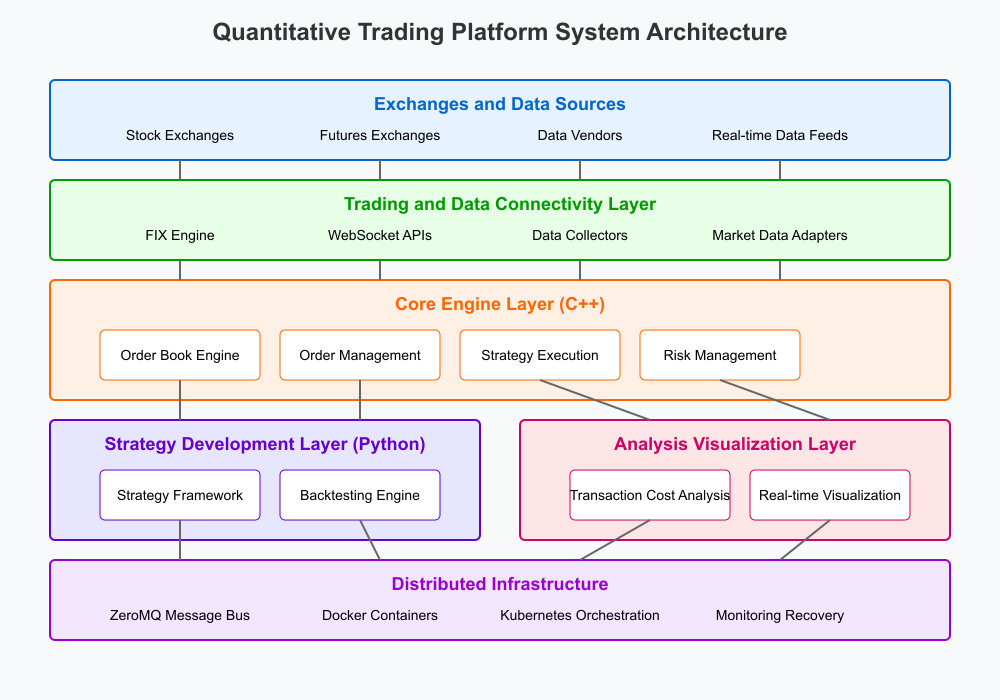
The platform consists of five key layers:
- Exchanges and Data Sources Layer
- Trading and Data Connectivity Layer
- Core Engine Layer (C++)
- Strategy Development Layer (Python)
- Analysis & Visualization Layer
All these components are supported by a robust Distributed Infrastructure layer that includes: - ZeroMQ message bus for low-latency inter-component communication - Docker containerization for deployment flexibility - Kubernetes orchestration for scaling and management - Comprehensive monitoring and automatic recovery systems
Key Features
- High-Performance Core Engine: C++ implementation of critical components ensures microsecond-level response time
- Real-time Market Microstructure Analysis: Capture and analyze order book dynamics and liquidity metrics
- Flexible Strategy Development: Python API for rapid strategy development using machine learning and quantitative models
- Comprehensive Backtesting: Event-driven backtesting engine with realistic market simulation
- Low-Latency Order Execution: FIX protocol integration for direct exchange connectivity
- Distributed Architecture: Microservices design with ZeroMQ messaging for horizontal scalability
- Cloud-Ready Deployment: Containerized services that can be deployed in cloud environments
Getting Started
Prerequisites
- C++17 compatible compiler (GCC 7+, Clang 5+, MSVC 2019+)
- CMake 3.15+
- Python 3.8+
- ZeroMQ 4.3+
- Boost 1.70+
- Fix8 (for FIX protocol support)
- YAML-CPP
Building from Source
- Clone the repository:
git clone https://github.com/jialuechen/trademind.git
cd trademind- Build the C++ components:
mkdir build && cd build
   cmake ..
make -j$(nproc)- Install the Python package:
cd python
   pip install -e .
Configuration
Edit the configuration files in the config directory to set up:
- Exchange connections
- Market data sources
- Risk parameters
- Logging preferences
- Performance settings
config/config.yaml.
Running the Platform
To start the platform with default settings:
./bin/trademindTo specify a custom configuration file:
./bin/trademind --config /path/to/custom_config.yamlStrategy Development
TradeMind provides a powerful Python API for developing trading strategies. Here's a minimal example:
from pyquant import Strategy, Context, OrderSide, OrderType
class SmaStrategy(Strategy):     def initialize(self) -> None:         # Set strategy parameters         self.parameters = {             "symbol": "AAPL",             "fast_period": 10,             "slow_period": 30,             "trade_size": 100         }                  # Add symbols to trade         self.context.symbols = [self.parameters["symbol"]]              def onbar(self, context: Context, bardict) -> None:         symbol = self.parameters["symbol"]         bars = bar_dict[symbol]                  # Calculate moving averages         fastma = bars['close'].rolling(self.parameters["fastperiod"]).mean()         slowma = bars['close'].rolling(self.parameters["slowperiod"]).mean()                  # Get current position         position = context.get_position(symbol)                  # Trading logic: Buy when fast MA crosses above slow MA         if fastma.iloc[-2] <= slowma.iloc[-2] and fastma.iloc[-1] > slowma.iloc[-1]:             if position.quantity <= 0:                 self.buy(symbol, self.parameters["trade_size"])                          # Sell when fast MA crosses below slow MA         elif fastma.iloc[-2] >= slowma.iloc[-2] and fastma.iloc[-1] < slowma.iloc[-1]:             if position.quantity >= 0:                 self.sell(symbol, self.parameters["trade_size"])
Backtesting
To backtest a strategy:
from pyquant import BacktestEngine, BacktestVisualizer, Timeframe
import pandas as pd
Load historical data
data = pd.readcsv("data/AAPLdaily.csv", indexcol='date', parsedates=True)
Create and configure strategy
strategy = SmaStrategy()
Set up backtest engine
backtest = BacktestEngine()
backtest.add_strategy(strategy)
backtest.addbardata("AAPL", Timeframe.D1, data)
Run backtest
results = backtest.run(
    start_time=data.index[100],
    end_time=data.index[-1],
    initial_capital=100000.0
)
Visualize results
visualizer = BacktestVisualizer()
visualizer.generate_report(results)
Parameter Optimization
TradeMind includes tools for strategy parameter optimization:
from pyquant import StrategyOptimizer
Create optimizer
optimizer = StrategyOptimizer(SmaStrategy)
optimizer.addbardata("AAPL", Timeframe.D1, data)
Define parameter grid
param_grid = {
    "fast_period": [5, 10, 15, 20],
    "slow_period": [20, 30, 40, 50],
}
Run grid search
bestparams = optimizer.gridsearch(
    paramgrid=paramgrid,
    start_time=data.index[100],
    end_time=data.index[-1],
    optimizemetric='sharperatio'
)
print(f"Best parameters: {best_params}")
Distributed Deployment
For production environments, TradeMind can be deployed as a distributed system using Docker and Kubernetes:
cd docker
docker-compose up -d
For Kubernetes deployment:
kubectl apply -f kubernetes/trademind.yamlContributing
Contributions are welcome! Please check out our contributing guidelines for details on how to submit pull requests, report issues, or suggest improvements.
License
This project is licensed under the Apache License 2.0 - see the LICENSE file for details.


