
Rust implementation of the Resonate algorithm for low-latency spectral analysis, with Python and WebAssembly bindings
resonators
A Rust implementation of Alexandre François's [Resonate algorithm][resonate] for low-latency spectral analysis, with Python and WebAssembly bindings.




[resonate]: https://alexandrefrancois.org/Resonate/ [paper]: https://alexandrefrancois.org/assets/publications/FrancoisARJ-ICMC2025.pdf [talk]: https://www.youtube.com/watch?v=QbNPA5QJ6OU [nofft]: https://github.com/alexandrefrancois/noFFT
What it is
This project implements Alexandre François's [Resonate algorithm][resonate] for computing spectral representations of an input signal. It produces outputs similar to STFT or CQT, with per-sample updates and no windowing or buffering. Internally, it's a bank of independent resonators (conceptually phasor-like oscillators) each tuned to a fixed frequency and accumulating the input's contribution via an exponentially weighted moving average. Because every resonator has its own frequency and its own time constant, you get per-bin control over the time-frequency tradeoff.
It's based on Alexandre's reference implementation, [noFFT][nofft], which is written in C++ and depends on Apple's Accelerate framework (macOS/iOS only). I created this to generate features for training ML models in Python and for inference in the browser via WASM. Writing it in Rust allows for portable SIMD and consistent numerical results across platforms.
When to use it
Good for:
- Real-time use where latency matters more than absolute frequency resolution
- Fixed memory footprint, independent of signal length
- Custom frequency layouts or per-bin time constants (non-uniform time-frequency resolution)
- General-purpose STFT or CQT analysis: use librosa or similar
- Offline batch where FFT's O(N log N) per frame is fine
Browser Demos
Live Spectrogram
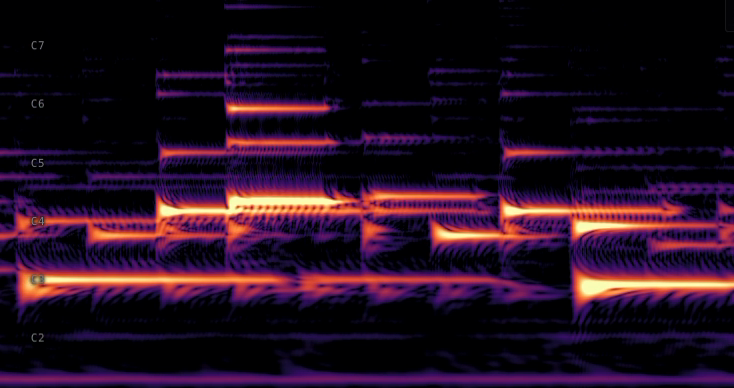
Loads the WASM build of the crate into an AudioWorkletNode, feeds it live microphone samples through a bank of 440 resonators (5 per semitone from A0 to C8), and writes the bank's magnitudes into a ring-buffer R32F texture. A WebGL2 fragment shader samples the texture, converts to dB, and applies a colormap.
In-browser Benchmark
Loads the WASM build into a Worker, runs the bank over one second of pseudo-random noise at 48 kHz, and times the result. Reports nanoseconds per sample, microseconds per 128-sample quantum, and the percentage of AudioWorklet callback budget consumed at 88, 264, 440, and 880 bins.
Install
Rust:
cargo add resonatorsPython:
pip install resonatorsnpm install resonatorsQuickstart
Rust:
use resonators::ResonatorBank;
use std::f32::consts::PI;
let samplerate = 44100.0; let freqs = [110.0, 220.0, 440.0, 880.0]; let mut bank = ResonatorBank::fromfrequencies(&freqs, samplerate);
let signal: Vec<f32> = (0..sample_rate as usize)     .map(|i| (2.0  PI  440.0 * i as f32 / sample_rate).sin())     .collect(); let spectrogram = bank.resonate(&signal, 256); // flat Vec<Complex32>, (nframes, nbins)
Python:
import numpy as np
from resonators import ResonatorBank
samplerate = 44100.0 freqs = np.array([110, 220, 440, 880], dtype=np.float32) bank = ResonatorBank(freqs, sample_rate)  # alphas default to a per-frequency heuristic
t = np.arange(samplerate, dtype=np.float32) / samplerate signal = np.sin(2  np.pi  440.0 * t).astype(np.float32) spectrogram = bank.resonate(signal, hop=256)  # shape (nframes, nbins), complex64
import init, { ResonatorBank } from "resonators";
await init();
const sampleRate = 44100; const freqs = new Float32Array([110, 220, 440, 880]); const bank = new ResonatorBank(freqs, sampleRate);
const signal = new Float32Array(sampleRate); for (let i = 0; i < signal.length; i++) {   signal[i] = Math.sin(2  Math.PI  440 * i / sampleRate); } const spectrogram = bank.resonate(signal, 256); // Float32Array, interleaved [re, im, ...]
Examples
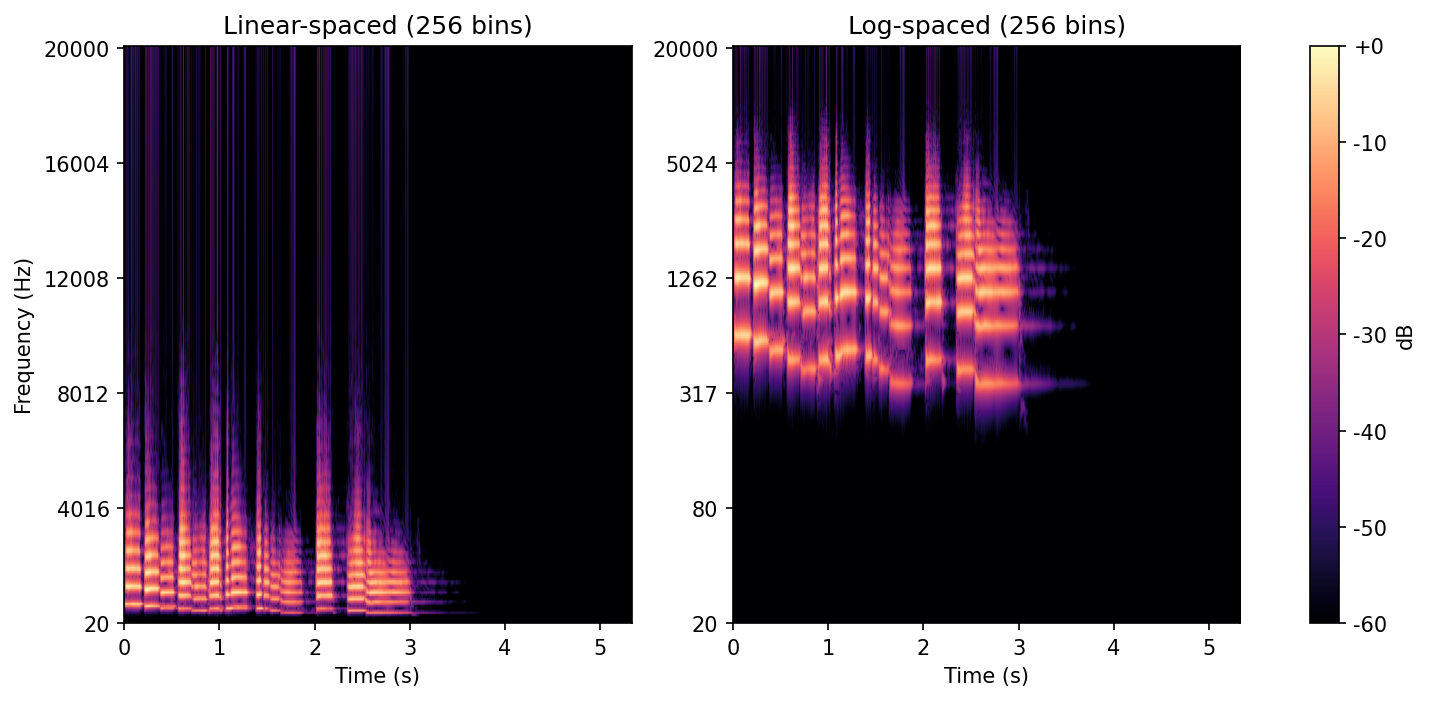
Same trumpet sample from librosa, rendered through two banks with different bin layouts: linear-spaced on the left, log-spaced on the right. The resonator algorithm is layout-agnostic, so you can match the bin structure to whatever analysis you're doing.
Reproduce with uv run scripts/example.py.
Benchmarks
Throughput of bank.resonate(signal, hop) measured against [noFFT][nofft] (installed from PyPI). noFFT uses Apple's Accelerate framework under the hood.
| Bins | Hop | resonators | noFFT | ratio | |------|-----|------------|-------|-------| | 88 | 256 | 23.88 M/s | 14.98 M/s | 1.59× | | 264 | 256 | 8.89 M/s | 5.49 M/s | 1.62× | | 440 | 256 | 5.44 M/s | 3.42 M/s | 1.59× | | 880 | 256 | 2.80 M/s | 1.73 M/s | 1.62× |
- Measured on Apple M2 Max, compiled with
-C target-cpu=native. - Reproduce with
uv run scripts/benchmark.py. - On other platforms,
cargo bench --bench bankmeasures per-sample throughput.
Credits
The Resonate algorithm is by Alexandre R. J. François.
- [Project page][resonate]
- Paper: Resonate: Efficient Low Latency Spectral Analysis of Audio Signals ([ICMC 2025 Best Paper][paper])
- [ADC talk][talk]: Real-Time, Low Latency and High Temporal Resolution Spectrograms
- Reference implementation: [noFFT][nofft] (C++, Apple Accelerate)
License
Dual-licensed under MIT or Apache-2.0, at your option.


