
Slim Neovim config for 0.11+ with minimal plugins.
Welcome to My Tiny Neovim 👋



Slim Neovim config for 0.11+ with minimal plugins.
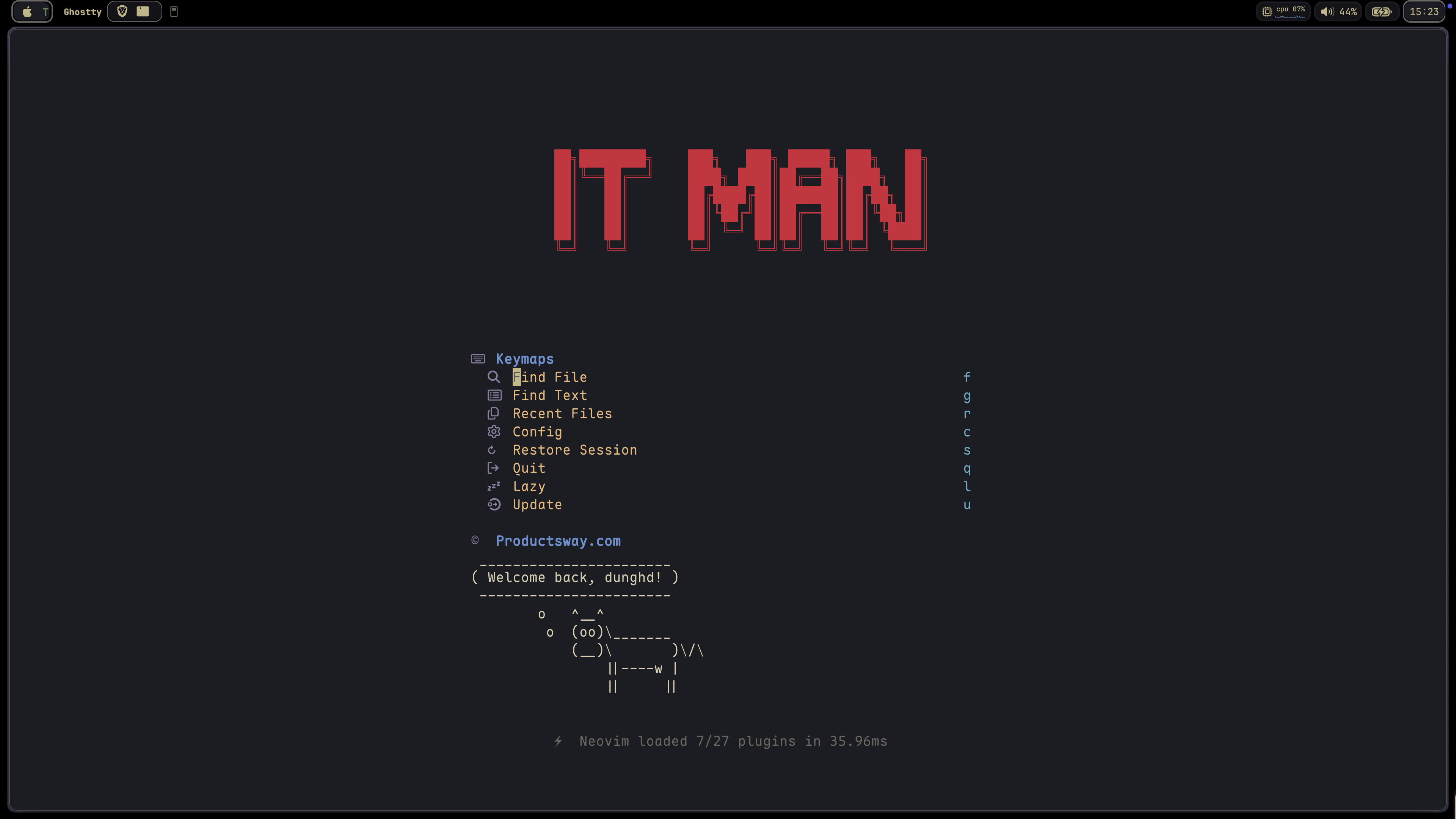
Motivation
This configuration is a migration from my-nvim-ide with two main goals:
- Leverage Neovim 0.11+ Built-in Features:
lspconfig by utilizing Neovim's built-in LSP support
- No need for the mason.nvim plugin; instead, use a shell script to install necessary tools
- Experience faster startup times and reduced complexity
- Take advantage of the latest Neovim improvements
- Optimize Plugin Selection:
blink.cmp for completion instead of built-in completion for better UX
- Maintain a minimal yet powerful development environment
- Adopt mini.nvim as Core UI Framework:
The result is a faster, more maintainable configuration that still provides all the necessary features for modern development.
🏠 Homepage
Quick Start
One-liner Installation (Recommended)
# Install with default app name (tiny-nvim)
curl -s https://raw.githubusercontent.com/jellydn/tiny-nvim/main/install.sh | bash
Or install with custom app name
curl -s https://raw.githubusercontent.com/jellydn/tiny-nvim/main/install.sh | bash -s -- --appname my_nvim
This will:
- Backup your existing Neovim configuration (if any)
- Clone the repository
- Install all required tools
- Install all plugins in headless mode
- Set up your complete Neovim environment
# If using default app name
NVIM_APPNAME=tiny-nvim nvim
If using custom app name
NVIMAPPNAME=mynvim nvim
Cleanup
To completely remove this configuration, run:
# Replace APPNAME with your chosen name (tiny-nvim or custom name)
rm -rf ~/.config/APPNAME
rm -rf ~/.local/share/APPNAME
rm -rf ~/.cache/APPNAME
rm -rf ~/.local/state/APPNAME
Manual Installation
If you prefer to install manually:
- Clone this repository:
git clone https://github.com/jellydn/tiny-nvim.git ~/.config/tiny-nvim- Run the installation script to set up all required tools:
cd ~/.config/tiny-nvim
./scripts/install-tools.sh- Launch Neovim with this configuration:
NVIM_APPNAME=tiny-nvim nvimHealth Checks & Debugging
After installation, run the following commands to ensure everything is set up correctly:
- Check overall Neovim health:
:checkhealth- Verify LSP configuration:
:check vim.lsp- For formatting issues, check conform.nvim status:
:ConformInfoFor more detailed debugging information, refer to conform.nvim debugging guide.
Filetype Mappings
This config includes custom filetype mappings to help LSPs attach cleanly and avoid :checkhealth warnings for uncommon extensions and templates. The mappings live in lua/config/autocmds.lua.
Features
Click to expand features
Migration from snacks.nvim to mini.nvim
This configuration has migrated from snacks.nvim to mini.nvim as its core UI framework.
Why mini.nvim?
- Consistent ecosystem from a single author
- Better integration between plugins
- Reduced dependencies while maintaining feature parity
- Optimized for Neovim 0.11+
Note: snacks.nvim is still available as an optional extra plugin if you prefer it.
mini.nvim Ecosystem
This configuration leverages the mini.nvim plugin suite as its core UI framework:
- mini.pick: Fuzzy finder for files, buffers, git, and more
- mini.starter: Beautiful start screen dashboard
- mini.diff: Git diff integration with hunk navigation
- mini.statusline: Lightweight, informative statusline
- mini.tabline: Smart buffer/tabline with buffer management
- mini.icons: Comprehensive icon support
- fff.nvim: Fast fuzzy file picker with frecency scoring and live grep
- mini.ai: Enhanced text objects for code
- mini.pairs: Automatic bracket and quote pairing
- mini.bufremove: Cleaner buffer deletion
- mini.extra: Additional pickers and utilities
Core Development
- LSP & Completion
- AI & Code Assistance
Usage Tips: - Sidekick (<leader>a*): AI CLI integration with Claude, Gemini, Copilot CLI and more. Includes Next Edit Suggestions (NES) for multi-line refactorings - Claude Code (<C-,>): Quick access to Claude in a floating window (when enabled) - Both can be used simultaneously without conflicts - different keybindings and use cases
Alternative: CopilotChat.nvim is available as an extra plugin if you prefer the traditional chat interface
- Code Generation & Documentation
- Git Integration
Testing & Debugging
- neotest: Testing framework
- vim-test: Testing framework
- trouble.nvim: Diagnostics and quickfix management
UI & Theme
- kanagawa.nvim: Beautiful theme inspired by Kanagawa wave
- mini.nvim: Buffer management via mini.tabline/mini.bufremove
- Statusline, tabline, icons, and starter via mini.nvim ecosystem
- noice.nvim: Improved notifications and command-line UI
- tiny-term.nvim: Lightweight terminal manager with simple toggles
- Default theme:
kanagawa - Switch theme:
:Theme kanagawa - Check current theme:
:Theme
Navigation & Search
- flash.nvim: Navigation and search enhancements
- which-key.nvim: Keybinding hints and management
- fff.nvim: Fast fuzzy file picker with frecency scoring, git integration, and live grep
- oil.nvim: File explorer that lets you edit your filesystem like a buffer
- Fuzzy finder and extra pickers via mini.nvim ecosystem
- better-escape.nvim: Better escape functionality
- grug-far.nvim: Advanced search and replace functionality
Picker Keymaps (FFF)
General
| Keymap | Mode | Description | | --- | --- | --- | | <leader><space> | n | Find Files (FFF — frecency-scored) | | <leader>/ | n | Live Grep (FFF) | | <leader>ff | n | Find Files (FFF) | | <leader>fr | n | Recent Files | | <C-e> | n | Find Files at project directory (FFF) | | <leader>, | n | Switch Buffer | | <leader>: | n | Command History |
FFF Prefix (<leader>')
| Keymap | Mode | Description | | --- | --- | --- | | <leader>'f | n | FFF find files | | <leader>'g | n | FFF live grep | | <leader>'z | n | FFF fuzzy grep | | <leader>'c | n | FFF search current word | | <leader>'r | n | FFF recent files |
Explorer
| Keymap | Mode | Description | | --- | --- | --- | | <leader>e | n | File Explorer (oil — floating window) |
Find (<leader>f)
| Keymap | Mode | Description | | --- | --- | --- | | <leader>fb | n | Buffers | | <leader>fc | n | Find Config File (FFF) | | <leader>fa | n | Find Files (all, including gitignored) | | <leader>fg | n | Find Git Files (including untracked) | | <leader>fR | n | Resume last picker |
Git (<leader>g)
| Keymap | Mode | Description | | --- | --- | --- | | <leader>gc | n | Git Commits | | <leader>gs | n | Git Status | | <leader>gS | n | Git Stash | | <leader>gb | n | Git Branches | | <leader>gB | n | Git Buffer Commits |
Search (<leader>s)
| Keymap | Mode | Description | | --- | --- | --- | | <leader>sb | n | Search Current Buffer | | <leader>sB | n | Search Lines in Open Buffers | | <leader>sg | n | Grep (all files, including hidden) | | <leader>sw | n | Search word under cursor (FFF) | | <leader>fw | n | Search word under cursor (FFF) | | <leader>fw | v | Search visual selection (FFF) | | <leader>s" | n | Registers | | <leader>sa | n | Find Actions (Commands) | | <leader>s: | n | Command History | | <leader>sc | n | Autocmds | | <leader>sC | n | Commands | | <leader>sd | n | Document Diagnostics | | <leader>sD | n | Workspace Diagnostics | | <leader>sh | n | Help Pages | | <leader>sH | n | Highlights | | <leader>si | n | LSP Incoming Calls | | <leader>so | n | LSP Outgoing Calls | | <leader>sj | n | Search Jumplist | | <leader>sk | n | Search Keymaps | | <leader>sl | n | Location List | | <leader>sm | n | Search Marks | | <leader>sM | n | Man Pages | | <leader>sq | n | Search Quickfix | | <leader>st | n | Todo Comments | | <leader>sT | n | Todo/Fix/Fixme | | <leader>su | n | Changelist | | <leader>sp | n | Search for Plugin Spec (FFF) | | <leader>uC | n | Colorschemes |
LSP
| Keymap | Mode | Description | | --- | --- | --- | | gd | n | Goto Definition | | gD | n | Goto Declaration | | gr | n | References | | gi | n | Goto Implementation | | gy | n | Goto Type Definition | | <leader>ss | n | LSP Document Symbols | | <leader>sS | n | LSP Workspace Symbols |
Task Management & Productivity
- hurl.nvim: Run HTTP requests directly from
.hurlfiles - overseer.nvim: Task runner and job management
- persistence.nvim: Session management
- quick-code-runner.nvim: Quick code execution
- refactoring.nvim: Code refactoring tools
- todo-comments.nvim: Highlight and search for todo comments
File Type Support
- render-markdown.nvim: Markdown rendering and preview
- previm: Markdown preview in browser
- ts-error-translator.nvim: TypeScript error translation
- typecheck.nvim: Type checking for TypeScript
VSCode Integration
This configuration works seamlessly with VSCode through the vscode-neovim extension. The configuration includes:
- VSCode-specific keymaps for enhanced productivity
- Integration with VSCode's built-in features
- Support for multiple cursors and fast cursor movement
- Git integration and file navigation
- Task running and debugging support
- Install the vscode-neovim extension
- Set your Neovim configuration path to point to this config:
"vscode-neovim.NVIM_APPNAME": "tiny-nvim",- Restart VSCode
Language Support
The configuration includes specialized support for various programming languages in the lua/langs directory:
- TypeScript: Enhanced TypeScript development with type checking and error translation
- Lua: Lua development with syntax highlighting and completion
- Go: Go development with gopls LSP integration
- Python: Python development support with LSP integration
- Markdown: Markdown editing with preview support
Theme
This configuration uses kanagawa.nvim as the default theme. The theme is inspired by the Kanagawa wave and provides a beautiful, elegant color scheme that's easy on the eyes while maintaining good contrast and readability.
Keymaps
Click to expand keymaps
Buffer Management
| Key | Description | | --------------- | --------------------------- | | <leader>bo | Delete Other Buffers | | <leader>br | Delete Buffers to the Right | | <leader>bl | Delete Buffers to the Left | | <S-h> or [b | Previous Buffer | | <S-l> or ]b | Next Buffer | | <leader>bb | Switch to Other Buffer | | <leader> | Switch to Other Buffer |
Window Management
| Key | Description | | ------------- | ---------------------- | | <C-h> | Go to Left Window | | <C-j> | Go to Lower Window | | <C-k> | Go to Upper Window | | <C-l> | Go to Right Window | | <C-Up> | Increase Window Height | | <C-Down> | Decrease Window Height | | <C-Left> | Decrease Window Width | | <C-Right> | Increase Window Width | | <leader>ww | Other Window | | <leader>wd | Delete Window | | <leader>w- | Split Window Below | | <leader>w\| | Split Window Right | | <leader>- | Split Window Below | | <leader>\| | Split Window Right |
Tab Management
| Key | Description | | ---------------- | ---------------- | | <leader><tab>l | Last Tab | | <leader><tab>o | Close Other Tabs | | <leader><tab>f | First Tab | | <leader><tab> | New Tab | | <leader><tab>] | Next Tab | | <leader><tab>d | Close Tab | | <leader><tab>[ | Previous Tab |
Movement & Editing
| Key | Description | | ------- | -------------------------------- | | j | Down (with gj for wrapped lines) | | k | Up (with gk for wrapped lines) | | <A-j> | Move Line Down | | <A-k> | Move Line Up | | gl | Go to end of line | | gh | Go to start of line | | <A-a> | Select all text |
Git Operations
| Key | Description | | ------------- | ------------- | | ]h | Next Hunk | | [h | Previous Hunk | | ]H | Last Hunk | | [H | First Hunk | | <leader>ghs | Stage Hunk | | <leader>ghr | Reset Hunk | | <leader>gc | Git Log | | <leader>gs | Git Hunks | | <leader>gS | Git Stash | | <leader>gg | Lazygit |
LSP & Code Actions
| Key | Description | | ------------ | ----------------------- | | <leader>ca | Code Action | | <leader>cr | Rename | | <leader>cf | Format Document | | <leader>. | Quick Fix / Code Action | | gd | Go to Definition | | K | Show Documentation |
Copilot (extra plugin)
| Key | Description | | ------- | ------------------- | | <C-y> | Accept Suggestion | | <C-i> | Accept Line | | <C-j> | Next Suggestion | | <C-k> | Previous Suggestion | | <C-d> | Dismiss Suggestion |
Search & Replace
| Key | Description | | ------------ | --------------------------------------------- | | <leader>sr | Search and Replace (with file type filtering) | | n | Next Search Result | | N | Previous Search Result | | <leader>ur | Redraw / Clear hlsearch / Diff Update |
Diagnostics & Quickfix
| Key | Description | | ------------ | --------------------------------- | | <leader>xx | Toggle Diagnostics | | <leader>xX | Toggle Buffer Diagnostics | | <leader>cs | Toggle Symbols | | <leader>cl | Toggle LSP Definitions/References | | <leader>xL | Toggle Location List | | <leader>xQ | Toggle Quickfix List | | [q | Previous Quickfix | | ]q | Next Quickfix | | <leader>cd | Line Diagnostics | | ]d | Next Diagnostic | | [d | Previous Diagnostic | | ]e | Next Error | | [e | Previous Error | | ]w | Next Warning | | w | Previous Warning |
File Operations
| Key | Description | | ------------ | ----------------------------------- | | <C-s> | Save File | | <leader>fn | New File | | <leader>qq | Quit All | | <C-c> | Copy whole file content | | <leader>m | Markdown preview (Previm) | | <leader>tm | Toggle Markdown preview (Render) | | <leader>e | File Explorer (oil — floating window) | | <C-s> | Save all changes (oil) | | q | Close oil buffer | | <C-y> | Copy entry path (oil) |
Search & Navigation
| Key | Description | | ---------------- | --------------------- | | <leader><space> | Find Files (FFF) | | <leader>/ | Live Grep (FFF) | | <leader>ff | Find Files (FFF) | | <leader>'f | FFF find files | | <leader>'g | FFF live grep |
UI & Formatting
| Key | Description | | ------------ | ------------------------ | | <leader>ui | Inspect Position | | <leader>uI | Inspect Tree | | <leader>uf | Toggle Autoformat | | <leader>zz | Open Lazy Plugin Manager | | <leader>? | Show Buffer Keymaps |
Todo Comments
| Key | Description | | ------------ | ---------------------------- | | <leader>st | Show all todo comments | | <leader>sT | Show todo/fix/fixme comments |
Dashboard
| Item | Description | | --------------- | --------------------- | | Find File | FFF find files | | Find Text | FFF live grep | | Recent Files | Recently opened files | | Config | FFF find files in config | | Restore Session | Load last session | | Lazy | Open lazy.nvim | | Update | Update plugins | | Quit | Quit Neovim |
Terminal
| Key | Description | | ------------ | ------------------ | | <esc><esc> | Enter Normal Mode | | <C-h> | Go to Left Window | | <C-j> | Go to Lower Window | | <C-k> | Go to Upper Window | | <C-l> | Go to Right Window | | <leader>ft | Toggle Terminal | | <C-/> | Toggle Terminal |
Treesitter
| Key | Description | | ----------- | ------------------------------------ | | <C-space> | Increment Selection | | <bs> | Decrement Selection (in visual mode) |
Folding
| Key | Description | | ---- | -------------------------------------------- | | zv | Close all folds except the current one | | zj | Close current fold when open, open next fold | | zk | Close current fold when open, open prev fold |
Neovide Specific
| Key | Description | | ------- | --------------------- | | <D-s> | Save File | | <D-c> | Copy (in visual mode) | | <D-v> | Paste (in all modes) |
AI (Sidekick)
| Key | Description | | ------------ | ----------------------------------- | | <leader>aa | Sidekick - Toggle CLI | | <leader>as | Sidekick - Select CLI tool | | <leader>ad | Sidekick - Detach CLI session | | <leader>at | Sidekick - Send "this" context | | <leader>af | Sidekick - Send file | | <leader>av | Sidekick - Send visual selection | | <leader>ap | Sidekick - Select prompt | | <leader>ac | Sidekick - Toggle Claude | | <leader>am | Sidekick - Generate commit message | | <Tab> | Next Edit Suggestion - Jump/Apply | | <C-.> | Sidekick - Switch focus to/from CLI |
Claude Code (extra)
| Key | Description | | ------------ | ------------------------ | | <C-,> | Toggle Claude | | <leader>Cc | Toggle Claude | | <leader>Cf | Focus Claude | | <leader>Cs | Send selection to Claude | | <leader>Cb | Add buffer to Claude | | <leader>Ca | Accept diff | | <leader>Cd | Deny diff | | <leader>Cp | Select prompt | | <leader>Ce | Explain code | | <leader>Cr | Review code | | <leader>Ct | Write tests | | <leader>Cm | Generate commit message | | <leader>Co | Optimize code | | <leader>Cx | Fix issues | | <leader>CR | Refactor code | | <leader>CD | Add documentation | | <leader>CS | Security review |
Testing
| Key | Description | | ------------- | ------------------- | | <leader>cjt | Run Test Nearest | | <leader>cjT | Run Test File | | <leader>cjS | Run Test Suite | | <leader>ctt | Run File | | <leader>ctT | Run All Test Files | | <leader>ctr | Run Nearest | | <leader>ctl | Run Last | | <leader>cts | Toggle Summary | | <leader>cto | Show Output | | <leader>ctO | Toggle Output Panel | | <leader>ctS | Stop | | <leader>ctw | Toggle Watch |
Task Runner & Code Execution
| Key | Description | | ------------ | --------------------- | | <leader>ot | Run Task | | <leader>oq | Quick Action | | <leader>or | Rerun Last Task | | <leader>oo | Toggle at bottom | | <leader>cp | Quick Code Runner/Pad |
Hurl (API Testing)
| Key | Description | | ------------ | --------------------------------- | | <leader>hA | Run All requests | | <leader>ha | Run Api request | | <leader>he | Run Api request to entry | | <leader>hE | Run Api request from entry to end | | <leader>hv | Run Api in verbose mode | | <leader>hV | Run Api in very verbose mode | | <leader>hr | Rerun last command | | <leader>hh | Hurl Runner/Show Last Response | | <leader>hg | Add global variable | | <leader>hG | Manage global variable | | <leader>tH | Toggle Hurl Split/Popup | | <leader>hd | Debug Info |
Neovide
# .config/neovide/config.toml
fork = true # Detach from the terminal instead of waiting for the Neovide process to terminate.
frame = "buttonless" # Transparent decorations including a transparent bar.
maximized = true # Maximize the window on startup, while still having decorations and the status bar of your OS visible.
title-hidden = true
Fonts
Click to expand font recommendations
I recommend using the following repo to get a "Nerd Font" (Font that supports icons)
[getnf
Project-Specific Configuration
Click to expand project configuration details
This configuration supports project-specific settings through .nvim-config.lua files. When Neovim starts, it will automatically look for a .nvim-config.lua file in the current working directory and load it if available.
Quick Setup with ProjectSettings
You can quickly create a .nvim-config.lua file using the :ProjectSettings command. This interactive command will:
- Show available plugins and LSP servers
- Let you select which ones to enable
- Create a
.nvim-config.luafile with your selections
:ProjectSettingsAvailable options:
- Plugins:
no-neck-pain: Additional UI plugin
- codecompanion: AI code companion
- avante: Alternative AI assistant
- mcphub: Minecraft Plugin Hub
- fold-preview: Fold preview
- difft: Structural diffs
- LSP Servers:
oxlint: Oxlint = Rust-based linter (ESLint replacement)
- lua_ls: Lua language server
- biome: Biome = Linter + Formatter
- json: JSON language server
- pyright: Python language server
- gopls: Go language server
- tailwindcss: Tailwind CSS language server
When prompted, enter your selections as comma-separated values:
Plugins: no-neck-pain,codecompanion
LSP: biome
Manual Configuration
You can also manually create a .nvim-config.lua file:
-- Project-specific Neovim configuration
-- Set TypeScript LSP server vim.g.lsptypescriptserver = "ts_ls"
-- Enable additional LSP servers vim.g.lspondemands = {   -- Add LSP servers here, e.g., "biome" }
-- Enable extra plugins vim.g.enableextraplugins = {   "no-neck-pain",  -- Additional UI plugin }
-- Note: fff.nvim (file picker) and oil.nvim (file explorer) are always enabled. -- They do not need to be listed here.
-- Set any other project-specific settings vim.opt.tabstop = 2 vim.opt.shiftwidth = 2
This file is not tracked by git, making it perfect for project-specific customizations.
Extra Plugins
Click to expand extra plugins
This configuration includes several extra plugins that can be enabled on demand through your project-specific configuration. These plugins provide additional functionality without bloating the core configuration.
Available Extra Plugins
- Distraction-free writing mode with customizable width - Alternative to zen-mode with a focus on reducing neck strain - Keymaps: -<leader>cz: Toggle No Neck Pain mode
- <leader>zu: Increase width
- <leader>zd: Decrease width
- AI code companion with GitHub Copilot integration
- Rich set of features including code explanation, refactoring, and inline documentation
- Supports slash commands for context-aware actions
- Keymaps prefix: <leader>A
- Visual mode selections:
- <leader>Ae: Explain selected code
- <leader>Af: Fix selected code
- <leader>At: Generate unit tests for selected code
- <leader>Ar: Refactor selected code
- <leader>Ad: Add inline documentation
- <leader>An: Suggest better naming
- Alternative AI code assistant using Copilot
- Replaces the standard Copilot implementation
- Provides a more streamlined interface
- Minecraft Plugin Hub integration
- Access Minecraft plugins directly from Neovim
- Command: :MCPHub
- Ultra-fast folding with treesitter and indent providers
- Enhanced fold text with line count display
- Improves code navigation and readability
- Keymaps:
- zR: Open all folds
- zM: Close all folds
- Preview folded code without opening the fold
- Includes pretty-fold.nvim for better fold text formatting
- Smart fold navigation with h/l keys
- Shows fold level indicators and line counts
7a. copilot-chat.nvim - Traditional AI chat interface with GitHub Copilot - Interactive conversations, code explanations, and commit message generation - Alternative to sidekick.nvim if you prefer a dedicated chat window - Automatically disables sidekick.nvim when enabled - Keymaps (when enabled): - <leader>ap: Prompt actions - <leader>am: Generate commit message - <leader>af: Fix diagnostic - <leader>al: Clear buffer and chat history - <leader>av: Toggle chat window - <leader>a?: Select models
7b. copilot.vim - GitHub Copilot integration moved to extra plugins - Provides AI-powered code completion and suggestions - Keymaps (when enabled): - <C-y>: Accept suggestion - <C-i>: Accept line - <C-j>: Next suggestion - <C-k>: Previous suggestion - <C-d>: Dismiss suggestion - Note: This plugin is disabled by default and can be enabled via extra plugins
7c. blink-copilot - Copilot source for blink.cmp - Note: This plugin is disabled by default and can be enabled via extra plugins
7d. claudecode.nvim - Claude Code integration (floating terminal + prompt shortcuts) - Note: This plugin is disabled by default and can be enabled via extra plugins
- Beautiful structural diffs using difft - Shows git diffs with better syntax highlighting and structure awareness - Supports multiple layouts: buffer, float, or ivy_taller - Keymaps: -<leader>gd: Toggle Difft viewer
- Blazingly fast file search and navigation
- Alternative to grug-far with better performance
- Interactive fuzzy search with file preview
- Automatically disables grug-far.nvim when enabled
- Keymaps:
- <leader>sr: Open scooter (normal mode)
- <leader>sr: Search selected text in scooter (visual mode)
Enabling Extra Plugins
To enable any of these plugins, add them to your .nvim-config.lua file:
vim.g.enableextraplugins = {
  "no-neck-pain",
  "codecompanion",
  "avante",
  "mcphub",
  "nvim-ufo",
  "fold-preview",
  "copilot-chat",  -- Alternative to sidekick.nvim
  "copilot",       -- GitHub Copilot integration
  "blink-copilot", -- Copilot source for blink.cmp
  "claudecode",    -- Claude Code integration
  "difft",
  "scooter"        -- Alternative to grug-far.nvim
}
Note that some plugins like avante.nvim, copilot-chat, and scooter will disable conflicting plugins when enabled.
Uninstall
rm -rf ~/.config/nvim
  rm -rf ~/.local/share/nvim
  rm -rf ~/.cache/nvim
  rm -rf ~/.local/state/nvim
Tips
Click to expand helpful tips
- Improve key repeat on Mac OSX, need to restart
defaults write NSGlobalDomain KeyRepeat -int 1
defaults write NSGlobalDomain InitialKeyRepeat -int 14- VSCode on Mac
# For VS Code
defaults write com.microsoft.VSCode ApplePressAndHoldEnabled -bool false
For VS Code Insider
defaults write com.microsoft.VSCodeInsiders ApplePressAndHoldEnabled -bool false
If necessary, reset global default
defaults delete -g ApplePressAndHoldEnabled
For Cursor
defaults write com.todesktop.230313mzl4w4u92 ApplePressAndHoldEnabled -bool false
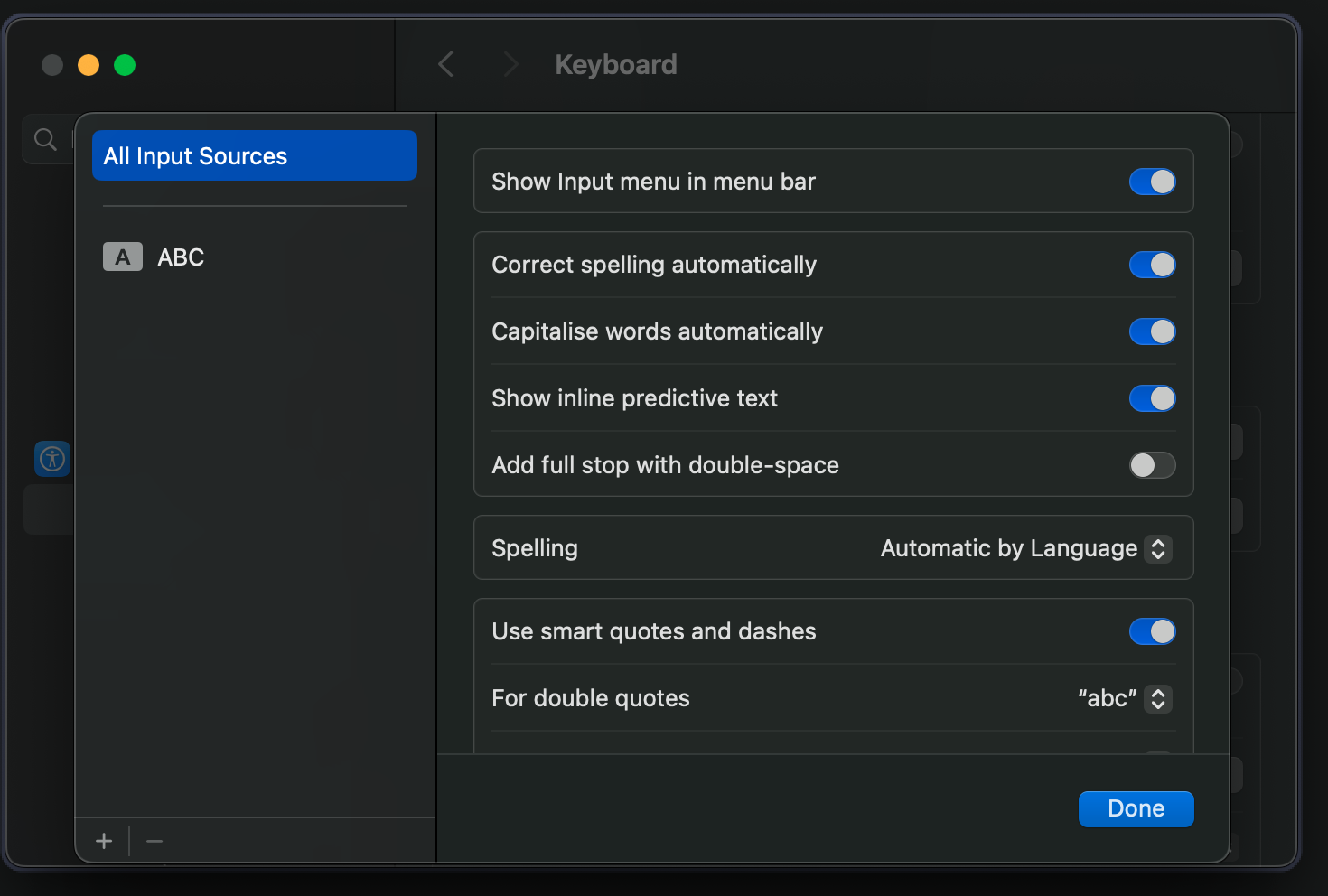
Also increasing Key Repeat and Delay Until Repeat settings in System Preferences -> Keyboard.

- Disable
full stop with double-spaceif you see the delay with<space>-<space>
Resources
Click to expand learning resources
- What's New in Neovim 0.11: A detailed overview of the latest features and improvements in Neovim 0.11.
- Neovim 0.11 Built-in Completion Setup: A comprehensive guide for setting up built-in completion in Neovim 0.11+.

[![IT Man - Talk #33 NeoVim as IDE [Vietnamese]](https://i.ytimg.com/vi/dFi8CzvqkNE/hqdefault.jpg)](https://www.youtube.com/watch?v=dFi8CzvqkNE)

[![IT Man - Step-by-Step Guide: Integrating Copilot Chat with Neovim [Vietnamese]](https://i.ytimg.com/vi/ByCCai62JE/hqdefault.jpg)](https://www.youtube.com/watch?v=ByCCai62JE)




Author
👤 Dung Huynh Duc
Show your support
Give a ⭐️ if this project helped you!
Contributors ✨
Thanks goes to these wonderful people (emoji key):
 Dung Duc Huynh (Kaka) 📖 💻 |  Zak Hargreaves 💻 |
This project follows the all-contributors specification. Contributions of any kind welcome!


