
ಠ_ಠ Terminal string styling done right.

































colors-cli




Terminal string styling done right. ಠ_ಠ
Install with npm:
npm install colors-cli --save-devStyles
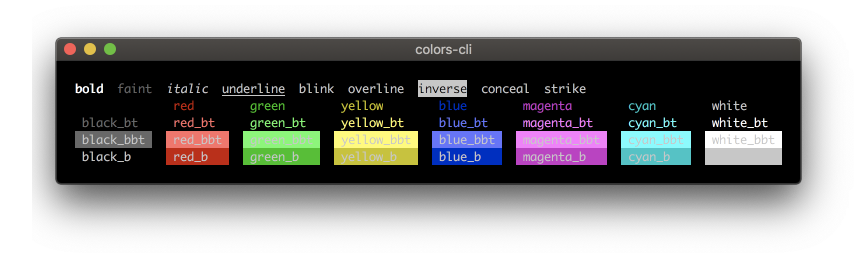
bold、 faint、 italic、 underline、 blink、 overline、 inverse、 conceal、 strike、
Colors
| Foreground | Background | Bright Foreground | Bright Background | ||
|---|---|---|---|---|---|
| black | black_b |  |
black_bt | black_bbt |  |
| red | red_b |  |
red_bt | red_bbt |  |
| green | green_b |  |
green_bt | green_bbt |  |
| yellow | yellow_b |  |
yellow_bt | yellow_bbt |  |
| blue | blue_b |  |
blue_bt | blue_bbt |  |
| magenta | magenta_b |  |
magenta_bt | magenta_bbt |  |
| cyan | cyan_b |  |
cyan_bt | cyan_bbt |  |
| white | white_b |  |
white_bt | white_bbt |  |
Basic usage:
Output colored text:
var color = require('colors-cli')
console.log( color.red('hello') )
Best way is to predefine needed stylings and then use it:
var color = require('colors-cli/safe')
var error = color.red.bold;
var warn = color.yellow;
var notice = color.blue;
console.log(error('Error!'));
console.log(warn('Warning'));
console.log(notice('Notice'));
Styles can be mixed:
var color = require('colors-cli/safe')
console.log('=>', color.red.bold.underline('hello') )
console.log('=>', color.magentabt.underline('hello ' + color.bluebt('wo' + color.yellowbt.magentabbt('r') + 'ld') + ' !!!!'));
console.log('=>', color.magentabt.underline('hello ' + color.bluebt('wo' + color.yellowbt.magentabbt('r'))));
console.log('=>', color.magentabt.underline('hello ' + color.bluebt('world') + ' !!!!' + color.yellow('kenny') + ' wong' ));
var color = require('colors-cli/safe') require('colors-cli/toxic') console.log('=> ' + color.underline('$ ' + 'npm'.magenta.underline + ' install'.yellow.underline + ' colors-cli --save-dev'));
require('colors-cli/toxic')
console.log( 'hello'.green );
console.log( 'hello'.green.black_b.underline );
console.log('=> $'.green + ' npm '.magenta + 'install '.yellow + 'colors-cli'.cyan + ' --save-dev');
ANSI 256 colors
Support ANSI 256 colors. [0 - 255], The rules of method name.
- Foreground x32 - Background xb32
var color = require('colors-cli/safe')
console.log( color.x45.bold.underline('hello') )
require('colors-cli/toxic') console.log( 'hello'.x23.underline ); console.log( 'hello'.green.xb34.underline );

Use the command line
Usage: colors
Options:
--black  => black    --blackb  => blackb    --red  => red    ...
Examples:
colors --red "\nhello world" --bold,underline,yellow "wcj"    colors --green,bold "\nhello world"    colors --x12,bold "hello world"
Reference
The ANSI Escape sequences control code screen.
echo -e "\033[31;41;4m something here 33[0m"\033 As the escape character, inform the terminal to switch to the escape mode. [ The beginning of the CSI. m Make the action to be performed. ; ASCII code separator.
License
Licensed under the MIT License.


