
💫 Extensible UI for Neovim notifications and LSP progress messages.
💫 Fidget


Extensible UI for Neovim notifications and LSP progress messages.
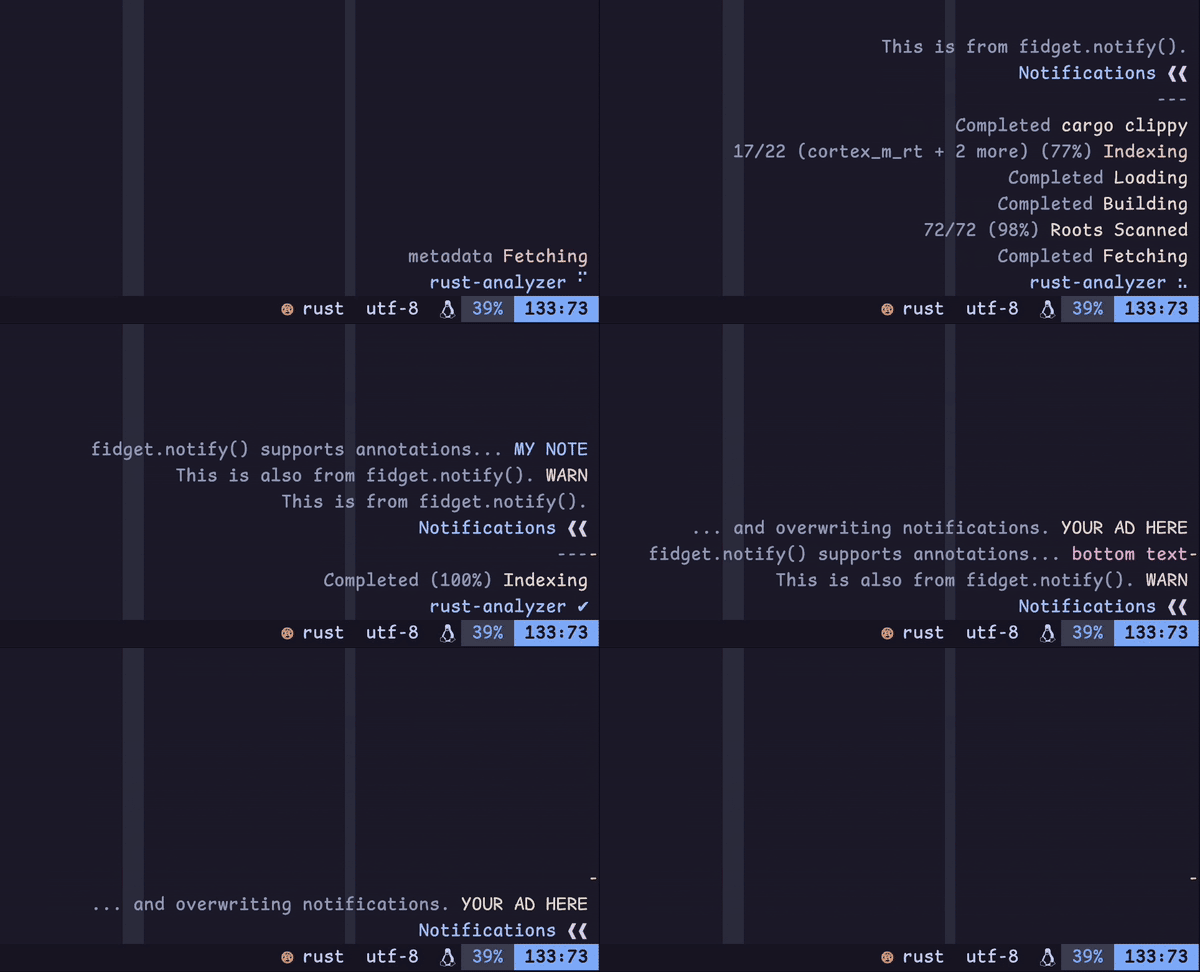
Demo setup
Note that this demo may not always reflect the exact behavior of the latest release.
This screen recording was taken as I opened a Rust file I'm working on, triggering rust-analyzer to send me some LSP progress messages.
As those messages are ongoing, I trigger some notifications with the following:
local fidget = require("fidget")
vim.keymap.set("n", "A", function()   fidget.notify("This is from fidget.notify().") end)
vim.keymap.set("n", "B", function()   fidget.notify("This is also from fidget.notify().", vim.log.levels.WARN) end)
vim.keymap.set("n", "C", function()   fidget.notify("fidget.notify() supports annotations...", nil, { annote = "MY NOTE", key = "foobar" }) end)
vim.keymap.set("n", "D", function()   fidget.notify(nil, vim.log.levels.ERROR, { annote = "bottom text", key = "foobar" })   fidget.notify("... and overwriting notifications.", vim.log.levels.WARN, { annote = "YOUR AD HERE" }) end)
(I use normal mode keymaps to avoid going into ex mode, which would pause Fidget rendering and make the demo look glitchy...)
Visible elements:
- Terminal + font: Kitty + Comic Shanns Mono
- Editor: Neovim v0.9.4
- Theme: catppuccin/nvim (mocha, dark)
- Status line: nvim-lualine/lualine.nvim
- Color columns:
:set colorcolumn=81,121,+1,+2(sorry) - Scrollbar: petertriho/nvim-scrollbar
Why?
Fidget is an unintrusive window in the corner of your editor that manages its own lifetime. Its goals are:
- to provide a UI for Neovim's [
$/progress][lsp-progress] handler - to provide a configurable [
vim.notify()][vim-notify] backend - to support basic ASCII animations (Fidget spinners!) to indicate signs of life
- to be easy to configure, sane to maintain, and fun to hack on
[lsp-progress]: https://microsoft.github.io/language-server-protocol/specifications/lsp/3.17/specification/#progress [vim-notify]: https://neovim.io/doc/user/lua.html#vim.notify()
Getting Started
Requirements
Fidget requires Neovim v0.11.3. It may work on older versions, but full functionality is not guaranteed.
If you would like to see progress notifications, you must have configured Neovim with an LSP server that uses the [$/progress][lsp-progress] handler. For an up-to-date list of LSP servers this plugin is known to work with, see this Wiki page.
Installation
Install this plugin using your favorite plugin manager.
See the documentation for setup() options.
Lazy
{
  "j-hui/fidget.nvim",
  opts = {
    -- options
  },
}
vim-plug
Plug 'j-hui/fidget.nvim'
" Make sure the plugin is installed using :PlugInstall. Then, somewhere after plug#end(): lua <<EOF require("fidget").setup {   -- options } EOF
rocks.nvim
:Rocks install fidget.nvimVersioning
Fidget is actively developed on the main branch, and may occasionally undergo breaking changes.
If you would like to ensure configuration/API stability, you can pin your tag to one of the release tags.
For instance, using Lazy:
{
  "j-hui/fidget.nvim",
  version = "*", -- alternatively, pin this to a specific version, e.g., "1.6.1"
  opts = {
    -- options
  },
}
Options
Fidget can be configured by passing a table of options to the setup(). Available options are shown below:
{
  -- Options related to LSP progress subsystem
  progress = {
    poll_rate = 0,                -- How and when to poll for progress messages
    suppressoninsert = false,   -- Suppress new messages while in insert mode
    ignoredonealready = false,  -- Ignore new tasks that are already complete
    ignoreemptymessage = false, -- Ignore new tasks that don't contain a message
    clearondetach =             -- Clear notification group when LSP server detaches
      function(client_id)
        local client = vim.lsp.getclientbyid(clientid)
        return client and client.name or nil
      end,
    notification_group =          -- How to get a progress message's notification group key
      function(msg) return msg.lsp_client.name end,
    ignore = {},                  -- List of LSP servers to ignore
-- Options related to how LSP progress messages are displayed as notifications     display = {       render_limit = 16,          -- How many LSP messages to show at once       done_ttl = 3,               -- How long a message should persist after completion       done_icon = "✔",            -- Icon shown when all LSP progress tasks are complete       done_style = "Constant",    -- Highlight group for completed LSP tasks       progress_ttl = math.huge,   -- How long a message should persist when in progress       progress_icon =             -- Icon shown when LSP progress tasks are in progress         { "dots" },       progress_style =            -- Highlight group for in-progress LSP tasks         "WarningMsg",       group_style = "Title",      -- Highlight group for group name (LSP server name)       icon_style = "Question",    -- Highlight group for group icons       priority = 30,              -- Ordering priority for LSP notification group       skip_history = true,        -- Whether progress notifications should be omitted from history       format_message =            -- How to format a progress message         require("fidget.progress.display").defaultformatmessage,       format_annote =             -- How to format a progress annotation         function(msg) return msg.title end,       formatgroupname =         -- How to format a progress notification group's name         function(group) return tostring(group) end,       overrides = {               -- Override options from the default notification config         rust_analyzer = { name = "rust-analyzer" },       },     },
-- Options related to Neovim's built-in LSP client     lsp = {       progressringbufsize = 0,  -- Configure the nvim's LSP progress ring buffer size       log_handler = false,        -- Log $/progress handler invocations (for debugging)     },   },
-- Options related to notification subsystem   notification = {     poll_rate = 10,               -- How frequently to update and render notifications     filter = vim.log.levels.INFO, -- Minimum notifications level     history_size = 128,           -- Number of removed messages to retain in history     overridevimnotify = false,  -- Automatically override vim.notify() with Fidget     configs =                     -- How to configure notification groups when instantiated       { default = require("fidget.notification").default_config },     redirect =                    -- Conditionally redirect notifications to another backend       function(msg, level, opts)         if opts and opts.on_open then           return require("fidget.integration.nvim-notify").delegate(msg, level, opts)         end       end,
-- Options related to how notifications are rendered as text     view = {       stack_upwards = true,       -- Display notification items from bottom to top       align = "message",          -- Indent messages longer than a single line       reflow = false,             -- Reflow (wrap) messages wider than notification window       icon_separator = " ",       -- Separator between group name and icon       group_separator = "---",    -- Separator between notification groups       groupseparatorhl =        -- Highlight group used for group separator         "Comment",       line_margin = 1,            -- Spaces to pad both sides of each non-empty line       render_message =            -- How to render notification messages         function(msg, cnt)           return cnt == 1 and msg or string.format("(%dx) %s", cnt, msg)         end,     },
-- Options related to the notification window and buffer     window = {       normal_hl = "Comment",      -- Base highlight group in the notification window       winblend = 100,             -- Background color opacity in the notification window       border = "none",            -- Border around the notification window       zindex = 45,                -- Stacking priority of the notification window       max_width = 0,              -- Maximum width of the notification window       max_height = 0,             -- Maximum height of the notification window       x_padding = 1,              -- Padding from edge of window boundary       y_padding = 0,              -- Padding from top/bottom edge of window boundary       align = "bottom",           -- How to align the notification window vertically       h_align = "right",          -- How to align the notification window horizontally       relative = "editor",        -- What the notification window position is relative to       tabstop = 8,                -- Width of each tab character in the notification window       avoid = {}                  -- Filetypes the notification window should avoid                                   -- e.g., { "aerial", "NvimTree", "neotest-summary" }     },   },
-- Options related to logging   logger = {     enable = true,                -- Whether to enable file logging     level = vim.log.levels.WARN,  -- Minimum logging level     max_size = 10000,             -- Maximum log file size, in KB     float_precision = 0.01,       -- Limit the number of decimals displayed for floats     path =                        -- Where Fidget writes its logs to       string.format("%s/fidget.nvim.log", vim.fn.stdpath("cache")),   }, }
For more details, see fidget-option.txt.
Lua API
Fidget has a Lua API, with documentation generated from source code. You are encouraged to hack around with that.
Commands
Fidget exposes some of its Lua API functions through :Fidget sub-commands (e.g., :Fidget clear), which support shell-like arguments and completion. These sub-commands are documented below.
:Fidget sub-commands
:Fidget clear
Clear active notifications
Arguments
Positional arguments:
{groupkey}:(any)_ group to clear
:Fidget clear_history
Clear notifications history
Arguments
Flags:
--before {seconds}:(number)filter history for items updated at least this long ago--groupkey {groupkey}:(any)clear history by group key--includeactive {true|false}:(boolean)_ whether to clear items that have not been removed (default: true)--includeremoved {true|false}:(boolean)_ whether to clear items that have have been removed (default: true)--since {seconds}:(number)filter history for items updated at most this long ago
{groupkey}:(any)_ clear history by group key
:Fidget history
Show notifications history
Arguments
Flags:
--before {seconds}:(number)filter history for items updated at least this long ago--groupkey {groupkey}:(any)filter history by group key--includeactive {true|false}:(boolean)_ whether to clear items that have not been removed (default:true)--includeremoved {true|false}:(boolean)_ whether to clear items that have have been removed (default:true)--since {seconds}:(number)filter history for items updated at most this long ago
{groupkey}:(any)_ filter history by group key
:Fidget lsp_suppress
Suppress LSP progress notifications
Arguments
Positional arguments:
{suppress}:(boolean)whether to suppress (omitting this argument toggles suppression)
:Fidget suppress
Suppress notification window
Arguments
Positional arguments:
{suppress}:(boolean)whether to suppress (omitting this argument toggles suppression)
Telescope
Fidget includes a [Telescope][telescope.nvim] picker extension, which will show your Fidget notification history in Telescope and allow you to filter it. To enable this extension, make sure the Telescope plugin is installed, and add the following to your configuration:
require("telescope").load_extension("fidget")You can open the Fidget picker using the command :Telescope fidget, or via the Lua API:
require("telescope").extensions.fidget.fidget()[telescope.nvim]: https://github.com/nvim-telescope/telescope.nvim
Highlights
Rather than defining its own highlights, Fidget's default configuration uses built-in highlight groups that are typically overridden by custom Vim color schemes. With any luck, these will look reasonable when rendered, but the visual outcome will really depend on what your color scheme decided to do with those highlight groups.
You can override these highlight groups (e.g., icon_style) using the :h fidget-options shown above.
Related Work
rcarriga/nvim-notify is first and foremost a vim.notify() backend, and it also supports LSP progress notifications (with the integration seems to have been packaged up in mrded/nvim-lsp-notify).
vigoux/notifier.nvim is a vim.notify() backend that comes with first-class LSP notification support.
neoclide/coc.nvim provides a nice LSP progress UI in the status line, which first inspired my desire to have this feature for nvim-lsp.
arkav/lualine-lsp-progress was the original inspiration for Fidget, and funnels LSP progress messages into nvim-lualine/lualine.nvim. I once borrowed some of its code (though much of that code has since been rewritten).
nvim-lua/lsp-status.nvim also supports showing progress text, though it requires some configuration to integrate that into their status line.
Acknowledgements
Most of the Fidget spinner patterns were adapted from the npm package sindresorhus/cli-spinners.


