
A macOS app for managing multiple Codex accounts, switching active auth quickly, and tracking usage in one dashboard.
Codex Pool Manager

Codex Pool Manager is a macOS app for operating a pool of Codex/OpenAI OAuth accounts from one control panel.
It helps you:
- track quota and remaining usage per account,
- switch the active auth account quickly,
- auto-rotate accounts with an intelligent policy,
- monitor status from Desktop Widget and Menu Bar,
- keep backup/export flows for recovery.
Table of Contents
- Screenshots
- Key Features
- How Intelligent Switching Works
- Widget + Menu Bar
- In-app Update Checks
- Authentication and Account Import
- Workspaces
- Install
- Build From Source
- Release DMG Pipeline
- Project Structure
- Testing
- Troubleshooting
- Security and Privacy Notes
- Contributing
Screenshots
All screenshots below use mock or non-sensitive test data.
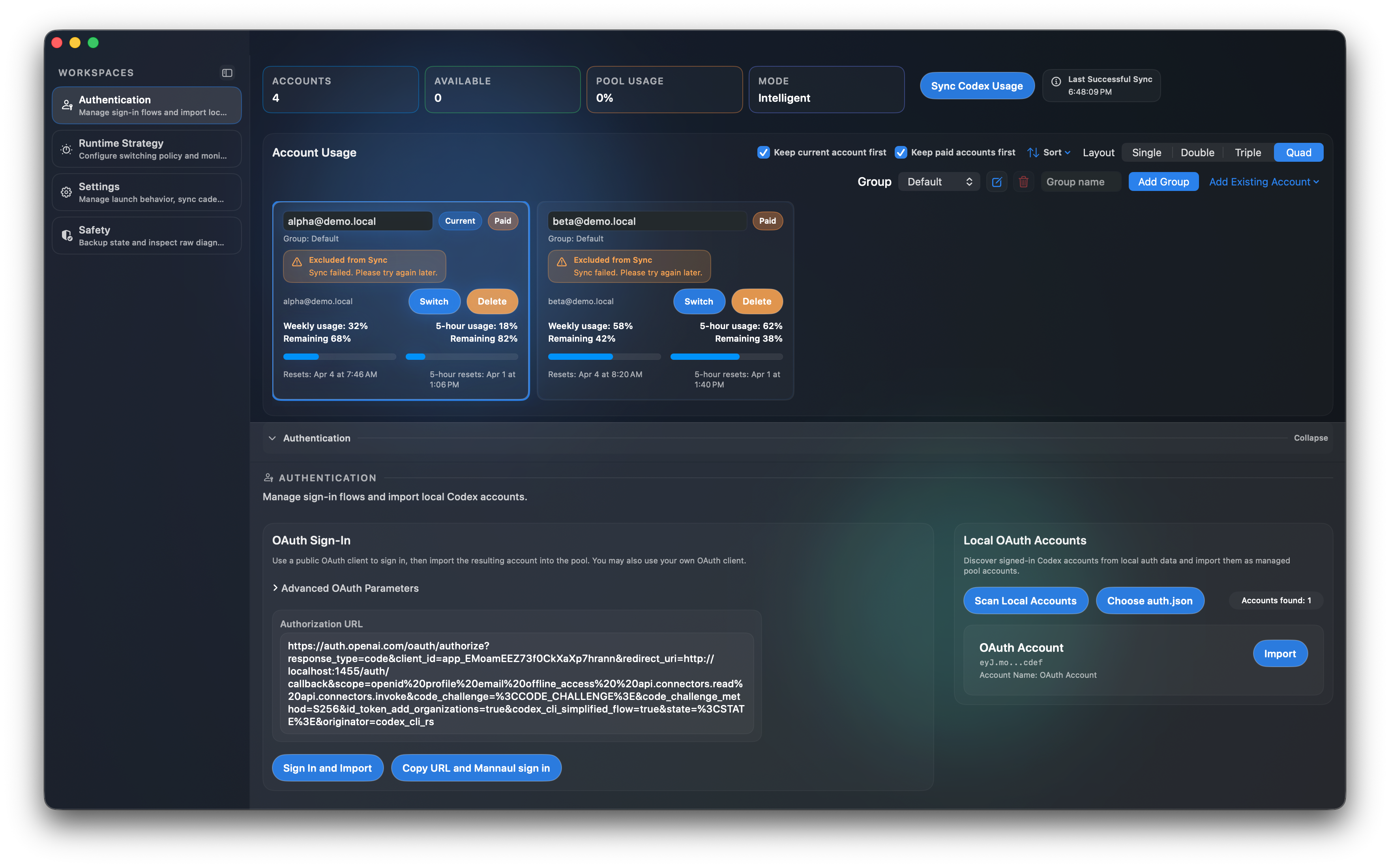
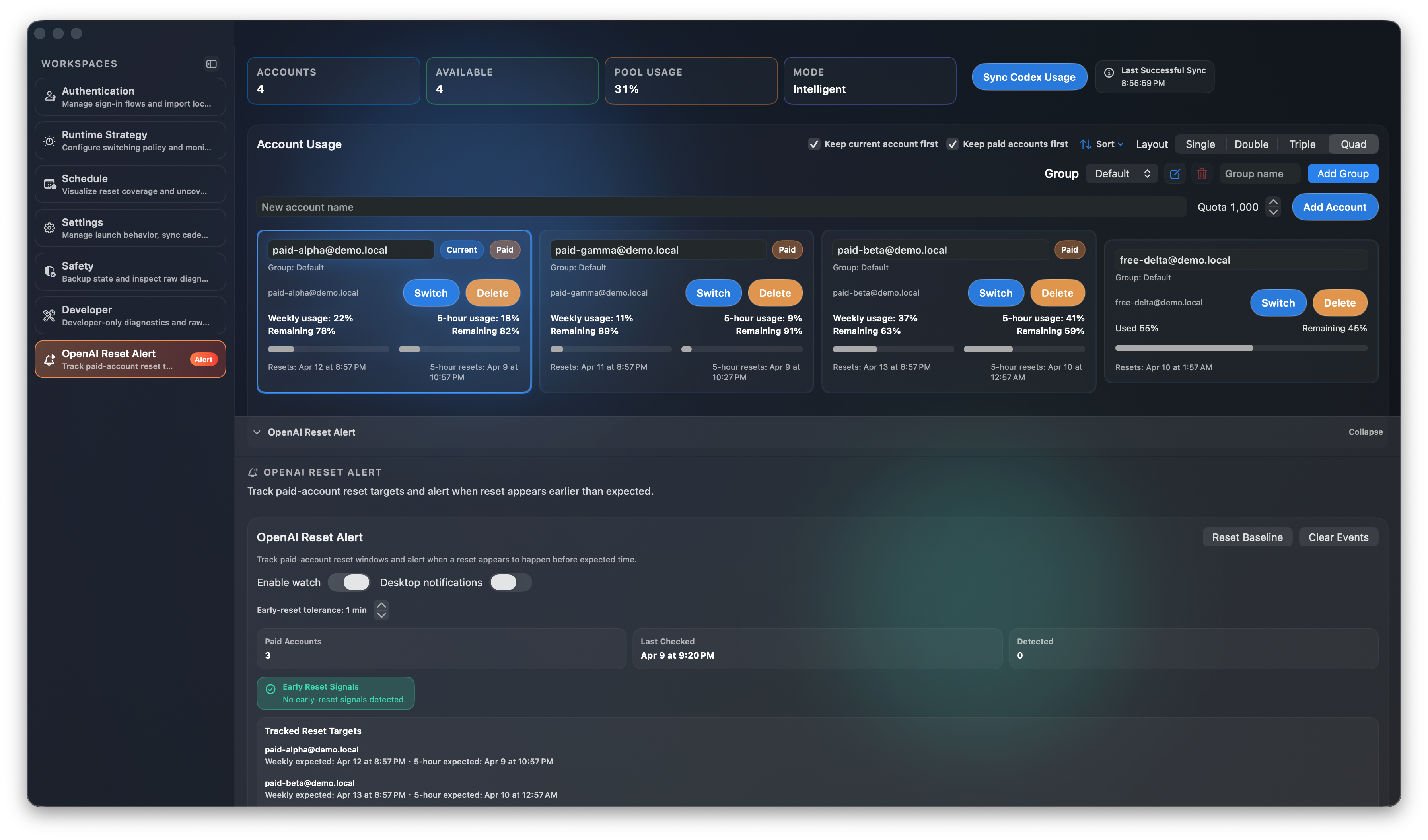
Main Dashboard (Dark, Mock Data)
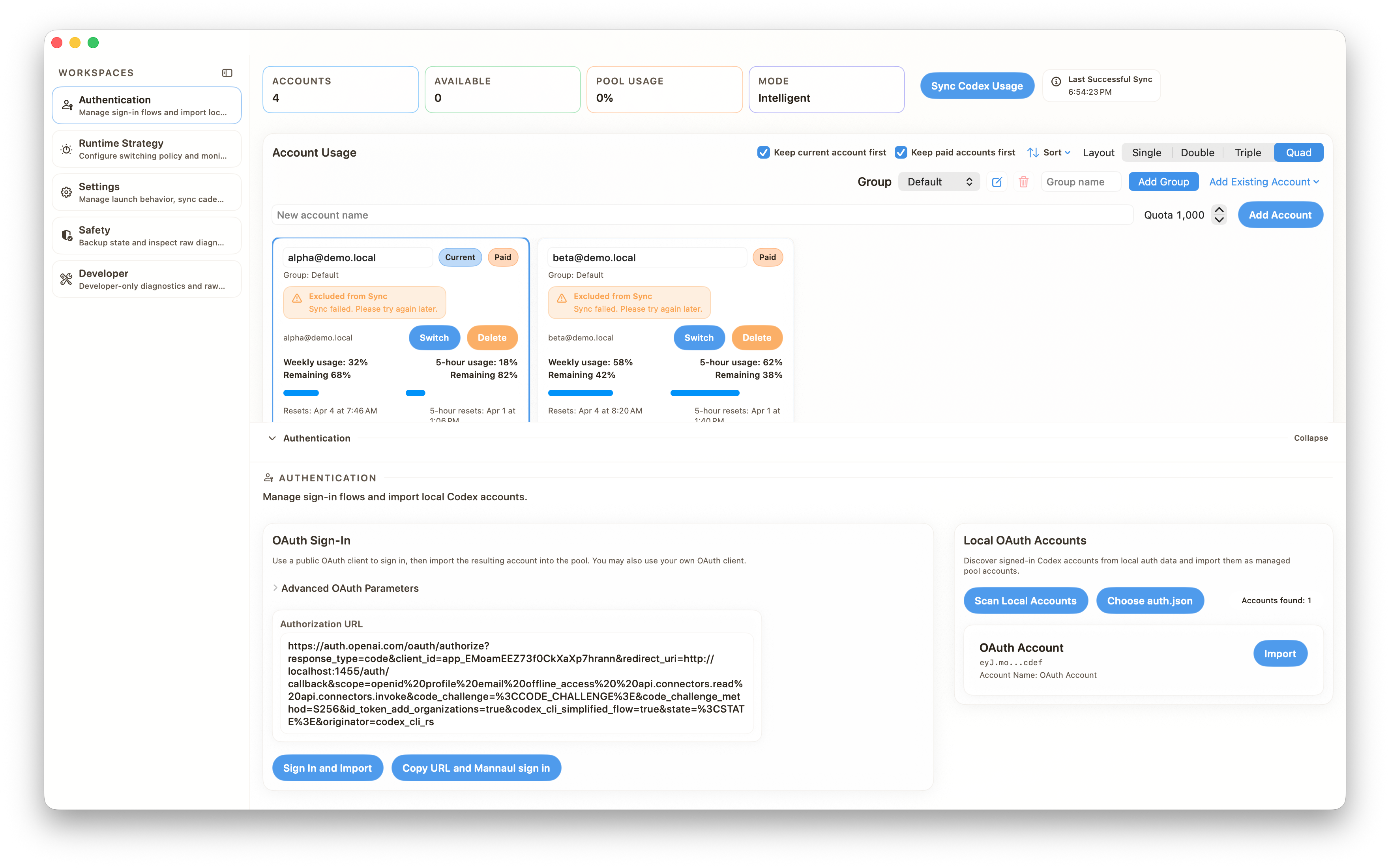
Header Overview (Light, Mock Data)
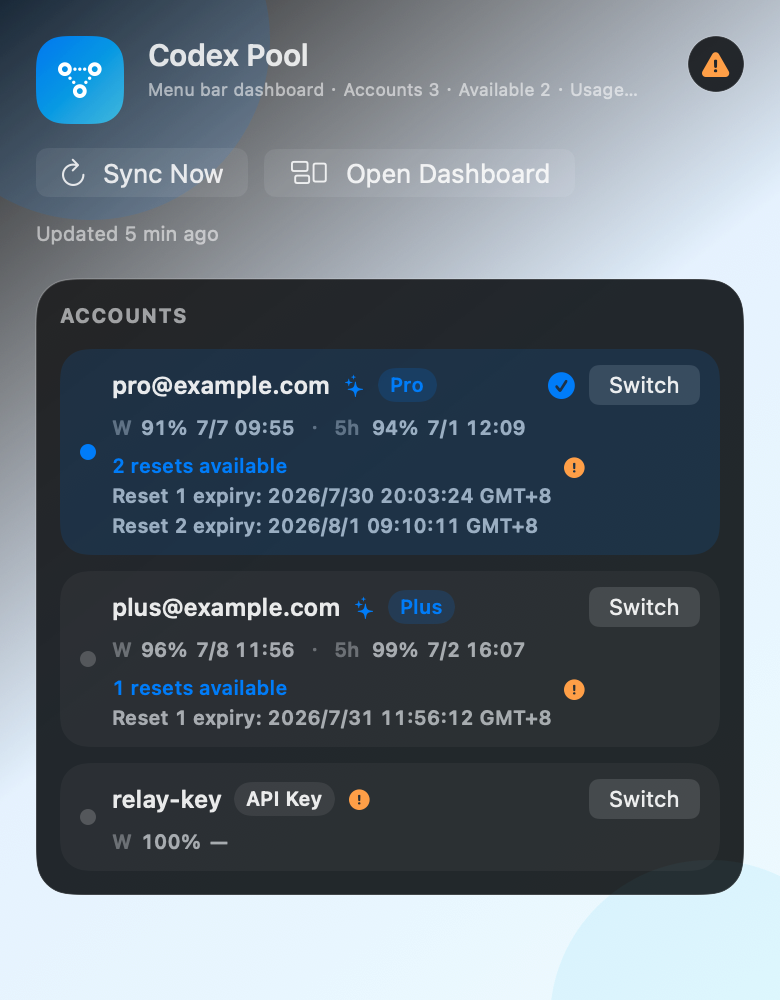
Menu Bar Status (Mock Data)
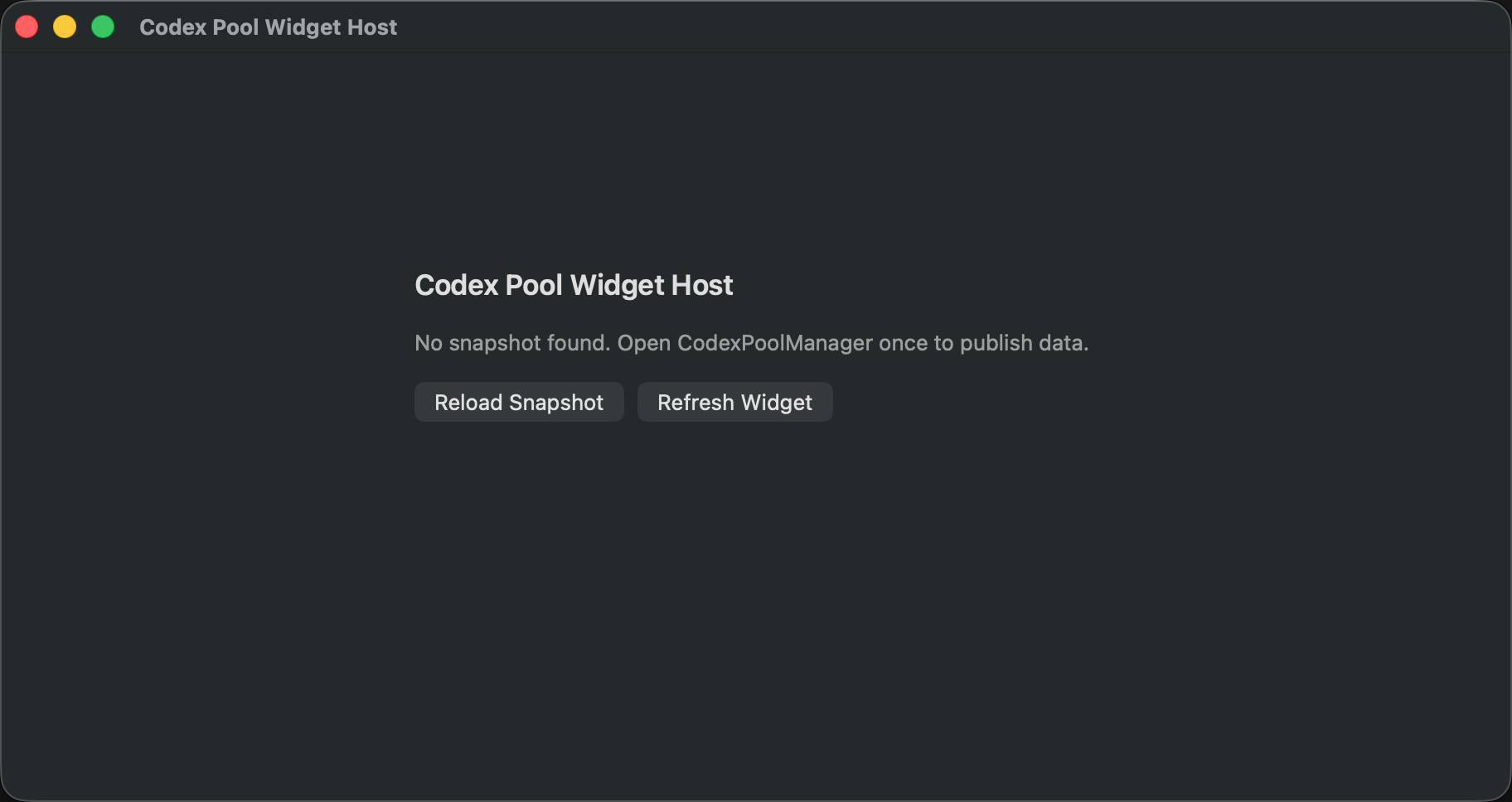
Widget (Empty-State Example, Mock State)
OpenAI Reset Alert (Mock Data)
Key Features
1) Account pool management
- Add, edit, duplicate, and remove accounts.
- Group accounts and manage groups (
Add,Rename,Delete). - Group deletion removes all accounts in that group.
- Sort and layout controls for large pools.
Minimallayout uses adaptive card sizing so column count responds to window width.- Dedup-aware pool statistics (
Accounts,Available,Pool Usage) to avoid counting duplicated identities multiple times. - Main-window account cards show reset credits: regular mode lists each estimated expiry, while
Minimalmode summarizes them as compact date chips such as2 resets · 7/30, 8/1.
2) Multiple switch modes
Intelligent: auto-selects the best account based on remaining capacity and policy thresholds.Manual: sticks to the account you manually choose.Focus: pins to the current account and avoids intelligent auto-rotation.
3) Usage sync and diagnostics
- Sync usage from Codex/OpenAI endpoints for all eligible accounts.
- Handles sync exclusions (missing token, missing account id, API/network errors).
- Shows last successful sync time and sync error details.
- Includes raw usage JSON and switch logs for diagnostics.
4) OAuth sign-in flows
- In-app OAuth sign-in and direct import.
- Manual flow: copy authorization URL, paste callback URL, then import.
- Local auth discovery from common local paths.
- Import local OAuth sessions/accounts into managed pool.
5) Desktop integration
- Native macOS notifications for key events (sync failure/recovery, low usage, auto-switch outcomes).
- Menu Bar extra with compact account list, group filtering, plan badges, warning popovers, and reset-credit expiry details.
- macOS Widget extension for quick status glance.
6) Backup and restore
- Export JSON snapshot.
- Export refetchable snapshot (sensitive; includes fields needed for re-fetch workflows).
- Import JSON snapshot for migration/recovery.
7) UI and localization
- Dark mode + light mode.
- Language switching via app settings.
- Locale-aware time formatting for app/widget texts.
- Version-specific
What's Newprompts are localized across all supported app languages.
8) Usage analytics and schedule planning
- Dedicated
Scheduleworkspace for reset timeline planning across accounts. - Daily/weekly usage analytics to identify consumption patterns.
- Coverage view to highlight potential uncovered windows between account resets.
- Per-account trend lines, threshold events, and anomaly summaries.
- Export analytics as JSON/CSV for reporting or external analysis.
9) OpenAI reset monitoring
- Dedicated
OpenAI Reset Alertworkspace for paid-account reset tracking. - Monitors weekly reset and 5-hour reset targets together.
- Flags early reset signals when resets move earlier than expected (within configurable tolerance).
- Optional desktop notifications and event history for auditability.
- Daily notification cap to reduce noisy false positives during unstable API periods.
How Intelligent Switching Works
This section explains the exact runtime behavior so release users understand what to expect.
Account eligibility
Only accounts that are not excluded from sync/scheduling are considered for automatic switching.
Examples of exclusion reasons:
- missing API token,
- missing ChatGPT account id,
- sync error status.
Paid vs non-paid remaining logic
- Non-paid account: intelligent remaining is based on weekly remaining ratio (
remainingUnits / quota). - Paid account (default): intelligent remaining uses the 5-hour remaining percentage.
- Paid account special case: if weekly remaining is already
0%, weekly remaining is treated as source of truth (account is effectively exhausted).
Candidate selection
From eligible accounts, the engine chooses the best candidate by highest intelligent remaining ratio.
Accounts with weekly remaining <= 0 are not eligible candidates.
Switch trigger conditions
In Intelligent mode, switching happens only when all are true:
- there is a valid candidate;
- current active account is low enough (below intelligent switch threshold);
- candidate is better than current;
- cooldown interval has elapsed.
Focus mode behavior
When switching into Focus, current account is pinned to prevent unexpected jumps. No intelligent auto-switch is performed in focus mode.
Low-usage alert threshold is separate
There are two different thresholds:
- Intelligent switch threshold: controls when switching is allowed.
- Low remaining usage alert threshold: controls when warning/notification is shown.
Widget + Menu Bar
Widget
- Widget reads snapshot from local bridge endpoint exposed by the main app.
- If no snapshot is available, widget shows a friendly empty-state prompt.
- Timeline refresh policy:
60s when snapshot exists,
- around every 10s when snapshot is missing.
Menu Bar
- Menu bar title contains compact status (remaining %, paid 5h left, update age).
- The popover mirrors main-window account ordering settings, including current account first, paid accounts first, and API Key accounts last.
- Account list supports group filtering, shows Plus/Pro/API Key badges, and keeps
Switchavailable even on the current account. - Rows show weekly and 5-hour remaining usage with exact reset times when available.
- Reset credits are shown inline as
N resets available, with one estimated expiry line per reset credit. Estimates use the previous successful sync time plus 30 days, so a warning popover explains that actual expiry may differ. - Account warnings are collapsed behind a compact exclamation popover to save vertical space.
- Refreshes periodically (every ~15s) and supports manual refresh.
In-app Update Checks
- Checks GitHub latest release metadata and compares against current app version.
- Supports normalized version parsing (for example
v1.8.0and1.8.0). - Auto-selects preferred installer by architecture (
Apple Silicon/Intel) when available. - Provides
Install now,Manual download, andSkip this versionactions in update dialog. - Shows a localized
What's Newprompt after version/build changes, and lets users reopen the latest feature notes from Settings.
Authentication and Account Import
Local account discovery paths
The app scans local auth JSON from common locations:
~/.codex/auth.json~/.config/codex/auth.json~/.openai/auth.json
Public OAuth client
By default, the app supports public client flow and also allows your own OAuth client parameters.
API Key Relay Providers
Codex Pool Manager can add an API Key / Relay account for Codex CLI custom providers. Relay accounts write a provider block to ~/.codex/config.toml and update Codex's API-key auth.json directly.
Relay accounts do not support ChatGPT/Codex subscription usage sync. They are available for manual switching, but are excluded from automatic intelligent/focus switching until a relay-specific usage source is configured.
Manual callback flow
If browser callback cannot complete directly in-app:
- click
Copy URL and Manual sign in; - complete sign-in in browser;
- paste callback URL into the callback field;
- click
Import.
Workspaces
The UI is organized into workspaces for clearer operational boundaries.
Authentication
- OAuth sign-in panel
- Advanced OAuth parameters
- Local OAuth account scanning/import
- API Key Relay provider setup
Runtime Strategy
- mode selector (
Intelligent,Manual,Focus) - intelligent switch threshold
- low-usage alert threshold
- launch target selection for
Switch and launch - smart recommendation panel
Schedule
- reset timeline overview across managed accounts
- daily/weekly usage analytics summaries
- coverage gap hints for planning account usage
- per-account trend lines and threshold/anomaly events
- analytics export (
Copy JSON,Export CSV,Export JSON)
OpenAI Reset Alert
- paid-account reset target tracking
- early-reset tolerance configuration
- early-reset signal detection summary and records
- optional desktop alerting + event list management
Settings
- launch behavior
- auto-sync toggle + interval
- language
- appearance (system/dark/light)
Safety
- backup/export/import controls
- diagnostics surface for raw data/log verification
Install
Option A: Download prebuilt DMG from Releases
Release assets provide two architecture-specific DMGs:
CodexPoolManager-<version>-apple-silicon.dmgCodexPoolManager-<version>-intel.dmg
Option B: Run from source in Xcode
See next section.
Build From Source
Requirements
- macOS
- Xcode 16+
Steps
cd /path/to/AIAgentPool
open CodexPoolManager.xcodeproj
In Xcode:
- Select the
CodexPoolManagerscheme. - Choose your local Mac destination.
- Build and Run.
Release DMG Pipeline
Automated DMG packaging + notarization is configured in:
.github/workflows/release-dmg.ymlscripts/buildandnotarize_dmg.sh
Pipeline highlights
- Builds both
arm64andx86_64variants. - Uses release version/tag for artifact naming (not commit hash).
- Signs with Developer ID Application certificate.
- Notarizes and staples each DMG.
- Uploads DMGs to both workflow artifacts and GitHub Release assets.
Required GitHub secrets
APPLECERTIFICATEP12_BASE64APPLECERTIFICATEPASSWORDKEYCHAIN_PASSWORDAPPLETEAMIDAPPLEAPIKEY_IDAPPLEAPIISSUER_IDAPPLEAPIPRIVATEKEYBASE64
Project Structure
AIAgentPool/
├─ CodexPoolManager/                 # Main macOS app target
├─ CodexPoolWidget/                  # Widget extension target
├─ CodexPoolWidgetHost/              # Companion host target for widget bridging/testing
├─ Domain/Pool/                      # Core state, switching rules, snapshot model
├─ Features/PoolDashboard/           # UI + flow coordinators
├─ Infrastructure/Auth/              # OAuth, auth file access/switch services
├─ Infrastructure/Usage/             # Usage sync client/service
├─ CodexPoolManagerTests/            # Unit tests
├─ CodexPoolManagerUITests/          # UI tests
├─ .github/workflows/release-dmg.yml # Release workflow
└─ scripts/buildandnotarize_dmg.sh # Local/CI DMG script
Testing
Run tests in Xcode, or via command line:
xcodebuild \
  -project CodexPoolManager.xcodeproj \
  -scheme CodexPoolManager \
  -destination 'platform=macOS' \
  test
Build release configuration:
xcodebuild \
  -scheme CodexPoolManager \
  -destination 'platform=macOS' \
  -configuration Release \
  build
Localization sanity checks:
for f in CodexPoolManager/en.lproj/Localizable.strings \
         CodexPoolManager/zh-Hans.lproj/Localizable.strings \
         CodexPoolManager/zh-Hant.lproj/Localizable.strings; do
  plutil -lint "$f"
done
Troubleshooting
"Syncing..." appears stuck
- Confirm network/API availability.
- Check Sync Error callout for details.
- Ensure active accounts have valid token and account id.
- Try manual sync again after a short interval.
Widget shows "No snapshot available"
- Open CodexPoolManager once (widget bridge is published by main app).
- Wait a few seconds and refresh widget.
- Verify local firewall/network rules do not block localhost loopback.
Local OAuth scan finds nothing
- Use
Choose auth.jsonand grant permission manually. - Verify auth data exists in one of the known candidate paths.
Account not switching in Intelligent mode
- Check whether current remaining is below switch threshold.
- Check cooldown interval.
- Check candidate account eligibility and remaining values.
- In focus mode, intelligent switching is intentionally disabled.
Security and Privacy Notes
- Refetchable exports may contain sensitive values.
- Do not share raw logs or exports publicly without redaction.
- Use secure storage for internal snapshots.
- OAuth/client credentials should be handled according to your security policy.
Contributing
Issues and PRs are welcome.
Recommended PR scope:
- one behavior change per PR,
- include test coverage for domain or coordinator logic,
- include before/after screenshots for UI changes.
If this project helps your Codex account operations, consider starring the repository.


