
A UI for local Kubernetes clusters created with k3d

k3x



k3x is a graphical user interface for k3d, making it trivial to have your own local Kubernetes cluster(s).
k3x is perfect for:
- having a fresh Kubernetes cluster in a couple of seconds.
- trying new deployments before going in production.
- learning about Kubernetes.
- to create/switch-to/destroy Kubernetes clusters easily.
- to drive the most important operations with global keyboard shortcuts.
- to reduce the learning curve of using Kubernetes.
Documentation
- Detailed installation instructions.
- Creating a new cluster.
- Preferences.
- Frequently asked questions and troubleshooting.
Quick start
Pre-requisites
- A Docker daemon. It can be both a local or a remote one... but things
- Some Linux distribution where you can install Flatpak packages.
Installing k3x
The preferred installation method is from the Flathub. Just visit the k3x_ page at the Flathub (built from this repo) or click in the following link:

From command line, you can install it with
flatpak remote-add --user --if-not-exists flathub https://flathub.org/repo/flathub.flatpakrepo
flatpak install --user flathub com.github.inercia.k3x
You can also use one of the .flatpak files provided in our releases page but you should first take a look at the instructions for your distro for some peculiarities.
Running k3x
Once k3x is installed it should be available from your launcher (ie, the GNOME Shell, your Applications menu, etc.). But you can also run it from the command line with:
flatpak run --user com.github.inercia.k3xThis also print the application log when started from the terminal, useful for debugging. Check out the troubleshooting guide if something goes wrong.
Once k3x is running you will see a new icon in your system tray that will unroll a menu when clicked:
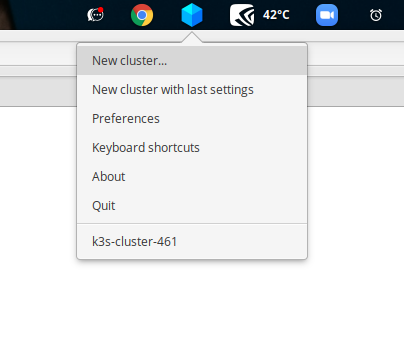
By clicking in the
New cluster...you will open the cluster creation dialog.Preferenceswill open the application settings window.
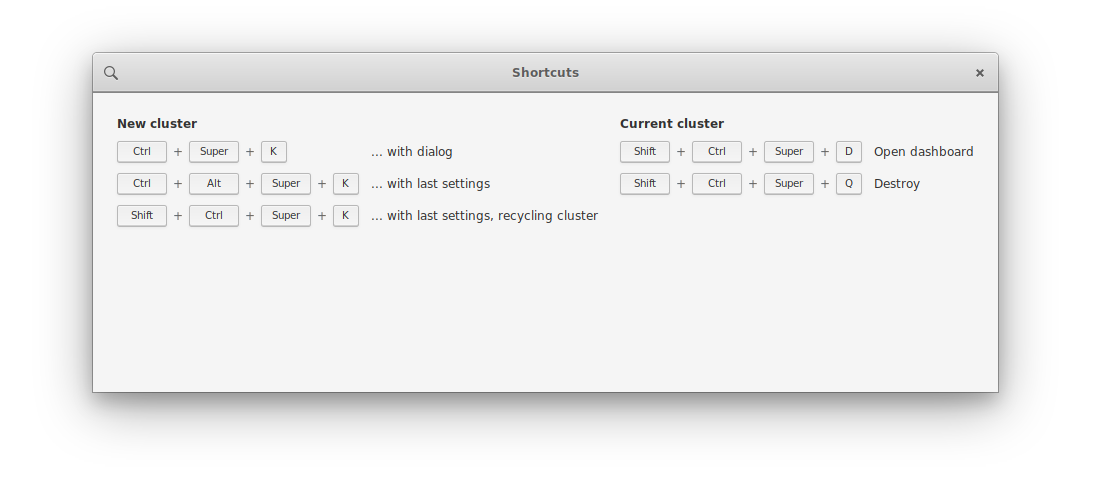
Contributing to k3x
- First, make sure the
flatpak-builder
is available in your machine.
- You can fork and clone this repo (if you plan to contribute) or just download
- Install all dependencies with:
make deps- Then you can run it with:
make run


