
Build Research and Rag agents with Granite on your laptop
Granite Retrieval and Image Research Agents
📚 Agents Overview
| Feature | Description | Models Used | Code Link | Tutorial Link | | ----------------------- | -------------------------------------------------------------------- | ------------------------------------------ | -------------------------------------------------------------------------- | ------------------------------------------------------------------------------------------------------------------------------------------------------------------------------------- | | Granite Retrieval Agent | General Agentic RAG for document and web retrieval using Autogen/AG2 | Granite 4 (ibm/granite4:latest) | graniteautogenrag.py | Build a multi-agent RAG system with Granite locally | | Image Research Agent | Image-based multi-agent research using CrewAI with Granite Vision | Granite 4 Tiny-H (ibm/granite4:tiny-h) | imageresearchergranitecrewai.py | Build an AI research agent for image analysis with Granite 3.2 Reasoning and Vision models |
Why Granite 4 for these agents?
Granite 4 introduces a hybrid Mamba-2/Transformer architecture (with MoE variants) that targets lower memory use and faster inference, making it a strong fit for agentic RAG and function-calling workflows. It uses >70% lower memory and ~2× faster inference vs. comparable models, which helps these agents run locally or on modest GPUs with lower cost and latency. Models are Apache-2.0 licensed, ISO 42001 certified, and cryptographically signed for governance and security.
Tiny-H (7B total / ~1B active) is optimized for low-latency, small-footprint deployments—ideal for the Image Researcher’s quick tool calls and orchestration steps. The family emphasizes instruction following, tool calling, RAG, JSON output, multilingual dialog, and code (incl. FIM), aligning with both agents’ needs.
Granite Retrieval Agent
The Granite Retrieval Agent is an Agentic RAG (Retrieval Augmented Generation) system designed for querying both local documents and web retrieval sources. It uses multi-agent task planning, adaptive execution, and tool calling via Granite 4 (ibm/granite4:latest).
🔹 Key Features:
- General agentic RAG for document and web retrieval using Autogen/AG2.
- Uses Granite 4 (ibm/granite4:latest) as the primary language model.
- Integrates with Open WebUI Functions for interaction via a chat UI.
- Optimized for local execution (e.g., tested on MacBook Pro M3 Max with 64 GB RAM).
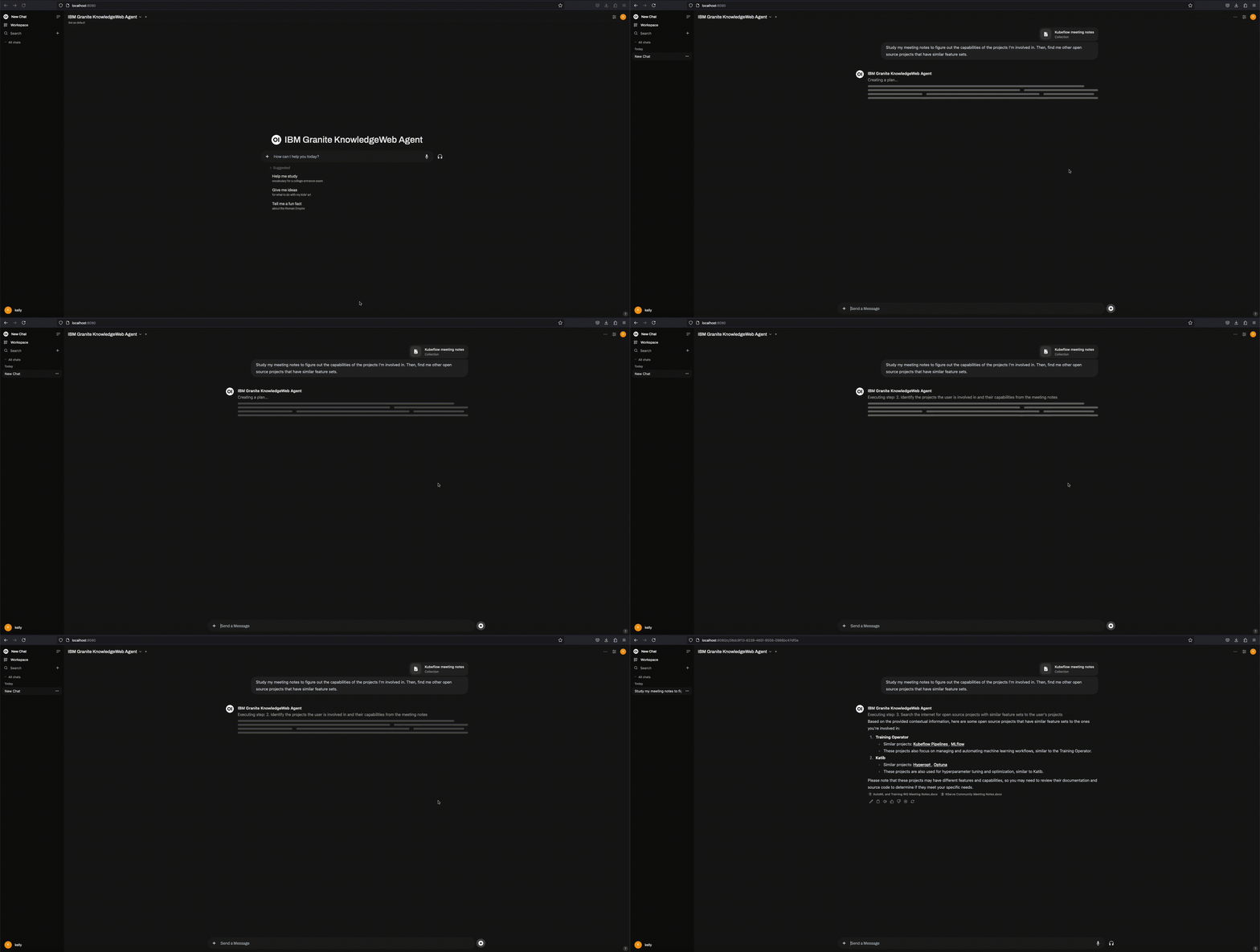
Retrieval Agent in Action:
Architecture:
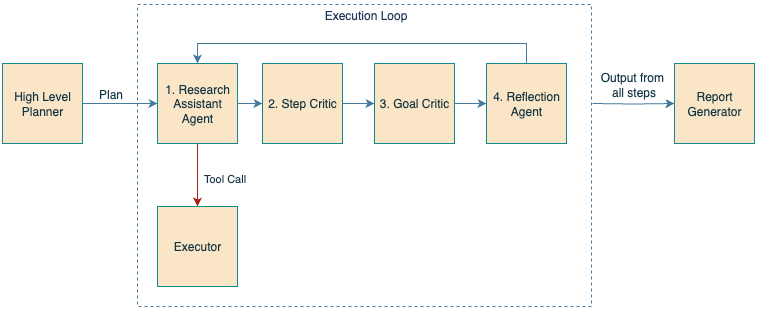
Image Research Agent
The Image Research Agent analyzes images and performs multi-agent research on image components using Granite 4 Tiny-H (ibm/granite4:tiny-h) with the CrewAI framework.
🔹 Key Features:
- Image-based multi-agent research using CrewAI.
- Granite 4 Tiny-H powers low-latency orchestration and tool calls; pair with a vision backend of your choice.
- Identifies objects, retrieves related research articles, and provides historical backgrounds.
- Demonstrates a different agentic workflow from the Retrieval Agent.
Image Researcher in Action:

Architecture:

🔑 Key Highlights
- Common Installation Instructions: The setup for Ollama and Open WebUI remains the same for both agents.
- Flexible Web Search: Agents use the Open WebUI search API, integrating with SearXNG or other search engines. Configuration guide.
🛠 Getting Started
1. Setup Ollama
Go to ollama.com and hit Download!
Once installed, pull the Granite 4 Micro model for the Granite Retrieval Agent
ollama pull ibm/granite4:latestPull the Granite 4 Tiny model for the Image Researcher
ollama pull ibm/granite4:tiny-hIf you would like to use the vision capabilities in these agents, pull the Granite Vision model
ollama pull granite3.2-vision:2b2. Install Open WebUI
pip install open-webui
open-webui serve
3. Optional: Set Up SearXNG for Web Search
Although SearXNG is optional, the agents can integrate it via Open WebUI’s search API.
docker run -d --name searxng -p 8888:8080 -v ./searxng:/etc/searxng --restart always searxng/searxng:latestConfiguration details: Open WebUI documentation.
4. Import the Agent Python Script into Open WebUI
- Open
http://localhost:8080/and log into Open WebUI. - Admin panel → Functions → + to add.
- Name it (e.g., “Granite RAG Agent” or “Image Research Agent”).
- Paste the relevant Python script:
graniteautogenrag.py (Retrieval Agent)
* imageresearchergranite_crewai.py (Image Research Agent)
- Save and enable the function.
- Adjust settings (inference endpoint, search API, model ID) via the gear icon.
imageresearchergranitecrewai.py, see this issue.
5. Load Documents into Open WebUI
- In Open WebUI, navigate to
Workspace→Knowledge. - Click
+to create a new collection. - Upload documents for the Granite Retrieval Agent to query.
6. Configure Web Search in Open WebUI
To set up a search provider (e.g., SearXNG), follow this guide.
⚙️ Configuration Parameters
Granite Retrieval Agent
| Parameter | Description | Default Value | | ----------------- | ----------------------------------------- | --------------------------- | | taskmodelid | Primary model for task execution | ibm/granite4:latest | | visionmodelid | Vision model for image analysis | (set as needed) | | openaiapiurl | API endpoint for OpenAI-style model calls | http://localhost:11434 | | openaiapikey | API key for authentication | ollama | | visionapiurl | Endpoint for vision-related tasks | http://localhost:11434/v1 | | model_temperature | Controls response randomness | 0 | | maxplansteps | Maximum steps in agent planning | 6 |
Image Research Agent
| Parameter | Description | Default Value | | ------------------------ | ----------------------------------------- | ------------------------ | | taskmodelid | Primary model for task execution | ibm/granite4:tiny-h | | visionmodelid | Vision model for image analysis | (set as needed) | | openaiapiurl | API endpoint for OpenAI-style model calls | http://localhost:11434 | | openaiapikey | API key for authentication | ollama | | visionapiurl | Endpoint for vision-related tasks | http://localhost:11434 | | model_temperature | Controls response randomness | 0 | | maxresearchcategories | Number of categories to research | 4 | | maxresearchiterations | Iterations for refining research results | 6 | | includeknowledgesearch | Option to include knowledge base search | False | | runparalleltasks | Run tasks concurrently | False |
🚀 Usage
Image Research Agent
- Upload an image to initiate research.
- Prompt with specifics to refine focus.
Analyze this image and find related research articles about the devices shown.Break down the image into components and provide a historical background for each object.Granite Retrieval Agent (AG2-based RAG)
- Queries local documents and web sources.
- Performs multi-agent task planning and adaptive execution.
Study my meeting notes to figure out the technological capabilities of the projects I’m involved in. Then, search the internet for other open-source projects with similar features.


