
diagnostic language server integrate with linters
diagnostic-languageserver
General purpose Language Server that integrate with
linter to support diagnostic features
Main features
- diagnostic with linters
- document format
Install
bash
yarn global add diagnostic-languageserver
make sure your yarn's global bin path is include in PATH
for example export PATH="$(yarn global bin):$PATH"
Config & Document
languageserver config:
jsonc
{
  "languageserver": {
    "dls": {
      "command": "diagnostic-languageserver",
      "args": ["--stdio", "--log-level", "2"],
      "filetypes": [ "sh", "email" ], // filetypes that you want to enable this lsp
      "initializationOptions": {
        "linters": {
          ...
        },
        "filetypes": {
          ...
        },
        "formatters": {
          ...
        },
        "formatFiletypes": {
          ...
        }
      }
    }
  }
}
linters field:
{
  "linterName": {                                    // linter name, for example: vint
    "command": "shellcheck",                         // linter command
    "rootPatterns": [],                              // root patterns, default empty array
    "isStdout": true,                                // use stdout output, default true
    "isStderr": false,                               // use stderr output, default false
    "debounce": 100,                                 // debounce time
    "onSaveOnly": false,                             // linter is triggered only when file is saved
    "args": [ "--format=gcc", "-"],                  // args
    "offsetLine": 0,                                 // offsetline
    "offsetColumn": 0,                               // offsetColumn
    "sourceName": "shellcheck",                      // source name
    "ignore": [".git", "dist/"]                      // ignore pattern same as .gitignore
                                                     // don't forget to add rootPatterns when using ignore
                                                     // it need workspace to filter
// Using regular expressions:     "formatLines": 1,                                // how much lines for formatPattern[0] to match     "formatPattern": [       "^([^:]+):(\\d+):(\\d+):\\s+([^:]+):\\s+(.*)$",  // line match pattern (javascript regex)       {         "sourceName": 1,                             // diagnostic file use match group 1. Will default to the file being linted.         "sourceNameFilter": true,                    // Display diagnostics only for the current file.                                                      // Only works when sourceName is defined and when it contains either an absolute                                                      // or relative path to the file being linted. Defaults to false.         "line": 2,                                   // diagnostic line use match group 2         "column": 3,                                 // diagnostic column use match group 3         "endLine": 2,                                // diagnostic end line use match group 2. Will default to group from line         "endColumn": 3,                              // diagnostic end column use match group 3. Will default to group from column         "message": [5],                              // message to display use match group 5         "security": 4                                // security to use match group 4, ignore if linter do not support security       }     ],
// Using JSON:     "parseJson": {       "errorsRoot": "[0].messages",                  // dot separated path. Will default to whatever JSON is output                                                      // for more information see examples at https://lodash.com/docs/#get                                                      // %filepath will be replaced with full path to the file (like in args)
// All of these support lodash.get syntax.       "sourceName": "file",                          // propert that contains the file. Will default to the file being linted.       "sourceNameFilter": true,                      // Display diagnostics only for the current file.                                                      // Only works when sourceName is defined and when it contains either an absolute                                                      // or relative path to the file being linted. Defaults to false.       "line": "line",                                // property that contains the line       "column": "column",                            // property that contains the column       "endLine": "endLine",                          // property that contains the endLine. Will default to line       "endColumn": "endColumn",                      // property that contains the endColumn. Will default to column       "security": "severity",                        // property that contains the security       "message": "${message} [${code}]",             // message to display     },
"securities": {                                  // security keys, ignore if linter do not support security       "error": "error",                              // [key: string]?: "error" | "warning" | "info" | "hint"       "warning": "warning",       "note": "info"     },     "requiredFiles": [                               // only run linter if any of these files exist. option       ".shellcheckrc",       "shellcheckrc"     ]   } }
filetypes field:
{
  "sh": "linterName",                          // filetype: linterName or linterName[]
  "": "linterName"                            //  is for all filetypes
}
formatters field:
"dartfmt": {                                 // formatter name
    "command": "dartfmt",                      // format command
    "args": [ "--fix" ],                       // args
    "rootPatterns": [],                        // root patterns, default empty array
    "isStdout": true,                          // use stdout output, default true
    "isStderr": false,                         // use stderr output, default false
    "doesWriteToFile": false,                  // use if formatter doesn't support stdio. should be paired with %file
    "requiredFiles": [                         // only run formatter if any of these files exist. optional
      ".run_dartfmt",
    ],
    "ignoreExitCode": false,                   // ignore exit code. default false: exit code > 0 will not change the file.
                                               // some formatter may exit with code > 0 so you need set it to true or number[]
                                               // exit code array that you want to ignore.
    "ignore": [".git", "dist/"]                // ignore pattern same as .gitignore
                                               // don't forget to add rootPatterns when using ignore
                                               // it need workspace to filter
  }
formatFiletypes field:
{
  "dart": "dartfmt",                          // filetype: formatterName or formatterName[]
  "": "linterName"                           //  is for all filetypes
}
Args additional syntax
args: ["%text", "%filename", "%relativepath", "%file", "%filepath", "%dirname", "%tempfile"]
%filenamewill replace with basename of file%textwill replace with file content%filewill replace with full path to the file and not use stdio%filepathwill replace with full path to the file%relativepathwill replace with relative path of file%dirnamewill replace with dirname of file%tempfilewill replace with the full path to a temporary file written with the contents
How to config a new linter
shellcheck for example:
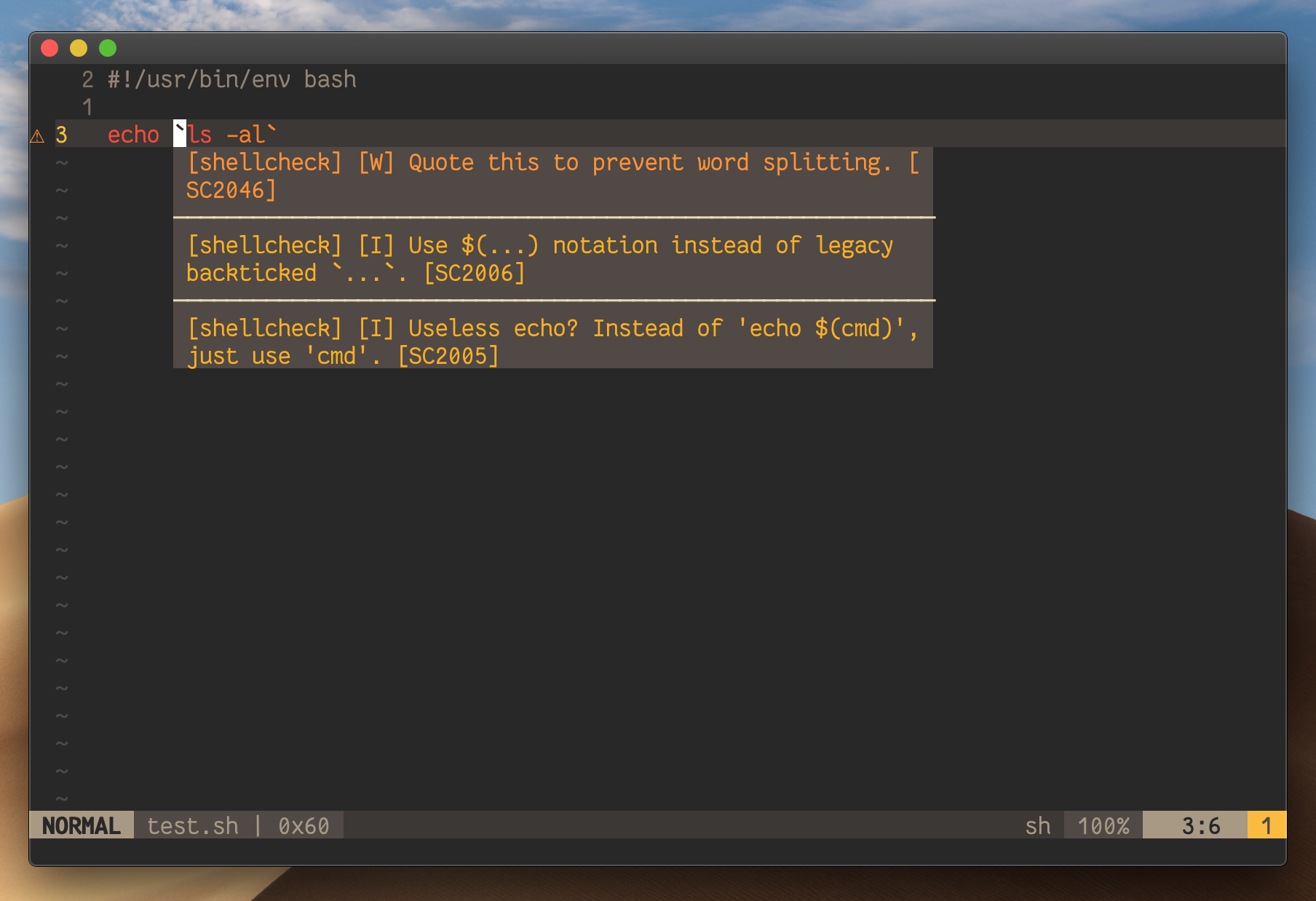
file test.sh:
sh
#!/usr/bin/env bash
echo ls -al
then:
shellcheck --format=gcc test.shoutput:
t.sh:3:6: warning: Quote this to prevent word splitting. [SC2046]
t.sh:3:6: note: Useless echo? Instead of 'echo $(cmd)', just use 'cmd'. [SC2005]
t.sh:3:6: note: Use $(...) notation instead of legacy backticked .... [SC2006]
write pattern to match the line for line column message security:
const line = "t.sh:3:6: warning: Quote this to prevent word splitting. [SC2046]"
const formatPattern = "^[^:]+:(\\d+):(\\d+):\\s+([^:]+):\\s+(.*)$"
const match = line.match(new RegExp(formatPattern))
console.log(match)
output:
jsonc
{
  0: "t.sh:3:6: warning: Quote this to prevent word splitting. [SC2046]"
  1: "3"
  2: "6"
  3: "warning"
  4: "Quote this to prevent word splitting. [SC2046]"
}
so you got:
line:match[1]column:match[2]message:match[4]security:match[3]
formatPattern field will be:
"formatPattern": [
  "^[^:]+:(\\d+):(\\d+):\\s+([^:]+):\\s+(.*)$",    // line match pattern (javascript regex)
  {
    "line": 1,                                     // diagnostic line use match group 1
    "column": 2,                                   // diagnostic column use match group 2
    "message": [4],                                // message to display use match group 4
    "security": 3                                  // security to use match group 3, ignore if linter do not support security
  }
]
Notes
if the linter's message for per issue more then one line, you have to set the formatLines to fill your pattern,
and you can view the languagetool pattern for example which formatLines = 2
Example with coc.nvim
Each LSP client should support initializationOptions option,
all you need fordiagnostic-languageserveris put the config ininitializationOptionsoption.
- shellcheck for shell
- languagetool for grammer check
- more Linters config example.
you can use this extension https://github.com/iamcco/coc-diagnostic
jsonc
{
  "languageserver": {
    "dls": {
      "command": "diagnostic-languageserver",
      "args": ["--stdio"],
      "filetypes": [ "sh", "email", "dart" ],
      "initializationOptions": {
        "linters": {
          "shellcheck": {
            "command": "shellcheck",
            "debounce": 100,
            "args": [ "--format=gcc", "-"],
            "offsetLine": 0,
            "offsetColumn": 0,
            "sourceName": "shellcheck",
            "formatLines": 1,
            "formatPattern": [
              "^[^:]+:(\\d+):(\\d+):\\s+([^:]+):\\s+(.*)$",
              {
                "line": 1,
                "column": 2,
                "message": 4,
                "security": 3
              }
            ],
            "securities": {
              "error": "error",
              "warning": "warning",
              "note": "info"
            }
          },
          "languagetool": {
            "command": "languagetool",
            "debounce": 200,
            "args": ["-"],
            "offsetLine": 0,
            "offsetColumn": 0,
            "sourceName": "languagetool",
            "formatLines": 2,
            "formatPattern": [
              "^\\d+?\\.\\)\\s+Line\\s+(\\d+),\\s+column\\s+(\\d+),\\s+([^\\n]+)\nMessage:\\s+(.*)$",
              {
                "line": 1,
                "column": 2,
                "message": [4, 3]
              }
            ],
          }
        },
        "formatters": {
          "dartfmt": {
            "command": "dartfmt",
            "args": [ "--fix" ],
          }
        },
        "filetypes": {
          "sh": "shellcheck",
          "email": "languagetool"
        },
        "formatFiletypes": {
          "dart": "dartfmt"
        }
      }
    }
  }
}
TODO
- [x] local node_modules linter support like eslint or textlint
- [x] diagnostic severity
- [x] root pattern
- [x] document format
References
- inspired by efm-langserver
Buy Me A Coffee ☕️



