
FPC enables Confidential Chaincode Execution for Hyperledger Fabric using Intel SGX.
Hyperledger Fabric Private Chaincode
Hyperledger Fabric Private Chaincode (FPC) enables the execution of chaincodes using Intel SGX for Hyperledger Fabric.
The transparency and resilience gained from blockchain protocols ensure the integrity of blockchain applications and yet contradicts the goal to keep application state confidential and to maintain privacy for its users.
To remedy this problem, this project uses Trusted Execution Environments (TEEs), in particular Intel Software Guard Extensions (SGX), to protect the privacy of chaincode data and computation from potentially untrusted peers.
Intel SGX is the most prominent TEE today and available with commodity CPUs. It establishes trusted execution contexts called enclaves on a CPU, which isolate data and programs from the host operating system in hardware and ensure that outputs are correct.
This project provides a framework to develop and execute Fabric chaincode within an enclave. It allows to write chaincode applications where the data is encrypted on the ledger and can only be accessed in clear by authorized parties. Furthermore, Fabric extensions for chaincode enclave registration and transaction verification are provided.
Fabric Private Chaicode is based on the work in the paper:
- Marcus Brandenburger, Christian Cachin, Rüdiger Kapitza, Alessandro
This project was accepted via a Hyperledger Fabric RFC and is now under development. We provide an initial proof-of-concept implementation of the proposed architecture. Note that the code provided in this repository is still prototype code and not yet meant for production use!
For up to date information about our community meeting schedule, past presentations, and info on how to contact us please refer to our wiki page.
Architecture and components
Overview
This project extends a Fabric peer with the following components: A chaincode enclave that executes a particular chaincode, running inside SGX. In the untrusted part of the peer, an enclave registry maintains the identities of all chaincode enclaves and an enclave transaction validator that is responsible for validating transactions executed by a chaincode enclave before committing them to the ledger.
The following diagram shows the architecture:
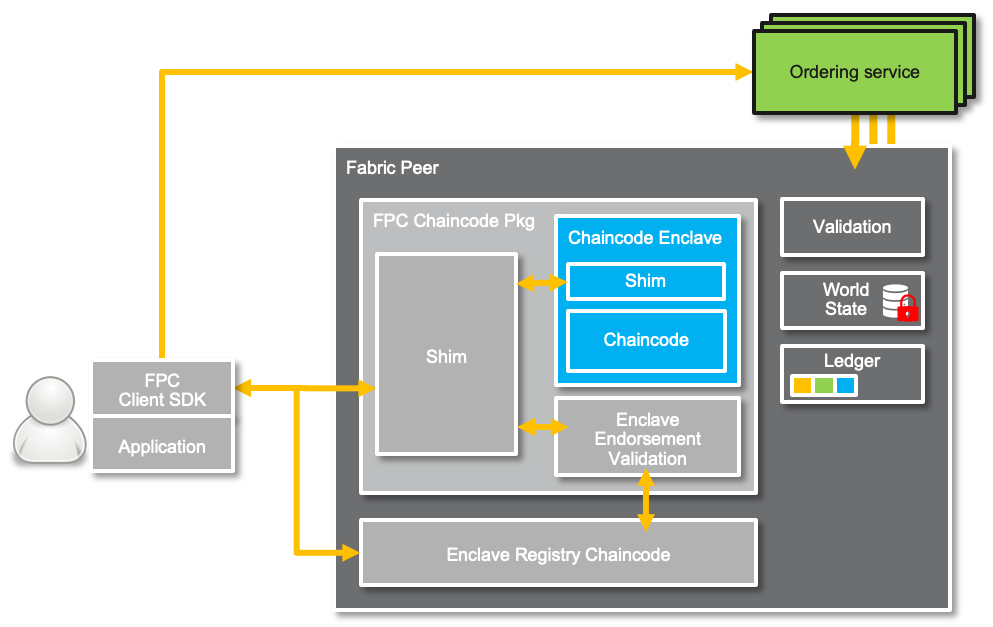
The system consists of the following components:
- Chaincode enclave: The chaincode enclave executes one particular
- Enclave Endorsement validation: The enclave endorsement validation
- FPC Chaincode Pkg:
invoke queries) or to the enclave endorsement validation logic (via endorse transactions).
- Enclave registry: The enclave registry (
ercc) is a chaincode that runs outside
More design information can be found here
Source organization
client_sdk: The FPC Go Client SDKcmake: CMake build rules shared across the projectcommon: Shared C/C++ codeconfig: SGX configurationdocs: Documentation and design documentsecc_enclave: C/C++ code for chaincode enclave
ecc: Go code for FPC chaincode package, including
ecc_go: Go code for FPC Go Chaincode Supportercc: Go code for Enclave Registry Chaincodesamples: FPC Samplesfabric: FPC wrapper for Fabric peer and utilities to
integration: FPC integration tests.internal: Shared Go codeprotos: Protobuf definitionsscripts: Scripts used in build process.utils/docker: Docker images and their build process.utils/fabric: Various Fabric helpers.
Releases
For all releases go to the Github Release Page.
*WARNING: This project is in continous development and the main branch will not always be stable. Unless you want to actively contribute to the project itself, we advise you to use the latest release.*
Getting started
The following steps guide you through the build phase and configuration, for deploying and running an example private chaincode.
We assume that you are familiar with Hyperledger Fabric; otherwise we recommend the Fabric documentation as your starting point. Moreover, we assume that you are familiar with the Intel SGX SDK.
This README is structure as follows. We start by cloning the FPC repository and explain how to prepare your development environment for FPC in Setup your FPC Development Environment. In Build Fabric Private Chaincode we guide you through the building process and elaborate on common issues. Finally, we give you a starting point for Developing with Fabric Private Chaincode by introducing the FPC Hello World Tutorial.
Clone Fabric Private Chaincode
Clone the code and make sure it is on your $GOPATH. (Important: we assume in this documentation and default configuration that your $GOPATH has a single root-directoy!) We use $FPC_PATH to refer to the Fabric Private Chaincode repository in your filesystem.
export FPC_PATH=$GOPATH/src/github.com/hyperledger/fabric-private-chaincode git clone --recursive https://github.com/hyperledger/fabric-private-chaincode.git $FPC_PATHSetup your Development Environment
There are two different ways to develop Fabric Private Chaincode.
Option 1: Using the Docker-based FPC Development Environment
Using our preconfigured Docker container development environment. Option 1Option 2: Setting up your system to do local development
As an alternative to the Docker-based FPC development environment you can install and manage all necessary software dependencies which are required to compile and run FPC. Option 2
Build Fabric Private Chaincode
Once you have your development environment up and running (i.e., using our docker-based setup or install all dependencies on your machine) you can build FPC and start developing your own FPC application. Note by default we build FPC with SGX simulation mode. For SGX hardware-mode support please also read the Intel SGX Attestation Support Section below.
To build all required FPC components and run the integration tests run the following:
cd $FPC_PATH make docker makeBesides the default target, there are also following make targets:
build: build all FPC build artifactsdocker: build docker imagestest: run unit and integration testsclean: remove most build artifacts (but no docker images)clobber: remove all build artifacts including built docker imageschecks: do license and linting checks on source
config.mk contains various defaults which can all be redefined in an optional file config.override.mk.
See also below on how to build the documentation.
Intel SGX Attestation Support
To run Fabric Private Chaincode in hardware mode (secure mode), you need an SGX-enabled hardware as well corresponding OS support. However, even if you don't have SGX hardware available, you still can run FPC in simulation mode by setting SGX_MODE=SIM in your environment. You can find more details here.
FPC Playground for non-SGX environments
FPC leverages Intel SGX as the Confidential Computing technology to guard Fabric chaincodes. Even though the Intel SGX SDK supports a simulation mode, where you can run applications in a simulated enclave, it still requires an x86-based platform to run and compile the enclave code. Another limitation comes from the fact that the Intel SGX SDK is only available for Linux and Windows.
To overcome these limitations and allow developers to toy around with the FPC API, we provide two ways to getting started with FPC.
1) Using the Docker-based FPC Development Environment (works well on x86-based platforms on Linux and Mac). 2) FPC builds without SGX SDK dependencies (targets x86/arm-based platforms on Linux and Mac).
We now elaborate on how to build the FPC components without the SGX SDK here. Note that this is indented for developing purpose only and does not provide any protection at all.
Troubleshooting
This section elaborate on common issues with building Fabric Private Chaincode that you can read here.
Building Documentation
To build documentation (e.g., images from the PlantUML .puml files), you will have to install java and download plantuml.jar. Either put plantuml.jar into in your CLASSPATH environment variable or override PLANTUMLJAR or PLANTUMLCMD in config.override.mk (see config.mk for default definition of the two variables). Additionally, you will need the dot program from the graphviz package (e.g., via apt-get install graphviz on Ubuntu).
By running the following command you can generate the documentation.
cd docs makeDeveloping with Fabric Private Chaincode
In the samples folder you find a few examples how to develop applications using FPC and run them on a Fabric network. In particular, samples/application contains examples of the FPC Client SDK for Go. In samples/chaincode we give illustrate the use of the FPC Chaincode API; and in samples/deployment we show how to deploy and run FPC chaincode on the Fabric-samples test network and with K8s (minikube).
More details about FPC APIs in the Reference Guides Section.
Your first private chaincode
Create, build and test your first private chaincode with the Hello World Tutorial.
Developing and deploying on Azure Confidential Computing
We provide a brief FPC on Azure Tutorial with the required steps to set up a confidential computing instance on Azure to develop and test FPC with SGX hardware mode enabled.
Reference Guides
You can find more details related to the Management API, FPC Shim and FPC client SDK here.
Getting Help
Found a bug? Need help to fix an issue? You have a great idea for a new feature? Talk to us! You can reach us on Discord in #fabric-private-chaincode.
We also have a weekly meeting every Tuesday at 3 pm GMT on Zoom. Please see the Hyperledger community calendar for details.
Contributions Welcome
For more information on how to contribute to Fabric Private Chaincode please see our contribution section.
References
- Marcus Brandenburger, Christian Cachin, Rüdiger Kapitza, Alessandro
- Presentation at the Hyperledger Fabric contributor meeting
- Presentation of at the Hyperledger Fabric contributor meeting
Project Status
Hyperledger Fabric Private Chaincode was accepted via a Hyperledger Fabric RFC and is now under development. Before, the project operated as a Hyperledger Labs project. This code is provided solely to demonstrate basic Fabric Private Chaincode mechanisms and to facilitate collaboration to refine the project architecture and define minimum viable product requirements. The code provided in this repository is prototype code and not intended for production use.
License
Hyperledger Fabric Private Chaincode source code files are made available under the Apache License, Version 2.0 (Apache-2.0), located in the LICENSE file.


