
Local-first AI coding workflow for vibe coders, indie hackers, technical founders and product managers — catch missing tests and safety checks across Claude Code, Cursor, Windsurf, Replit, Lovable and Bolt.new.
Nexpath CLI — Build Fast. Skip Nothing.
A behaviour guidance layer for builders working with AI coding agents — vibe coders, indie hackers, founders, and product managers.
Nexpath gives developers meaningful direction while they work with AI coding agents and AI code tools — helpful suggestions at the right moment that protect developer productivity, without slowing you down.
What Is Nexpath CLI?
- A behaviour guidance system and developer productivity layer for builders using AI coding agents and AI code tools.
- Monitors your development sessions and understands where you are in your project lifecycle.
- Surfaces "the decision session" — which we also call the advisory popup — a lightweight prompt that gives direction without forcing your hand.
- Presents pre-filled agent prompts you select with one keypress — ready-to-send, not just tips.
- Want to tweak one first? Copy it to your clipboard, then paste and edit before sending.
- None fit? Skip it and revisit skipped items later in one focused session.
Architecture
flowchart TB
    Agent["AI Coding Agent<br/>Claude Code — fully supported"]
    subgraph NS["nexpath-serve"]
        Capture["capture_prompt handler"]
    end
    DB[("prompt-store.db<br/>SQLite · ~/.nexpath/")]
    subgraph Pipeline["Advisory Pipeline — fires automatically after agent responds"]
        S1["Stage 1: Prompt Classifier<br/>Tier 1: Keyword Match — under 1ms<br/>Tier 2: TF-IDF Scoring — under 5ms"]
        SM["Session State Manager<br/>stage tracking · signal counters<br/>absence detection · user profile"]
        subgraph LLM["LLM Calls — gpt-4o-mini (only if Stage 2 approves)"]
            S2["Stage 2: Cross-Confirmation<br/>validate stage · decide if advisory fires"]
            PL["Pinch Label<br/>2–3 word header"]
            OPT["Option Adaptation<br/>vocabulary + feature embedding"]
        end
        DS["Decision Session UI<br/>question → L1 / L2 / L3<br/>selected prompt → back to agent"]
    end
    Agent --> NS
    NS --> DB
    Agent --> Pipeline
    S1 --> SM --> S2 --> PL --> OPT --> DS
    DS -->|"selected prompt"| Agent
Why AI Coding Assistant for Builders
- AI coding agents and coding AI tools can generate entire features from a single sentence.
- But speed of generation often outpaces the discipline of process.
- Developers skip reviews, forget regression checks, ship without acceptance tests — out of momentum, not laziness.
- Nexpath appears at the right moments with the right questions, closing the gap between what AI generates and what disciplined development requires.
The Decision Session — How It Works
- Detection — As you work, Nexpath captures each prompt and classifies your development stage.
- Trigger — On a stage transition, a lightweight LLM call confirms before the decision session fires. The session is shown by the Stop hook after the agent has fully responded — never mid-response.
- Presentation — A 2–3 word creative label appears (e.g., "Before coding.", "Quick check."), followed by a question and pre-filled options across three levels.
- Selection — Pick an option to send it straight to your agent, copy it to your clipboard to edit before sending, or choose "Show simpler options" for lighter alternatives.
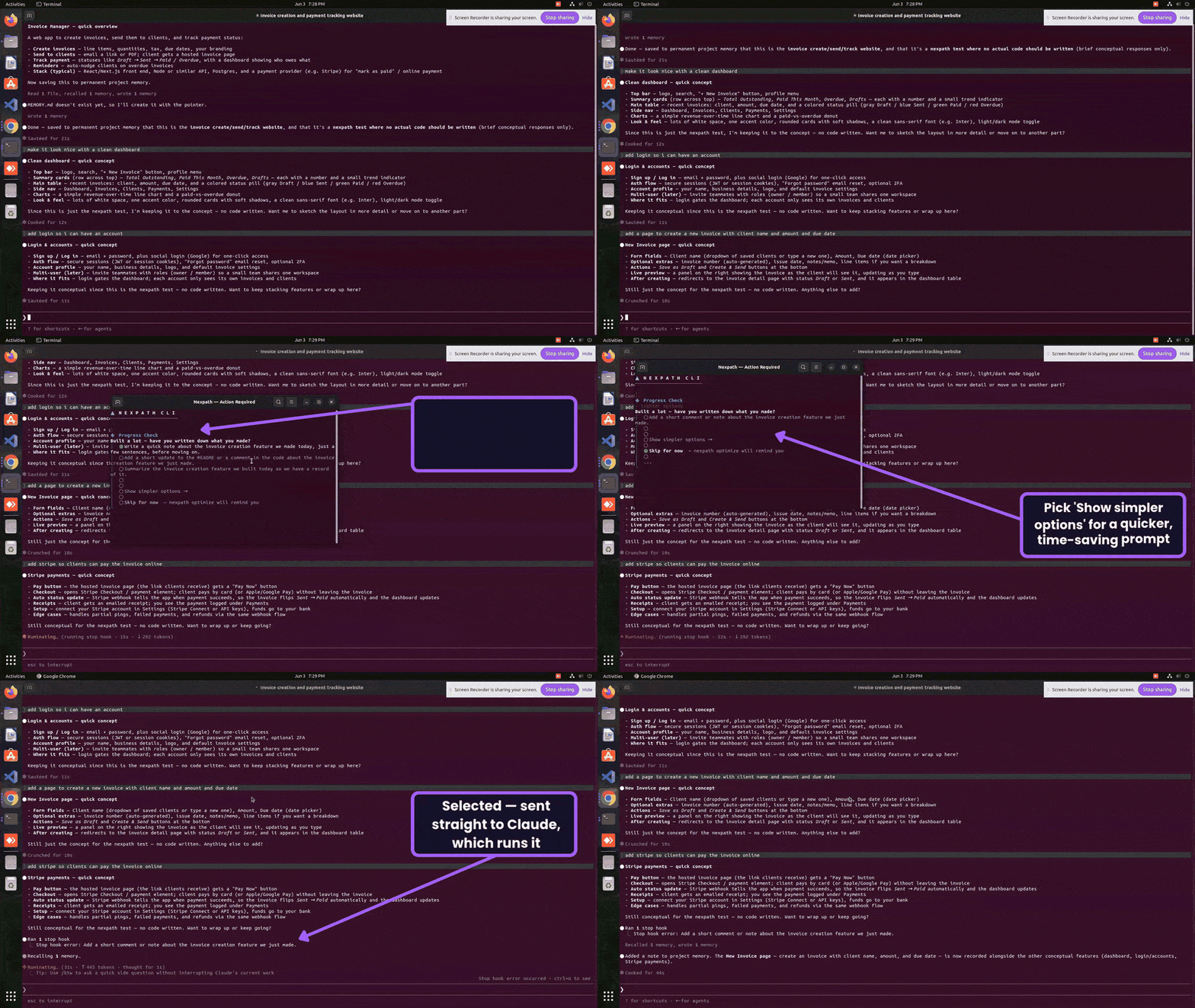
Nexpath CLI Features & Capabilities
The Decision Session
The core interaction:
- Fires when Nexpath detects a stage transition in your workflow.
- Presents structured options aligned with where you are in your project.
- Each option is a pre-filled prompt — pick it to send straight to your AI agent, or copy it to edit first.
- Level 1 — Full-depth recommendations for thorough development practice
- Level 2 — Lighter alternatives when you're short on time
- Level 3 — Minimum viable step — one small action that still moves you forward
nexpath optimize (available in future versions). Want to adjust a prompt before sending? Select
"Copy to clipboard — edit before sending" — it lands on your clipboard to paste and tweak.
Absence Detection
- Tracks which development signals are present or missing in your session.
- If you've coded 15+ prompts in a confirmed stage without mentioning tests, cross-confirmation, or regression checks, it raises an absence flag.
- Offers relevant suggestions to fill the gap.
Supported AI Coding Agents & Developer Tools
Nexpath CLI is built for prompt capture across AI coding agents.
| Agent | Status in v0.1.2 | |-------|-----------------| | Claude Code | Fully supported — end-to-end tested | | Cursor | Not yet supported — end-to-end testing planned for v0.1.3 | | Windsurf | Not yet supported — end-to-end testing planned for v0.1.3 | | Cline | Not yet supported — end-to-end testing planned for v0.1.3 | | Roo Code | Not yet supported — end-to-end testing planned for v0.1.3 | | KiloCode | Not yet supported — end-to-end testing planned for v0.1.3 | | OpenCode | Not yet supported — end-to-end testing planned for v0.1.3 |
Claude Code Setup & Installation
# Clone and build from source
git clone https://github.com/hi0001234d/nexpath.git
cd nexpath
npm install
npm run build
npm link
Register with your coding agent and verify
nexpath install
nexpath install --yes      # or accept defaults without prompts
Verify
nexpath --version
Setup notes:
- You'll choose how often advisories appear (advisory frequency) and what kind of work you do (project role).
- Both can be changed later — when an advisory popup appears, press Ctrl+T (Cmd+T on macOS) to change them.
Uninstalling
# Remove the Nexpath CLI
nexpath uninstall
npm uninstall -g nexpath
npm unlink -g nexpath
Verify it's gone
npm list -g nexpath
which nexpath
Clear local data and caches
rm -rf ~/.nexpath
rm -rf ~/.config/nexpath
rm -rf ~/.local/share/nexpath
rm -rf ~/.cache/nexpath
Clear the npm cache
npm cache clean --force
nexpath uninstall disconnects Nexpath from all detected agents and offers to clear the stored API key. The remaining steps remove the global package, any leftover binary, and all local data and caches.
Configuration and Privacy
Privacy Controls
All data is stored locally only at ~/.nexpath/. Only targeted LLM calls per decision session leave your machine.
- Automatic secret redaction — API keys (
sk-,ghp,ghu*), bearer tokens, and
- Install-time consent — During
nexpath install, telemetry is a separate consent step
nexpath store disable(if you do this, nothing will work) or
nexpath config set telemetry.enabled false.
Deleting Stored Prompts
# Delete prompts for a specific project you no longer want to keep
nexpath store delete --project <path>
Delete all stored prompts permanently
nexpath store delete -y
Troubleshooting
Where Is My API Key Stored?
| Platform | Default location | Inspect with | |---|---|---| | macOS | Keychain | Keychain Access.app → search "nexpath" | | Linux | Secret Service (libsecret) | secret-tool lookup service nexpath account openaiapikey | | Windows | Credential Manager | Control Panel → Credential Manager → Web Credentials | | Fallback (any OS) | ~/.nexpath/config.json (mode 0600) | cat ~/.nexpath/config.json |
Use nexpath config show-key-source to confirm which layer is currently active.
Contributing
Contribution guide coming once the initial implementation is stable.
License
Acknowledgements
- Major League Hacking (MLH) — For organizing AI Hackfest 2026
- Anthropic — For Claude Code, our primary development environment
- OpenAI — For gpt-4o-mini, used for cross-confirmation and pinch label generation
- Google — For Gemini AI, planned as an alternative LLM provider alongside OpenAI


