
An open-source personal learning agent with three-layer memory (learner profile / wiki knowledge base / cross-conversation recall), a proactive scheduler, personal IM channels, and a workspace-scoped Practice Lab — built on the Pi SDK.
Inno Agent
An open-source personal learning agent with layered memory, a proactive scheduler, multi-channel messaging, and a workspace-scoped Practice Lab — built on the Pi coding-agent SDK without modifying its kernel.



English | 简体中文
🌐 Homepage · 📄 Technical Report (arXiv, June 2026) · 📦 Resource Hub (skill library + workspace presets)
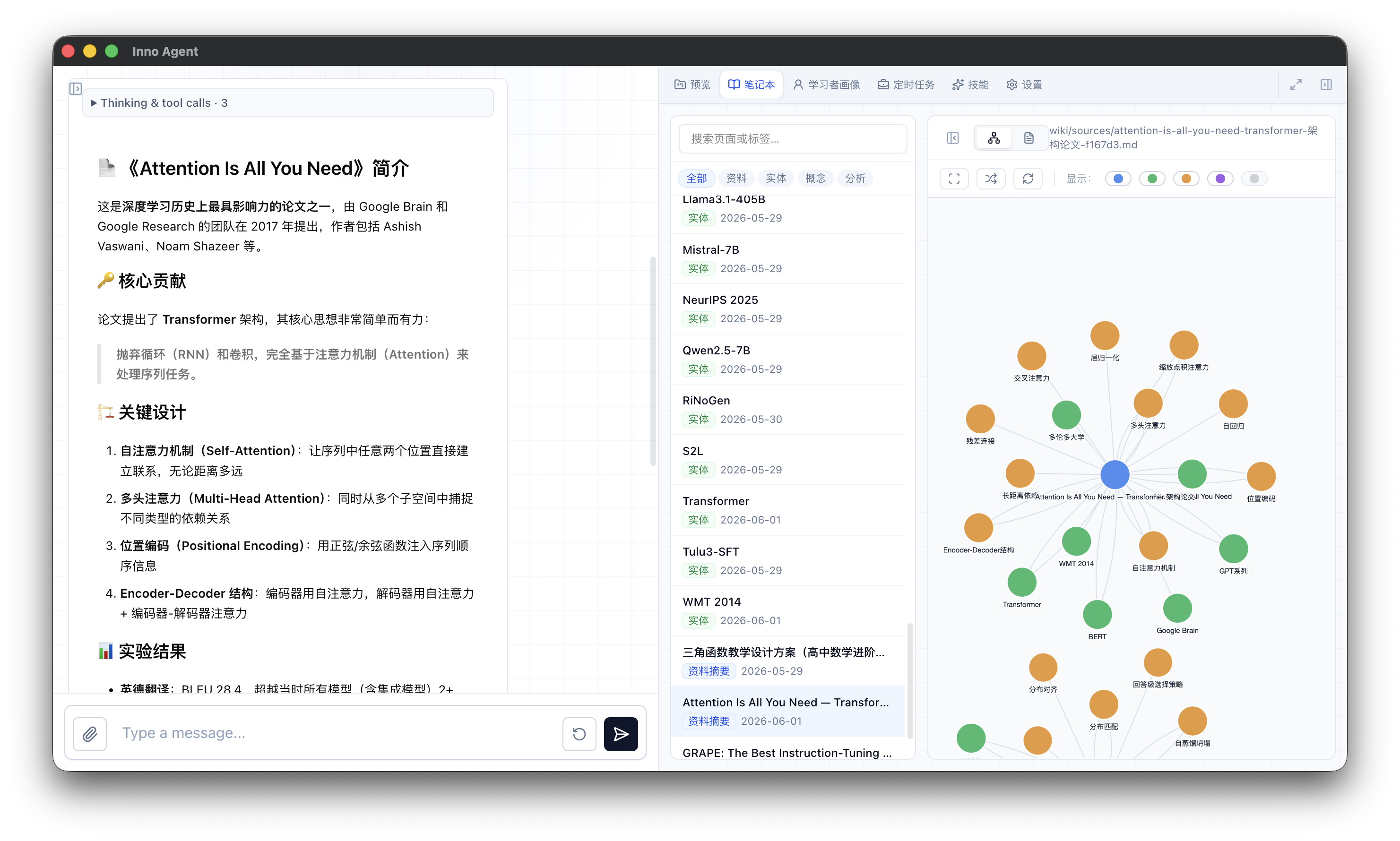
Inno Agent is a single-learner companion that organizes long-term learning support into three explicit memory layers — an L1 learner profile, an L2 native wiki knowledge base, and L3 session records with cross-conversation retrieval — and wraps them in a learning loop: a cron scheduler, personal IM channels (Feishu / WeChat), and a Practice Lab with an in-browser terminal.
It ships in three forms that share the same runtime state:
- Desktop app (Electron) — one-click install for macOS and Windows.
- Web UI (React 19 + Tailwind 4) — Node HTTP server with SSE streaming, terminal, wiki graph, jobs, skills, and settings.
- Terminal CLI (
inno) — a pure TUI agent, no HTTP.
Why Inno Agent
General-purpose coding agents optimize for open-ended software engineering. Education is a different target: the value lies in personalized explanation, misconception diagnosis, exercise generation, feedback, review scheduling, privacy, and low-latency continuous interaction. Inno Agent's stances:
- Layered memory, not a flat chat summary — learner state, archived knowledge, and recent dialogue have different lifecycles and live in separate layers.
- Durable facts go to tools, not replies — anything that affects future teaching is written to L1/L2 via tools, so personalization is evidence-driven and traceable.
- An open, correctable learner model — the L1 profile is inspectable and editable by the learner; unevidenced labels are forbidden.
- The SDK kernel is never modified — all learning behavior is added through registered tools and one extension hook, keeping the runtime upstream-compatible.
Non-goals
Inno Agent is a personal agent, and the architecture deliberately reflects that:
- One process, one active agent session. A single in-memory prompt queue serializes all work; sessions, workspaces, and channels share it. Session switching swaps session files in place — there is no per-session agent pool.
- No multi-user concurrency, no horizontal scaling. There is no auth model, no tenant isolation, and no sharded state. If you need a team deployment, run one instance per person.
- Backpressure is a feature, not a bug. When the queue is busy (e.g. another session's long turn or an unanswered question card), cross-session operations answer
409 sessionbusywith blocker details instead of silently queueing for minutes — the UI surfaces this so you can finish or abort the blocking turn. See issue #124 for the design discussion.
Features
- 🧠 Three-layer memory
- ⏰ Proactive scheduler — cron jobs created in natural language, runnable from the agent, the UI, or the daemon.
- 💬 Personal IM channels — Feishu (native) plus WeChat (iLink QR login or bridge mode), with a unified dispatcher for reminders.
- 🧪 Practice Lab — workspace-scoped web terminal (xterm.js over WebSocket) with run records the agent can read.
- 🎯 Simple Mode + presets — one-click preset workspaces (lesson plan, PPT creation, scenario explain) for non-technical users.
- 🧩 Skill system + content hub — browse and import skills/presets from a remote hub (GitHub repo or self-hosted bundle service).
- 🔌 Pluggable providers — any
openai-completionsoranthropic-messagesendpoint (Anthropic, OpenAI, DeepSeek, Ollama, local models); switch models live in the UI. - 🌍 i18n & themes — Chinese/English UI, four themes.
- 🎬 Session replay showcase — export any real session (button or CLI) and replay it in a standalone site built from the real product UI, with streaming messages, workspace/notebook/profile panels, and generated artifacts.
- 🛡️ Optional OS-level sandbox — gate bash/file operations via pi-sandbox; optional subagents via
pi-subagents.
Quick Start
Option A — Desktop app (easiest)
Download the latest installer from GitHub Releases:
- macOS (Apple Silicon):
Inno.Agent-x.y.z-arm64.dmg— unsigned; right-click → Open on first launch. - Windows (x64):
Inno.Agent.Setup.x.y.z.exeor.msi.
~/.inno-agent/config/config.json — add your provider API key there (or via the in-app settings).
Option B — From source
git clone https://github.com/hhyqhh/inno-agent.git
cd inno-agent
npm install      # pulls the Pi SDK from npm npm run build    # compiles backend + web
mkdir -p runtime/config runtime/data runtime/skills workspace cp config.example.json runtime/config/config.json Edit runtime/config/config.json and set providers[*].apiKey
npm run server -- --home ./runtime --workspace ./workspace --port 3000
Open http://localhost:3000. See QUICKSTART.md (中文) for a 5-minute walkthrough with provider examples.
Option C — Docker
docker compose up -d # serves on :3000, mounts runtime/ and workspace/Run Modes
npm run server          # Web UI (API + built frontend on :3000)
npm run start           # CLI (terminal agent, no HTTP)
npm run electron        # Desktop app locally
npm run server:sandbox  # Web UI with OS-level sandbox (requires ripgrep)
Dev: backend on :3000 + Vite HMR on :5173
npm run dev:server & npm run web:dev
restart-dev.sh orchestrates the dev lifecycle (build, start, stop, status, logs, smoke-test) — run bash restart-dev.sh --help.
Configuration
runtime/config/config.json (template: config.example.json):
{
  "defaultProvider": "innospark",
  "defaultModel": "claude-sonnet-4-6",
  "providers": {
    "innospark": {
      "baseUrl": "https://api.example.com",
      "api": "anthropic-messages",
      "apiKey": "replace-me",
      "models": [{ "id": "claude-sonnet-4-6", "name": "Claude Sonnet 4.6" }]
    }
  },
  "server": { "port": 3000 },
  "channels": {
    "feishu": { "enabled": false },
    "wechat": { "enabled": false, "mode": "ilink" }
  },
  "memory": { "l1Enabled": true, "l2Enabled": true, "l3Enabled": true },
  "ui": { "theme": "light", "closeBehavior": "ask" }
}
Each provider declares a baseUrl, an api (openai-completions or anthropic-messages), an apiKey, and a models[] list. The server hot-rewrites this file when you switch models in the UI.
Runtime paths
Both CLI and server resolve paths through apps/inno-agent/src/runtime.ts. Precedence: CLI flag > env var > ~/.inno-agent/....
| CLI flag | Env var | Default | |---|---|---| | --home | INNO_HOME | ~/.inno-agent | | --config-dir | INNOCONFIGDIR | <home>/config | | --data | INNODATADIR | <home>/data | | --skills | INNOSKILLSDIR | <home>/skills | | --workspace | INNOWORKSPACEDIR | invocation CWD | | --port | INNO_PORT | 3000 |
Content Hub
The skill library and Simple Mode presets are fetched from a remote content hub — by default the public GitHub repo Chloris-Blaxk/inno-agent-hub. Point contentHub in config.json (or Settings → Content Hub) at a private GitHub repo ("type": "github") or a self-hosted bundle service ("type": "bundle") — a zero-dependency bundle server lives in scripts/content-hub-server/. Presets are cached locally; bundled templates serve as an offline fallback.
Architecture
Four layers: user interfaces → application layer → Pi agent runtime → layered memory.
User Interfaces      CLI · Web UI (React) · Desktop · Feishu · WeChat
        ↓
Application Layer    Channel adapters · HTTP API (SSE) · Memory orchestration
                     Cron scheduler · Practice Lab · WebSocket terminal
        ↓
Agent Runtime        Pi AgentSession · registered tools · inno extension
(Pi SDK, unmodified) General LLM provider  ──or──  distilled educational model
        ↓
Layered Memory L1 learner profile · L2 native wiki · L3 session records- Agent core —
@earendil-works/pi-coding-agentprovides the loop.inno-extension.tsregisters providers and tools (L1/L2/L3, scheduler, practice lab, documents, OCR) and abeforeagent_starthook that injects the L1 context pack and threshold-gated L3 recall into the system prompt. - Memory — L1 (
src/memory/learner/): evidence-driven profile + event log. L2 (src/memory/l2/): structured wiki with graph, summarizer, ingestion, and hybrid retrieval; exposed via agent tools and/api/wiki/*. L3 (src/memory/l3/): a SQLite FTS5 index layered over Pi session JSONL files. - Scheduler (
src/scheduler/) — cron jobs persisted tojobs.json+runs.jsonl. - Channels (
src/channels/) —ChannelRegistrywith Feishu, WeChat (iLink / bridge), and QQ (bridge). - HTTP server (
src/server.ts) — plain Nodehttp.createServerwith SSE chat streaming and a WebSocket terminal; route table inapps/inno-agent/README.md. - Web UI (
web/src/) — React 19 + Tailwind 4. Framework-agnosticEventEmitterstores inweb/src/stores/; REST/SSE calls inweb/src/api/.
Repository Layout
apps/inno-agent/           Backend (CLI + HTTP server), TypeScript → dist/
apps/inno-agent/web/       Frontend (React 19 + Tailwind 4 + Vite)
apps/inno-agent/presets/   Bundled preset workspaces (offline fallback)
apps/showcase/             Session replay showcase site (real product UI + recorded cases)
electron/                  Electron main process (desktop app)
scripts/content-hub-server/  Self-hosted Content Hub bundle service
runtime/                   Local runtime state (config, data, skills) — gitignored
workspace/                 Default agent working directory — gitignored
Deployment
Typical production layout, separating code, config, data, and workspace:
INNOCONFIGDIR=/etc/inno-agent \
INNODATADIR=/var/lib/inno-agent/data \
INNOSKILLSDIR=/var/lib/inno-agent/skills \
INNOWORKSPACEDIR=/srv/inno-workspace \
INNO_PORT=3000 \
npm run server
A Dockerfile and docker-compose.yml are provided as starting points; see docs/SYSTEMDEPENDENCIES.md for the full dependency reference. Desktop packaging notes are in ELECTRONBUILD.md.
Showcase — Session Replay Site
apps/showcase/ is a standalone site that replays recorded Inno Agent sessions through the real product UI (via a Vite alias into apps/inno-agent/web/src) — no backend, no model calls. A replay reproduces the streaming chat turn by turn and keeps the right-hand panels in sync: workspace files appear as tools write them (including bash-generated artifacts like HTML/PDF/PPTX), wiki notes accumulate in the notebook, and the learner profile lights up as learning events are recorded.
Export a real session from inside the product (hover a session in the sidebar → clapperboard icon) or from the CLI:
npm run showcase:export -- --session <substring>   # pick one recorded session
npm run showcase:view                              # build + serve + open the replay site
Exported cases land in runtime/data/showcase-exports/cases/ with automatic path/username/secret sanitization; the viewer overlays them on top of the published cases without a rebuild.
- apps/showcase/README.md — architecture, mock backend, and the constraints for keeping the replay UI in sync with product code.
- apps/showcase/EXPORTING.md — full export handbook (中文): button flow, CLI reference, sanitization rules, troubleshooting.
Use Cases & Docs
- Skill Tutorial — Building a Workspace Agent — use
agent.mdand.skills/to build a custom learning agent scoped to a workspace. - QUICKSTART.md — 5-minute setup guide (中文).
- apps/inno-agent/README.md — backend API route table (中文).
Contributing
Issues and PRs are welcome. Before opening a PR, run npm run build locally — the TypeScript build doubles as the sanity check (no lint/test runner is wired up yet). Keep changes focused, match the existing code style, and update docs when behavior changes.
Community
Join the WeChat user group to ask questions, share use cases, and follow updates:
License
MIT. This project depends on the Pi SDK (@earendil-works/pi-* packages by Mario Zechner), also MIT-licensed and consumed via npm.
Citation
@misc{hao2026innoagent,
  author       = {Hao Hao, Ye Lu, Ruotong Yang, Yongheng Guo and Aimin Zhou},
  title        = {Inno Agent: An Open-Source Personal Learning Agent with Layered Memory, Educational Post-Training, and Local Deployment},
  year         = {2026},
  publisher    = {GitHub},
  journal      = {GitHub repository},
  howpublished = {\url{https://github.com/hhyqhh/inno-agent}}
}


