
Build and deploy docker images to Kubernetes using git push

Gitkube
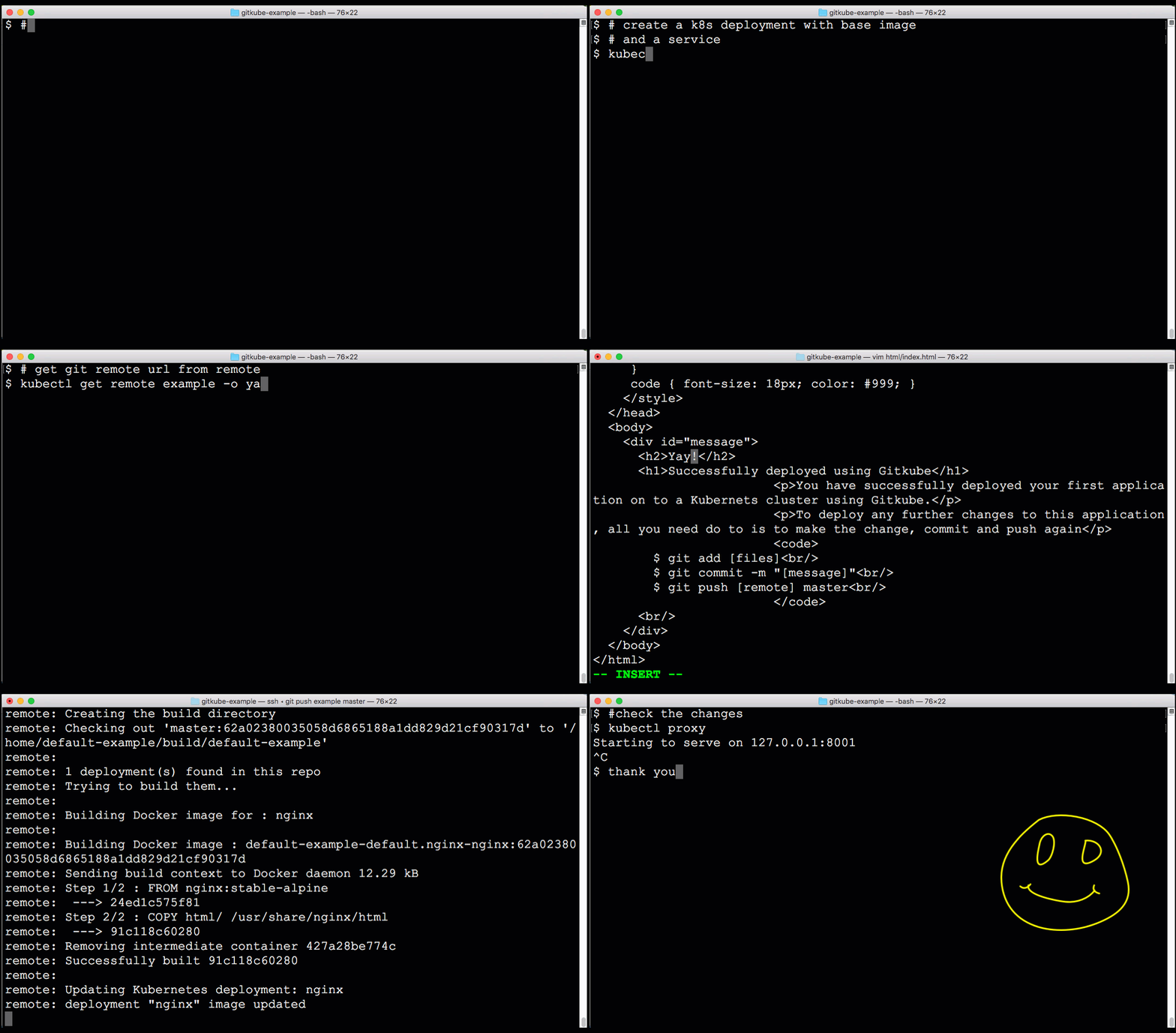
Gitkube is a tool for building and deploying Docker images on Kubernetes using git push.
After a simple initial setup, users can simply keep git push-ing their repos to build and deploy to Kubernetes automatically.

When should I use gitkube?
- Ideal for development where you can push your WIP branch to the cluster to test.
- Reference implementation for writing git-based automation on your server. Fork this repo and create your own CRD + controller + git remote hook that can do things on the Kubernetes cluster.
Features:
- No dependencies except native tooling (git, kubectl)
- Plug and play installation
- Simple public key based authentication
- RBAC ready - Control access to git remotes using RBAC
- Support for namespace based multi-tenancy - Remotes can only deploy to their own namespace
- No assumptions about repository structure
Getting started
Gitkube will run on any Kubernetes vendor/distribution AS IS. In case you find any difficulties in the setup, please comment on #33
Install gitkube
Using kubectl
kubectl create -f https://raw.githubusercontent.com/hasura/gitkube/master/manifests/gitkube-setup.yaml
#expose gitkubed service kubectl --namespace kube-system expose deployment gitkubed --type=LoadBalancer --name=gitkubed
Using gitkube CLI (DEPRECATED)
- Install Gitkube CLI:
bash
curl https://raw.githubusercontent.com/hasura/gitkube/master/gimme.sh | bashscoop install gitkubePATH.
- Use Gitkube CLI to install Gitkube on the cluster:
gitkube installWorkflow
- Local dev: User creates a base git repo for the application with Dockerfile and K8s deployment
- Setting Remote: User defines a spec for Remote containing the rules for
git push - Deploying application: Once a Remote is setup, application can be deployed to K8s using
git push <remote> master
Local dev
User should have a git repo with source code and a Dockerfile. User should also create a base K8s deployment for the application.Setting Remote
A Remote resource consists of 3 parts:- authorizedKeys: List of ssh-keys for authorizing
git push. - registry: Details of docker registry where images are pushed post-build.
- deployments: Spec for building docker image and updating corresponding K8s deployment.
apiVersion: gitkube.sh/v1alpha1
kind: Remote
metadata:
  name: sampleremote
  namespace: default
spec:
Insert ssh-keys for allowing users to git push
  authorizedKeys:
  - "ssh-rsa your-ssh-public-key"
Provide registry details: https://github.com/hasura/gitkube/blob/master/docs/registry.md
  registry:
    url: "docker.io/user"
    credentials:
      secretRef: regsecret                # Name of docker-registry secret
Define deployment rules
  deployments:
  - name: www                             # Name of K8s deployment which is updated on git push
    containers:
    - name: www                           # Name of container in the deployment which is built during git push
      path: example/www                   # Docker build context path in the git repo
      dockerfile: example/www/Dockerfile  # Location of Dockerfile for the source code
Deploying application
Once a Remote is created, it gets a git remote URL which you can find in its status spec
$ kubectl get remote sampleremote -o yaml
...
status:
  remoteUrl: ssh://default-sampleremote@35.225.226.96/~/git/default-sampleremote
  remoteUrlDesc: ""
Add the generated remoteUrl in git
$ git remote add sampleremote ssh://default-sampleremote@35.225.226.96/~/git/default-sampleremoteAnd finally, git push
$ git push sampleremote masterMore examples
Follow this example repo for more workflows with gitkube.How it works
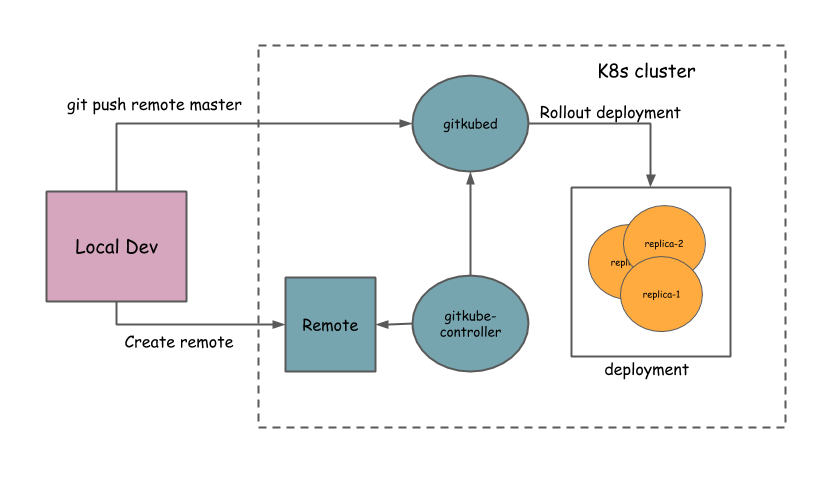
Gitkube has three components:
- Remote: Custom resource defined by a K8s CRD
- gitkube-controller: Controller that manages Remote objects and propogates changes to gitkubed
- gitkubed: Git host that builds docker image from the repo and rolls out deployment
High-level architecture
Contributing
Gitkube is an open source project licensed under Apache License 2.0
Contributions are welcome.
Community and Support
- Join the Gitkube channel in the Kubernetes Slack group

Maintainers
This project has come out of the work at hasura.io. Current maintainers @Tirumarai, @shahidhk.
Follow @gitkube to stay updated.
Gitkube logo concept and design by Samudra Gupta.


