
Customizable agenda view for orgmode
org-super-agenda.nvim


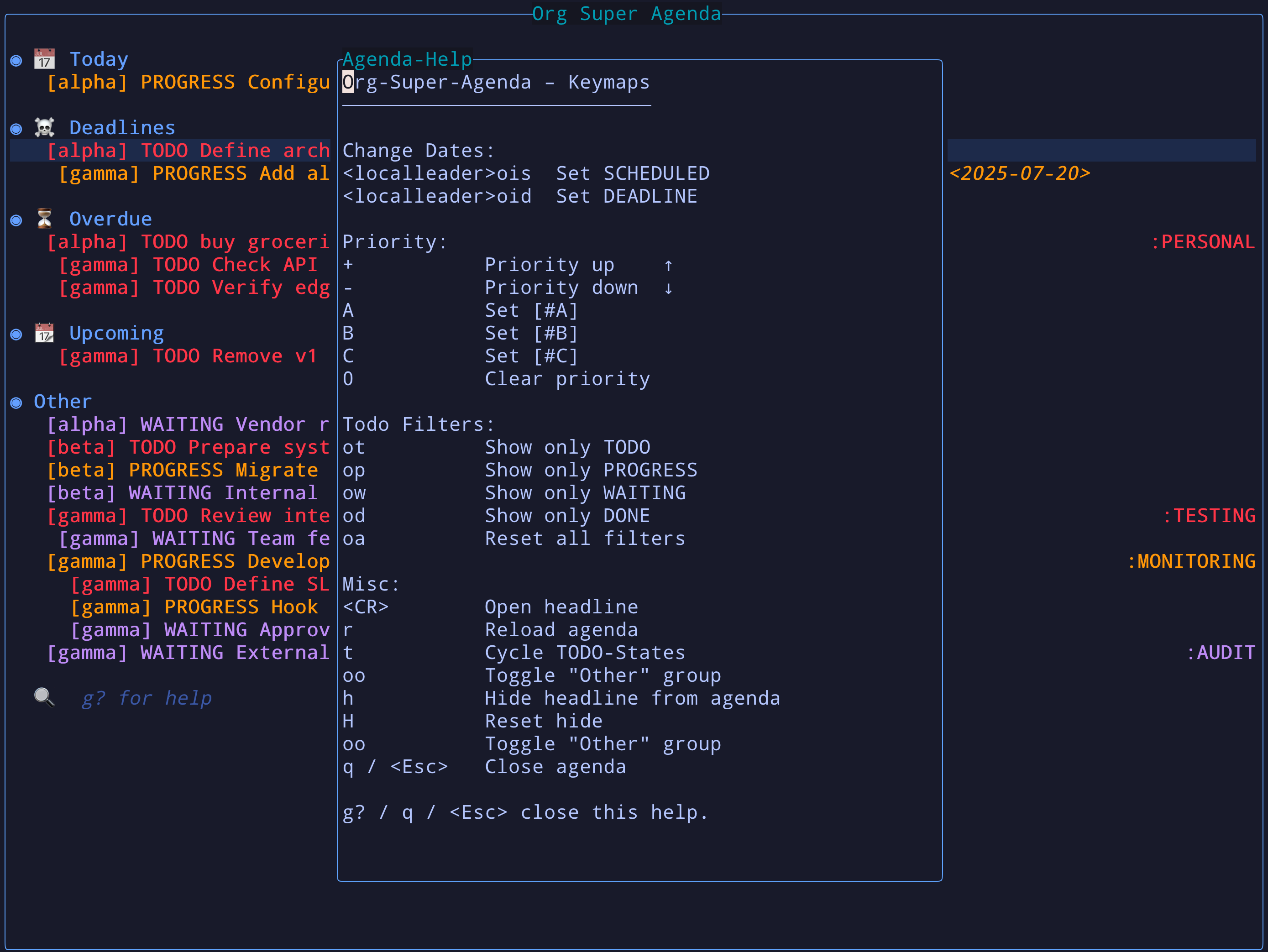
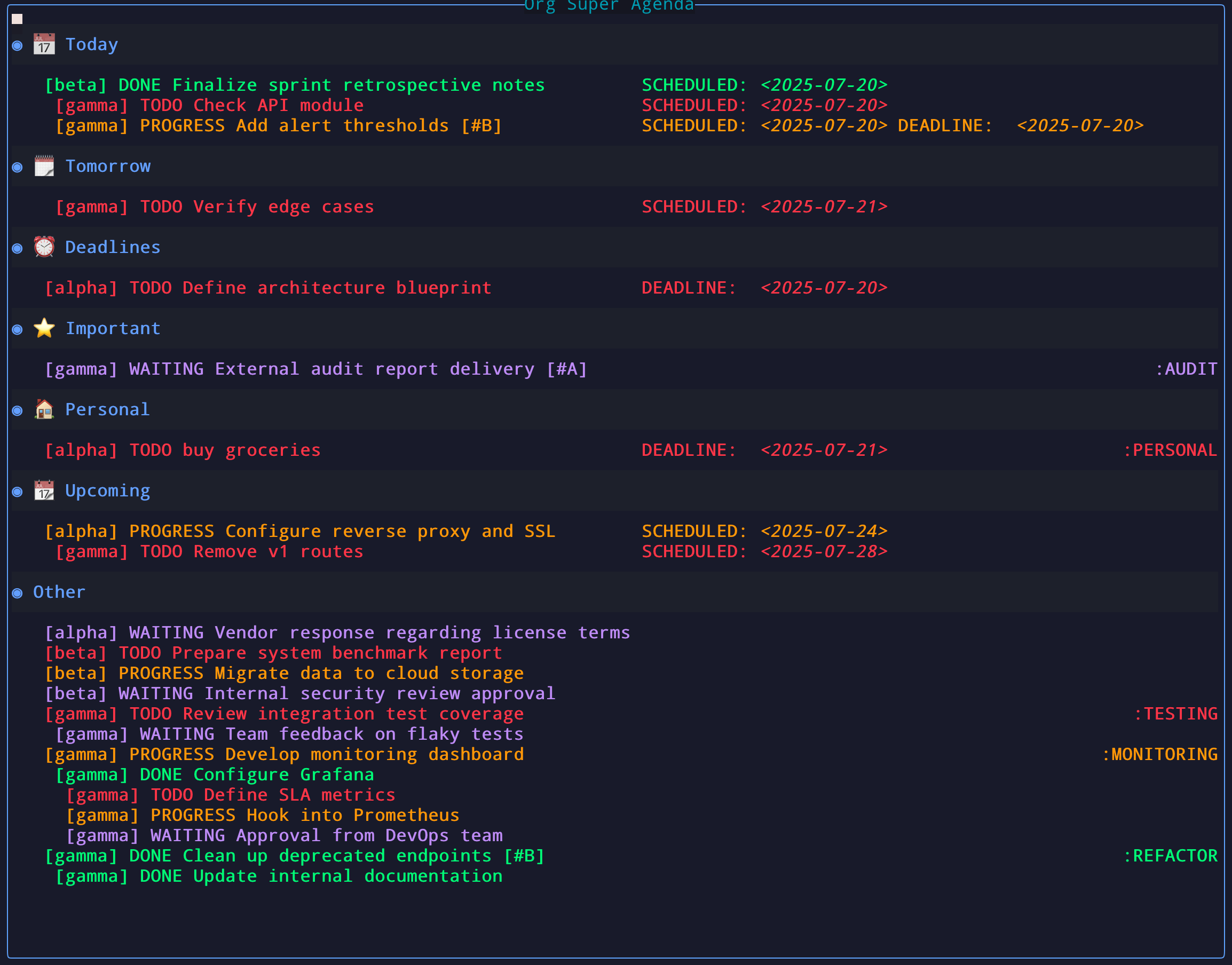
A Neovim plugin inspired by org-super-agenda for Emacs. Organize your org-mode agenda into smart, configurable groups — fast, keyboard-driven, and safe-by-design.
✨ Features
- One command:
:OrgSuperAgenda— no buffers polluted
:OrgSuperAgenda fullscreen or* :OrgSuperAgenda!
- Centered float with configurable size & border
- Smart groups: Today, Tomorrow, Overdue, Upcoming, Important, Personal/Work, and anything you script
- Per-section sorting (with global fallback)
- Live filtering: exact (
of), fuzzy (oz), and advanced query (oq) - Bulk actions: mark multiple items (
m), then batch TODO state / reschedule / deadline - Quick TODO filters via per‑state keymaps (e.g.
ot,op,ow,od) - Inline editing for TODO, priority, scheduled & deadline
- Direct state setting via
sprefix (e.g.,st,sd) with colored menu fallback - Priority tools:
A,B,C,+,-,0 - Preview headline (
K), open (<CR>), refile (R) - Clock integration: clock in (
I), clock out (O), cancel (X), jump (gI) - Hide item (
x) / reset hidden (gX) with optional persistence - Undo last change (
u) within the agenda - Toggle duplicates across groups (
D) - Group folding:
<Tab>on headers, fold all (zM), unfold all (zR) - Custom views with pre-configured filters, groups, sort, and global keymaps (
Vpicker) - Switch view between
classicandcompact(ov) - Right‑aligned tags, customizable header format, and filename display
- Safety: refuses edits when a swapfile is present or buffer is modified elsewhere
- Sticky DONE: items marked DONE during the session remain visible until you close the window
🚀 Commands
:OrgSuperAgenda— open the agenda (float):OrgSuperAgenda fullscreenor:OrgSuperAgenda!— open fullscreen:OrgSuperAgenda view <name>— open a specific custom view:OrgSuperAgenda views— open the view picker
vim.keymap.set('n', '<leader>oa', '<cmd>OrgSuperAgenda<cr>')
vim.keymap.set('n', '<leader>oA', '<cmd>OrgSuperAgenda!<cr>') -- fullscreen
📦 Installation (lazy.nvim)
return {
  'hamidi-dev/org-super-agenda.nvim',
  dependencies = {
    'nvim-orgmode/orgmode', -- required
    { 'lukas-reineke/headlines.nvim', config = true }, -- optional nicety
  },
  config = function()
    require('org-super-agenda').setup({
      -- Where to look for .org files
      org_files           = {},
      org_directories     = {}, -- recurse for *.org
      exclude_files       = {},
      exclude_directories = {},
-- TODO states + their quick filter keymaps and highlighting       -- Optional: add shortcut field to override the default key (first letter)       todo_states = {         { name='TODO',     keymap='ot', color='#FF5555', strike_through=false, fields={'filename','todo','headline','priority','date','tags'} },         { name='PROGRESS', keymap='op', color='#FFAA00', strike_through=false, fields={'filename','todo','headline','priority','date','tags'} },         { name='WAITING',  keymap='ow', color='#BD93F9', strike_through=false, fields={'filename','todo','headline','priority','date','tags'} },         { name='DONE',     keymap='od', color='#50FA7B', strike_through=true,  fields={'filename','todo','headline','priority','date','tags'} },       },
-- Agenda keymaps (inline comments explain each)       keymaps = {         filter_reset      = 'oa', -- reset all filters         toggle_other      = 'oo', -- toggle catch-all "Other" section         filter            = 'of', -- live filter (exact text)         filter_fuzzy      = 'oz', -- live filter (fuzzy)         filter_query      = 'oq', -- advanced query input         undo              = 'u',  -- undo last change         reschedule        = 'cs', -- set/change SCHEDULED         set_deadline      = 'cd', -- set/change DEADLINE         cycle_todo        = 't',  -- cycle TODO state         set_state         = 's',  -- set state directly (st, sd, etc.) or show menu         reload            = 'r',  -- refresh agenda         refile            = 'R',  -- refile via Telescope/org-telescope         hide_item         = 'x',  -- hide current item         preview           = 'K',  -- preview headline content         clock_in          = 'I',  -- clock in on current headline         clock_out         = 'O',  -- clock out active clock         clock_cancel      = 'X',  -- cancel active clock         clock_goto        = 'gI', -- jump to active/recent clocked task         reset_hidden      = 'gX', -- clear hidden list         fold_all          = 'zM', -- collapse all groups         unfold_all        = 'zR', -- expand all groups         toggle_duplicates = 'D',  -- duplicate items may appear in multiple groups         cycle_view        = 'ov', -- switch view (classic/compact)         bulk_mark         = 'm',  -- toggle mark on current item (● indicator)         bulkunmarkall   = 'M',  -- clear all marks         bulk_reselect     = 'gv', -- reselect last marks         bulk_action       = 'B',  -- run action on all marked items         open_view         = 'V',  -- open custom view picker       },
-- Window/appearance       window = {         width        = 0.8,         height       = 0.7,         border       = 'rounded',         title        = 'Org Super Agenda',         title_pos    = 'center',         margin_left  = 0,         margin_right = 0,         fullscreen_border = 'none', -- border style when using fullscreen       },
-- Group definitions (order matters; first match wins unless allow_duplicates=true)       groups = {         { name = '📅 Today',     matcher = function(i) return i.scheduled and i.scheduled:istoday() end, sort={ by='scheduledtime', order='asc' } },         { name = '🗓️ Tomorrow', matcher = function(i) return i.scheduled and i.scheduled:daysfromtoday() == 1 end, sort={ by='scheduled_time', order='asc' } },         { name = '☠️ Deadlines', matcher = function(i) return i.deadline and i.todostate ~= 'DONE' and not i:hastag('personal') end, sort={ by='deadline', order='asc' } },         { name = '⭐ Important',  matcher = function(i) return i.priority == 'A' and (i.deadline or i.scheduled) end, sort={ by='date_nearest', order='asc' } },         { name = '⏳ Overdue',    matcher = function(i) return i.todostate ~= 'DONE' and ((i.deadline and i.deadline:ispast()) or (i.scheduled and i.scheduled:ispast())) end, sort={ by='datenearest', order='asc' } },         { name = '🏠 Personal',   matcher = function(i) return i:has_tag('personal') end },         { name = '💼 Work',       matcher = function(i) return i:has_tag('work') end },         { name = '📆 Upcoming',   matcher = function(i)             local days = require('org-super-agenda.config').get().upcoming_days or 10             local d1 = i.deadline  and i.deadline:daysfromtoday()             local d2 = i.scheduled and i.scheduled:daysfromtoday()             return (d1 and d1 >= 0 and d1 <= days) or (d2 and d2 >= 0 and d2 <= days)           end,           sort={ by='date_nearest', order='asc' }         },       },
-- Defaults & behavior       upcoming_days      = 10,       hideemptygroups  = true,      -- drop blank sections       keep_order         = false,     -- keep original org order (rarely useful)       allow_duplicates   = false,     -- if true, an item can live in multiple groups       group_format       = '* %s',    -- group header format       othergroupname   = 'Other',       showothergroup   = false,     -- show catch-all section       show_tags          = true,      -- draw tags on the right       show_filename      = true,      -- include [filename]       headingmaxlength = 70,       persist_hidden     = false,     -- keep hidden items across reopen       view_mode          = 'classic', -- 'classic' | 'compact'
classic = { headingorder={'filename','todo','priority','headline'}, shortdatelabels=false, inlinedates=true },       compact = { filenameminwidth=10, labelminwidth=12 },
-- Global fallback sort for groups that omit sort       groupsort = { by='datenearest', order='asc' },
-- Popup mode: auto-detected when launched via the tmux script (ORGSUPERAGENDA_POPUP=1).       -- Override only if you use a different popup mechanism.       popup_mode = {         enabled      = vim.env.ORGSUPERAGENDA_POPUP == '1',         hide_command = 'tmux detach-client',       },
debug = false,
-- Custom views: reusable named views with pre-configured filters       custom_views = {         -- work_week = {         --   name = "Work This Week",         --   keymap = "<leader>ow",         --   filter = "tag:work sched>=0 sched<7 -is:done",         -- },       },     })   end, }
🔢 Sorting (per-section & global)
Supported sort keys:
date_nearest(min of days-to-deadline/scheduled; missing → ∞)deadline,scheduled(days from today)deadlinetime,scheduledtime(sorts by exact date+time when available)priority(A > B > C)todo(order of yourtodostates, or customsort.todoorder)filename,headline
Examples:
-- Global default
groupsort = { by = 'datenearest', order = 'asc' }
-- Per group override (by date only) {    name = '☠️ Deadlines',    matcher = function(i) return i.deadline and i.todo_state ~= 'DONE' end,    sort = { by = 'deadline', order = 'asc' }  }
-- Sort by exact time (includes hour:minute when present) {    name = '📅 Today',    matcher = function(i) return i.scheduled and i.scheduled:is_today() end,    sort = { by = 'scheduled_time', order = 'asc' }  }
-- Sort by custom TODO order (per group) {   name = '📅 Today',   matcher = function(i) return i.scheduled and i.scheduled:is_today() end,   sort = {     by = 'todo',     order = 'asc',     todo_order = { 'PROGRESS', 'NEXT', 'TODO', 'WAIT', 'CANX', 'DONE' },   } }
Note: Items with time-of-day (e.g., SCHEDULED: <2026-01-31 09:00>) are displayed with their times in classic view. Use scheduledtime or deadlinetime sort keys to order by exact timestamp.
🔍 Filtering & Advanced Query
Quick filters
- Exact text:
of→ type to filter; ESC/Enter to stop - Fuzzy text:
oz→ same but fuzzy - Reset:
oa - Per‑state:
ot/op/ow/od(customizable)
Query language (oq)
Tokens (space-separated):
tag:work|home      # must have any of these tags
-file:archive      # (negated) exclude if filename contains substring
file:notes         # filename contains substring
 todo:TODO|WAITING # limit to TODO states
 prio>A            # A is highest (A > B > C); also: prio:A
 due<3             # deadline in < 3 days (relative)
 sched>=0          # scheduled today or later
 before:2025-12-31 # deadline before absolute date
 after:2025-08-01  # scheduled after absolute date
 is:overdue        # scheduled/deadline in the past
 is:done           # DONE items only
 has:todo          # items with TODO state (excludes plain events)
 -has:todo         # items without TODO state (events only)
 words here        # free-text includes (AND)
 -noise            # free-text excludes
Examples:
# A-priority work due soon
prio:A tag:work due<5
Upcoming personal, not waiting
tag:personal -WAITING sched>=0
Only tasks (no events) with work tag
has:todo tag:work
Only events (no TODO state) tagged personal
-has:todo tag:personal
📦 Bulk Actions
Mark multiple items and apply an operation to all of them at once.
| Key | Action | |-----|--------| | m | Toggle mark on current item (shows ● indicator) | | M | Clear all marks | | gv | Reselect last marks (like vim gv for visual) | | B | Open bulk action menu for all marked items |
After pressing B, choose an action:
| Key | Bulk Action | |-----|------------| | s | Set TODO state (prompts for state) | | r | Reschedule (datepicker once, applied to all) | | d | Set deadline (datepicker once, applied to all) |
Example workflow:
mon several overdue tasksB→r→ pick new date → all rescheduled at once
u.
🎯 Custom Views
Define reusable, named agenda views with pre-configured filters, groups, and sort. Switch between them instantly via keymaps, commands, or an in-agenda picker.
Configuration
custom_views = {
  work_week = {
    name = "Work This Week",
    keymap = "<leader>ow",                        -- global keymap to open this view
    filter = "tag:work sched>=0 sched<7 -is:done", -- query string (same syntax as oq)
    groups = { ... },                              -- optional: override default groups
    sort = { by = 'deadline', order = 'asc' },     -- optional: view-level sort fallback
    title = "🏢 Work Week",                        -- optional: custom window title
    view_mode = "compact",                         -- optional: override layout
  },
  personal = {
    name = "Personal",
    keymap = "<leader>op",
    filter = "tag:personal -is:done",
  },
  overdue = {
    name = "Overdue",
    filter = "is:overdue -is:done",
  },
}
All fields except the key itself are optional. A view with just a filter is perfectly valid.
Accessing views
- Global keymaps: defined via
keymapfield, available everywhere in normal mode - Commands:
:OrgSuperAgenda view work_week — open a specific view directly
- :OrgSuperAgenda views — open the view picker
- In-agenda picker: press
Vinside the agenda to open the picker
1, 2, etc.)
- Shows active view indicator (◀)
- When a view is active, first option is "Default Agenda" to go back
Visual indicators
- Window title updates to reflect the active view name
- Footer badge shows the active view name and its filter string
Sort precedence
When a custom view is active:
- Per-group
sort(highest priority) - View-level
sort(from custom view config) - Global
group_sort(lowest priority fallback)
Tab completion
:OrgSuperAgenda supports tab completion for all view names:
:OrgSuperAgenda view <Tab>🧭 View modes
- classic: headline prefix
[filename] TODO [#A] Title …with inline or separate date line - compact: fixed columns for filename and date label (
Sched. in 3 d.:), right-aligned tags
ov (or set view_mode in config).
⏱️ Clocking
Iclocks in the task under cursorOclocks out the currently active clockXcancels the currently active clockgIjumps to the active clock task- Active clock entries are marked with
⏱in agenda rows - Active clock status is shown at the bottom of the agenda
reset_hidden key changed from X to gX because X is now used for clock cancel.
🗂️ Group folding
Group headers include item counts: 📅 Today (12 items)
- Press
<Tab>on a group header to collapse/expand that group - Press
<Tab>on an item line to preview (same behavior asK) - Collapse all groups with
zM, expand all withzR
🎯 Direct State Setting
Set TODO states directly without cycling:
| Keys | Action | |------|--------| | st | Set TODO | | sp | Set PROGRESS | | sw | Set WAITING | | sd | Set DONE | | s0 | Clear state | | s (wait) | Show colored menu |
The prefix key (s) is configurable via keymaps.set_state. Shortcut keys are derived from the first letter of each state name. If you have conflicting state names (e.g., TODO and TRACKING), add an explicit shortcut field:
todo_states = {
  { name='TODO',     shortcut='t', ... },
  { name='TRACKING', shortcut='r', ... },  -- explicit shortcut to avoid conflict
}
When you press s and wait, a colored menu appears showing all available states in their configured colors.
📤 Refile (Telescope + org-telescope)
- Hit
Ron an item to open a picker - Toggle between file and headline targets with
<C-Space> - Segment is moved and auto-reloaded in any open buffers
🪟 Popup Mode (tmux integration)
Run OrgSuperAgenda in a dedicated tmux session for instant access. Pressing q hides the popup (nvim keeps running in the background) instead of closing the buffer.
No config needed — popup mode is auto-detected when launched via the script below.
tmux script (~/.local/bin/tmux-org-agenda.sh or anywhere on your $PATH):
#!/usr/bin/env bash
SESSION="orgagenda"
if ! tmux has-session -t "=$SESSION" 2>/dev/null; then   tmux new-session -d -s "$SESSION" -e "ORGSUPERAGENDA_POPUP=1" \     "nvim +'autocmd User VeryLazy ++once OrgSuperAgenda fullscreen'"   tmux set-option -t "$SESSION" status off fi
tmux display-popup -w 100% -h 99% -E \   "tmux attach-session -t '=$SESSION'"
tmux binding:
bind -n 'M-a' run-shell -b "$HOME/.local/bin/tmux-org-agenda.sh"That's it. The ORGSUPERAGENDA_POPUP=1 env var tells the plugin it's running in a popup, so q runs tmux detach-client to hide the popup cleanly.
Override if you use a different mechanism:
popup_mode = {
  enabled      = true,            -- or use your own detection logic
  hide_command = "my-hide-cmd",   -- anything that dismisses your popup
}
⚠️ Safety & behavior details
- Will refuse to edit if the buffer is modified in Neovim or a swapfile is detected (likely open elsewhere)
- Sticky DONE items remain visible in a dedicated section until the window is closed
- “Other” section never collects DONE items by design
- Hidden items respect
persist_hidden
🤝 Contributing
PRs, issues, discussions welcome.
📄 License
MIT License


