
A command line tool to create a graph representing your Ansible playbook tasks and roles
Ansible Playbook Grapher




ansible-playbook-grapher is a command line tool to create a graph representing your Ansible playbooks, plays, tasks and roles. The aim of this project is to have an overview of your playbooks that you can use as documentation.
Inspired by Ansible Inventory Grapher.
Features
- Multiple rendering formats: graphviz, mermaid and JSON.
- Automatically find all your installed roles and collection.
- Native support for Ansible filters based on tags.
- Variables interpolation (when possible).
- Support for
importandinclude. - Multiple flags to hide empty plays, group roles by name, etc...
- Support for playbooks in collections.
- Collapsible play, role and block nodes in the SVG output with (
--collapsible-nodes).
- Highlighting of all the related nodes of a given node when clicking or hovering. Example: Click on a role to select
--include-role-tasks is set.
- A double click on a node opens the corresponding file or folder depending on whether it's a playbook, a play, a task
--open-protocol-handler vscode: it will open the folders when double-clicking on roles (not include_role) and
the files for the other nodes. The cursor will be at the task exact position in the file.
Lastly, you can provide your own protocol formats
with --open-protocol-handler custom --open-protocol-custom-formats '{}'. See the help
and an example.
To not confuse
with Ansible Handlers.
- Export the dot file used to generate the graph with Graphviz.
Prerequisites
- Python 3.10 at least. It might work with previous versions, but the code is NOT tested against them.
- A virtual environment from which to run the grapher. This is highly recommended because the grapher depends on
ansible package has been split).
- Graphviz: The tool used to generate the graph in SVG. Optional if you don't plan to use the
graphvizrenderer.
script
  sudo apt-get install graphviz # or yum install or brew install
I try to respect Red Hat Ansible Engine Life Cycle for the supported Ansible version.
Installation
Using uv (recommended)
uv tool install ansible-playbook-grapherUsing pip
pip install ansible-playbook-grapherYou can also install the unpublished version from GitHub directly. Examples:
# Using uv
uv tool install "ansible-playbook-grapher @ git+https://github.com/haidaraM/ansible-playbook-grapher"
Using pip
pip install "ansible-playbook-grapher @ git+https://github.com/haidaraM/ansible-playbook-grapher"
Renderers
At the time of writing, two renderers are supported:
graphviz(default): Generate the graph in SVG. Has more features than the other renderers.mermaid-flowchart: Generate the graph in Mermaid format. You can
json: Generate a JSON representation of the graph. The corresponding JSON schema
Comparison of the renderers:
| | graphviz (.svg) | mermaid-flowchart (.mmd) | json (.json) | |----------------------------------------------------------|:-----------------:|:--------------------------:|:--------------------------------------------------------:| | Click on nodes to open the files (open protocol handler) | ✅ | ❌ | ✅: the file location is in the output | | Highlight on hover | ✅ | ❌ | ❌: NA | | Change graph orientation | ❌ | ✅ | ❌: NA | | Group roles by name | ✅ | ✅ | ✅: the roles with the same names will have the same IDs. | | View the output file in your the OS default viewer | ✅ | ✅ on https://mermaid.live/ | ✅ | | Tests of the output | Automatic | Manual (need a parser) | Automatic |
If you are interested to support more renderers, feel free to create an issue or raise a PR based on the existing renderers.
Usage
ansible-playbook-grapher tests/fixtures/example.yml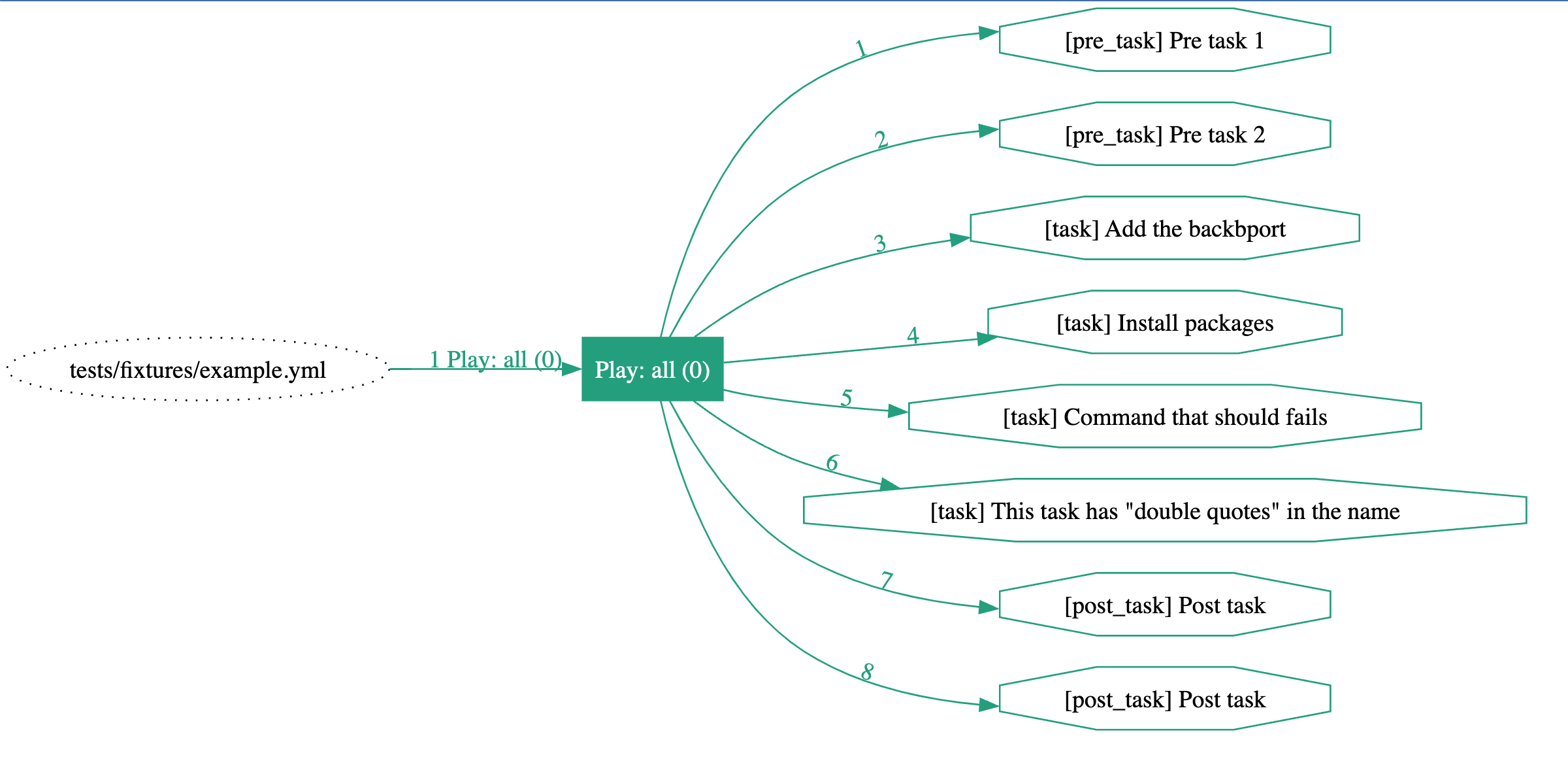
ansible-playbook-grapher --include-role-tasks tests/fixtures/with_roles.yml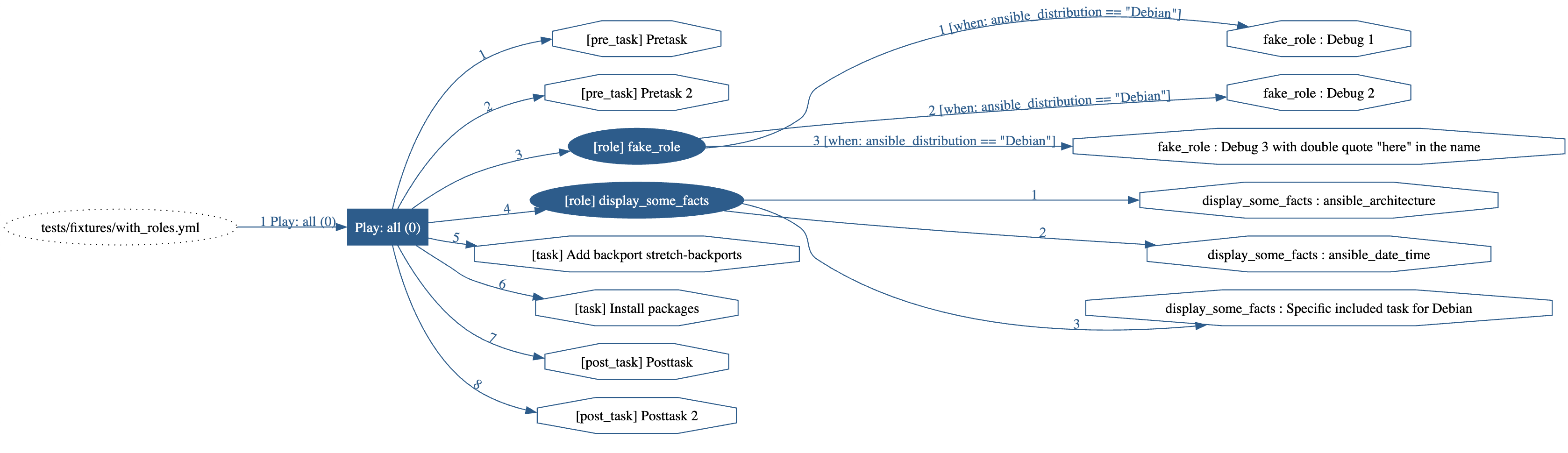
ansible-playbook-grapher tests/fixtures/with_block.yml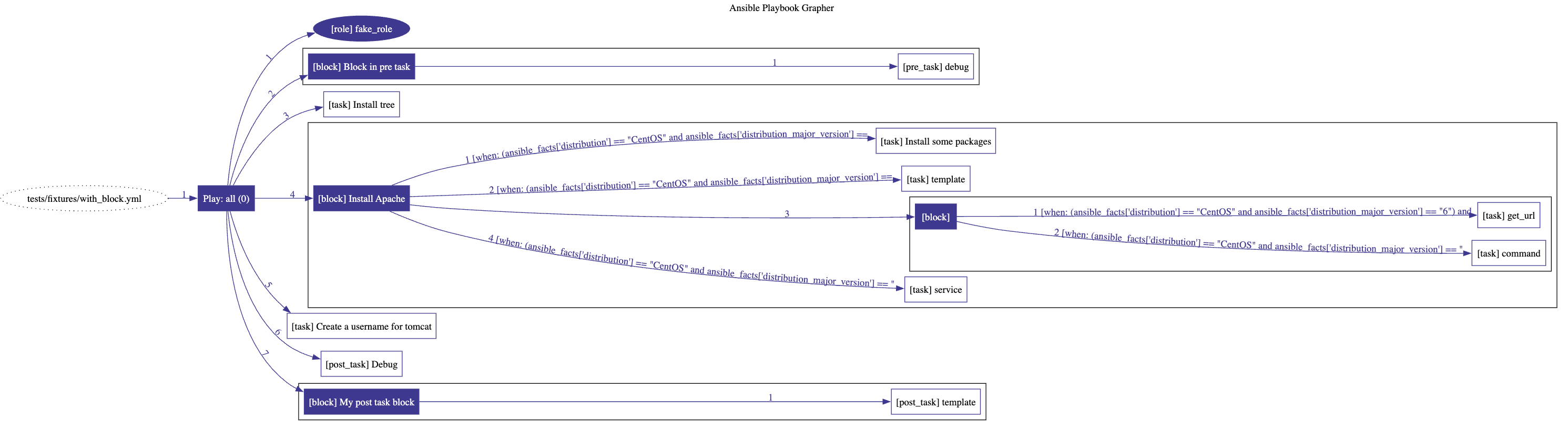
ansible-playbook-grapher --include-role-tasks --renderer mermaid-flowchart tests/fixtures/multi-plays.yml---
title: Ansible Playbook Grapher
%%{ init: { "flowchart": { "curve": "bumpX" } } }%%
flowchart LR
%% Start of the playbook 'tests/fixtures/multi-plays.yml'
playbook_a27d9bec("tests/fixtures/multi-plays.yml")
%% Start of the play 'Play: all (0)'
play_d6dd122d["Play: all (0)"]
style play_d6dd122d stroke:#ba1a12,fill:#ba1a12,color:#ffffff
playbooka27d9bec --> |"1"| playd6dd122d
linkStyle 0 stroke:#ba1a12,color:#ba1a12
pretask676cdcb1["[pre_task] Pretask"]
style pretask676cdcb1 stroke:#ba1a12,fill:#ffffff
playd6dd122d --> |"1"| pretask_676cdcb1
linkStyle 1 stroke:#ba1a12,color:#ba1a12
pretask44476583["[pre_task] Pretask 2"]
style pretask44476583 stroke:#ba1a12,fill:#ffffff
playd6dd122d --> |"2"| pretask_44476583
linkStyle 2 stroke:#ba1a12,color:#ba1a12
%% Start of the role '[role] fake_role'
playd6dd122d --> |"3"| rolef0c07194
linkStyle 3 stroke:#ba1a12,color:#ba1a12
rolef0c07194(["[role] fakerole"])
style role_f0c07194 fill:#ba1a12,color:#ffffff,stroke:#ba1a12
task90876ffc["[task] fakerole : Debug 1"]
style task_90876ffc stroke:#ba1a12,fill:#ffffff
rolef0c07194 --> |"1 [when: ansibledistribution == 'Debian']"| task_90876ffc
linkStyle 4 stroke:#ba1a12,color:#ba1a12
taskbb701882["[task] fakerole : Debug 2"]
style task_bb701882 stroke:#ba1a12,fill:#ffffff
rolef0c07194 --> |"2 [when: ansibledistribution == 'Debian']"| task_bb701882
linkStyle 5 stroke:#ba1a12,color:#ba1a12
taskc00c5d61["[task] fakerole : Debug 3 with double quote "here" in the name"]
style task_c00c5d61 stroke:#ba1a12,fill:#ffffff
rolef0c07194 --> |"3 [when: ansibledistribution == 'Debian']"| task_c00c5d61
linkStyle 6 stroke:#ba1a12,color:#ba1a12
%% End of the role '[role] fake_role'
%% Start of the role '[role] displaysomefacts'
playd6dd122d --> |"4"| rolea168caef
linkStyle 7 stroke:#ba1a12,color:#ba1a12
rolea168caef(["[role] displaysome_facts"])
style role_a168caef fill:#ba1a12,color:#ffffff,stroke:#ba1a12
task737e2be9["[task] displaysomefacts : ansiblearchitecture"]
style task_737e2be9 stroke:#ba1a12,fill:#ffffff
rolea168caef --> |"1"| task737e2be9
linkStyle 8 stroke:#ba1a12,color:#ba1a12
task61bbb3fb["[task] displaysomefacts : ansibledate_time"]
style task_61bbb3fb stroke:#ba1a12,fill:#ffffff
rolea168caef --> |"2"| task61bbb3fb
linkStyle 9 stroke:#ba1a12,color:#ba1a12
task3b7308dc["[task] displaysome_facts : Specific included task for Debian"]
style task_3b7308dc stroke:#ba1a12,fill:#ffffff
rolea168caef --> |"3"| task3b7308dc
linkStyle 10 stroke:#ba1a12,color:#ba1a12
%% End of the role '[role] displaysomefacts'
task_c8b76065["[task] Add backport {{backport}}"]
style task_c8b76065 stroke:#ba1a12,fill:#ffffff
playd6dd122d --> |"5"| taskc8b76065
linkStyle 11 stroke:#ba1a12,color:#ba1a12
task_f7cebcbb["[task] Install packages"]
style task_f7cebcbb stroke:#ba1a12,fill:#ffffff
playd6dd122d --> |"6"| taskf7cebcbb
linkStyle 12 stroke:#ba1a12,color:#ba1a12
posttaskcaafa665["[post_task] Posttask"]
style posttaskcaafa665 stroke:#ba1a12,fill:#ffffff
playd6dd122d --> |"7"| posttask_caafa665
linkStyle 13 stroke:#ba1a12,color:#ba1a12
posttaskb5ade468["[post_task] Posttask 2"]
style posttaskb5ade468 stroke:#ba1a12,fill:#ffffff
playd6dd122d --> |"8"| posttask_b5ade468
linkStyle 14 stroke:#ba1a12,color:#ba1a12
%% End of the play 'Play: all (0)'
%% Start of the play 'Play: database (0)'
play_d780677e["Play: database (0)"]
style play_d780677e stroke:#686864,fill:#686864,color:#ffffff
playbooka27d9bec --> |"2"| playd780677e
linkStyle 15 stroke:#686864,color:#686864
%% Start of the role '[role] fake_role'
playd780677e --> |"1"| role1e6bf323
linkStyle 16 stroke:#686864,color:#686864
role1e6bf323(["[role] fakerole"])
style role_1e6bf323 fill:#686864,color:#ffffff,stroke:#686864
task3cb17d25["[task] fakerole : Debug 1"]
style task_3cb17d25 stroke:#686864,fill:#ffffff
role1e6bf323 --> |"1 [when: ansibledistribution == 'Debian']"| task_3cb17d25
linkStyle 17 stroke:#686864,color:#686864
task1f6232f4["[task] fakerole : Debug 2"]
style task_1f6232f4 stroke:#686864,fill:#ffffff
role1e6bf323 --> |"2 [when: ansibledistribution == 'Debian']"| task_1f6232f4
linkStyle 18 stroke:#686864,color:#686864
task0361ffa3["[task] fakerole : Debug 3 with double quote "here" in the name"]
style task_0361ffa3 stroke:#686864,fill:#ffffff
role1e6bf323 --> |"3 [when: ansibledistribution == 'Debian']"| task_0361ffa3
linkStyle 19 stroke:#686864,color:#686864
%% End of the role '[role] fake_role'
%% Start of the role '[role] displaysomefacts'
playd780677e --> |"2"| rolea8b4b712
linkStyle 20 stroke:#686864,color:#686864
rolea8b4b712(["[role] displaysome_facts"])
style role_a8b4b712 fill:#686864,color:#ffffff,stroke:#686864
taskc1d17653["[task] displaysomefacts : ansiblearchitecture"]
style task_c1d17653 stroke:#686864,fill:#ffffff
rolea8b4b712 --> |"1"| taskc1d17653
linkStyle 21 stroke:#686864,color:#686864
task8353a2ef["[task] displaysomefacts : ansibledate_time"]
style task_8353a2ef stroke:#686864,fill:#ffffff
rolea8b4b712 --> |"2"| task8353a2ef
linkStyle 22 stroke:#686864,color:#686864
taskd8141ffa["[task] displaysome_facts : Specific included task for Debian"]
style task_d8141ffa stroke:#686864,fill:#ffffff
rolea8b4b712 --> |"3"| taskd8141ffa
linkStyle 23 stroke:#686864,color:#686864
%% End of the role '[role] displaysomefacts'
%% End of the play 'Play: database (0)'
%% Start of the play 'Play: webserver (0)'
play_4d3ee472["Play: webserver (0)"]
style play_4d3ee472 stroke:#43418b,fill:#43418b,color:#ffffff
playbooka27d9bec --> |"3"| play4d3ee472
linkStyle 24 stroke:#43418b,color:#43418b
%% Start of the role '[role] nestedincluderole'
play4d3ee472 --> |"1"| rolef611e648
linkStyle 25 stroke:#43418b,color:#43418b
rolef611e648(["[role] nestedinclude_role"])
style role_f611e648 fill:#43418b,color:#ffffff,stroke:#43418b
task8d2e4414["[task] nestedinclude_role : Ensure postgresql is at the latest version"]
style task_8d2e4414 stroke:#43418b,fill:#ffffff
rolef611e648 --> |"1"| task8d2e4414
linkStyle 26 stroke:#43418b,color:#43418b
taskd1bc52f0["[task] nestedinclude_role : Ensure that postgresql is started"]
style task_d1bc52f0 stroke:#43418b,fill:#ffffff
rolef611e648 --> |"2"| taskd1bc52f0
linkStyle 27 stroke:#43418b,color:#43418b
%% Start of the role '[role] displaysomefacts'
rolef611e648 --> |"3 [when: x is not defined]"| role39ad2981
linkStyle 28 stroke:#43418b,color:#43418b
role39ad2981(["[role] displaysome_facts"])
style role_39ad2981 fill:#43418b,color:#ffffff,stroke:#43418b
task110062e7["[task] displaysomefacts : ansiblearchitecture"]
style task_110062e7 stroke:#43418b,fill:#ffffff
role39ad2981 --> |"1"| task110062e7
linkStyle 29 stroke:#43418b,color:#43418b
task05309d40["[task] displaysomefacts : ansibledate_time"]
style task_05309d40 stroke:#43418b,fill:#ffffff
role39ad2981 --> |"2"| task05309d40
linkStyle 30 stroke:#43418b,color:#43418b
taskd8106118["[task] displaysome_facts : Specific included task for Debian"]
style task_d8106118 stroke:#43418b,fill:#ffffff
role39ad2981 --> |"3"| taskd8106118
linkStyle 31 stroke:#43418b,color:#43418b
%% End of the role '[role] displaysomefacts'
%% Start of the role '[role] fake_role'
rolef611e648 --> |"4"| role60085133
linkStyle 32 stroke:#43418b,color:#43418b
role60085133(["[role] fakerole"])
style role_60085133 fill:#43418b,color:#ffffff,stroke:#43418b
taskaa202401["[task] fakerole : Debug 1"]
style task_aa202401 stroke:#43418b,fill:#ffffff
role60085133 --> |"1"| taskaa202401
linkStyle 33 stroke:#43418b,color:#43418b
taskbb8335d6["[task] fakerole : Debug 2"]
style task_bb8335d6 stroke:#43418b,fill:#ffffff
role60085133 --> |"2"| taskbb8335d6
linkStyle 34 stroke:#43418b,color:#43418b
task7e0c8ed3["[task] fakerole : Debug 3 with double quote "here" in the name"]
style task_7e0c8ed3 stroke:#43418b,fill:#ffffff
role60085133 --> |"3"| task7e0c8ed3
linkStyle 35 stroke:#43418b,color:#43418b
%% End of the role '[role] fake_role'
%% End of the role '[role] nestedincluderole'
%% Start of the role '[role] displaysomefacts'
play4d3ee472 --> |"2"| roleff23a4e9
linkStyle 36 stroke:#43418b,color:#43418b
roleff23a4e9(["[role] displaysome_facts"])
style role_ff23a4e9 fill:#43418b,color:#ffffff,stroke:#43418b
task8fc8f4bc["[task] displaysomefacts : ansiblearchitecture"]
style task_8fc8f4bc stroke:#43418b,fill:#ffffff
roleff23a4e9 --> |"1"| task8fc8f4bc
linkStyle 37 stroke:#43418b,color:#43418b
task6a9bc407["[task] displaysomefacts : ansibledate_time"]
style task_6a9bc407 stroke:#43418b,fill:#ffffff
roleff23a4e9 --> |"2"| task6a9bc407
linkStyle 38 stroke:#43418b,color:#43418b
taskb6121d94["[task] displaysome_facts : Specific included task for Debian"]
style task_b6121d94 stroke:#43418b,fill:#ffffff
roleff23a4e9 --> |"3"| taskb6121d94
linkStyle 39 stroke:#43418b,color:#43418b
%% End of the role '[role] displaysomefacts'
%% End of the play 'Play: webserver (0)'
%% End of the playbook 'tests/fixtures/multi-plays.yml'ansible-playbook-grapher --renderer json tests/fixtures/simple_playbook.yml{
"version": 1,
"playbooks": [
{
"type": "PlaybookNode",
"id": "playbook_75f89ea1",
"name": "tests/fixtures/simple_playbook.yml",
"when": "",
"index": 1,
"location": {
"type": "file",
"path": "tests/fixtures/simple_playbook.yml",
"line": 1,
"column": 1
},
"plays": [
{
"type": "PlayNode",
"id": "play_b348eb24",
"name": "all",
"when": "",
"index": 1,
"location": {
"type": "file",
"path": "/Users/mohamedelmouctarhaidara/projects/ansible-playbook-grapher/tests/fixtures/simple_playbook.yml",
"line": 2,
"column": 3
},
"post_tasks": [
{
"type": "TaskNode",
"id": "posttaskd67cb13a",
"name": "Post task 1",
"when": "",
"index": 1,
"location": {
"type": "file",
"path": "/Users/mohamedelmouctarhaidara/projects/ansible-playbook-grapher/tests/fixtures/simple_playbook.yml",
"line": 4,
"column": 7
}
},
{
"type": "TaskNode",
"id": "posttask2f8f97a7",
"name": "Post task 2",
"when": "",
"index": 2,
"location": {
"type": "file",
"path": "/Users/mohamedelmouctarhaidara/projects/ansible-playbook-grapher/tests/fixtures/simple_playbook.yml",
"line": 7,
"column": 7
}
}
],
"pre_tasks": [],
"roles": [],
"tasks": [],
"handlers": [],
"hosts": [],
"colors": {
"main": "#4a826b",
"font": "#ffffff"
}
}
]
}
],
"title": "Ansible Playbook Grapher"
}Note on block: Since a block is a logical group of tasks, the conditional when is not displayed on the edges pointing to them but on the tasks inside the block. This mimics Ansible behavior regarding the blocks.
CLI options
The available options:
usage: ansible-playbook-grapher [-h] [-v] [--exclude-roles EXCLUDE_ROLES] [--only-roles] [-i INVENTORY] [--include-role-tasks] [-s]
                                [--collapsible-nodes] [--view] [-o OUTPUT_FILENAME] [--open-protocol-handler {default,vscode,custom}]
                                [--open-protocol-custom-formats OPENPROTOCOLCUSTOM_FORMATS] [--group-roles-by-name]
                                [--renderer {graphviz,mermaid-flowchart,json}]
                                [--renderer-mermaid-directive RENDERERMERMAIDDIRECTIVE]
                                [--renderer-mermaid-orientation {TD,RL,BT,RL,LR}] [--version] [--hide-plays-without-roles]
                                [--hide-empty-plays] [--title TITLE] [--show-handlers] [-t TAGS] [--skip-tags SKIP_TAGS]
                                [--vault-id VAULTIDS] [-J | --vault-password-file VAULTPASSWORDFILES] [-e EXTRAVARS]
                                playbooks [playbooks ...]
Make graphs from your Ansible Playbooks.
positional arguments:   playbooks             Playbook(s) to graph. You can specify multiple playbooks, separated by spaces and reference playbooks in                         collections.
options:   --collapsible-nodes   Add collapse/expand buttons to play, role, and block nodes in the SVG output. Default: False   --exclude-roles EXCLUDE_ROLES                         Specify file path or comma separated list of roles, which should be excluded. This argument may be specified                         multiple times.   --group-roles-by-name                         When rendering the graph (graphviz and mermaid), only a single role will be displayed for all roles having the                         same names. Default: False   --hide-empty-plays    Hide the plays that end up with no tasks in the graph (after applying the tags filter). Will be removed in the next major version                         (v3.0.0) to make it the default behavior. Default: False   --hide-plays-without-roles                         Hide the plays that end up with no roles in the graph (after applying the tags filter). Only roles at the play level and include_role as                         tasks are considered (no import_role).   --include-role-tasks  Include the tasks of the roles in the graph. Default: False. This only applies to roles at the play level and include_role tasks. The                         tasks from an 'import_role' are always added to the graph.   --only-roles          Only render the roles in the graph (ignoring the tasks)   --open-protocol-custom-formats OPENPROTOCOLCUSTOM_FORMATS                         The custom formats to use as URLs for the nodes in the graph. Required if --open-protocol-handler is set to                         custom. You should provide a JSON formatted string like: {"file": "", "folder": ""}. Example: If you want to                         open folders (roles) inside the browser and files (tasks) in vscode, set it to: '{"file":                         "vscode://file/{path}:{line}:{column}", "folder": "{path}"}'. path: the absolute path to the file containing                         the the plays/tasks/roles. line/column: the position of the plays/tasks/roles in the file. You can optionally                         add the attribute "removefrompath" to remove some parts of the path if you want relative paths.   --open-protocol-handler {default,vscode,custom}                         The protocol to use to open the nodes when double-clicking on them in your SVG viewer (only for graphviz). Your                         SVG viewer must support double-click and Javascript. The supported values are 'default', 'vscode' and 'custom'.                         For 'default', the URL will be the path to the file or folders. When using a browser, it will open or download                         them. For 'vscode', the folders and files will be open with VSCode. For 'custom', you need to set a custom                         format with --open-protocol-custom-formats.   --renderer {graphviz,mermaid-flowchart,json}                         The renderer to use to generate the graph. Default: graphviz   --renderer-mermaid-directive RENDERERMERMAIDDIRECTIVE                         The directive for the mermaid renderer. Can be used to customize the output: fonts, theme, curve etc. More info                         at https://mermaid.js.org/config/directives.html. Default: '%%{ init: { "flowchart": { "curve": "bumpX" } }                         }%%'   --renderer-mermaid-orientation {TD,RL,BT,RL,LR}                         The orientation of the flow chart. Default: 'LR'   --show-handlers       Show the handlers in the graph.   --skip-tags SKIP_TAGS                         only run plays and tasks whose tags do not match these values. This argument may be specified multiple times.   --title TITLE         The title to display in the graph. Default: 'Ansible Playbook Grapher'. Set it to an empty string to remove the                         title.   --vault-id VAULT_IDS  the vault identity to use. This argument may be specified multiple times.   --vault-password-file, --vault-pass-file VAULTPASSWORDFILES                         vault password file   --version             show program's version number and exit   --view                Automatically open the resulting SVG file with your system's default viewer application for the file type   -J, --ask-vault-password, --ask-vault-pass                         ask for vault password   -e, --extra-vars EXTRA_VARS                         set additional variables as key=value or YAML/JSON, if filename prepend with @. This argument may be specified                         multiple times.   -h, --help            show this help message and exit   -i, --inventory INVENTORY                         Specify inventory host path or comma separated host list. This argument may be specified multiple times.   -o, --output-file-name OUTPUT_FILENAME                         Output filename without the '.svg' extension (for graphviz), '.mmd' for Mermaid or .json. The extension will                         be added automatically.   -s, --save-dot-file   Save the graphviz dot file used to generate the graph.   -t, --tags TAGS       only run plays and tasks tagged with these values. This argument may be specified multiple times.   -v, --verbose         Causes Ansible to print more debug messages. Adding multiple -v will increase the verbosity, the builtin plugins currently evaluate up to                         -vvvvvv. A reasonable level to start is -vvv, connection debugging might require -vvvv. This argument may be specified multiple times.
Configuration: ansible.cfg
The content of ansible.cfg is loaded automatically when running the grapher according to Ansible's behavior. The corresponding environment variables are also loaded.
The values in the config file (and their corresponding environment variables) may affect the behavior of the grapher. For example TAGSRUN and TAGSSKIP or vault configuration.
More information here.
Limitations and notes
- Since Ansible Playbook Grapher is a static analyzer that parses your playbook, it's limited to what can be determined
ansibleosfamily, ansible_system, etc.). The tasks inside any
import or include with some variables in their arguments may not appear in the graph.
- The rendered SVG graph may sometime display tasks in a wrong order. I cannot control this behavior of Graphviz yet.
- The label of the edges may overlap with each other. They are positioned so that they are as close as possible to
- Looping on tasks and roles is not supported. The tasks using loop are displayed as a single task.
Contribution
Contributions are welcome. Feel free to contribute by creating an issue or submitting a PR :smiley:
Local development
To set up a new local development environment:
- Install graphviz (see above)
- Install uv
uv sync --dev(cd tests/fixtures && ansible-galaxy install -r requirements.yml)
The project contains some collections in collections. If you modify them, you need to do
a force install with ansible-galaxy install -r requirements.yml --force
Run the tests and open the generated files in your system's default viewer application:
script
export TESTVIEWGENERATED_FILE=1
make test # run all tests
The graphs are generated in the folders tests/generated-svgs, tests/generated-mermaids and tests/generated-jsons. They are also generated as artifacts in GitHub Actions. Feel free to look at them when submitting PRs.
Lint and format
The project uses ruff to format and lint the code. Run make lint to format and lint.
License
GNU General Public License v3.0 or later (Same as Ansible)
See LICENSE for the full text


