
⚗️ Lox365: XLOOKUP for LibreOffice
⚗️ Lox365: Modern functions for LibreOffice
Lox365 is a LibreOffice Calc extension that adds modern spreadsheet functions like IMAGE, TEXTSPLIT, and TOCOL.

Do you like using Lox365? Let me know in the Discussions. Maybe buy me a coffee.

Install or update
- Download the extension
Lox365.oxtfrom Releases. - Start LibreOffice > Tools > Extension Manager > Add > Select the oxt file > restart LibreOffice.
Usage
Use the function like you would any other function in LibreOffice Calc.
Multiple outputs
To output results in multiple cells, enter your formula with Ctrl + Shift + Enter.
To edit the formula that is using multiple cells, select the entire cell range first.
This is because Lox365 functions are array functions. LibreOffice Calc does not support Excel's dynamic arrays.
Syntax
FILTER (Removed)
Filters an array.
Similar to Excel's FILTER.
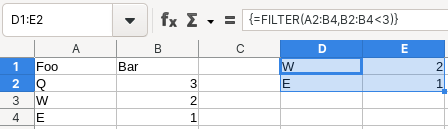
=FILTER(array, include, [if_empty])
array: The array to filter.include: An array of booleans where TRUE represents a row or column to retain.[if_empty]: Returned if no items are retained. Optional.
IMAGE
Returns an image from a given source.
The source can be a local image file or a web URL. You can use a web URL of a third-party service to generate, for example, a QR code, equation, or diagram.
Similar to Excel's IMAGE.
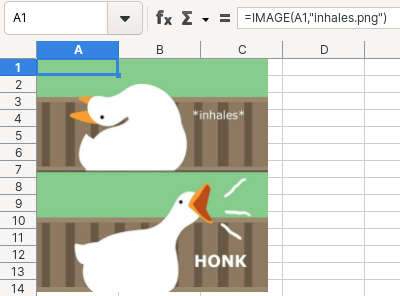
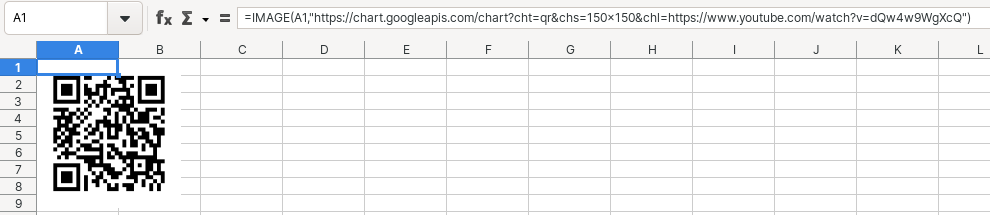
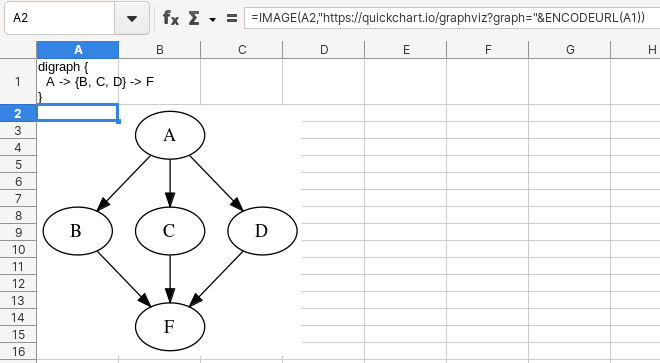
=IMAGE(out_cell, source)
out_cell: Reference to the cell where the image is to be placed.source: The path of the source that points to the image.
SORT (Removed)
Sorts an array.
Similar to Excel's SORT.
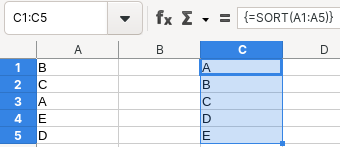
=SORT(array, [sortindex], [sortorder])
array: The array to sort.[sort_index]: A number indicating the row or column to sort by. Optional.[sort_order]: A number indicating the desired sort order; 1 for ascending order (default), -1 for descending order. Optional.- Not supported:
by_col.
TEXTSPLIT
Splits text into columns using delimiters.
Similar to Excel's TEXTSPLIT.
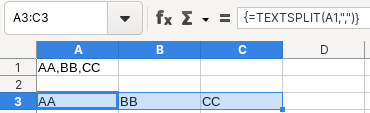
=TEXTSPLIT(text, col_delimiter)
text: The text you want to split.col_delimiter: The text that marks the point where to split the text across columns.- Not supported:
rowdelimiter,ignoreempty,matchmode,padwith.
TOCOL
Returns the array as one column.
Similar to Excel's TOCOL.
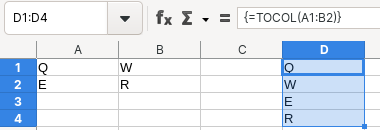
=TOCOL(array)
array: The array to return as a column.- Not supported:
ignore,scanbycolumn.
UNIQUE (Removed)
Returns the unique values from a range or array.
Similar to Excel's UNIQUE.
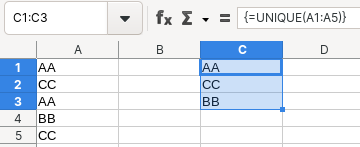
=UNIQUE(array)
array: The array from which to return unique rows.- Not supported:
bycol,exactlyonce.
XLOOKUP (Removed)
Searches an array for a match and returns the corresponding item from a second array.
Similar to Excel's XLOOKUP.
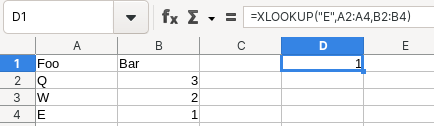
=XLOOKUP(lookupvalue, lookuparray, returnarray, [ifnot_found])
lookup_value: The value to search for.lookup_array: The array to search.return_array: The array to return.[ifnotfound]: Where a valid match is not found, return the [ifnotfound] text you supply. Optional.- Not supported:
matchmode,searchmode.
Version notes
These functions have been removed in Lox365 version 6 because you can now use them in the latest LibreOffice (24.8):
- FILTER
- SORT
- UNIQUE
- XLOOKUP
Why
I use these functions quite often in Excel and wanted to use them in LibreOffice too, so I made this.
Here are what others are saying about this project:
Thanks for this; great idea!
— u/timespreader
Great work, goose! 😊
— Mike Saunders
Really nice idea.
— Behzat Yildirim
Very well done to the creator of the extension.
— Jimmy
Oh, wonderful!>
😀 Thanks for implementing this!
— Arne
The support of XLOOKUP is a great addition.
— Marius Spix
Dobre rozszerzenie, bardzo przydatne funkcje.
— Piotr Osada
Pues muchísimas gracias.
— Guille
Bravo!
— Shakir Mahmud Sumon
The IMAGE function is very useful for those of us that import Google Docs that contain remote (URL base) images.
— René Haché
Keep up the great work!👍
— LeighAnne Kenney
👍😀>
A 1000 thanks.
— Mikael Arling
The idea is splendid because Microsoft's IMAGE function in Excel doesn't work with local pictures or with pictures from LAN shares.
— Gabriela Salvisberg
Compatibility
Lox365 is not compatible with Microsoft Excel.
Lox365 must be installed in order to read and write Lox365 functions. You can check whether it is installed using LibreOffice Extension Manager.
On a machine without Lox365 installed, you will not be able to view calculation results from Lox365 functions.
Availability of other functions
These functions are not in LibreOffice and not provided by Lox365 but are available in the latest Excel:
- GROUPBY
- LAMBDA
- PIVOTBY
- STOCKHISTORY
- TOROW
- CONCAT
- FILTER
- IFS
- LET
- MAXIFS
- MINIFS
- RANDARRAY
- SEQUENCE
- SORT
- SORTBY
- SWITCH
- TEXTJOIN
- UNIQUE
- XLOOKUP
- XMATCH
References
Usage
https://wiki.documentfoundation.org/Documentation/HowTo/install_extension
https://wiki.documentfoundation.org/FeatureComparison:LibreOffice-Microsoft_Office
Media
https://blog.documentfoundation.org/blog/2022/09/23/lox365-extension-xlookup-and-more-for-libreoffice-calc/
https://blog.documentfoundation.org/blog/2022/10/06/libreoffice-project-and-community-recap-september-2022/
https://www.reddit.com/r/libreoffice/comments/x98nqt/lox365xlookupfor_libreoffice/
https://www.reddit.com/r/libreoffice/comments/xltuio/lox365extensionxlookupfiltersortandmore_for/
https://www.reddit.com/r/opensource/comments/xfdmml/lox365xlookupfor_libreoffice/
https://twitter.com/LibreOffice/status/1573232603351879682
https://fosstodon.org/@libreoffice/109046849962893237
https://www.facebook.com/libreoffice.org/posts/pfbid07mXEodbV2i32W6JkbRYWdDoyw8sUkiw7cX8QdTLU357AhJKGr9QoH5zKeJUxArkzl
[es] https://es.blog.documentfoundation.org/extension-lox365-xlookup-y-mas-para-libreoffice-calc/
[es] https://www.youtube.com/watch?v=BSPCJnc6r2g
[ja] https://forest.watch.impress.co.jp/docs/news/1442776.html
[ja] https://opensource.srad.jp/story/22/09/27/1337200/
[ja] https://www.zaikei.co.jp/article/20220928/691186.html
[pt] https://www.matsuura.com.br/2022/09/extensao-lox365-xlookup-e-mais-para.html
[tr] https://blog.libreoffice.org.tr/2022/09/23/libreoffice-calc-icin-yeni-bir-eklenti-goosepirate/
https://www.ubuntubuzz.com/2023/06/how-to-add-xlookup-function-to-libreoffice-calc.html
https://www.reddit.com/r/libreoffice/comments/16gaeth/lox365xlookupandnowimageforlibreoffice/
https://fosstodon.org/@libreoffice/111052323463423962
https://twitter.com/LibreOffice/status/1701582897784729628
https://www.facebook.com/libreoffice.org/posts/pfbid02882qs7Ek5EZXgSkpkZFMHXCLHszP87pUT8uKcHDpSfwAZfWVytHanGh5fFGocieFl
[zh] https://www.youtube.com/watch?v=ndvbu0kC83o
https://www.youtube.com/watch?v=_zHuJIFLSMw
Development
https://bugs.documentfoundation.org/show_bug.cgi?id=126573
https://bugs.documentfoundation.org/show_bug.cgi?id=127293
https://gerrit.libreoffice.org/c/core/+/131905
https://flywire.github.io/lo-p/
https://wiki.openoffice.org/wiki/Calc/Add-In/Python_How-To
https://wiki.openoffice.org/wiki/Python/PythonLanguageBinding
https://wiki.documentfoundation.org/Documentation/DevGuide/Spreadsheet_Documents
https://help.libreoffice.org/latest/en-US/text/sbasic/python/main0000.html
https://help.libreoffice.org/latest/en-US/text/sbasic/python/python_programming.html
https://www.openoffice.org/api/docs/common/ref/com/sun/star/sheet/module-ix.html
https://www.openoffice.org/api/docs/common/ref/com/sun/star/sheet/AddIn.html
https://git.libreoffice.org/core/
https://forum.openoffice.org/en/forum/
LibreOffice API
https://api.libreoffice.org/docs/idl/ref/namespaces.html
https://api.libreoffice.org/docs/idl/ref/interfacecom11sun11star11beans11XPropertySet.html
https://api.libreoffice.org/docs/idl/ref/servicecom11sun11star11sheet11AddIn.html
https://api.libreoffice.org/docs/idl/ref/interfacecom11sun11star11table11XCellRange.html
https://api.libreoffice.org/docs/idl/ref/interfacecom11sun11star11uno11XInterface.html
Other
https://extensions.libreoffice.org/en/extensions/show/27434
https://bugs.documentfoundation.org/
https://ask.libreoffice.org/
https://forum.openoffice.org/en/forum/index.php


