
Litmus is a comprehensive LLM testing and evaluation tool designed for GenAI Application Development. It provides a robust platform with a user-friendly UI for streamlining the process of building and assessing the performance of your LLM-powered applications.
Litmus: A comprehensive LLM testing and evaluation tool designed for GenAI Application Development.



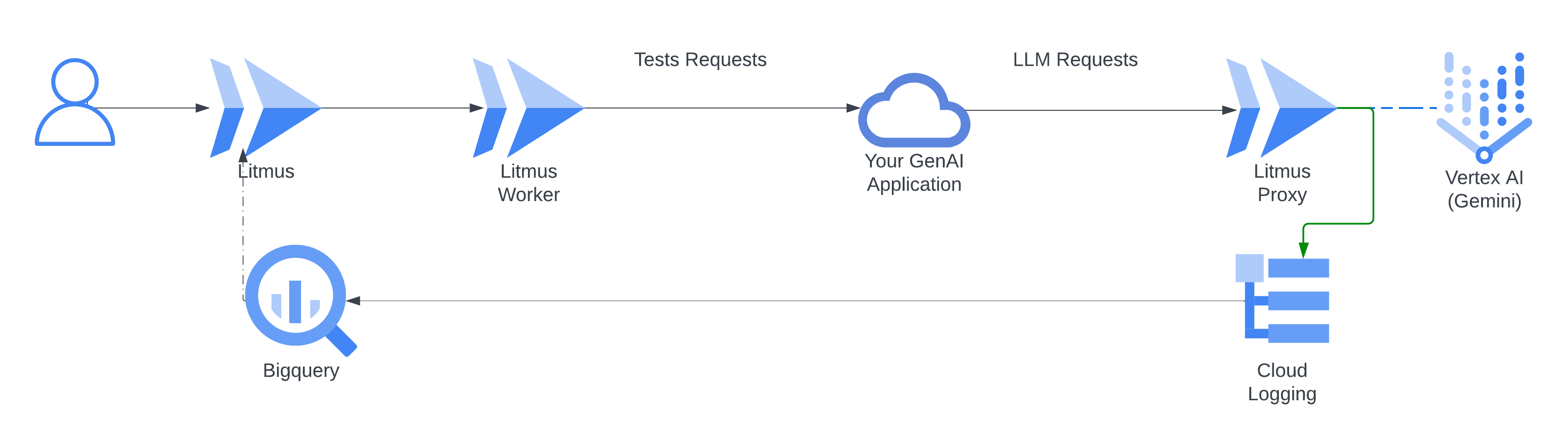
Litmus is a comprehensive tool designed for testing and evaluating HTTP Requests and Responses, especially for Large Language Models (LLMs). It combines a powerful API, a robust worker service, a user-friendly web interface, and an optional proxy service to streamline the testing process.
Features
- Automated Test Execution: Submit test runs using pre-defined templates to evaluate responses against golden answers using AI.
- Flexible Test Templates: Define and manage test templates specifying the structure and parameters of your tests. You can choose between two template types: "Test Run" for single-turn interactions and "Test Mission" for multi-turn interactions where the LLM generates its requests.
- User-Friendly Web Interface: Interact with the Litmus platform through a visually appealing and intuitive web interface.
- Detailed Results: View the status, progress, and detailed results of your test runs.
- Advanced Filtering: Filter responses from test runs based on specific JSON paths for in-depth analysis.
- Performance Monitoring: Track the performance of your responses and identify areas for improvement by using AI.
- Multiple LLM Evaluation Methods: Leverage a variety of LLM evaluation methods:
- Proxy Service for Enhanced LLM Monitoring: Analyze your LLM interactions in greater detail with the optional proxy service, capturing comprehensive logs of requests and responses.
- Cloud Integration: Leverage the power of Google Cloud Platform (Firestore, Cloud Run, BigQuery, Vertex AI) for efficient data storage, execution, and analysis.
- Quick Deployment: Use the provided deployment tool for a streamlined setup.
Architecture
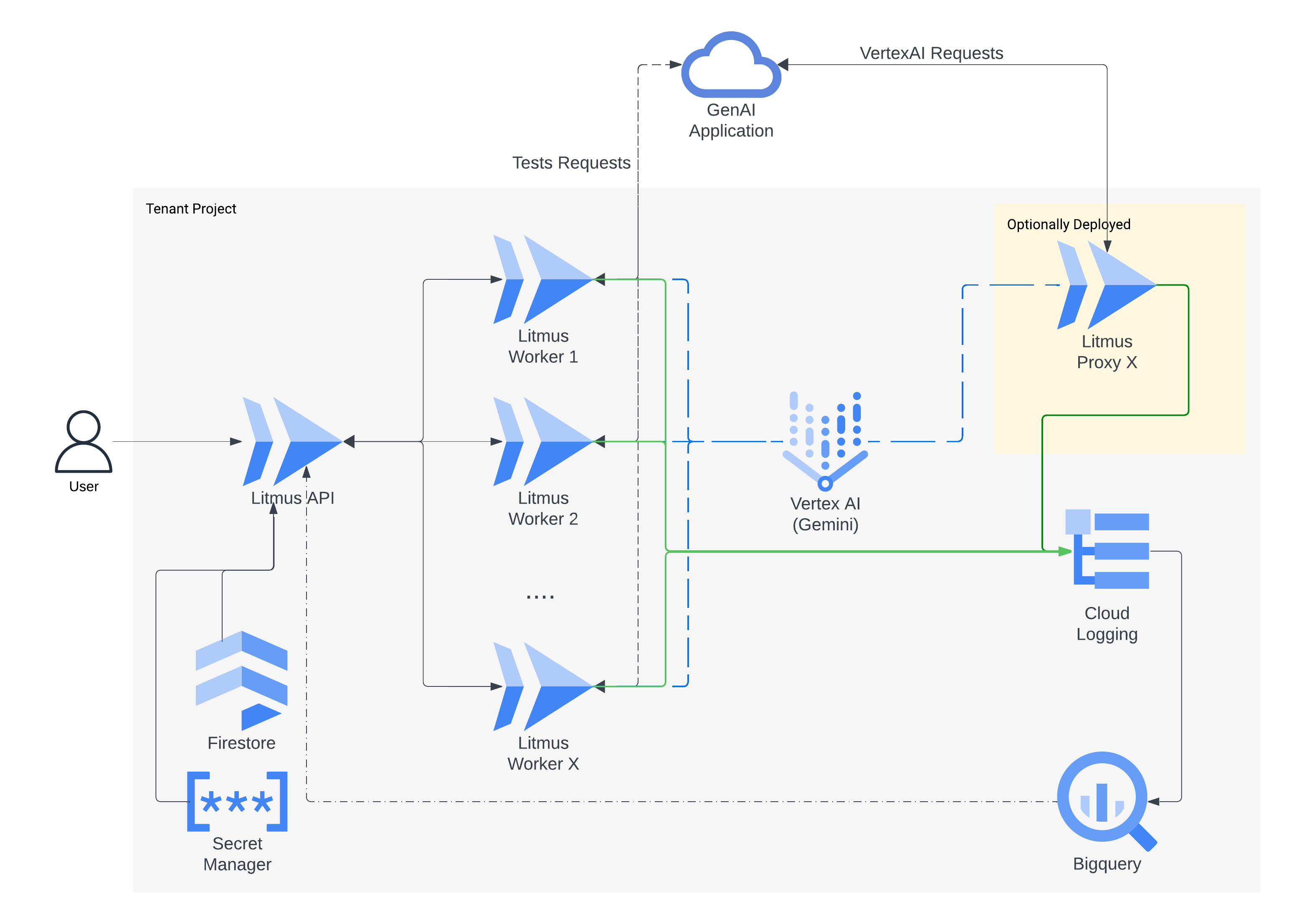
Litmus consists of four core components:
- Proxy Service:
- API:
- Worker Service:
- User Interface:
Getting Started
1. Quick Deployment with the Litmus CLI:
- This is the easiest way to set up Litmus.
- Make sure you have the Google Cloud SDK installed and configured with the correct project.
- Install the Litmus CLI:
curl https://storage.googleapis.com/litmus-cloud/install/linux.sh | sudo sh
- binary: https://storage.googleapis.com/litmus-cloud/prod/linux/litmus
- sha256: https://storage.googleapis.com/litmus-cloud/prod/linux/litmus.sha256
- OSX:
- install:curl https://storage.googleapis.com/litmus-cloud/install/osx.sh | sudo sh
- binary: https://storage.googleapis.com/litmus-cloud/prod/osx/litmus
- sha256: https://storage.googleapis.com/litmus-cloud/prod/osx/litmus.sha256
- Deploy Litmus:
litmus deploy
- Deploy the proxy service (optional):
litmus proxy deploy
- The deployment script will:
2. Manual Setup:
- If you prefer manual deployment:
worker directory and deploy it to Cloud Run.
- Deploy the API service: Build a Docker image for the API service in the api directory and deploy it to Cloud Run.
- Deploy the proxy service: Build a Docker image for the proxy service in the proxy directory and deploy it to Cloud Run.
- Configure API settings: Create a api/util/settings.py file with your Google Cloud project ID, region, and other settings.
- Deploy the UI: Deploy the user interface code in the api/ui directory to a web server (e.g., Nginx, Apache).
- Connect the UI: Configure the UI to connect to the deployed API service.
3. Using Litmus:
- Access the web interface.
- Create and manage test templates, defining test requests, expected responses, and LLM evaluation prompts.
- Select your desired evaluation methods in your templates (Custom LLM Evaluation, Ragas, DeepEval).
- Optionally configure your LLM client to use the proxy service.
- Submit test runs, monitor progress, and analyze the detailed results, including LLM-based assessments.
- Explore proxy data and understand your LLM usage patterns.
Code Structure
- api: Contains the code for the API service.
- ui: Contains the user interface code.
- worker: Contains the code for the worker service.
- proxy: Contains the code for the proxy service.
- deployment: Contains deployment scripts to simplify the deployment process.
Contributing
See CONTRIBUTING.md for details.
License
Apache 2.0; see LICENSE for details.
Disclaimer
This project is not an official Google project. It is not supported by Google and Google specifically disclaims all warranties as to its quality, merchantability, or fitness for a particular purpose.
Code Use and Cloud Costs:
The code provided in this repository is provided "as is" without warranty of any kind, express or implied. It is your responsibility to understand the code, its dependencies, and its potential impact on your Google Cloud environment.
Please be aware that deploying and running this application on Google Cloud will incur costs associated with the services it utilizes, such as Cloud Run, Firestore, and potentially others. You are solely responsible for monitoring and managing these costs. We recommend setting up appropriate budget alerts and monitoring tools within your Google Cloud Console to avoid unexpected expenses.
Security and Abuse:
Also ensure you follow security best practices when deploying and configuring this application. Improper configuration or use could potentially lead to security vulnerabilities or abuse. We recommend reviewing the security documentation provided by Google Cloud and implementing appropriate security measures to protect your project.


