
Enable the power of fzf fuzzy search for the neovim built in lsp
fzf-lsp.nvim
Installation
Install using vim-plug. Put this in your init.vim.
Plug 'gfanto/fzf-lsp.nvim'
Plug 'nvim-lua/plenary.nvim'
Requirements
- Neovim 0.5+
fzfinstalled in addition to use this plugin. Seebatinstalled for the preview. See
Features
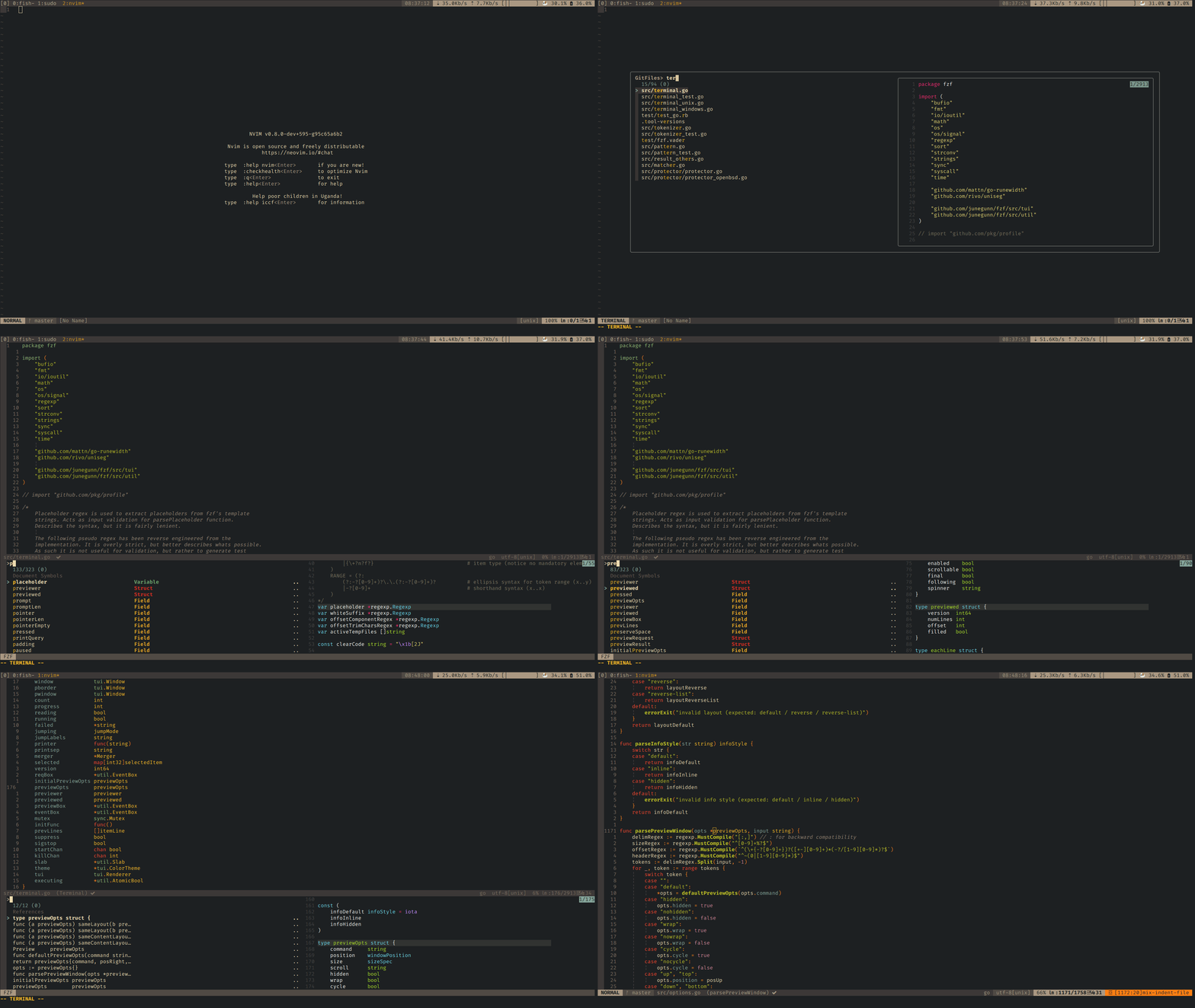
This is an extension for fzf that give you the ability to search for symbols using the neovim builtin lsp.
Commands and settings
If you have fzf.vim installed, this plugin will respect your g:fzfcommandprefix setting.
Settings:
In general fzf-lsp.vim will respect your fzf.vim settings, alternatively you can override a specific settings with the fzf-lsp.vim equivalent:
g:fzflspaction: the equivalent ofg:fzf_action, it's a dictionary containing all the actions that fzf will do in case of specific inputg:fzflsplayout: the equivalent ofg:fzflayout, dictionary with the fzfwindow layoutg:fzflspcolors: the equivalent ofg:fzf_colors, it's a string that will be passed to fzf to set colorsg:fzflsppreviewwindow: the equivalent ofg:fzfpreview_window, it's a list containing the preview windows position and key bindingsf:fzflspcommandprefix: the equivalent ofg:fzfcommand_prefix, it's the prefix applied to all commands
g:fzflsptimeout: integer value, number of milliseconds after command calls will go to timeoutg:fzflspwidth: integer value, max width per line, used to truncate the current lineg:fzflsppretty: boolean value, select the line format, default is false
v:true or v:false)
Commands:
Commands accepts and respect the ! if given
- Call
:Definitionsto show the definition for the symbols under the cursor - Call
:Declarationsto show the declaration for the symbols under the cursor\* - Call
:TypeDefinitionsto show the type definition for the symbols under the cursor\* - Call
:Implementationsto show the implementation for the symbols under the cursor\* - Call
:Referencesto show the references for the symbol under the cursor - Call
:DocumentSymbolsto show all the symbols in the current buffer - Call
:WorkspaceSymbolsto show all the symbols in the workspace, you can optionally pass the query as argument to the command - Call
:IncomingCallsto show the incoming calls - Call
:OutgoingCallsto show the outgoing calls - Call
:CodeActionsto show the list of available code actions - Call
:RangeCodeActionsto show the list of available code actions in the visual selection - Call
:Diagnosticsto show all the available diagnostic informations in the current buffer, you can optionally pass the desired severity level as first argument or the severity limit level as second argument - Call
:DiagnosticsAllto show all the available diagnostic informations in all the opened buffers, you can optionally pass the desired severity level as first argument or the severity limit level as second argument
Declarations) it's usually not implemented in favour of textDocument/definition (Definitions).
Functions
Commands are just wrappers to the following function, each function take one optional parameter: a dictionary containing the options.
require'fzflsp'.codeaction_callrequire'fzflsp'.rangecodeactioncallrequire'fzflsp'.definitioncallrequire'fzflsp'.declarationcallrequire'fzflsp'.typedefinition_callrequire'fzflsp'.implementationcallrequire'fzflsp'.referencescallrequire'fzflsp'.documentsymbol_callrequire'fzflsp'.workspacesymbol_call
require'fzflsp'.incomingcalls_callrequire'fzflsp'.outgoingcalls_callrequire'fzflsp'.diagnosticcall
Handlers
Functions and commands are implemented using sync calls, if you want your calls to be async you can use the standard neovim calls setting his relative handler. To do that you can use the provided setup function, keeping in mind that this will replace all your handlers:
require'fzf_lsp'.setup()or you can manually setup your handlers. The provided handlers are:
vim.lsp.handlers["textDocument/codeAction"] = require'fzflsp'.codeaction_handler vim.lsp.handlers["textDocument/definition"] = require'fzflsp'.definitionhandler vim.lsp.handlers["textDocument/declaration"] = require'fzflsp'.declarationhandler vim.lsp.handlers["textDocument/typeDefinition"] = require'fzflsp'.typedefinition_handler vim.lsp.handlers["textDocument/implementation"] = require'fzflsp'.implementationhandler vim.lsp.handlers["textDocument/references"] = require'fzflsp'.referenceshandler vim.lsp.handlers["textDocument/documentSymbol"] = require'fzflsp'.documentsymbol_handler vim.lsp.handlers["workspace/symbol"] = require'fzflsp'.workspacesymbol_handler vim.lsp.handlers["callHierarchy/incomingCalls"] = require'fzflsp'.incomingcalls_handler vim.lsp.handlers["callHierarchy/outgoingCalls"] = require'fzflsp'.outgoingcalls_handlerSetup options
The setup function optionally takes a table for configuration. Available options:
overrideuiselect: boolean option to override the vim.ui.select function (only for neovim 0.6+)


