
Minecraft Server powered by Docker & Azure Container Instance
Last updated Dec 5, 2025
64
Stars
41
Forks
4
Issues
0
Stars/day
Attention Score
47
Topics
Language breakdown
HCL 50.4%
PowerShell 33.2%
Smarty 14.3%
C# 2.0%
Ruby 0.1%
▸ Files
click to expand
README
Minecraft Server powered by Docker & Azure Container Instance
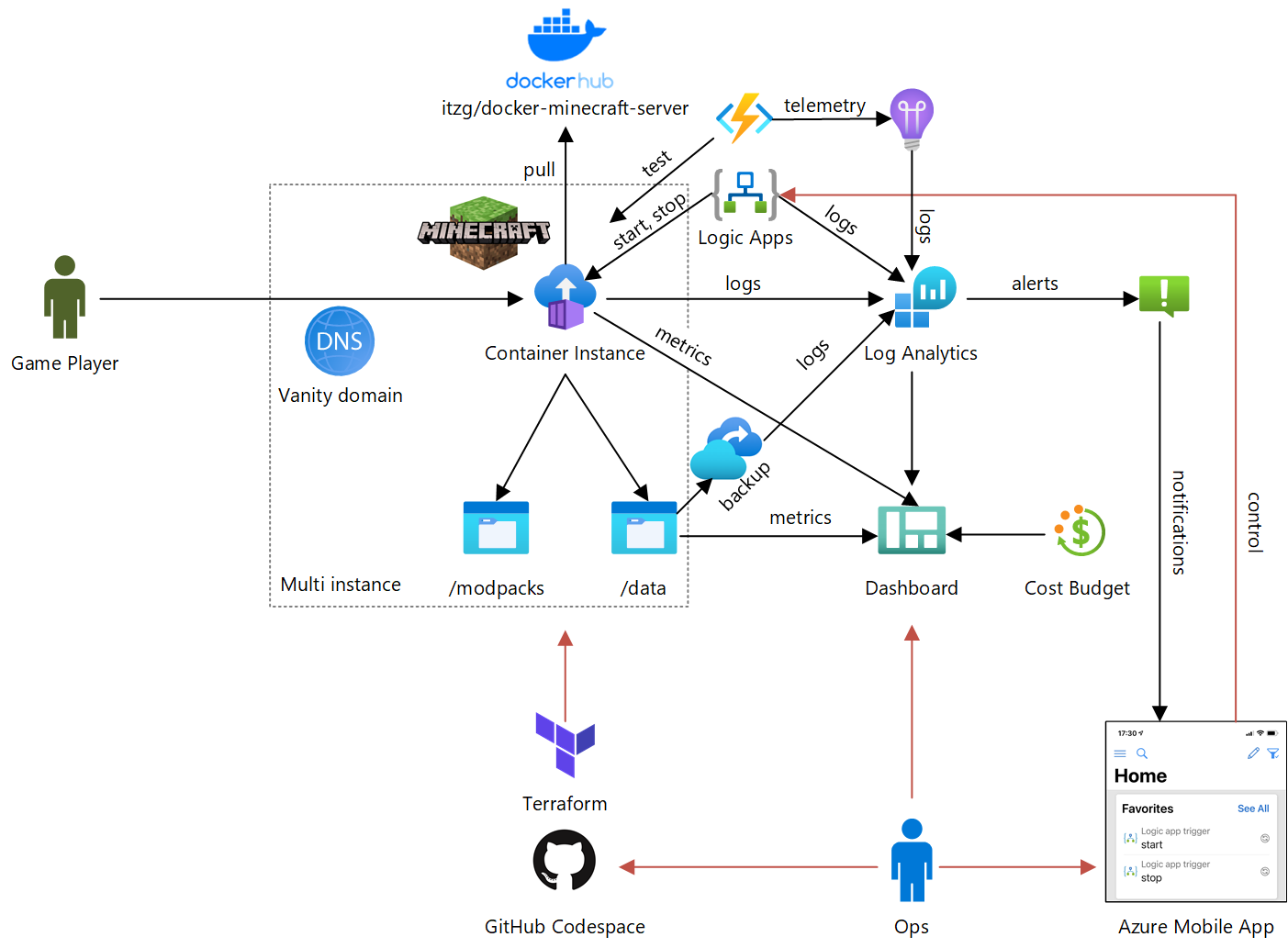
This repo deploys itzg/minecraft-server as Azure Container Instance, using Terraform.


Instructions
There are 2 ways to set this up:Codespace setup
The easiest method is to use a GitHub Codespace (in beta). Just create a GitHub Codespace from the Code menu. Wait for the Codespace to complete provisioning. When the Codespace has completed provisioning and you open a terminal window (Ctrl-, Control-backquote), you should see a message like this:
<pre><code class="lang-">To provision infrastructure, make sure you're logged in with Azure CLI e.g. run 'az login' and 'az account set --subscription 00000000-0000-0000-0000-000000000000'. Then, either:
- change to the /home/codespace/workspace/azure-minecraft-docker/terraform directory and run 'terraform apply', or:
- run /home/codespace/workspace/azure-minecraft-docker/scripts/deploy.ps1 -apply
To destroy infrastructure, replace 'apply' with 'destroy' in above commands</code></pre>
Just follow these steps to provision Minecraft on Azure.
Local setup
If you set this up locally, make sure you have the following pre-requisites:
- Azure CLI
- PowerShell
- Terraform (to get that you can use tfenv on Linux & macOS, Homebrew on macOS or chocolatey on Windows)
On macOS, you can run brew bundle to install the pre-requisites.
Once you have those, you can go ahead and provision:
- Use Azure CLI for SSO with Terraform:
az login Select subscription to use: az account set --subscription 00000000-0000-0000-0000-000000000000 Initialize terraform: terraform init Provision cloud infrastructure: terraform apply Customization
You can customize the deployment by overriding defaults for Terraform input variables. The easiest way to do this is to copy config.auto.example.tfvars and save it as config.auto.tfvars. - Use the
minecraft_users array to define users allowed to log in Use a custom DNS name with vanitydnszoneid and vanityhostname_prefix, using an Azure DNS managed domain Once things get serious, you may want to start backing up data with enable_backup Are your kids home schooling on the same computer that has Minecraft installed? Configure auto shutdown & startup during weekdays with enableautostartstop, starttime & stoptime. The Logic App triggers created can be favorited in the mobile app for on-demand startup & shutdown. Concerned about chat messages appearing in logs? enablelogfilter` uses the Console Spam Fix and configures it to hide chat messages from logs. This feature is dependent on PowerShell and is more brittle in automation, but satisfies a key privacy requirement. See variables.tf for all input variables. Dashboard
Once provisioned, a dashboard like this will be available in the Azure Portal: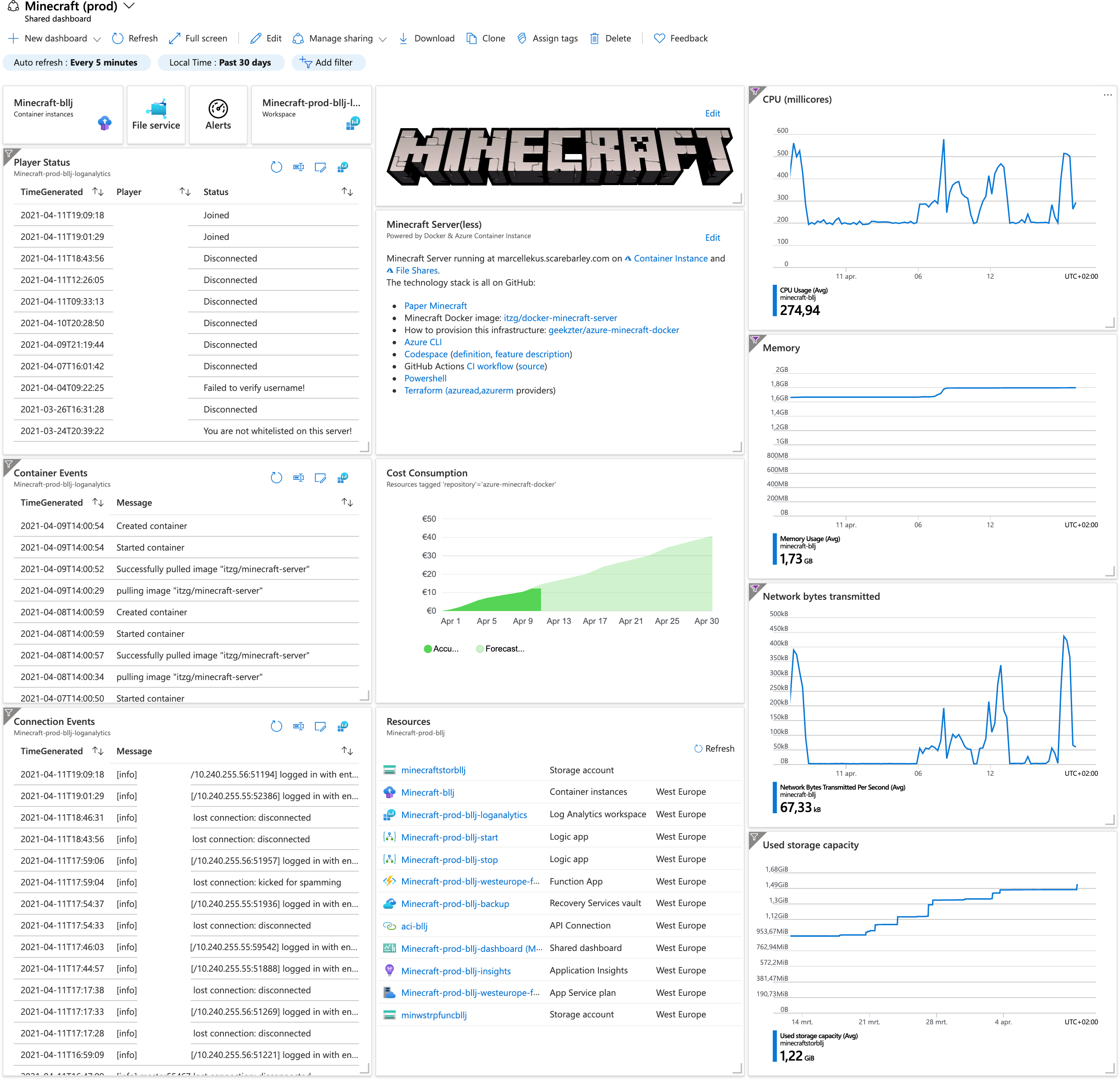 You can update the dashboard in the portal and re-generate the template using templatizedashboard.ps1.
Resources
- itzg/minecraft-server on Docker Hub
- docker-minecraft-server on Github
- Minecraft on Azure Friday (uses Docker CLI workflow)
- Minecraft on Docker Blog (uses Docker CLI workflow)


